Date: January 21, 2018
Tags: dynamic, dynamic VHD files, fixed size VHD, Hyper V, Pass-Through VHD, VHD, Windows Server
With the release of Windows Server 2008 R2, one of the enhancements was improving the performance of dynamic VHD files. Prior to R2, writes to dynamically expanding VHD files could be 3x slower than writes to a fixed size VHD file due to limited meta data caching. Overall, Microsoft is claiming the performance of dynamic VHD files vs. fixed size VHD files is almost identical.Pass-through disks are another option when configuring a Hyper-V VM. According to my results, the performance of a pass-through disk is marginally better than that of VHD files. However, if you use pass-through disks you lose all of the benefits of VHD files such as portability, snap-shotting and thin provisioning. Considering these trade-offs, using pass-through disks should really only be considered if you require a disk that is greater than 2 TB in size or if your application is I/O bound and you really could benefit from another .1 ms shaved off your average response time.
I figured rather than taking Microsoft’s word for it, I would put these different disk types to the test for myself. I set up a Hyper-V Windows Server 2008 R2 virtual machine running on top of Windows Server 2008 R2. For my Hypervisor, I used Dell PowerEdge 1950 server attached to a Dell AX150 SAN and carved off three 10 GB LUNs for use in my test. In Hyper-V Manager, I added three new disks, one pass-through, one dynamic VHD and one fixed-size VHD. I then used IOMeter to test the performance of the disks. The test parameters and raw data can be found in this CSV file.
The charts below summarize my results. As you can see, on the extremes (Maximum/Minimum), the pass-through disk wins in most cases. However, on average, there is almost no difference between the performances of the three different disk types.
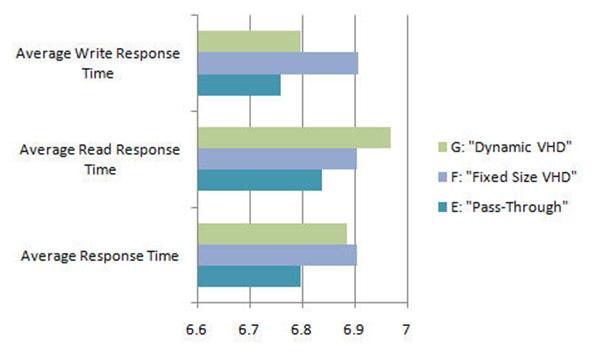


The benefit of thin provisioning, meaning building a VHD file or multiple VHD files with a combined size that is greater than the available disk space, and the portability of VHD files make dynamically expanding VHD files the obvious choice for most Windows Server 2008 R2 virtual machines.
In summary, I’d strongly consider the use of dynamically expanding VHD files for your next Hyper-V deployment on Windows Server 2008 R2.
Reproduced with permission from https://clusteringformeremortals.com/2009/09/25/hyper-v-pass-through-disk-performance-vs-fixed-size-vhd-files-and-dynamic-vhd-files-in-windows-server-2008-r2/