SIOS SANless clusters

SIOS SANless clusters High-availability Machine Learning monitoring

  • Home
  • 產品
    • SIOS DataKeeper for Windows
    • SIOS Protection Suite for Linux
  • 新闻与活动
  • 伺服器集群简单化
  • 成功案例
    • 台灣成功案例
  • 聯繫我們
  • English
  • 中文 (中国)
  • 中文 (台灣)
  • 한국어
  • Bahasa Indonesia
  • ไทย

需要替代AlwaysOn可用性組,請嘗試使用SIOS DataKeeper

4 2 月, 2018 by Jason Aw Leave a Comment

尋找AlwaysOn可用性組的替代方案?

微軟公佈了SQL Server 2012引入的最廣泛預期的可用性選項。此更改包括AlwaysOn可用性組,它僅適用於SQL企業版。對於任何服務器(具有多達4個物理處理器),SQL Server Enterprise的成本為27,496美元,而標準版為7,172美元。要利用“只讀”副本,解決方案的成本加倍($ 54992),因為您必須同時許可源服務器和目標服務器。如此高的價格點,您開始懷疑是否有AlwaysOn可用性組的替代品。繼續閱讀。因為我將介紹SteelEye DataKeeper Cluster Edition,它可能會為您帶來最好的收益。

好消息是Microsoft仍然允許您使用SQL Server Standard Edition構建雙節點集群。 由於這通常部署在主動 – 被動配置中,因此您無需許可備用服務器。因此,對於7,172美元,您可以構建一個非常強大的2節點SQL群集。假設您擁有可用於存儲群集數據的企業級SAN。

你說的是什麼,你沒有SAN?或者您寧願構建一個解決方案,將SAN作為單點故障排除在外。 而是允許您使用數據複製來保持群集節點之間的數據同步,這與AlwaysOn可用性組允許的方式相同?或者您可能希望利用本地連接的SSD驅動器提供的速度,例如Fusion-IO提供的那些,但又不想放棄可用性?

SteelEye DataKeeper Cluster Edition的優點

對於SQL Server 2012 Standard Edition的單個副本的成本以及SteelEye DataKeeper Cluster Edition的非常實惠的添加,您將能夠部署具有數據複製的雙節點SQL Server 2012 Standard Edition群集。最好的部分?它大約是雙節點SQL Server企業版AlwaysOn可用性組的一半。此外,它只是具有隻讀目標的AlwaysOn可用性組的1/4。

如果您發現自己對以下任何問題回答“是”。然後,或許,這是尋找AlwaysOn可用性組的替代品的標誌。Windows Server故障轉移群集和DataKeeper Cluster Edition可能是更明智的選擇。

  • 我關心SQL Server企業版的成本嗎?
  • 我使用複製或日誌傳送?
  • 我是否需要支持使用分佈式事務的Lync Server或其他應用程序?
  • 我是否需要確保SQL Agent作業(如數據庫備份,優化,DTS等)繼續運行,而不管服務中的節點是什麼?
  • 我是否需要確保SQL登錄帳戶在群集節點之間保持同步?
  • 我想盡量減輕我的行政負擔?

我們做了比較

下表總結了SQL Server 2012可用性選項。我們已經包含了第三個選項,即使用帶有DataKeeper Cluster Edition的Windows Server故障轉移群集構建傳統的SQL群集。

SQL Server 2012可用性選項,包括Datakeeper

使用DataKeeper Cluster Edition進行故障轉移群集將為您節省大量資金。而且,它還將幫助您克服AlwaysOn可用性組的一些固有限制。

關於DataKeeper解決方案無法做的唯一事情就是擁有隻讀目標。正如我前面提到的,只讀目標需要第二個SQL許可證,所以要有這個功能將花費你至少$ 54,938。如果您確實必須具有隻讀目標,那麼您將很高興知道可以將AlwaysOn故障轉移群集與DataKeeper和AlwaysOn可用性組混合使用。基本上,您將結束使用DataKeeper的雙節點SQL故障轉移群集和作為AlwaysOn可用性組的只讀目標的單個獨立SQL Server。在這種情況下,您仍然需要兩個SQL Server Enterprise Edition副本 – 一個用於群集,一個用於只讀目標。

實質上,請查看AlwaysOn可用性組的可能替代方案,以節省成本並改進工作流程。我去年在亞特蘭大的Tech-Ed 2011上展示了這個解決方案,並得到了很多真正的好評。此特定演示顯示了一個2節點多站點群集。但是,不同的概念可以應用於單個站點群集。

https://clusteringformeremortals.com/2011/05/15/sql-server-denali-hadron-multisite-cross-subnet-failover-video-demonstration/

轉載https://clusteringformeremortals.com/2012/04/05/sql-server-2012-standard-edition-availability-options/

Filed Under: Datakeeper, 伺服器集群简单化 Tagged With: AlwaysOn可用性組

Windows Server故障轉移群集的新功能

3 2 月, 2018 by Jason Aw Leave a Comment

Windows Server故障轉移群集的新功能

Elden Christensen最近在Windows Server 8中討論了Windows Server故障轉移群集的一些新功能。你可以在這裡閱讀整篇文章

Windows Server 8中的Windows Server故障轉移群集中的所有這些功能都是受歡迎的附加功能。 我個人最喜歡的是“動態集群”,或者我認為可能更好地描述為“動態仲裁”。它基本上允許仲裁動態重新配置,我認為這是一個很棒的功能!如果配置正確,您實際上可以承受除了一個剩餘節點(最後一個人站立)以外的所有節點的故障,並且仍然具有功能集群。以前只有在使用“僅磁盤”仲裁模型時才可以這樣做,不建議這樣做,因為磁盤仲裁代表單點故障。

隨著節點從群集中移除的新動態仲裁模型,其餘節點以最具彈性的方式重新配置自身。例如,以前您使用“節點多數”仲裁模型有一個5節點集群。 如果丟失了三個節點,剩餘的兩個節點將關閉,因為它們不再擁有多數投票(5個中的2個不是多數)。使用新模型,當節點離開群集時,仲裁會重新配置自身,以便剩餘的兩個節點保持聯機狀態。

上面的描述實際上是對封面下實際發生的事情的過度簡化。我計劃在將來寫更多關於它的信息,但它絕對是一個值得歡迎的功能!

欲獲得更多信息

還有一些與Windows Server故障轉移群集相關的其他博客文章,您應該參考

如何啟用故障轉移群集和網絡負載平衡Windows Server“8”上的PowerShell幫助:

http://blogs.msdn.com/b/clustering/archive/2012/03/21/10286213.aspx

如何啟用CSV緩存:

http://blogs.msdn.com/b/clustering/archive/2012/03/22/10286676.aspx

如何在限制Active Directory環境中創建群集:

http://blogs.msdn.com/b/clustering/archive/2012/03/30/10289577.aspx

經Clusteringformeremortals許可轉載


Filed Under: 伺服器集群简单化 Tagged With: Windows Server 8

配置Windows Server 8 Beta ISCSI目標軟件以在群集中使用

2 2 月, 2018 by Jason Aw Leave a Comment

但首先,你知道Windows Server故障轉移群集嗎?

所以你只需要下載Windows Server 8 Beta版本,你就急於嘗試所有令人興奮的新功能。Windows存儲空間,持續可用的失敗服務器和Hyper-V可用性等許多功能將要求您熟悉Windows Server故障轉移群集

Windows iSCSI Target軟件是在實驗室環境中為故障轉移群集和空間提供存儲的最佳選擇,可以充分利用這些新功能。尤其是因為諸如存儲空間之類的東西可能需要你訪問額外的存儲來模擬JBODS。本文分步驟假定您有三個Windows Server 8服務器在域環境中運行。我的實驗室環境包含以下內容:

硬件
我的三台服務器都是運行在VMware Workstation 8上的虛擬機,位於裝有16 GB RAM的Windows 7筆記本電腦上。請參閱我的文章,了解如何在VMware Workstation 8上安裝Windows Server 8。服務器名稱和角色
PRIMARY.win8.local – 我的群集節點1
SECONDARY.win8.local – 我的群集節點2
WIN-EHVIK0RFBIU.win8.local – 我的域控制器(在我將其升級為域控制器之前,誰忘了重命名DC)

網絡
192.168.37.X / 24 – 我的公共網絡也用來傳輸iSCSI流量
10.X.X.X / 8-在PRIMARY和SECONDARY之間為集群通信定義的專用網絡

本文將逐步指導您如何執行以下操作:

  • 在您的域控制器上安裝iSCSI目標角色
  • 配置iSCSI目標
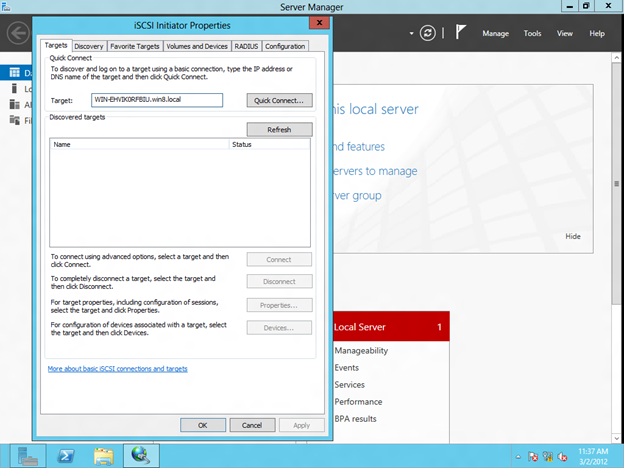
  • 使用iSCSI啟動器連接到iSCSI目標
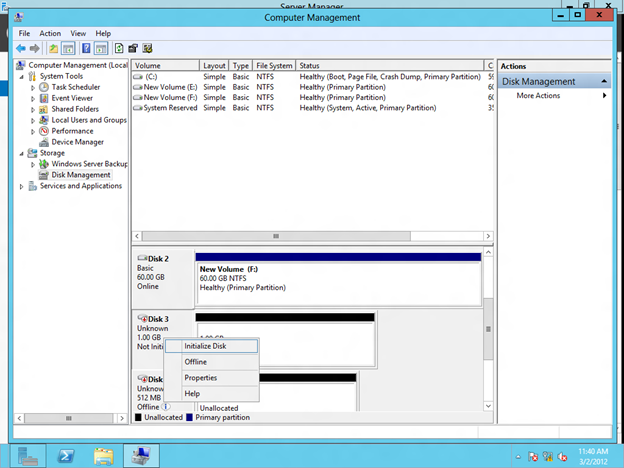
  • 格式化iSCSI目標
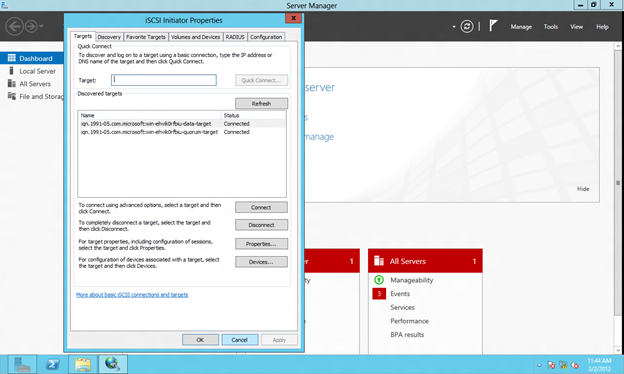
  • 從SECONDARY服務器連接到共享的iSCSI目標
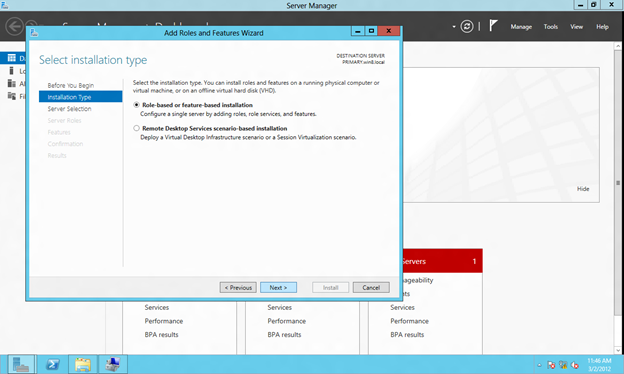
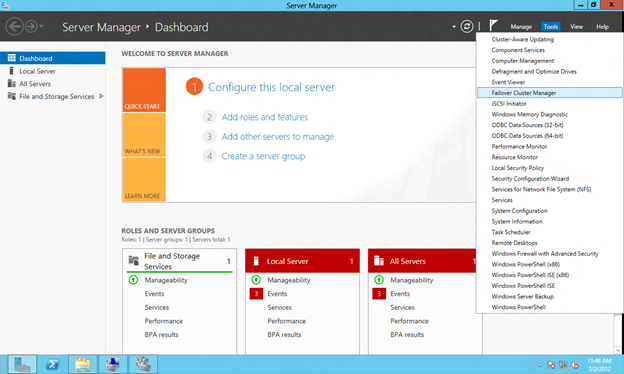
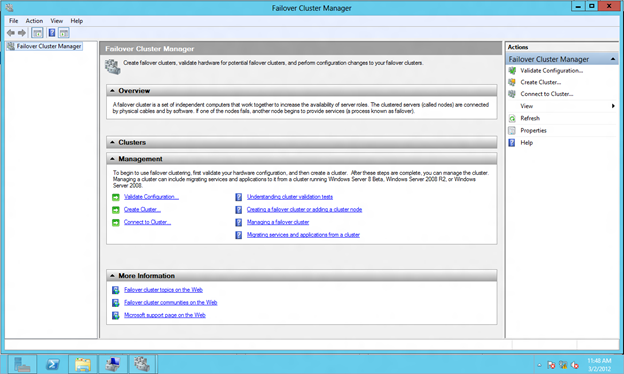
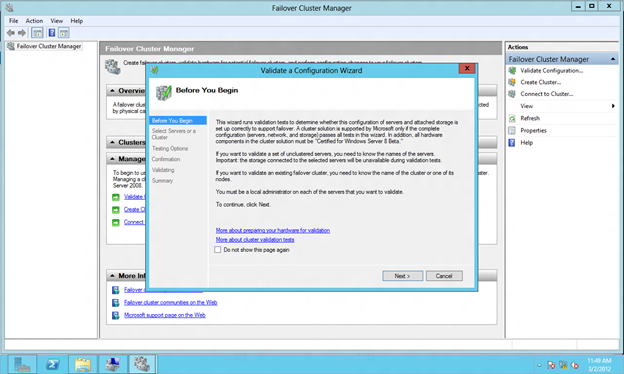
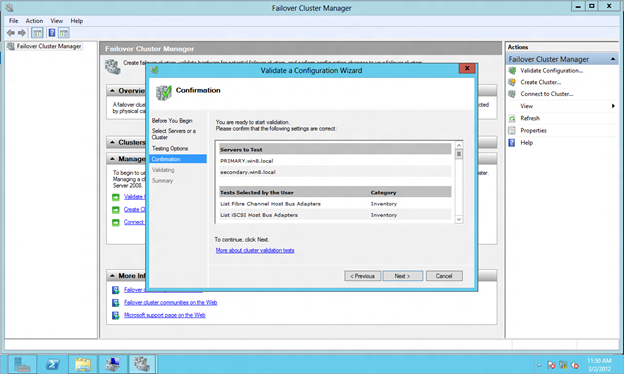
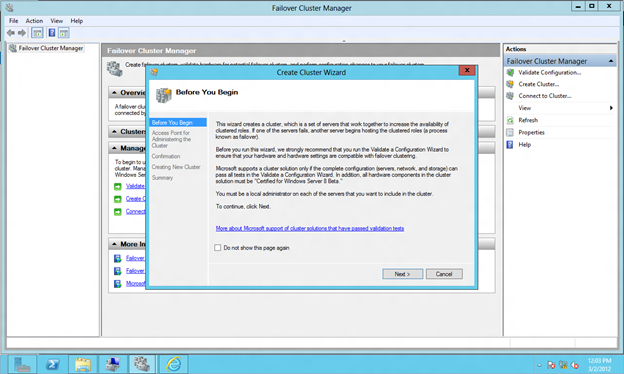
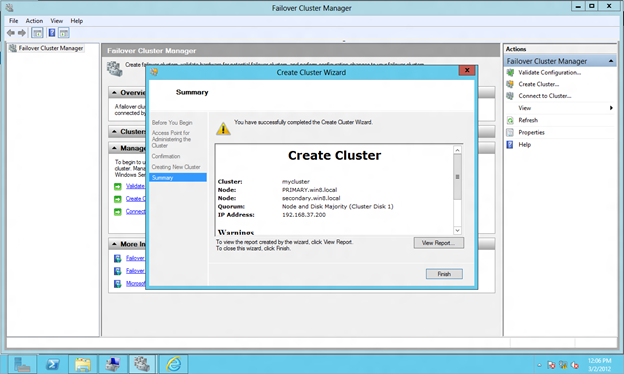
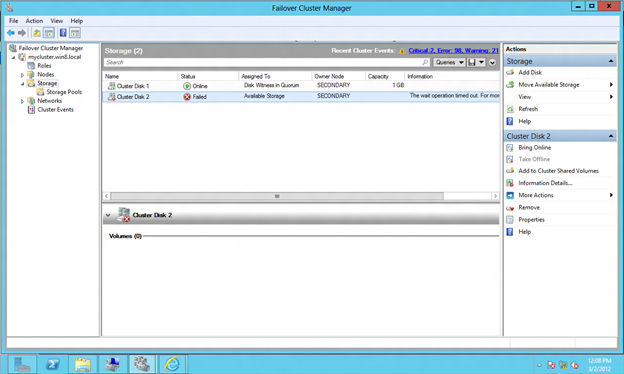
  • 配置Windows Server 8故障轉移群集

這篇文章主要是屏幕截圖,但是我也會在需要的地方添加註釋。

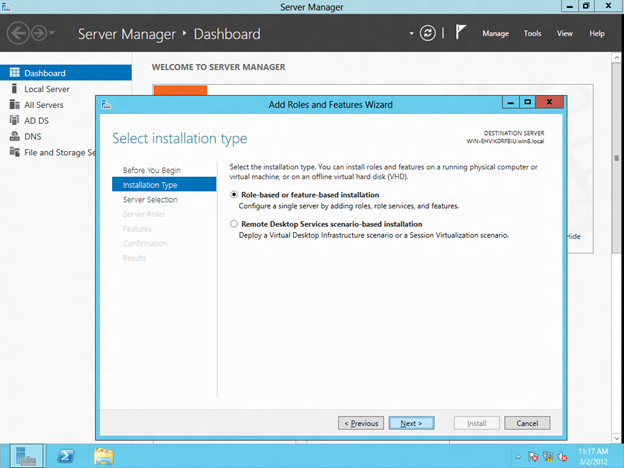
在您的域控制器上安裝iSCSI目標角色

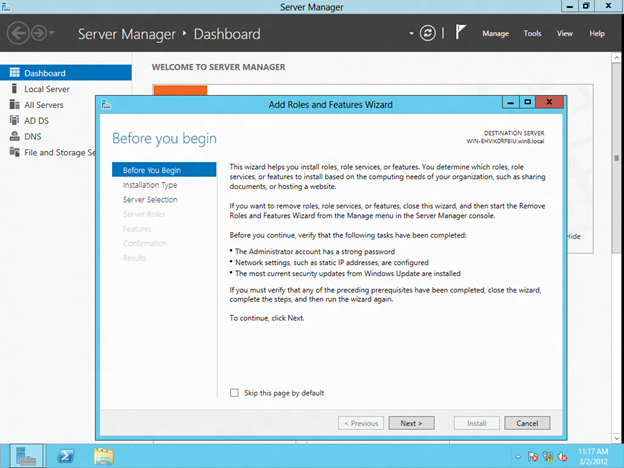
點擊添加角色和功能來安裝iSCSI目標角色。配置Windows Server 8 Beta ISCSI目標軟件以在群集中使用

配置Windows Server 8 Beta ISCSI目標軟件以在群集中使用

配置Windows Server 8 Beta ISCSI目標軟件以在群集中使用

配置Windows Server 8 Beta ISCSI目標軟件以在群集中使用

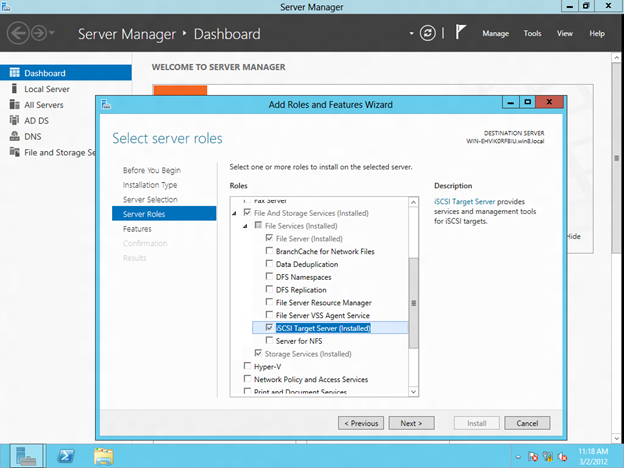
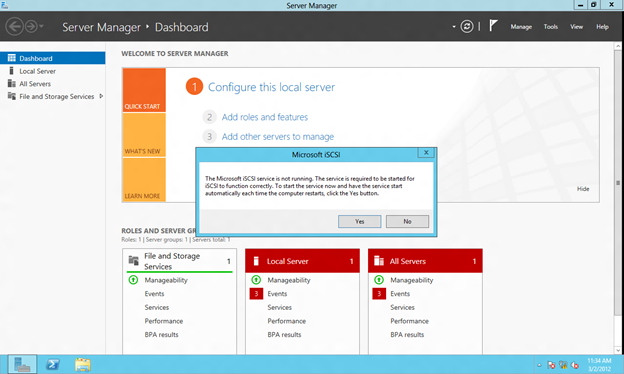
您會發現iSCSI目標角色是在“文件和存儲服務器/文件服務”下找到的功能。只需選擇iSCSI Target Server,然後單擊Next開始安裝iSCSI Target Server角色。配置Windows Server 8 Beta ISCSI目標軟件以在群集中使用

配置iSCSI目標

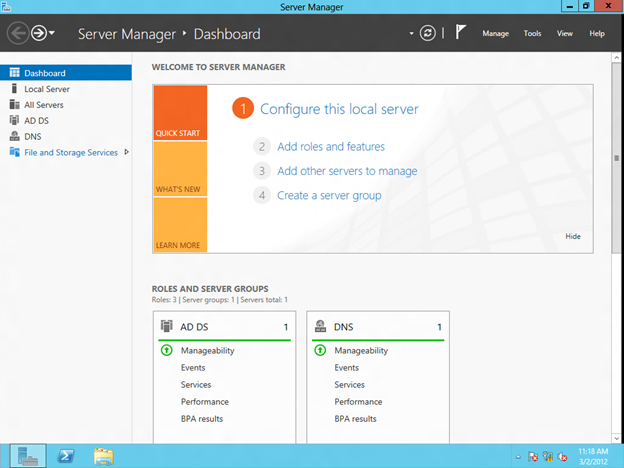
iSCSI目標軟件在服務器管理器儀表板上的“文件和存儲服務”下進行管理,單擊該軟件以繼續

配置Windows Server 8 Beta ISCSI目標軟件以在群集中使用

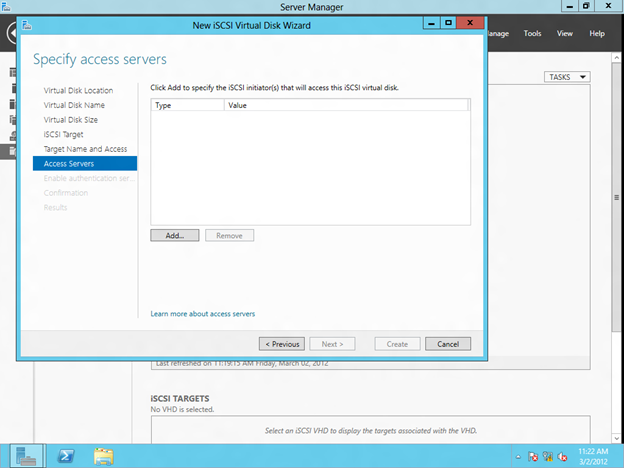
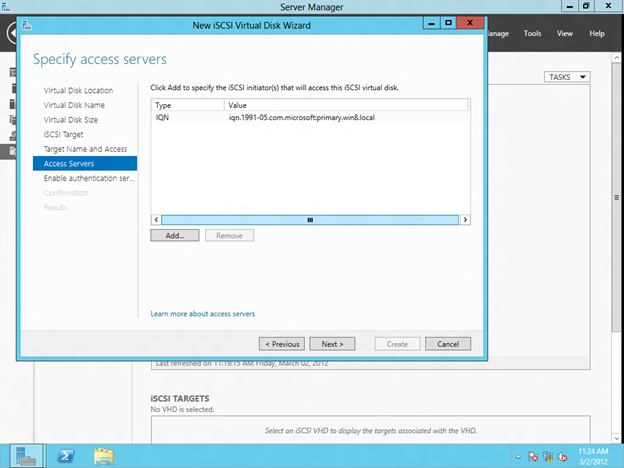
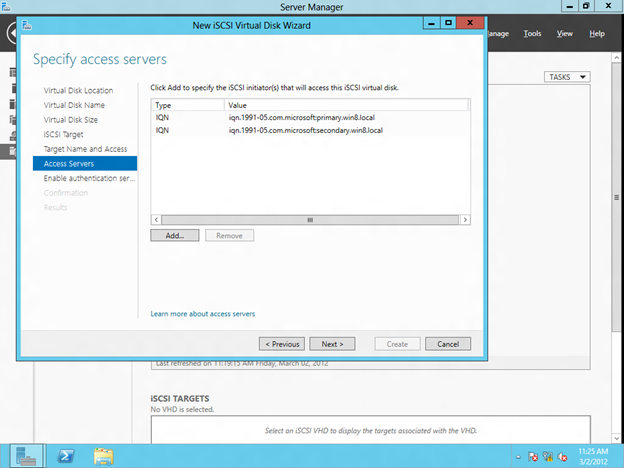
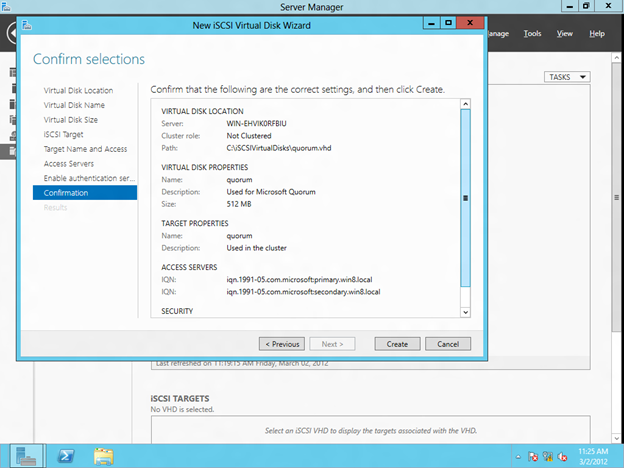
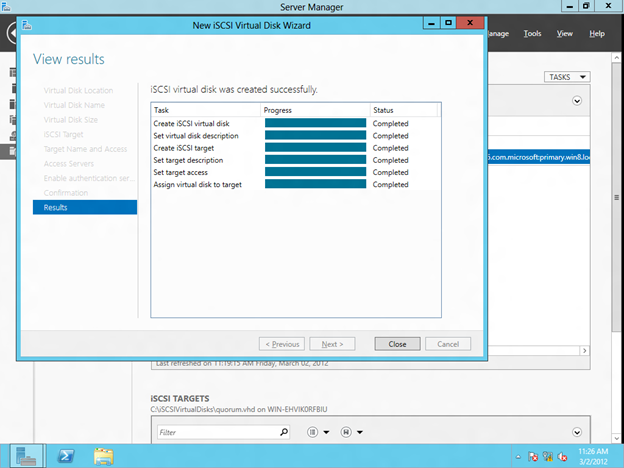
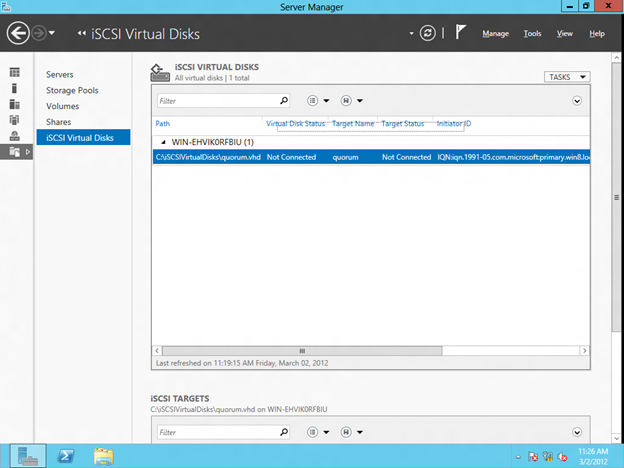
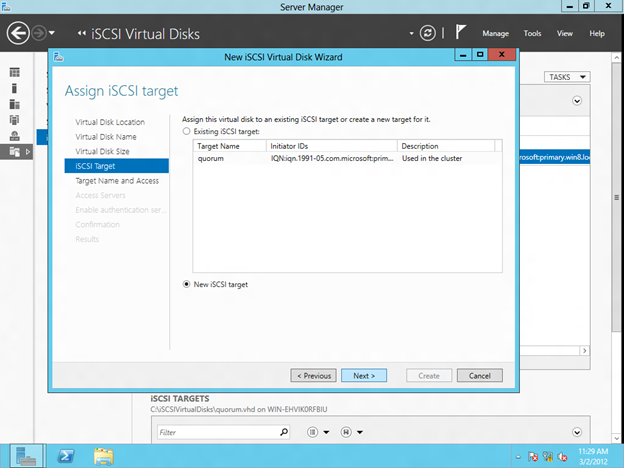
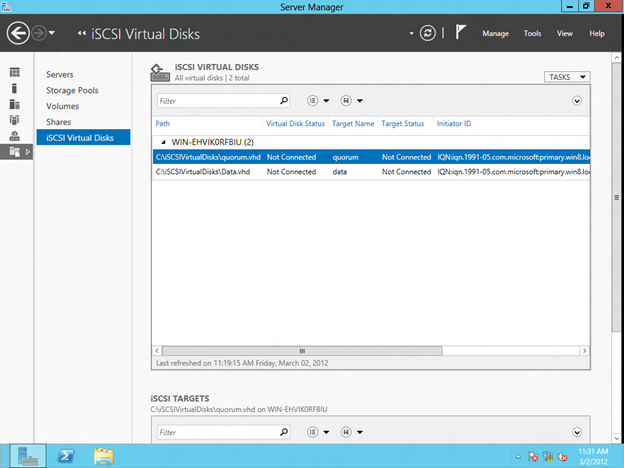
創建iSCSI目標的第一步是創建一個iSCSI虛擬磁盤。點擊啟動新的虛擬磁盤嚮導創建一個虛擬磁盤。配置Windows Server 8 Beta ISCSI目標軟件以在群集中使用

配置Windows Server 8 Beta ISCSI目標軟件以在群集中使用

配置Windows Server 8 Beta ISCSI目標軟件以在群集中使用

配置Windows Server 8 Beta ISCSI目標軟件以在群集中使用

配置Windows Server 8 Beta ISCSI目標軟件以在群集中使用

配置Windows Server 8 Beta ISCSI目標軟件以在群集中使用

配置Windows Server 8 Beta ISCSI目標軟件以在群集中使用

配置Windows Server 8 Beta ISCSI目標軟件以在群集中使用

配置Windows Server 8 Beta ISCSI目標軟件以在群集中使用

配置Windows Server 8 Beta ISCSI目標軟件以在群集中使用

配置Windows Server 8 Beta ISCSI目標軟件以在群集中使用

配置Windows Server 8 Beta ISCSI目標軟件以在群集中使用

配置Windows Server 8 Beta ISCSI目標軟件以在群集中使用

配置Windows Server 8 Beta ISCSI目標軟件以在群集中使用

配置Windows Server 8 Beta ISCSI目標軟件以在群集中使用

配置Windows Server 8 Beta ISCSI目標軟件以在群集中使用

配置Windows Server 8 Beta ISCSI目標軟件以在群集中使用

配置Windows Server 8 Beta ISCSI目標軟件以在群集中使用

配置Windows Server 8 Beta ISCSI目標軟件以在群集中使用

使用iSCSI啟動器連接到iSCSI目標

配置Windows Server 8 Beta ISCSI目標軟件以在群集中使用

配置Windows Server 8 Beta ISCSI目標軟件以在群集中使用

配置Windows Server 8 Beta ISCSI目標軟件以在群集中使用

配置Windows Server 8 Beta ISCSI目標軟件以在群集中使用

配置Windows Server 8 Beta ISCSI目標軟件以在群集中使用

配置Windows Server 8 Beta ISCSI目標軟件以在群集中使用

格式化iSCSI目標

配置Windows Server 8 Beta ISCSI目標軟件以在群集中使用

配置Windows Server 8 Beta ISCSI目標軟件以在群集中使用

配置Windows Server 8 Beta ISCSI目標軟件以在群集中使用

配置Windows Server 8 Beta ISCSI目標軟件以在群集中使用

配置Windows Server 8 Beta ISCSI目標軟件以在群集中使用

配置Windows Server 8 Beta ISCSI目標軟件以在群集中使用

配置Windows Server 8 Beta ISCSI目標軟件以在群集中使用

配置Windows Server 8 Beta ISCSI目標軟件以在群集中使用

配置Windows Server 8 Beta ISCSI目標軟件以在群集中使用

配置Windows Server 8 Beta ISCSI目標軟件以在群集中使用

配置Windows Server 8 Beta ISCSI目標軟件以在群集中使用

從第二服務器連接到共享的iSCSI目標

配置Windows Server 8 Beta ISCSI目標軟件以在群集中使用

配置Windows Server 8 Beta ISCSI目標軟件以在群集中使用

配置Windows Server 8 Beta ISCSI目標軟件以在群集中使用

配置WINDOWS服務器8故障集群

配置Windows Server 8 Beta ISCSI目標軟件以在群集中使用

配置Windows Server 8 Beta ISCSI目標軟件以在群集中使用

配置Windows Server 8 Beta ISCSI目標軟件以在群集中使用

配置Windows Server 8 Beta ISCSI目標軟件以在群集中使用

配置Windows Server 8 Beta ISCSI目標軟件以在群集中使用

配置Windows Server 8 Beta ISCSI目標軟件以在群集中使用

配置Windows Server 8 Beta ISCSI目標軟件以在群集中使用

配置Windows Server 8 Beta ISCSI目標軟件以在群集中使用

配置Windows Server 8 Beta ISCSI目標軟件以在群集中使用

配置Windows Server 8 Beta ISCSI目標軟件以在群集中使用

配置Windows Server 8 Beta ISCSI目標軟件以在群集中使用

配置Windows Server 8 Beta ISCSI目標軟件以在群集中使用

配置Windows Server 8 Beta ISCSI目標軟件以在群集中使用

配置Windows Server 8 Beta ISCSI目標軟件以在群集中使用

配置Windows Server 8 Beta ISCSI目標軟件以在群集中使用

配置Windows Server 8 Beta ISCSI目標軟件以在群集中使用

配置Windows Server 8 Beta ISCSI目標軟件以在群集中使用

配置Windows Server 8 Beta ISCSI目標軟件以在群集中使用


轉載https://clusteringformeremortals.com/2012/03/05/step-by-step-configuring-windows-server-8-beta-iscsi-target-software-for-use-in-a-cluster/ #在您的域控制器上安裝iSCSI目標角色

Filed Under: 伺服器集群简单化

如何在VMware Workstation 8上安裝Windows Server 8 Beta

1 2 月, 2018 by Jason Aw Leave a Comment

在VMware Workstation 8上安裝Windows Server 8 Beta?開始吧!

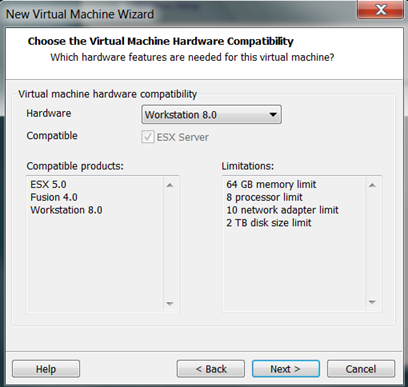
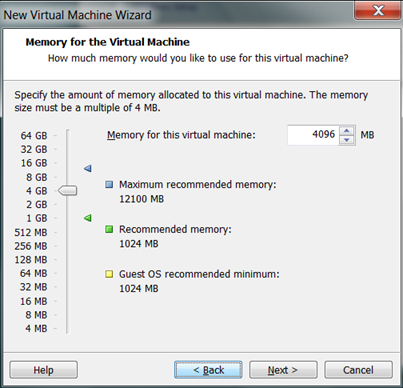
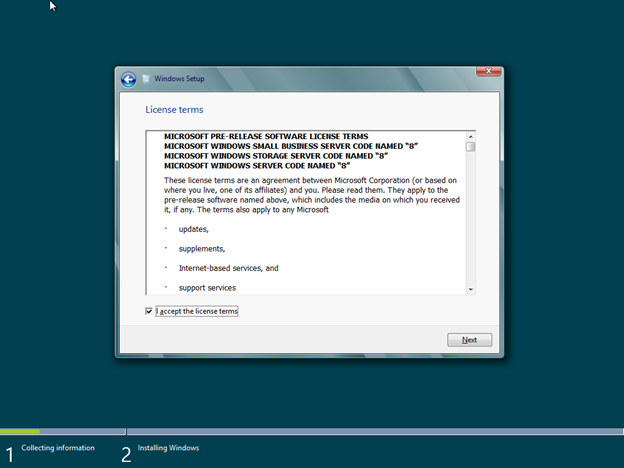
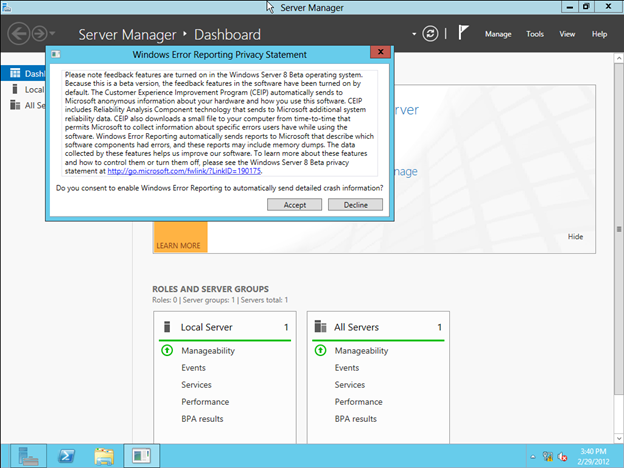
以下是在VMware Workstation 8上安裝Windows Server 8 Beta的過程中的屏幕截圖。我注意到了最重要的事情。如何在VMware Workstation 8上安裝Windows Server 8 Beta

如何在VMware Workstation 8上安裝Windows Server 8 Beta


如何在VMware Workstation 8上安裝Windows Server 8 Beta

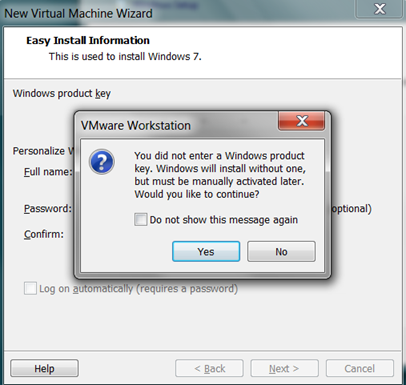
請注意,我選擇Windows 7,而不是Windows 7 64位。我不確定這是否重要,但我相信這對你最有效。下載是預先許可證,所以你不必在這裡輸入任何東西。但是,如果您不斷開軟盤,則稍後會導致問題。如何在VMware Workstation 8上安裝Windows Server 8 Beta

如何在VMware Workstation 8上安裝Windows Server 8 Beta

如何在VMware Workstation 8上安裝Windows Server 8 Beta

如何在VMware Workstation 8上安裝Windows Server 8 Beta

如何在VMware Workstation 8上安裝Windows Server 8 Beta

如何在VMware Workstation 8上安裝Windows Server 8 Beta

如何在VMware Workstation 8上安裝Windows Server 8 Beta

如何在VMware Workstation 8上安裝Windows Server 8 Beta

如何在VMware Workstation 8上安裝Windows Server 8 Beta

點擊自定義硬件

如果要在此服務器上運行Hyper-V角色,請選擇與您的主機匹配的處理器,並啟用虛擬化Intel VT-x / EPT(您的處理器必須支持此功能)。看我以前的博客文章如何做到這一點。如何在VMware Workstation 8上安裝Windows Server 8 Beta

確保您取消選中“在創建後打開此虛擬機的電源”,在繼續之前,我們需要再編輯一個東西。如何在VMware Workstation 8上安裝Windows Server 8 Beta

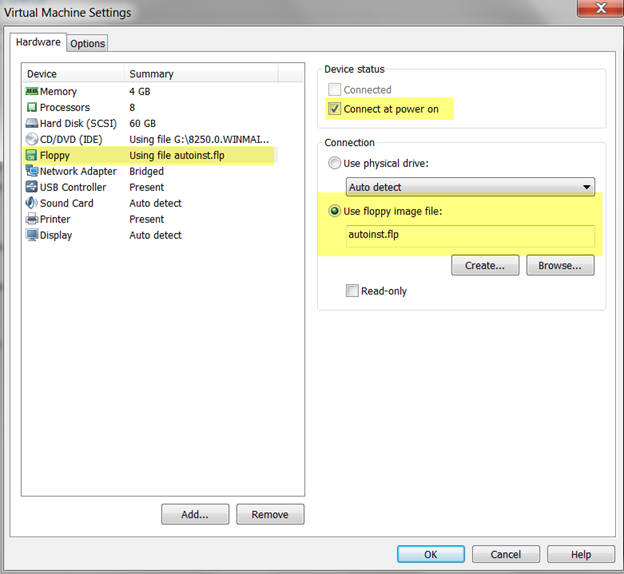
創建虛擬機後,請重新進入並斷開軟盤連接,否則安裝將失敗,因為autoinst.flp缺少產品密鑰。如何在VMware Workstation 8上安裝Windows Server 8 Beta

如何在VMware Workstation 8上安裝Windows Server 8 Beta

如何在VMware Workstation 8上安裝Windows Server 8 Beta


如何在VMware Workstation 8上安裝Windows Server 8 Beta


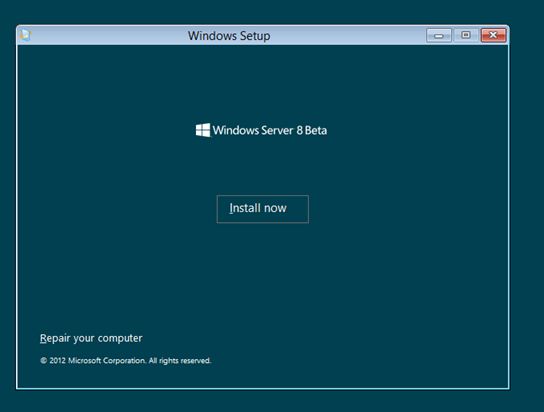
很久以後,幾次重啟之後…

如何在VMware Workstation 8上安裝Windows Server 8 Beta

如何在VMware Workstation 8上安裝Windows Server 8 Beta

如何在VMware Workstation 8上安裝Windows Server 8 Beta

如何在VMware Workstation 8上安裝Windows Server 8 Beta

如何在VMware Workstation 8上安裝Windows Server 8 Beta

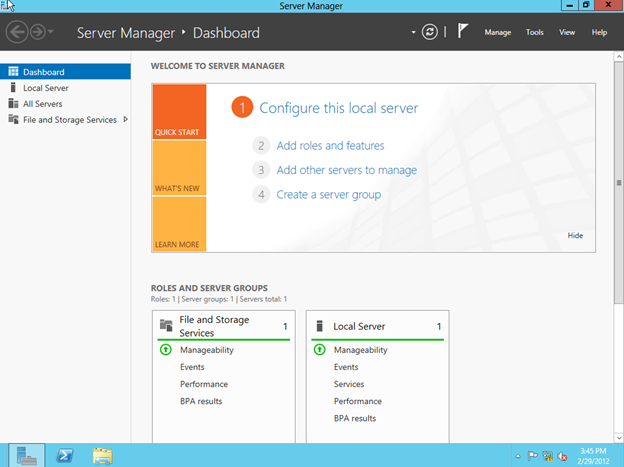
您現在已經準備好使用Windows Server 8 Beta了!我還沒有安裝VMware工具,但我可能會稍後嘗試。如果你嘗試,讓我知道你的想法。轉載https://clusteringformeremortals.com/2012/03/01/how-to-install-windows-server-8-beta-on-vmware-workstation-8/

Filed Under: 伺服器集群简单化 Tagged With: 安裝, 預習

用於災難恢復的SQL Server 2012多站點故障轉移群集

1 2 月, 2018 by Jason Aw Leave a Comment

使用SteelEye DataKeeper Cluster Edition進行災難恢復的SQL Server 2012多站點故障轉移群集

微軟剛剛發布了一篇關於針對災難恢復的SQL Server 2012多站點故障轉移群集的新支持的優秀白皮書。如果您有興趣,可以在這裡下載副本。

事實上,不要忘記我在之前的帖子中發布了關於此功能的博客。 我收錄了一個視頻演示。它顯示了使用SteelEye DataKeeper Cluster Edition進行災難恢復的SQL Server 2012多站點故障轉移群集。 SQL Server 2012和跨子網故障轉移功能將為尋找災難恢復選項的人們帶來全新的可能性。

經https://clusteringformeremortals.com/2012/01/03/sql-server-2012-disaster-recovery-multisite-clusters/許可轉載

Filed Under: Datakeeper, 伺服器集群简单化

  • « Previous Page
  • 1
  • …
  • 103
  • 104
  • 105
  • 106
  • 107
  • …
  • 113
  • Next Page »

最近的帖子

  • 什麼是高可用性(HA)?
  • 如何在周五晚上的系統崩潰中倖存下來:從簡陋的裸機到無縫的數據複製
  • 接地氣:錯過Percona Live Amsterdam讓我對HA有了哪些新的認識
  • SIOS LifeKeeper 與 Red Hat 高可用性附加元件:
  • 應用彈性現況:2026 年 SIOS 高可用性調查

最熱門的帖子

加入我們的郵件列表

Copyright © 2026 · Enterprise Pro Theme on Genesis Framework · WordPress · Log in