SIOS SANless clusters

SIOS SANless clusters High-availability Machine Learning monitoring

  • Home
  • Products
    • SIOS DataKeeper for Windows
    • SIOS Protection Suite for Linux
  • News and Events
  • Clustering Simplified
  • Success Stories
  • Contact Us
  • English
  • 中文 (中国)
  • 中文 (台灣)
  • 한국어
  • Bahasa Indonesia
  • ไทย

Continuity Central: Strategies For Protecting SQL Server In The Cloud

February 27, 2015 by Tony Tomarchio

SQL Server is a business critical application that requires high availability protection, regardless of where it is deployed. Even in the cloud, you still need to protect SQL Server from downtime if the cloud instance or the cloud provider fails. However, traditional solutions, such as shared-storage clusters may not be practical or even possible in the cloud. SANless software can provide enterprises with high availability and disaster recovery protection for SQL Server in the cloud without the limitations of shared storage. This article will look at strategies for how this can be achieved.

Most cloud providers allow you to deploy your applications across multiple separate and redundant data centers. However, they do not offer shared storage (i.e., a SAN), which is required to support traditional Microsoft Windows Server Failover Clustering (WSFC) across these computing resources. The solution is to use SANless software instead of a shared storage to create a high availability cluster using WSFC with local storage. You can deploy a highly available SQL Server Failover Cluster Instance (FCI) across multiple windows instances in the cloud. When a failure occurs, WSFC will coordinate the SQL Server failover and restart SQL on another node in the cluster. SANless software as an ingredient in your WSFC environment in a cloud deployment eliminates the need for shared storage. Instead of a SAN, the software keeps storage in all nodes synchronized (identical) using real time, block level replication. Replication can be performed in either synchronous or asynchronous modes. Cluster nodes can also be located in separate cloud regions for added protection. The local, replicated storage is presented to WSFC as if it was shared storage. Using SANless clusters is a fast, easy way to deploy SQL Server in a highly available configuration in the cloud while continuing to use Windows Server Failover Clustering.

To provide high availability and disaster protection for SQL Server in the cloud, you may also want to configure a failover cluster with nodes in different geographically separate areas (e.g., AWS or Microsoft Azure Regions). One way to achieve this is using the AlwaysOn Availability Groups feature that is built into SQL server itself. However, Availability Groups requires SQL Server Enterprise Edition, which can be very cost prohibitive for simple two node deployments in this configuration. Unfortunately, Availability Groups also has a number of limitations you should be aware of: it isn’t compatible with distributed transactions, so if your application relies on the Microsoft Distributed Transaction Coordinator (MSDTC) you cannot use AlwaysOn Availability Groups because the instance ID of the server changes upon failover and the distributed transaction coordinator is not aware of the new instance ID. Additionally, Availability Groups only replicates user defined databases and NOT system databases (like Master and MSDB). SQL Agent jobs and SQL logons are not automatically synchronized and will not fail over as part of the Availability Group. Finally, Availability Groups introduces additional administrative overhead you might not want to deal with. Availability Groups are configured and managed at the database level, not at the SQL Server instance level. Therefore, administrators must reconfigure protection every time a database is added or dropped. Essentially, you are managing two separate instances of SQL and have to take great care that you keep their configurations in sync.

In these cases, SANless software can be used to deploy a SQL Failover Cluster Instance (FCI) to provide high availability failover for the entire SQL instance, even across different subnets, using cost-efficient SQL Server Standard Edition. You can build a cluster using SANless software to enhance WSFC enabling failover of SQL Server Standard Edition across cloud availability zones or regions. This can be the best choice for companies that want full high availability and disaster recovery protection of the entire SQL instance; gaining the affordability of SQL Server Standard Edition, maximum application compatibility, and reduced administrative overhead.

Summary

For many years, WSFC has been used to provide high availability and disaster recovery protection for SQL applications in traditional on-site environments. Until recently, managing site failures has been very complex and expensive, requiring large investments in specialized hardware and software as well as the availability of a second data center site. The cloud offers an attractive and cost-effective second site in which to locate a cluster member and to handle a failover when the local site fails. However, because traditional clusters require shared storage between all cluster nodes across local and cloud resources, this has not been a practical architecture for traditional clusters. In these cases, SANless software can be used to create clusters that provide high availability across local and cloud resources and extend an on-premises SAN-based or SANless cluster for SQL Server to the cloud for disaster recovery protection without the cost of a remote recovery site or SQL Server Enterprise Edition licenses. SANless software can be an easy, cost-efficient high availability and disaster recovery solution for companies that are continuing to manage their SQL environments on physical, private cloud, or on-premises VM environment.

The author:
Tony Tomarchio is director of Field Engineering at SIOS Technology Corp. Tony is responsible for defining and delivering technical pre-sales services, support and best practices to SIOS customers, prospects and partners. Tony has more than a decade of experience providing systems management and high availability solutions to enterprise customers.

Read the Article at ContinuityCentral.com

Filed Under: News and Events, News posts Tagged With: #SANLess Clusters for Windows Environments, Cloud, News, Tony Tomarchio

VI Briefing: Cayan Protects Business Critical Applications with SIOS SANLess Clusters

February 18, 2015 by Margaret Hoagland

Easy-to-Manage High Availability Protection for Business Critical SQL Server

SAN MATEO, CA – February 18, 2015 – SIOS Technology Corp. (www.us.sios.com), maker of SAN and #SANLess clustering software products, today announced that Cayan™ is using SIOS DataKeeper™ Cluster Edition software to protect its important Windows applications.

Cayan is the leader in the payment solutions industry. The company’s flagship Genius® Customer Engagement Platform® aggregates and integrates every conceivable transaction technology, payment type and customer program – both present and future – into a single platform. Customers include some of the world’s largest online retailers. “Our top priority is ensuring that our customers can complete transactions continuously 24 hours a day, seven days a week,” said Paul Vienneau, chief technology officer, Cayan.

SIOS_360 Logo

When the company decided to move to a larger, state-of-the-art data center, they looked for an affordable, easy-to-deploy way to provide high availability and disaster protection for the SQL Server database that their Genius platform and other important applications run on. The company considered using a traditional shared storage cluster, but did not want the cost and complexity of purchasing and managing a SAN storage array. As shared storage, a SAN would also introduce the risk of a single point of failure. “We needed a solution that could handle the large volume of transactions we process without slowing application performance,” said Vienneau.

Cayan IT staff decided to use SANLess clusters. They built two-node clusters using standard Windows Server Failover Clustering (WSFC) and adding SIOS DataKeeper Cluster Edition software as an ingredient. “The SIOS software has very intuitive configuration wizards that enabled us to deploy our platform and applications in the SANLess clusters quickly and easily,” said Vienneau. “Since SIOS DataKeeper is completely integrated with WSFC, our IT staff did not have to change system administration or add complexity.”

Because the SANLess clusters use local storage, there is minimal performance overhead and fast application response times. “We were able to run our applications in the new SANLess cluster environment in our new data center in a full production mode before we put it into full production. We set up a performance lab and tested the replication latency under heavy load. It ran great. The SIOS software met or exceeded our expectations. Implementation and ongoing administration is easy and we have had zero downtime since we implemented our SIOS SANLess clusters,” said Vienneau.

“Results achieved by Cayan are common across SIOS’ customer base,” said Jerry Melnick, COO, SIOS Technology.  “SIOS DataKeeper adds replication for disaster protection in SAN-based Windows clusters and enables SANLess clusters in Windows Server Failover Clustering environments where shared storage clusters are impossible or impractical.”

About SIOS Technology Corp.

SIOS Technology Corp. makes SAN and #SANLess software solutions that make clusters easy to use and easy to own. An essential part of any cluster solution, SIOS SAN and #SANLess software provides the flexibility to build Clusters Your Way™ to protect your choice of Windows or Linux environment in any configuration (or combination) of physical, virtual and cloud (public, private, and hybrid) without sacrificing performance or availability. The unique SIOS #SANLess clustering solution allows you to configure clusters with local storage, eliminating both the cost and the single-point-of-failure risk of traditional shared (SAN) storage.

Founded in 1999, SIOS Technology Corp. (www.us.sios.com) is headquartered in San Mateo, California, and has offices throughout the United States, United Kingdom and Japan.

# # #

SIOS, SIOS Technology, SIOS DataKeeper, SIOS Protection Suite, Clusters Your Way, and associated logos are registered trademarks or trademarks of SIOS Technology Corp. and/or its affiliates in the United States and/or other countries. All other trademarks are the property of their respective owners.

Contact:

Beth Winkowski
Winkowski Public Relations, LLC for SIOS
Phone: 978-649-7189
Email: bethwinkowski@US.SIOS.com

Filed Under: News and Events, News posts Tagged With: #SANLess Clusters for Windows Environments, Cayan, News

DR Journal: Cayan Protects Business Critical Applications with SIOS SANLess Clusters.

February 18, 2015 by Margaret Hoagland

Easy-to-Manage High Availability Protection for Business Critical SQL Server

SAN MATEO, Calif. – SIOS Technology Corp. (www.us.sios.com), maker of SAN and #SANLess clustering software products, today announced that Cayan™ is using SIOS DataKeeper™ Cluster Edition software to protect its important Windows applications.

Cayan is the leader in the payment solutions industry. The company’s flagship Genius® Customer Engagement Platform® aggregates and integrates every conceivable transaction technology, payment type and customer program – both present and future – into a single platform. Customers include some of the world’s largest online retailers. “Our top priority is ensuring that our customers can complete transactions continuously 24 hours a day, seven days a week,” said Paul Vienneau, chief technology officer, Cayan.

When the company decided to move to a larger, state-of-the-art data center, they looked for an affordable, easy-to-deploy way to provide high availability and disaster protection for the SQL Server database that their Genius platform and other important applications run on. The company considered using a traditional shared storage cluster, but did not want the cost and complexity of purchasing and managing a SAN storage array. As shared storage, a SAN would also introduce the risk of a single point of failure. “We needed a solution that could handle the large volume of transactions we process without slowing application performance,” said Vienneau.

Cayan IT staff decided to use SANLess clusters. They built two-node clusters using standard Windows Server Failover Clustering (WSFC) and adding SIOS DataKeeper Cluster Edition software as an ingredient. “The SIOS software has very intuitive configuration wizards that enabled us to deploy our platform and applications in the SANLess clusters quickly and easily,” said Vienneau. “Since SIOS DataKeeper is completely integrated with WSFC, our IT staff did not have to change system administration or add complexity.”

Because the SANLess clusters use local storage, there is minimal performance overhead and fast application response times. “We were able to run our applications in the new SANLess cluster environment in our new data center in a full production mode before we put it into full production. We set up a performance lab and tested the replication latency under heavy load. It ran great. The SIOS software met or exceeded our expectations. Implementation and ongoing administration is easy and we have had zero downtime since we implemented our SIOS SANLess clusters,” said Vienneau.

“Results achieved by Cayan are common across SIOS’ customer base,” said Jerry Melnick, COO, SIOS Technology.  “SIOS DataKeeper adds replication for disaster protection in SAN-based Windows clusters and enables SANLess clusters in Windows Server Failover Clustering environments where shared storage clusters are impossible or impractical.”

About SIOS Technology Corp.

SIOS Technology Corp. makes SAN and #SANLess software solutions that make clusters easy to use and easy to own.An essential part of any cluster solution, SIOS SAN and #SANLess software provides the flexibility to build Clusters Your Way™to protect your choice of Windows or Linux environment in any configuration (or combination) of physical, virtual and cloud (public, private, and hybrid) without sacrificing performance or availability. The unique SIOS #SANLess clustering solution allows you to configure clusters with local storage, eliminating both the cost and the single-point-of-failure risk of traditional shared (SAN) storage.

Founded in 1999, SIOS Technology Corp. (www.us.sios.com) is headquartered in San Mateo, California, and has offices throughout the United States, United Kingdom and Japan.

Filed Under: News and Events, News posts Tagged With: #SANLess Clusters for Windows Environments, Cayan, DR Journal, News

VMblog.com: High Availability vSphere for SQL Server: 5 Things You Need to Know

February 11, 2015 by Margaret Hoagland

SQL Server administrators have many options for implementing high availability (HA) in a VMware environment. VMware offers vSphere HA. Microsoft offers Windows Server Failover Clustering (WSFC). And SQL Server in WSFC has its own HA options with AlwaysOn Availability Groups and AlwaysOn Failover Clusters.

Third party vendors also provide solutions purpose-built for HA and disaster recovery, and these often integrate with other solutions to create even more options. For example, some solutions leverage the AlwaysOn Failover Cluster feature included with SQL Server to deliver robust HA and data protection for less than the cost of AlwaysOn Availability Groups that require the more expensive Enterprise Edition.

This article highlights five things every SQL Server administrator should know before formulating a high availability strategy for mission-critical applications in a vSphere environment. Such a strategy is likely to resemble the multi-site configuration shown in Figure 1, which is not possible with some HA options.

1. High-Availability Clusters for vSphere require Raw Disk Mapping

The layers of abstraction used in virtualized servers afford substantial flexibility, but such abstractions can cause problems when a virtual machine (VM) must interface with a physical device. This is the case for vSphere with Storage Area Networks (SANs).

To enable compatibility with certain SAN and other shared-storage features, such as I/O fencing and SCSI reservations, vSphere utilizes a technology called Raw Device Mapping (RDM) to create a direct link through the hypervisor between the VM and the external storage system. The requirement for using RDM with shared storage exists for any cluster, including a SQL Server Failover Cluster.

In a traditional cluster created with WSFC in vSphere, RDM must beused to provide virtual machines (VMs) direct access to the underlying storage (SAN). RDM is able to maintain 100 percent compatibility with all SAN commands, making virtualized storage access seamless to the operating system and applications which is an essential requirement of WSFC.

RDM can be made to work effectively, but achieving the desired result is not always easy, and may not even be possible. For example, RDM does not support disk partitions, so it is necessary to use “raw” or whole LUNs (logical unit numbers), and mapping is not available for direct-attached block storage and certain RAID devices.

2. Use of Raw Disk Mapping means Sacrificing Popular VMware Features

Another important aspect of being fully informed about RDM involves understanding the hurdles it can create for using other VMware features, many of which are popular with SQL Server administrators. When these hurdles are deemed unacceptable, as they often are, they eliminate Raw Device Mapping as an option for implementing high availability.

The underlying problem is how RDM interferes with VMware features that employ virtual machine disk (VMDK) files. For example, RDM prevents the use of VMware snapshots, and this in turn prevents the use of any feature that requires snapshots, such as Virtual Consolidated Backups (VCBs).

Raw Disk Mapping also complicates data mobility, which creates impediments to using the features that make server virtualization so beneficial, including converting VMs into templates to simplify deployment, and using vMotion to migrate VMs dynamically among hosts.

Another potential problem for transaction-intensive applications like SQL Server is the inability to utilize Flash Read Cache when RDM is configured.

3. Shared Storage can create a Single Point of Failure

The traditional need for clustered servers to have direct access to shared storage can create limitations for high availability and disaster recovery provisions, and these limitations can, in turn, create a barrier to migrating business-critical applications to vSphere.

In a traditional failover cluster, two or more physical servers (cluster nodes) are connected to a shared storage system. The application runs on one server, and in the event of a failure, clustering software, such as Windows Server Failover Clustering, moves the application to a standby node. Similar clustering is also possible with virtualized servers in a vSphere environment, but this requires a technology like Raw Disk Mapping so that the VMs can access the shared storage directly.

Whether the servers are physical or virtual, the use of shared storage can create a single point of failure. A SAN can have a high availability configuration, of course, but that increases its complexity and cost, and can adversely affect performance, especially for transaction-intensive applications like SQL Server.

4. HA vSphere Clusters can be built without Sacrificing VMware Functionality

Some third-party solutions are purpose-built to overcome the limitations associated with shared storage and the requirement to use RDM with SQL Server’s AlwaysOn Failover Clusters and Windows Server Failover Clusters.

Figure 1 – A multi-site high-availability configuration protects applications from outages that affect an entire data center.

The best of these solutions provide complete configuration flexibility, making it possible to create a SANLess cluster to meet a wide range of needs – from a two-node cluster in a single site, to a multinode cluster, to a cluster with nodes in different geographic locations for disaster protection as shown in Figure 1. Some of these solutions also make it possible to implement LAN/WAN-optimized, real-time block-level replication in either a synchronous or asynchronous manner. In effect, these solutions are capable of creating a RAID 1 mirror across the network, automatically changing the direction of the data replication (source and target) as needed after failover and failback.

Just as importantly, a SANLess cluster is often easier to implement and operate with both physical and virtual servers. For example, for solutions that are integrated with WSFC, administrators are able to configure high-availability clusters using a familiar feature in a way that avoids the use of shared storage as a potential single point of failure. Once configured, most solutions then automatically synchronize the local storage in two or more servers (in one or more data centers), making them appear to WSFC as if it was a shared storage device.

5. HA SANLess Clusters deliver Superior Capabilities and Performance

In addition to creating a single point of failure, replicating data on a SAN can significantly reduce throughput performance in VMware environments. Highly transactional applications like SQL Server are particularly vulnerable to these performance-related factors.

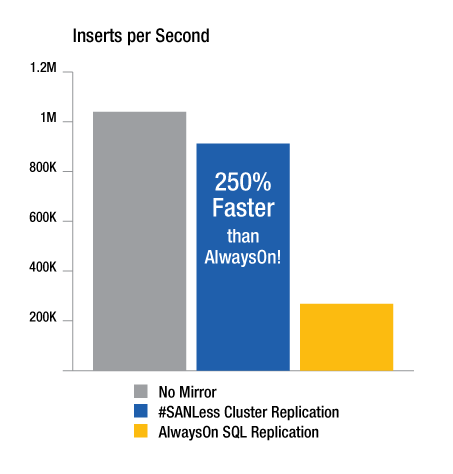
Figure 2 – Testing of SQL Server’s AlwaysOn Availability Groups and SIOS #SANLess clusters shows the throughput advantage possible with replication techniques purpose built for high availability and high performance.

Figure 2 summarizes test results that show the 60-70 percent performance penalty associated with using SQL Server AlwaysOn Availability Groups to replicate data. These test results also show how a purpose-built high-availability SANLess cluster, which utilizes local storage, is able to perform nearly as well as configurations not protected with any data replication or mirroring.

The #SANLess cluster tested is able to achieve this impressive performance because its driver sits immediately below NTFS. As writes occur on the primary server, the driver writes one copy of the block to the local VMDK and another copy simultaneously across the network to the secondary server which has its own independent VMDK.

SANLess clusters have many other advantages, as well. For example, those that use block-level replication technology that is fully integrated with WSFC are able to protect the entire SQL Server instance, including the database, logons and agent jobs-all in an integrated fashion. Contrast this approach with AlwaysOn Availability Groups, which failover only user-defined databases, and require IT staff to manage other data objects for every cluster node separately and manually.

##

About the Author

Jerry Melnick, COO, SIOS Technology Corp.

Jerry Melnick (jmelnick@us.sios.com) is responsible for defining corporate strategy and operations at SIOS Technology Corp. (www.us.sios.com), maker of SIOS SAN and #SANLess cluster software (www.clustersyourway.com). He more than 25 years of experience in the enterprise and high availability software industries. He holds a Bachelor of Science degree from Beloit College with graduate work in Computer Engineering and Computer Science at Boston University.

Filed Under: News and Events, News posts Tagged With: #SANLess, Jerry Melnick, News, VMware

Tech Target: SIOS SANLess cluster helps keep Epicure websites up and running

January 15, 2015 by Margaret Hoagland

Direct-sales food distributor Epicure deployed a new server cluster to keep its websites from being overwhelmed — and saved money on SQL Server and storage in the process.

Traffic on the two primary websites operated by Canadian direct-sales food distributor Epicure went up substantially at the end of each month — so much that the spikes often made the sites unusable. Epicure tried working with the third-party vendor that hosts the sites to resolve the problem, but saw no improvement. And the North Saanich, British Columbia company’s business model is dependent on the two sites. It uses one website to market itself and its selection of food and cookware products; the other site is used by the independent “consultants” who sell the Epicure products at tasting parties to place orders and communicate with the company.

Russell Born, senior network infrastructure administrator at Epicure, looked for a way to keep the sites running smoothly through the end-of-month rush — and, while doing a Google search last year, he found SIOS Technology Corp. and its DataKeeper data replication software andSANLess clustering tools. The SIOS offerings enable users looking to guard against processing downtime to create Windows or Linux server clusters that utilize local storage only, avoiding the need to deploy a storage area network (SAN).

“Before that, I thought we required a SAN,” Born said. SIOS also supports SAN-based clusters, but Epicure would have faced some difficulties if [it] went that route,” he added. According to Born, a SAN leads to higher costs and more setup effort; it also creates a “single point of failure,” since the entire operation becomes dependent on it to function. To combat that, Born could have deployed multiple SANs, but he said doing so would have become prohibitively expensive.

No backup in case of outage

Epicure had another good reason to want to bolster its websites, which use SQL Server to process and fulfill orders and track the work of its consultants. Shortly before Born learned about SIOS, Epicure’s data center suffered an outage that lasted several hours. “We didn’t have redundant Web servers, so there was no failover externally,” he said.The company had two servers, one for each site, and both were reaching their resource limit, which contributed to the end-of-month performance problems. In addition to SIOS, Born turned to cloud computing vendorAmazon Web Services (AWS) to help relieve the pressure. The new setup for Epicure includes a primary Web server running on-premises and a cloud-based failover system, and the SIOS software replicating data between them. Concurrently, Epicure is upgrading from SQL Server 2008 to SQL Server 2012, and from Windows 2008 to Windows 2012.Jerry Melnick, COO of San Mateo, Calif.-based SIOS, said one of the primary motivators for the deployment was Epicure’s concerns about disaster protection and recovery. “There is so much depending on those sites,” he said. “Users are ordering off the sites. If they go down, it could take weeks to get [them] back up.”One method for ensuring high availability is to deploy servers in a second location so that, if the primary data center goes down, you can failover to the backup one. But Melnick said that has a high startup cost, so he recommended companies like Epicure tap into a cloud provider, such asAWS, for disaster recovery. SIOS’ job, according to Melnick, is to be the linchpin of the SANLess cluster.

More money left on Epicure’s table

Consolidating the two servers into one primary system also saved the company some money on the DataKeeper software. “SIOS’ licenses are based on the number of servers, so it was half the cost,” Born said.

Also, prior to working with SIOS, Epicure had been using SQL Server Enterprise Edition solely because that was the only way to get the high-availability features included in the database. Now that Epicure is using the SIOS software, Born said it has been able to downgrade to the much less-expensive SQL Server Standard Edition, achieving “very substantial cost savings” on that as well.

Born started out with some reservations about the SIOS technology. “I did have concerns initially that if SIOS lost its data connection, there would be some corruption,” he said. “But we didn’t see that.” In fact, he was able to work out all of the startup issues with the SQL Server version of DataKeeper while testing the product, and only needed to make a couple calls to SIOS support. “It migrated over seamlessly,” Born said, adding that so far, he’s pleased with what the SIOS software has done for Epicure’s websites and the SQL Server systems that power them.Jessica Sirkin is associate site editor of SearchSQLServer. Email her at jsirkin@techtarget.com and follow us on Twitter: @SearchSQLServer.

Read more on TechTarget.com

Filed Under: News and Events, News posts Tagged With: #SANLess, #SANLess Clusters for SQL Server Environments, Cloud, Customer Story, News

  • « Previous Page
  • 1
  • 2
  • 3
  • Next Page »

Recent Posts

  • Active-Active vs. Active-Passive
  • Broadcom/VMware: Time To Decouple High Availability From Your Hypervisor
  • How To Improve Customer Satisfaction in Technical Support
  • Keeping Buildings Safe: High Availability in Maintenance and Security Systems
  • Designing High Availability Through Modularity and Abstraction

Most Popular Posts

Maximise replication performance for Linux Clustering with Fusion-io
Failover Clustering with VMware High Availability
create A 2-Node MySQL Cluster Without Shared Storage
SAP for High Availability Solutions For Linux
Bandwidth To Support Real-Time Replication
The Availability Equation – High Availability Solutions.jpg
Choosing Platforms To Replicate Data - Host-Based Or Storage-Based?
Guide To Connect To An iSCSI Target Using Open-iSCSI Initiator Software
Best Practices to Eliminate SPoF In Cluster Architecture
Step-By-Step How To Configure A Linux Failover Cluster In Microsoft Azure IaaS Without Shared Storage azure sanless
Take Action Before SQL Server 20082008 R2 Support Expires
How To Cluster MaxDB On Windows In The Cloud

Join Our Mailing List

Copyright © 2026 · Enterprise Pro Theme on Genesis Framework · WordPress · Log in