SIOS SANless clusters

SIOS SANless clusters High-availability Machine Learning monitoring

  • Home
  • Products
    • SIOS DataKeeper for Windows
    • SIOS Protection Suite for Linux
  • News and Events
  • Clustering Simplified
  • Success Stories
  • Contact Us
  • English
  • 中文 (中国)
  • 中文 (台灣)
  • 한국어
  • Bahasa Indonesia
  • ไทย

High Availability Software is Insurance Against SAP Downtime

July 18, 2020 by Jason Aw Leave a Comment

High Availability Software is Insurance Against SAP DowntimeHigh Availability Software is Insurance Against SAP Downtime

We all need to buy insurance – for our cars, our houses, our lives. Nobody likes to pay money for a service that we hope we never have to use. But we all know that we should have it just in case. Most people either put off insurance until something awful happens, buy the cheapest, or actually do their homework and buy it from someone they trust.  This last group usually fares the best.
High Availability Software is Insurance Against Downtime

Insurance is often for consumers, but it’s critical to businesses too. You have computer systems and applications that run your business.  If they fail for some reason, you want your business to continue to run or it could cost millions of dollars in lost business through lost transactions and customer data, and irreparable damage to your reputation with your customers. High availability software is your “insurance” against system downtime. This is not something you can ignore. This is not something you can trust that will come along with your hardware or software infrastructure. You want to use high availability solutions from a company that has decades of expertise in high availability and knows how to keep your systems up and running.

A trusted high availability software company should: 

  • Provide a single solution that is platform agnostic – usable on-prem, in the cloud, and on all of your hardware and software platforms
  • Have a product that is easy to configure and set up without having considerable application expertise
  • Know your applications and when your applications are having a problem
  • Take the proper action to attempt to restart or failover applications
  • Fail over the application to a secondary server, maintaining application best practices, and bringing the application back up in the proper order

One of the key applications used in enterprises today is SAP S/4HANA, based on the HANA in-memory database.  Most SAP customers will be required to run the HANA database with SAP by 2025.  You want to find an intelligent HANA availability solution from a company that knows high availability, that knows SAP, knows HANA, and knows what to do to ensure that your critical SAP applications, and your business, continue to run smoothly.

SIOS Technology is the company you can trust for a reliable High Availability Software. The 9.5 release of the LifeKeeper for Linux product contains a new HANA Application Recovery Kit. This will provide you with all you need to keep your SAP and HANA environment running.  Want more information about this release? Watch this interview.

Reproduced with permission from SIOS

Filed Under: Clustering Simplified Tagged With: High Availability

6 Common Cloud Migration Challenges

July 17, 2020 by Jason Aw Leave a Comment

6 Common Cloud Migration Challenges

6 Common Cloud Migration Challenges

As a software engineer for customer experience with SIOS, I often help companies who are migrating their on-premises high availability clustering environments to the cloud.

Cloud migration is a process, not a destination. When we engage a customer transitioning to the cloud, it’s often late in the planning process, which isn’t ideal, but not unusual in a cloud migration. Below are six cloud migration challenges we see all too frequently.

  1. Time – Understanding how long it takes for data transfer to the cloud

    How long will it take to get your data from on-premise into the cloud? It can vary quite drastically depending on your application, type of data, and cloud provider. One often overlooked detail is the time required to sync data from the primary node to secondary node, and in some cases to the disaster recovery (DR) site. Customers who don’t account for resync times are left twiddling their thumbs while data replicates.

  2. Cost – Understanding cost implications of data transfer within the cloud

    Data transfer within a cloud region is free of charge. Data transfer between regions will incur a cost. Typically, we see architectures where primary and secondary nodes are located in separate cloud availability zones within a region. Cost can increase significantly when a DR site is introduced because the DR site will always be in another region. Disaster recovery for data-rich applications like SAP NetWeaver may be cost inhibitive to replicate across regions.

  3. Replication Between Regions

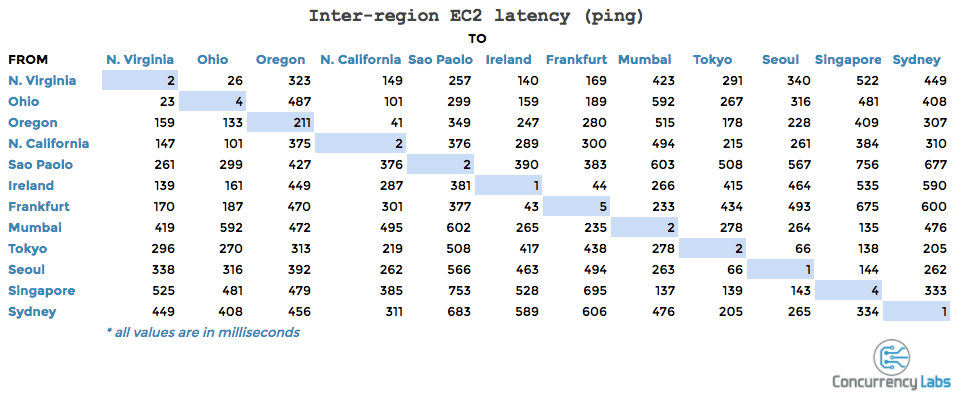
    Inter-region replication introduces another challenge: replication type. Asynchronous or synchronous replication within an AZ is determined by the RTO and RPO requirements of the customer. Regardless of instance size, data replication will experience some latency when crossing between regions. SIOS recommends asynchronous replication between regions to reduce the impact of that latency. Concurrency Labs provided some insightful information on latency between EC2 regions.

    Concurrency Labs on Cloud Migration

  4. Cloud Configuration quirks

    Ready-made OS images can be deployed from the cloud. This convenience comes at a cost, introducing another factor to configuration management. The cloud-init service included on SuSE Enterprise Linux images optimized for cloud can remove user-defined virtual IP addresses. Nothing stops a PoC quite like a virtual IP address disappearing every two minutes!

  5. Cloud Security

    The scale of cloud computing provides greater security than a business can afford in an on-premise datacenter. Cloud workloads take advantage of cutting-edge security without even knowing it. For example, by default AWS EC2 instances block any traffic that is not sent by or sent to the instance itself. This is a great feature for securing a network in the cloud. If a system requires Network Address Translation (NAT), EC2 default security measures will cause IP addresses to fail. Disabling source/destination check from the console will resolve the issue. Depending on a user’s familiarity with AWS this can take between a few clicks to a few support calls. Understanding the specifics of how a system interacts in an environment is key to a successful cloud migration.

  6. Cloud User Acceptance Testing (UAT)

    Customers coming from an on-prem system need to be reminded that resources are no longer a limiting factor. In the cloud, systems can effortlessly be copied and run in isolation of production, something not trivial on-premise. On-demand access to IT resources allows UAT of HA and DR to expand beyond “shut down the primary node”. Networks can be sabotaged, kernels can be panicked, even databases can be corrupted and none of this will impact production! Identifying and testing these scenarios improves HA and DR posture.

Executing a successful cloud migration requires input from all stakeholders. High availability and disaster recovery are core aspects of any enterprise workload. Whether SIOS is already part of your current system or will be part of your future cloud migration, get us involved!

-Harrison Howell, Software Engineer for Customer Experience

Reproduced with permission from SIOS

Filed Under: Clustering Simplified Tagged With: cloud migration, cloud security

SIOS Protection Suite for Linux Version 9.5 is Here!

July 15, 2020 by Jason Aw Leave a Comment

SIOS Protection Suite for Linux Version 9.5 is Here

SIOS Protection Suite for Linux Version 9.5 is Here!

We are proud to announce the availability of SIOS Protection Suite for Linux version 9.5. This product introduces advanced automation and application-aware monitoring making it the most comprehensive, out-of-the-box SAP S/4HANA clustering software in the industry.

We know what a hassle it is to try to manually build an SAP S/4HANA cluster, making sure that all of the HANA services will failover to the right locations and start up in the right order. Hours of scripting, testing, and aggravation. And the stakes are high. Getting it wrong can mean failover doesn’t happen or worse – downtime, data loss, lots of aggravated users calling.

That’s why we added intelligent application availability for two-node SAP S/4HANA database configurations that are using HANA System replication (HSR). We’ve built this release to take the hassle and risk out of building and managing a cluster.

SIOS Protection Suite v9.5 Automates and Monitors

Starting from easy, wizard-driven configuration that actually validates your input. No hours of manual scripting… or searching for a mistaken keystroke when things don’t go right.

It monitors all the processes in the HANA stack from the application to the hardware, servers, and network – not just checking that the server is operational like other clustering software.

And unlike other clustering solutions that trigger a failover for everything, if SIOS Protection Suite detects an issue, it automatically takes the appropriate recovery action – whether that’s simply restarting a service, recovering on the node that is in service or orchestrating a failover to a secondary node.

Speaking of failover orchestration, it will automatically ensure that SAP-specific best practices are maintained throughout. For example, it makes sure that on failover or switchover, ASCS is never on a server with the primary application or on the same server with the ERS.

If the wizard-driven configuration isn’t easy enough, we also added a new command-line interface (CLI) cloning feature that lets you deploy a SIOS cluster simply by importing the CLI instructions for configuration. You can also export the CLI instructions of an existing cluster to create a clone of it.

Now with SIOS Protection Suite for Linux, you can create a high availability cluster quickly and easily to protect any application. This includes SQL Server, Oracle, SAP and S/4HANA, from downtime and disasters.

Request a Free Trial

Reproduced with permission from SIOS

Filed Under: Clustering Simplified Tagged With: sios protection suite

EC2 Monitoring Best Practices: Using SIOS AppKeeper to Protect NGINX Webservers on Amazon EC2
July 14, 2020 by Jason Aw Leave a Comment

EC2 Monitoring Best Practices: Using SIOS AppKeeper to Protect NGINX Webservers on Amazon EC2EC2 Monitoring Best Practices: Using SIOS AppKeeper to Protect NGINX Webservers on Amazon EC2
NGINX is a web server that can also act as a load balancer, reverse proxy, etc. Together between them, NGINX and Apache serve more than 50% of the traffic on the web.  Today many companies are running their NGINX Open Source or NGINX Plus webservers on the Amazon EC2 environment using either Amazon Linux, Red Hat Linux, and Ubuntu.

Everyone agrees that it is a best practice to monitor applications like NGINX on EC2 and respond to any systems irregularities quickly.  Users expect fast access and constant uptime for their applications.

Current choices for monitoring NGINX webservers on Amazon EC2

Many companies are deploying Amazon CloudWatch to monitor their applications, and are even creating some levels of automation by developing scripts or by using AWS Lambda.  But configuring Amazon CloudWatch properly with custom metrics and setting up Amazon Lambda requires a certain amount of technical expertise that may be beyond that of many companies.  And then there is a cost and effort required to maintain any scripts as the applications evolve.

Another choice is to deploy an application performance monitoring (APM) solution, such as one from New Relic, Dynatrace, Datadog, or LogicMonitor.  APM solutions are great.  They do a really good job of watching over all your systems and pinpointing what happened and why.  They create logs that can be shared with and interpreted by your development team to recreate the issue and ensure that it doesn’t happen again.  But here’s the thing:  APM solutions provide a lot of data that you have to sort through (separating “signals from the noise”) and they do nothing to recover from failures when they occur.  APM tools are only part of the solution when it comes to reducing downtime for your NGINX webservers.

But some companies don’t have the internal staff or tools to monitor their EC2 environment themselves. This is the reason why they choose to outsource the task to a managed service provider.  There are some very real benefits to working with an MSP to manage your environment, such as not having to hire more staff as your environment expands, or not having to train your team on new technologies.  And the MSPs enjoy efficiencies as they can spread out their investments over many clients.  But there are downsides.  In some cases, you can be locked into high, fixed-cost contracts, and costs can escalate if issues are experienced and they have to escalate to address them.  And you lose continuity between the team that is monitoring the environments and those responsible for building and deploying the applications.

Whether you chose to invest in an APM solution or to outsource to an MSP, you still need to think about how quickly you can recover your NGINX webservers from downtime if and when it occurs.  We’d like to propose another alternative:  automated remediation with SOIS AppKeeper.

SIOS AppKeeper:  Automated remediation for NGINX webservers on EC2

Many of our customers have chosen to use SIOS AppKeeper to protect their NGINX webservers.  While they could have chosen a standard application performance monitoring (APM) solution or third-party monitoring solutions, they chose instead to rely on AppKeeper to automatically recover services or the entire EC2 instances if a failure occurs.  We will take a look at some of the reasons why and share with you a short video showing how AppKeeper works with NGINX.

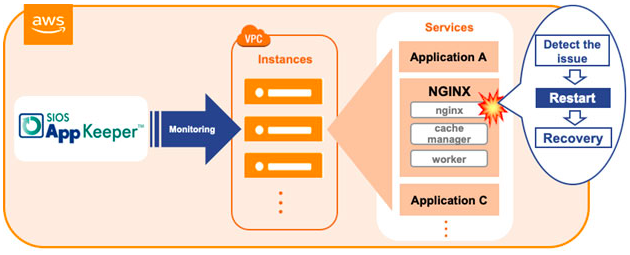
SIOS AppKeeper is a SaaS service that is easy to install and configure and monitors any applications running on Amazon EC2, such as your NGINX webservers and their “nginx”, “cache manager”, and “worker” services.  When an anomaly is detected, AppKeeper automatically restarts the service, and if that doesn’t work it reboots the entire instance.  No more reading through painful logs to pinpoint the reason for the failure, or escalation to developers to restart your service or expensive outsourcing fees.  AppKeeper provides “set-it-and-forget-it” functionality so that you can rest assured knowing that your NGINX webservers are following EC2 monitoring best practices and are running properly, or will be quickly restarted if they experience any issues.

Wistia video thumbnail

Today hundreds of companies rely on AppKeeper to keep their cloud environments running.  We invite you to check out this quick video for a demonstration of how AppKeeper protects NGINX webservers.

If you would like to try SIOS AppKeeper for yourself, we offer a 14-day free trial.  Simply click here to sign up.

Filed Under: Clustering Simplified Tagged With: NGINX, SIOS Appkeeper

What is Amazon CloudWatch?

July 12, 2020 by Jason Aw Leave a Comment

What is Amazon CloudWatch


What is Amazon CloudWatch?

What you can do with CloudWatch and some hurdles to consider

With AWS boasting a dominant share of the cloud market, many companies are migrating their on-premises systems to the cloud with Amazon AWS.  So, how should a system running in the AWS environment be managed?

In this blog post, we will introduce the features of Amazon CloudWatch, a monitoring service provided by AWS, as well as the challenges of implementing it and how to solve them.

Using Amazon CloudWatch to closely monitor your AWS environment

To ensure that you have a stable cloud environment, it is important to detect anomalies (“system impairments”) quickly and respond in a timely manner.  Monitoring becomes an important and necessary task for any organization moving to the cloud.  This is no different than if you were managing on-premises applications and infrastructure. So, how should you monitor in an AWS environment?  One choice is to use Amazon CloudWatch, which monitors CPU, memory, and disk usage and notifies you when a predetermined threshold is exceeded.  Plus, you can set up your own metrics to monitor various items such as application logs.

The best part about Amazon CloudWatch is that it’s a service provided by AWS itself.  It has a high affinity with Amazon EC2 and other AWS services, so it can quickly respond to frequent functional extensions and specification changes, and can easily support AWS Auto Scaling, which automatically increases or decreases resources according to the load.  Amazon CloudWatch provides precise monitoring tailored to each environment’s unique circumstances.

Amazon CloudWatch implementation challenges

While Amazon CloudWatch is an ideal fit for organizations with experienced cloud engineers and DevOps teams, there are some things the average users should be aware of.

Amazon CloudWatch is effective for monitoring an organization’s AWS environment, but it requires a certain level of skill and knowledge to configure and deploy.  Especially when you set your own metrics, are setting up alerts, or taking into account Auto Scaling, the complexity increases. For example, If you’re setting up monitoring, it’s easy, but if you’re setting up email, rebooting, AutoScaling, etc., depending on the resource situation, it can be difficult.

If you want to automate the recovery process with instructions such as “restart the server when an error occurs”, you must first create a recovery scenario with an AWS Lambda script that provides a detailed description of the conditions and actions to be taken.  How familiar is your team with AWS Lambda?

The principal advantage of Amazon CloudWatch is that you can monitor your environment closely, but in order to do that, you must properly design in advance for each system what items to monitor and when, threshold values, etc.  These design tasks can take a lot of time.  Of course, your mission-critical systems need to be closely monitored in this way, but this level of detail and sophistication is not appropriate for all systems. For some, such as internal websites or WordPress servers, you will want to minimize your operating and labor costs. In such cases, we would like to suggest you consider a tool that can be more easily operated and managed.

For mission-critical applications, you need high availability protection with SIOS clustering software. Add SIOS DataKeeper software to a Windows Server Failover Clustering environment to create a SANless cluster in Amazon EC2 that fails over across availability zones and regions.  Use SIOS Protection Suite for Linux for application-aware clustering designed to simplify complexity and orchestrate failover according to application-specific best practices.

 Contact the SIOS availability experts today to learn more about achieving maximum uptime for your mission-critical applications.

Reproduced from SIOS

Filed Under: Clustering Simplified Tagged With: Amazon AWS, AppKeeper, Application availability, application monitoring

  • « Previous Page
  • 1
  • …
  • 83
  • 84
  • 85
  • 86
  • 87
  • …
  • 120
  • Next Page »

Recent Posts

  • Setting Up Nginx Load Balancer on AWS
  • With Great Power: Cluster Maintenance Best Practices
  • AI Is Moving Fast. Critical Applications Still Need to Stay Up.
  • What Is High Availability (HA)?
  • Surviving the Friday Night Crash: From Scrappy Bare Metal to Seamless Data Replication

Most Popular Posts

Maximise replication performance for Linux Clustering with Fusion-io
Failover Clustering with VMware High Availability
create A 2-Node MySQL Cluster Without Shared Storage
SAP for High Availability Solutions For Linux
Bandwidth To Support Real-Time Replication
The Availability Equation – High Availability Solutions.jpg
Choosing Platforms To Replicate Data - Host-Based Or Storage-Based?
Guide To Connect To An iSCSI Target Using Open-iSCSI Initiator Software
Best Practices to Eliminate SPoF In Cluster Architecture
Step-By-Step How To Configure A Linux Failover Cluster In Microsoft Azure IaaS Without Shared Storage azure sanless
Take Action Before SQL Server 20082008 R2 Support Expires
How To Cluster MaxDB On Windows In The Cloud

Join Our Mailing List

Copyright © 2026 · Enterprise Pro Theme on Genesis Framework · WordPress · Log in