SIOS SANless clusters

SIOS SANless clusters High-availability Machine Learning monitoring

  • Home
  • Products
    • SIOS DataKeeper for Windows
    • SIOS Protection Suite for Linux
  • News and Events
  • Clustering Simplified
  • Success Stories
  • Contact Us
  • English
  • 中文 (中国)
  • 中文 (台灣)
  • 한국어
  • Bahasa Indonesia
  • ไทย

Solution Brief: High Availability for SQL Server in Amazon Cloud Environments

May 17, 2020 by Jason Aw Leave a Comment

High Availability for SQL Server

Solution Brief: High Availability for SQL Server in Amazon Cloud Environments

SIOS software provides a simple, cost-efficient way to provide high availability protection for SQL Server in the Amazon Web Services Cloud. Add SIOS DataKeeper Cluster Edition software to a Windows Server Failover Clustering Environment such as SQL Server Always On Failover Cluster Instance (FCI) to create a cloud-friendly SANless cluster. Use AWS Quickstart deployment templates to create a SIOS SANless cluster in minutes.

Fast, Cost-Efficient Way to Add High Availability

Like all traditional failover clustering solutions, SQL Server FCI environments require the use of a shared storage. This requirement makes them impractical or impossible in public cloud environments, including Amazon Web Services. SIOS SANless clustering software eliminates this requirement in an environment that is fully integrated with Windows Server Failover Clustering. SIOS software adds the flexibility to protect your business critical applications such as SQL Server Standard or Enterprise Edition in Windows or Linux and any combination of physical, virtual, and cloud environments.

Fast, Efficient Synchronization

SIOS software uses highly efficient block-level replication to synchronize storage in all cluster nodes in realtime to create a SANless cluster. By replicating data volumes at the block level, SIOS software use significantly fewer system resources, makes more efficient use of the available bandwidth and transfers more data faster across than file-based replication alternatives. As a result, SIOS software delivers incredibly fast replication speeds—without hardware accelerators or compression devices. You get efficient storage without the cost or configuration limitations of a traditional SAN-based environment.

Failover Across Availability Zones for Disaster Protection

It keeps real-time copies of data synchronized across multiple nodes and across EC2 Availability Zones (AZs) for availability and disaster protection.

High Availability with SQL Server Standard Edition

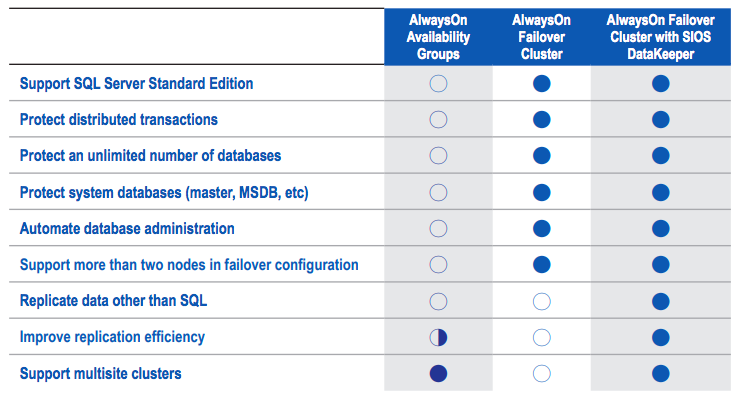
SIOS DataKeeper Cluster Edition software can be used with SQL Server Standard Edition FCI to create a cost-efficient high availability cluster without the need for more costly SQL Server Enterprise Edition licenses.
Solution Brief: High Availability for SQL Server in Amazon Cloud Environments

Key Benefits

Enables Clustering in the Cloud

• Makes cluster failover protection in cloud environments possible by eliminating the need for shared storage.

• Fully integrated with Windows Server Failover Clustering (WSFC)

Protection for Applications and Data

• High availability and disaster protection in a cloud environment.

Ease of Use

• AWS Quick Start deployment templates

• Intuitive console for easy ongoing AWS monitoring and management.

Download our Solution Brief High Availability for SQL Server in Amazon Cloud Environments
Filed Under: Clustering Simplified Tagged With: Amazon Web Services Cloud, High Availability, SQL Server

High Availability and DR for S/4HANA and other SAP platforms

April 28, 2020 by Jason Aw 1 Comment

High Availability and DR for S/4HANA and other SAP platforms

High Availability and DR for S/4HANA and other SAP platforms

SAP is the market leader in enterprise application software. Over the span of many years, SAP had helped companies of all sizes and in all industries run efficiently and effectively. As a result of their hard work, they have built an ecosystem of enterprises heavily reliant on its platform. 77% of the world’s transaction revenue touches an SAP system.

SAP application touches many critical parts of a company such as its’ ERP, manufacturing, business processes, customer service etc. It has become the lifeline of many enterprises that depends on it for their business to operate properly. As such, high-availability has became one of the top concerns of company managements when it comes to their SAP systems.

In this article, we will discuss at a high-level what is HANA system replication and how it works. What are the limitations when it comes to high-availability, and how we can overcome them. We will also discuss about the options for HANA’s high-availability and the key differences.

To select the right solution to use for HA, ask yourselves at the end of the day

  • Meet Recovery Time Objectives (RTO)

—– How long can SAP be down before you recover?

  • Meet Recovery Point Objectives (RPO)

—–  How old can your data be when service is restored

  • Meet Availability Service Level Agreements (SLA)

—– How much uptime do you need?

SAP HANA system replication

SAP HANA System Replication is a reliable data protection and disaster recovery solution that provides continuous synchronization of a HANA database to a secondary location either in the same data center, remote site or in the cloud.

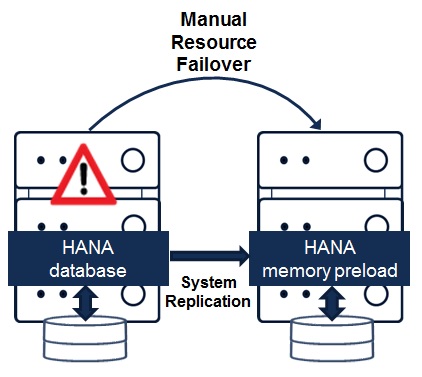
System Replication is a standard SAP HANA feature that comes with the software. Using this feature, all data is replicated to the secondary site and data is pre-loaded into memory on the secondary site which helps to reduce the recovery time objective (RTO) significantly. So in case of a failover, the secondary site will be able to take over without even performing a HANA DB (re)start and will work as primary DB instantaneously upon failover. However, the failover has to be triggered manually by the admin using the sr_takeover command. For the replication to be reversed, or failback to primary, separate commands will need to be issued as well.

HANA System Replication failover high-availability and DR
Figure 1: HANA System Replication failover high-availability and DR

Below are some key points of the HANA system replication method for HA and DR:

  • Redundant Servers / Nodes
  • In-memory database replicated by HANA system replication (in “log replay” mode)
  • Multiple replication options: sync, sync-mem, async
  • Supports active-active (read-only on secondary)
  • Setup and admin through HANA cockpit, HANA studio or command line

Limitations

  • No monitoring of application process or replication failures and automated failover
  • Failover, reverse replication and failback has to be performed manually – many manual steps are needed
  • No virtual IP
  • No integrated HA failover orchestration together with SAP ASCS etc. components

As you can probably deduce from the above points by now, HANA system replication is designed to protect against data loss. Such that when an issue happens with the primary node, an admin can manually run a “sr_takeover” command, so that a problem with the primary system will not take down the entire SAP setup which depends on the HANA database for the prolonged period of downtime. However, a lot of this work has to happen manually and depends on human manual intervention, which although is good enough for DR, it does not make an ideal situation for HA (where downtime needs to be prevented).

SIOS High Availability Clustering

SIOS high availability software for SAP lets you protect SAP S/4HANA in any configuration (or combination) of physical, virtual, cloud (public, private, and hybrid) and high performance flash storage environments. SIOS software provides easy and flexible configuration, fast replication, and comprehensive monitoring and protection of the entire SAP S/4HANA environment.

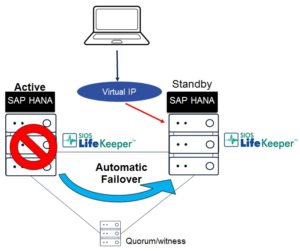
Specifically for SAP S/4HANA and the HANA database. SIOS can be used to complement what SAP is already doing with the HANA system replication. SIOS adds on to what SAP has to provide true high-availability – automated monitoring of key HANA application processes, and provide automated failover, failback, including virtual IP(s), even if you have multi-instance within a single HANA node.

SIOS HANA System Replication failover high-availability and DR
Figure 2: SIOS HANA System Replication failover high-availability and DR

Below are some key points of the SIOS Protection Suite for SAP HANA HA and DR:

  • Works in the cloud cross AZ and AR
  • Provides automated failure detection and failover for key SAP HANA DB components:
    — SAP HANA Host Agent
    — SAP HANA sapstartsrv
    — SAP HANA Replication
  • Enables automated SAP HANA replication takeover, switchback
  • Automatically reverse replication
  • Verifies and monitors that the HANA DB is running
  • Provides Virtual IP
  • “Full stack” failover orchestration with ASCS etc. SAP components

Four steps to install and configure HA for HANA database

We will not discuss the specific steps of how to configure SAP HANA, since there are already many on-line resources that cover those steps. But at a high-level, what you need to do are 4 basic steps:

  1. Install SAP HANA
  2. Configure HANA system Replication
    See – https://help.sap.com/viewer/6b94445c94ae495c83a19646e7c3fd56/2.0.02/en-US/676844172c2442f0bf6c8b080db05ae7.html
  3. Install SIOS protection suite
    See – http://docs.us.sios.com/spslinux/9.4.1/en/topic/sios-protection-suite-for-linux-installation-guide
  4. Use HANA recovery kit (wizard) in GUI to protect HANA
    See – http://docs.us.sios.com/spslinux/9.4.1/en/topic/sap-hana-recovery-kit

The installation process flow are similar for other SAP components (ASCS, ERS, PAS, Web Dispatcher etc.) as well.

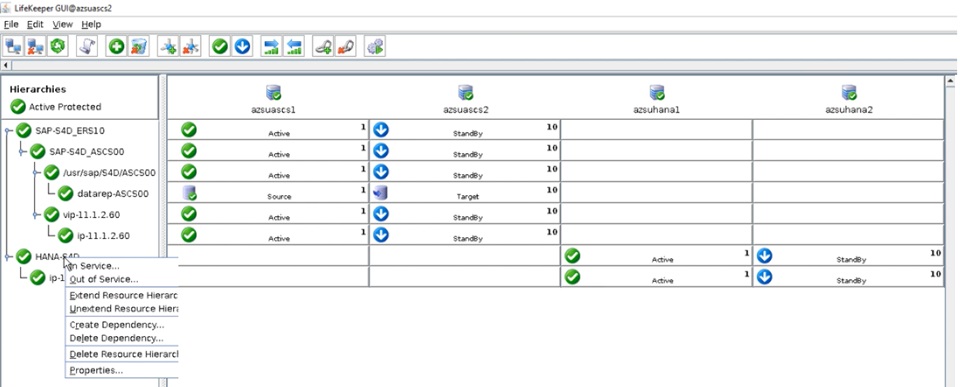
With the HANA recovery kit included in the SIOS protection suite software, you can basically use a wizard in the SIOS Lifekeeper management GUI, to quickly protect a HANA database instance. You can also assign the virtual IP address for clients to connect to it, and manage the entire stack from it. Build a multi-instance environment and the solution will manage all the instances, virtual IPs etc. within the a fully integrated GUI, which makes it very easy to configure, manage the entire SAP landscape that is on SIOS HA.

SIOS Lifekeeper Management GUI for SAP HANA ASCS and ERS
Figure 3: SIOS Lifekeeper Management GUI for SAP HANA ASCS and ERS

Comprehensive HA/DR stack for SAP –

Other than HANA database, SIOS Protection Suite also provides protection for key SAP services and supporting applications, all of which can be managed from the same GUI :

  • Primary Application Server (PAS)
  • ABAP SAP Central Service (ASCS)
  • SAP Central Services (SCS)
  • Enqueue and message servers
  • Enqueue Replication Server (ERS)
  • Database (Oracle, Sybase, MaxDB, HANA, etc)
  • Shared and/or Replicated File Systems
  • Logical Volumes (LVM)
  • NFS Mounts and Exports
  • Virtual IPs

Clustering in the cloud

When moving SAP to the cloud, one of the key challenges is how to protect the SAP database, as well as the SAP applications stack in a SAP supported architecture. SIOS has been forefront of this move and are designed, certified and supported by SAP as well as all the major cloud providers.

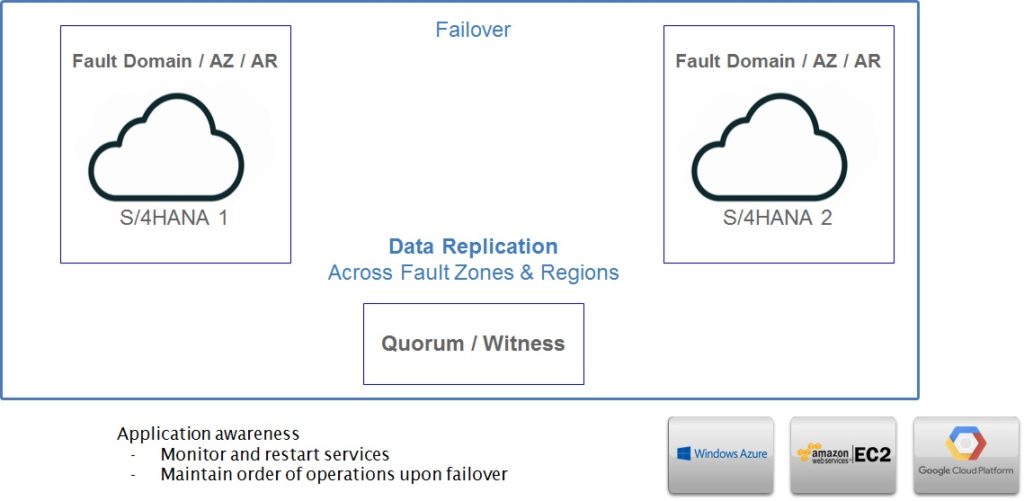
The diagram below is a high-level design of how a pair of S/4HANA system can be deployed across different availability zones, or even regions. In cloud environments, as the providers do have very low latencies between AZs, it is entirely possible to use synchronous replication across the AZs, thereby creating a pair of highly available S/4HANA system, not just for HA but also for DR at the same time. This is because AZs are geographically separate datacenters, much like how on-premise DR datacenters are, which highly redundant high-speed network connectivity between them.

SIOS Protection Suite for SAP S/4HANA cloud architecture
Figure 4: SIOS Protection Suite for SAP S/4HANA cloud architecture

Why use SIOS over open-source HA for SAP?

This question will invariably come up in people’s mind, since some Linux vendors already provide their HA extensions (HAE) or clustering, why would anyone want to use a commercial 3rd party HA solution like SIOS?

  1. Open-source HA is being offered as part of certain OS flavors “enterprise SAP” extensions subscription – it comes at a cost, it’s definitely not free, and not all Linux flavors are supported. SIOS supports all the major Linux flavors including Redhat, SUSE, Centos and Oracle Linux. For customers who want to run Windows for their ASCS or Content Server etc. SIOS also has Windows based solution with Windows clustering support, making it a one-stop-shop for the entire SAP landscape regardless of platform.
  2. Commercial HA support – OS vendors depend on open-source community for bug fixes, which can be a problem if the bug requires a longer time to get solved by a less active contributor. SIOS provides commercial support with dedicated support and development team just for its high-availability solution. It has immediate 24×7 support resolution, which would give customers much more confidence when there are issues that may develop.
  3. Complex setup and admin via command line is needed by open-source tools. They are made up of different components like Pacemaker, Corosync etc. maintained by different open-source initiatives. SIOS provides all-in-one GUI for wizards-based setup and admin. It allows one to deploy SAP HA in a matter of hours instead of weeks/months.
  4. SIOS provide pre-built application monitoring and failover orchestration for all SAP and cloud components requiring HA through a wizard in the GUI, as opposed to using HA extensions that still requires a lot of manual configuration.
  5. Automatically ensures SAP ERS is always running in opposite node of ASCS – SIOS provides the intelligence even in a multi-node ASCS setup, if a failover occured and ASCS failsover to the node with the running ERS, when the original ASCS node recovers, ERS gets automatically switched across so that the locks are always getting the redundancy needed. Opensource solution requires this to be done manually, hence impacts reliability and availability especially in times of multiple failures and recovery.
  6. SIOS reduces implementation/management time and costs, the lesser time you spend implementing and maintaining HA, the more time you will have for other more important tasks.
  7. Open-source use its STONITH mechanism which had been hardly reliable especially in cloud environments, SIOS provides multi-throng approach to prevent false failover and split-brain – quorum witness, multiple comm. path (heartbeat) which has been proven for over 20 years to be highly reliable in many scenarios.

Summary

SAP HANA system replication feature comes as part of the software and works well to protect the database from dataloss in case a problem arise from hardware or system failures. However if high-availability is the requirement, it would still need a 3rd party solution in order to get some of the automated monitoring, failover orchestration, virtual IP and so on. While there are opensource options in the form of enterprise Linux OS subscriptions for SAP, they certainly do not come free, and technical support is still limited as they purely relying on opensource community to maintain the Pacemaker, Corosync etc. projects. and to get support from contributors. There are also limitations in the native System Replication, opensource HAE which can be overcome by a commercial software solution vendor like SIOS.

Hence, SIOS as a reliable 3rd party high-availability solution provider can help to ensure enterprise customers get the reliability and high-availability that they need in their mission critical SAP systems operations. For a peace of mind, SIOS proves to be a very viable complementary solution to SAP HANA system replication, which is also fully supported by SAP and all the major OS and platform vendors.

Author:

Jason Aw SIOS Technology
Jason Aw
An IT professional who has been focused on high-availability and disaster recovery for over 20 years. Currently employed at SIOS Technology Corp. as Strategic Business Development for APAC.

Filed Under: Blog posts, Clustering Simplified

SIOS High Availability Solution And Its Benefits

April 22, 2020 by Jason Aw Leave a Comment

SIOS High Availability Solution And Its Benefits

SIOS High Availability Solution And Its Benefits

What SIOS can do for you?

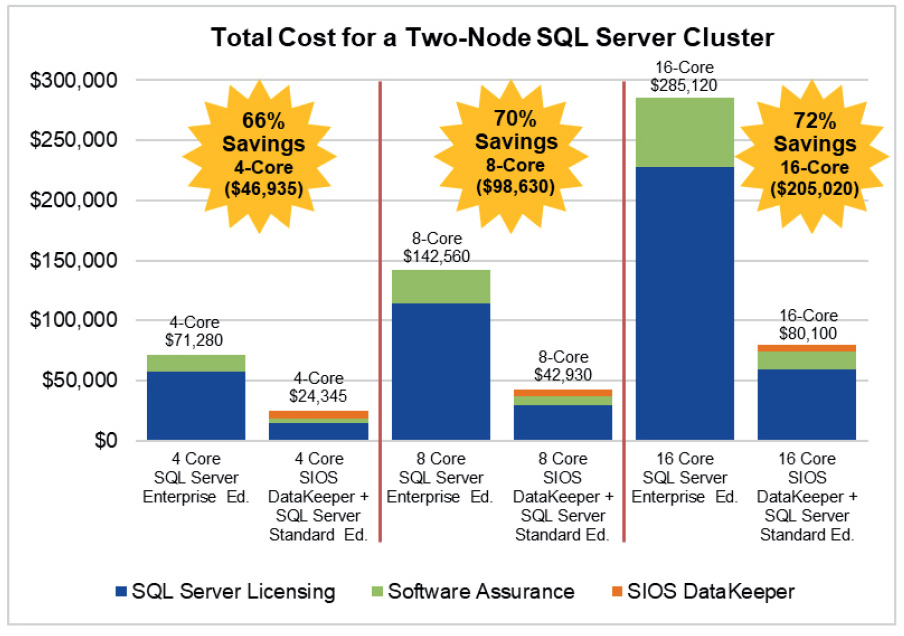
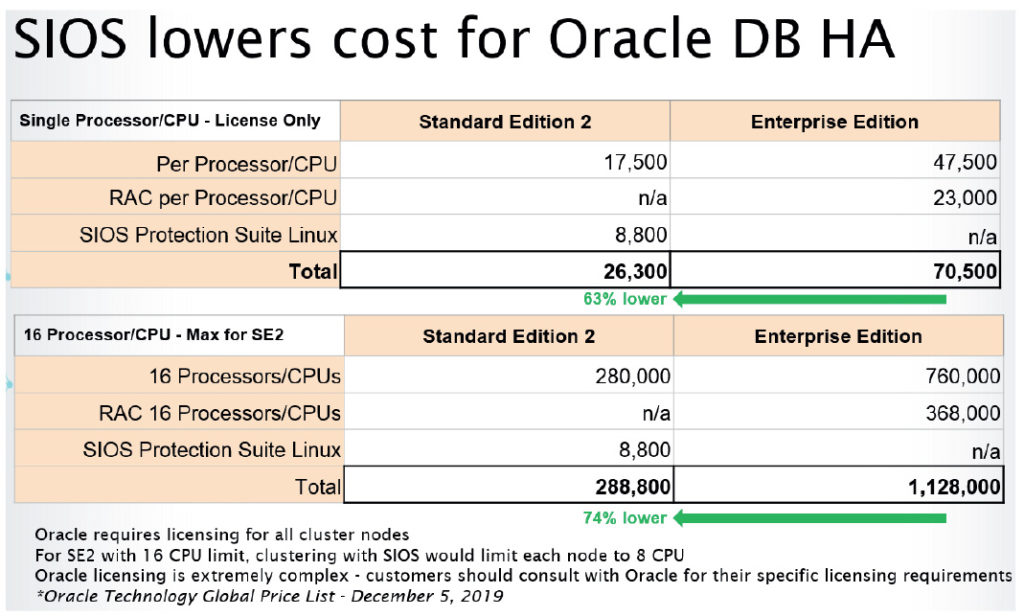
With SIOS, get ready to enjoy high availability cluster protection for 70% less than SQL Enterprise Edition, Oracle Enterprise Edition/ RAC. On top of that, save running costs from not having to migrate to a certain vendors’ cloud platform for extended support.

Rest assured. SIOS is SAP certified for all major Linux and cloud providers, hence you can easily achieve High Availability and Disaster Recovery on VMware without RDM (shared storage). Thereby, allowing snapshot-based backups to succeed.

Best of all, overcome technical limitations of native features from application and database software vendors.

No Configuration Limitations

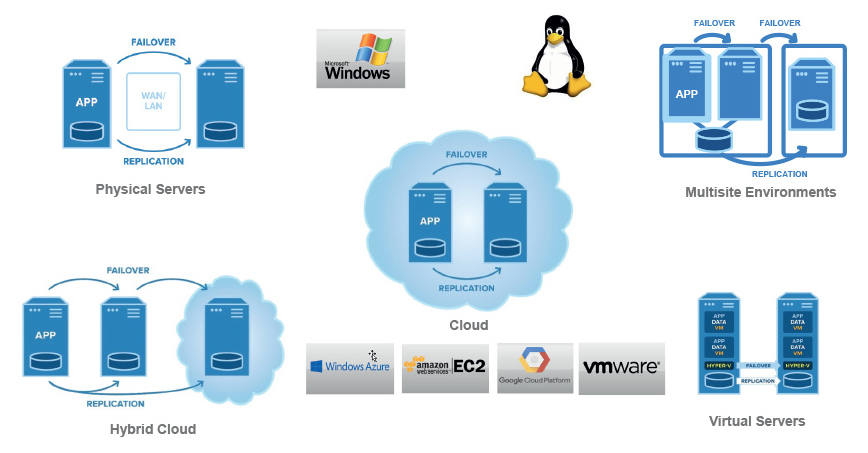
SIOS is a high availability solution that is suitable for use in any Windows/Linus Application on Physical, Virtual, Public/Virtual Cloud.

Why Sell SIOS HA Solutions

SIOS has been a high availability solutions leader for 20 years, with its strength as a simple add-on to fit any HA environment. Specifically focusing on channel sales, the great margins translate to cost reduction for customers by more than 60% . You will be provided with sales support and given marketing opportunities. Most of all, you can be guaranteed access to a world-class technical support team.

SIOS strives to solve customers’ challenges by providing usable solutions. 

  • Benefits for MSSQL customers

Use SIOS Datakeeper with AlwaysOn FCI on SQL standard edition with no need for Enterprise Edition, thereby saving more than 66% of cost. Maintain support even after migrating customers’ old MSSQL 2008 to cloud. SIOS supports multinode cluster (MS limitation), and provides protection for Master System Databases (Master, MSD). Also, it protects other files and applications other than MSSQL

  • Benefits for Oracle customers

SIOS offers protection for Oracle DB and  75% cost savings with Oracle standard edition. Use SIOS with STD edition and continue to get High Availability even as Oracle ends RAC support for STD edition from v.19c onward. SIOS is less complex than Dataguard and RAC, thereby reducing administrative time and costs. Enjoy the ease and flexibility to  run Oracle DB with High Availability on any cloud provider platform. Protect other files and applications not just Oracle DB.

  • Benefits for SAP customers 

With its easy implementation, application protection wizards, and management via GUI, be sure to save time and cost on your projects. No change from on-premises clustering design and versions used as you migrate to cloud by “life-and-shift”.

As a high availability solution, SIOS promises to offer protection that SAP does not cover. Automatic failure detection and failover orchestration for HANA and Central Services with automatic ERS switchover to opposite node (feature not provided by opensource/HAE). Certified by SAP for any cloud provider and and linux flavor. This includes Oracle Linux with SAP in public cloud providers All SAP customers enjoy commercial-grade replication and tech support.

  • Benefits for VMware environments

Achieve High Availability, Data Recovery on VMware without RDM (shared storage). This allows for snapshot backups that is not supported with VMware HA. Additionally, you get to enjoy cost savings since there is no need for single-point-of-failure SAN or SAN-to-SAN replication for High Availability, Data Recovery. Similarly, this ends the need for complex vSphere replication for DR of applications like SQL, SAP, Oracle etc. With SIOS, you’ll easily achieve full application monitoring and automated failover.  Furthermore, this feature is not provided by VMware HA, only VM and host failures. 

The solution is specifically designed for HA with full stack monitoring (server, VM, application, network, split-brain). Like a hybrid our high availability solution works on-premises with any VM-to-any Cloud.

Download PDF

Filed Under: Clustering Simplified Tagged With: high availability solutions, MSSQL, Oracle, SAP, SIOS

Achieving Application Consistent Recovery Points of SQL Server 2008 R2 With Azure Site Recovery In Azure

June 20, 2019 by Jason Aw Leave a Comment

Achieving Application Consistent Recovery Points of SQL Server 2008 R2 With Azure Site Recovery In Azure

Achieving Application Consistent Recovery Points of SQL Server 2008 R2 With Azure Site Recovery In Azure

If you want to use ASR to replicate SQL Server 2008 R2 standalone or clustered instances, you will need to update the SQL Writer  to 2012 or later.

You can use SQL express version as it is a free download.

https://www.microsoft.com/en-us/download/details.aspx?id=29062

Once downloaded, navigate to the download location and run the executable with /x.  This will give you an option to specify a location to extract the files to.

ENU\x64\SQLEXPRADV_x64_ENU.exe /x

Once the extraction completes, navigate to the extracted location and the following location:

SQL\1033_enu_lp\x64\setup\x64

Within that folder you should find SQLWriter.msi.  Run this on the system where you want to update the SQL writer.

You now will be able to use ASR to do application consistent recovery points of SQL Server 2008 R2.

Reproduced with permission from Clusteringformeremortals.com

Filed Under: Clustering Simplified Tagged With: Azure, SQL Server

Major Cloud Outage Impacts Google Compute Engine – Were You Prepared? 

June 7, 2019 by Jason Aw Leave a Comment

Major Cloud Outage Impacts Google Compute Engine Were You Prepared

Major Cloud Outage Impacts Google Compute Engine – Were You Prepared?

Google first reported an “Issue” on Jun 2, 2019 at 12:25 PDT. As is now common in any type of disaster, reports of this outage first appeared on social media. Social media seems to the most reliable place to get any type of information early in a disaster now.

Twitter is quickly becoming the first source of information on anything from revolutions, natural disasters to cloud outages.

Many services that rely on Google Compute Engine were impacted. I’ve three teenage kids at home. Something was up when all three kids emerged from their caves, aka, bedrooms, at the same time with a worried look on their faces. Snapchat, Youtube and Discord were all offline!

They must have thought that surely this was the first sign of the apocalypse. I reassured them this was not the beginning of the new dark ages. And instead they should go outside and do some yard work. That scared them back to reality and they quickly scurried away to find something else to occupy their time.

All kidding aside, there were many services being reported as down, or only available in certain areas. The dust is still settling on the cause, breadth and scope of the outage. But it certainly seems that the outage was pretty significant in size and scope, impacting many customers and services including Gmail and other G-Suite services, Vimeo and more.

Many services were impacted by this outage, Gmail, YouTube and SnapChat just to name a few.

While we wait for the official root cause analysis on this latest Google Compute Engine outage, Google reported “high levels of network congestion in the eastern USA” caused the downtime. We will have to wait to see what they determine caused the network issues. Was it human error, cyber-attack, hardware failure, or something else?

Were You Prepared For This Cloud Outage?

I wrote during the last major cloud outage. If you are running business critical workloads in the cloud, regardless of the cloud service provider, it is incumbent upon you to plan for the inevitable outage. The multi-day Azure outage of Sept 4th, 2018 was related to a failure of the secondary HVAC system to kick in during a power surge related to an electrical storm. While the failure was just within a single datacenter, the outage exposed multiple services that had dependencies on this single datacenter. This made the datacenter itself a single point of failure.

Have A Sound Disaster Recovery Plan

Leveraging the cloud’s infrastructure, minimize risks by continuously replicating critical data between Availability Zones, Regions or even cloud service providers. In addition to data protection, having a procedure in place to rapidly recover business critical applications is an essential part of any disaster recovery plan. There are various replication and recovery options available. This includes services provided by the cloud vendor themselves like Azure Site Recovery, to application specific solutions like SQL Server Always On Availability Groups, to third party solutions like SIOS DataKeeper that protect a wide range of applications running on both Windows and Linux.

Having a disaster recovery strategy that is wholly dependent on a single cloud provider leaves you susceptible to a scenario that might impact multiple regions within a single cloud. Multi-datacenter or multi-region disasters are not likely. However, as we saw with this recent outage and the Azure outage last fall, even if a failure is local to a single datacenter, the impact can be wide reaching across multiple datacenters or even regions within a cloud. To minimize your risks, consider a multi-cloud or hybrid cloud scenario where the disaster recovery site resides outside of your primary cloud platform.

The cloud is just as susceptible to outages as your own datacenter. You must take steps to prepare for disasters. I suggest you start by looking at your most business critical apps first. What would you do if they were offline and the cloud portal to manage them was not even available? Could you recover? Would you meet your RTO and RPO objectives? If not, maybe it is time to re-evaluate your Disaster Recovery strategy.

“By failing to prepare, you are preparing to fail.”

― Benjamin Franklin

Reproduced with permission from Clusteringformeremortals.com

Filed Under: Clustering Simplified, Datakeeper Tagged With: cloud outage, disaster recovery

  • « Previous Page
  • 1
  • …
  • 85
  • 86
  • 87
  • 88
  • 89
  • …
  • 120
  • Next Page »

Recent Posts

  • Setting Up Nginx Load Balancer on AWS
  • With Great Power: Cluster Maintenance Best Practices
  • AI Is Moving Fast. Critical Applications Still Need to Stay Up.
  • What Is High Availability (HA)?
  • Surviving the Friday Night Crash: From Scrappy Bare Metal to Seamless Data Replication

Most Popular Posts

Maximise replication performance for Linux Clustering with Fusion-io
Failover Clustering with VMware High Availability
create A 2-Node MySQL Cluster Without Shared Storage
SAP for High Availability Solutions For Linux
Bandwidth To Support Real-Time Replication
The Availability Equation – High Availability Solutions.jpg
Choosing Platforms To Replicate Data - Host-Based Or Storage-Based?
Guide To Connect To An iSCSI Target Using Open-iSCSI Initiator Software
Best Practices to Eliminate SPoF In Cluster Architecture
Step-By-Step How To Configure A Linux Failover Cluster In Microsoft Azure IaaS Without Shared Storage azure sanless
Take Action Before SQL Server 20082008 R2 Support Expires
How To Cluster MaxDB On Windows In The Cloud

Join Our Mailing List

Copyright © 2026 · Enterprise Pro Theme on Genesis Framework · WordPress · Log in