SIOS SANless clusters

SIOS SANless clusters High-availability Machine Learning monitoring

  • Home
  • Products
    • SIOS DataKeeper for Windows
    • SIOS Protection Suite for Linux
  • News and Events
  • Clustering Simplified
  • Success Stories
  • Contact Us
  • English
  • 中文 (中国)
  • 中文 (台灣)
  • 한국어
  • Bahasa Indonesia
  • ไทย

Reducing downtime for WordPress sites hosted on Amazon EC2

October 19, 2020 by Jason Aw Leave a Comment


Reducing downtime for WordPress sites hosted on Amazon EC2

Going from ignorance to bliss with SIOS AppKeeper

WordPress is an open-source content management system (CMS) used by millions of companies to create websites, blogs, or apps.  According to estimates, there are over 75 million websites today that use WordPress and many companies are beginning to host their WordPress instances on Amazon EC2. Users love WordPress for its flexibility and the ease with which you can create and modify layouts.  If you are using WordPress for your website, then you are in good company.

With so many users relying on WordPress to power their websites, you can imagine that there is a rich set of third-party tools (plugins and services) designed to meet the needs of those users.  Some of these plugins are to add security functionality, such as scanners to probe for vulnerabilities.  Because more plugins can lead to more vulnerabilities.

Trust, but verify.  Why monitoring WordPress uptime matters.

Deploying a website or application running on WordPress without monitoring it properly would be like leaving your car running outside with the keys in it.  You’ll want to protect your investment.  For companies managing WordPress sites (or any applications, for that matter), there are three primary reasons to monitor:

  1. To understand the visitors and optimize their experience;
  2. To monitor the speed of the site and ensure that it meets expected service level agreements (SLAs); and
  3. To ensure that you maximize uptime.  Downtime can mean (serious) lost revenue for any e-commerce sites running on WordPress.

You believe your WordPress site is working properly, but you really want to know what is going on.  The goal of monitoring should be to know quickly what is going on and why, allowing you to respond quickly to any issues.

There is a wide range of tools available to help WordPress users monitor their sites.  Some are very focused on WordPress, such as ManageWP and JetPack, while others are industry-standard solutions that apply to many different CMSs and applications.  Some go “deep” and are focused on one element of monitoring, such as Google Analytics and its focus on visitor analytics, while others try to go “broad” and address all three key aspects of monitoring.  What you decide to use depends on your budget, your requirements, and your technical capabilities.

Here at SIOS, we believe that the best of breed approach makes sense.  We focus on monitoring applications and ensuring that our customers’ experience as little downtime as possible with those applications.  Many of our customers are using SIOS AppKeeper today to monitor and protect their WordPress sites running on Amazon EC2.

SIOS AppKeeper – simple but powerful monitoring and automated remediation for WordPress sites

Many WordPress monitoring solutions (from free plugins to low-cost freemium services) will tell you when your WordPress site is down.  And depending on the sophistication (and cost) of your monitoring solution, it may tell you why your WordPress site is down.  But will it help you reduce downtime and automatically restart your services or reboot your instances when downtime is experienced?

Many companies host their WordPress sites on Amazon EC2 using either Apache or NGINX webservers.  SIOS AppKeeper is a SaaS service that can be configured to automatically discover WordPress sites or applications running on Amazon EC2 instances and their services, and then automatically take any number of actions if and when downtime is experienced.  So instead of only getting alerts that something is wrong, you get notified that something happened and was automatically addressed.

Downtime matters.  If you are running an e-commerce site using WordPress, then downtime will result in lost revenue.  How much revenue?  Simply divide your annual revenues by 365 days and 24 hours (Annual revenue/365/24) to understand your revenue per hour.  In 2013 Google experienced a 5-minute outage that cost them $545,000 in revenue. Now, you may not be Google, but you certainly do want to eliminate downtime wherever possible.

Now imagine what happens when you receive an alert that your WordPress site is down.  Are you ready to respond immediately?  Do you know what should be addressed to get your WordPress site back up and running?  According to our customer research, the average customer using only three Amazon EC2 instances experiences downtime at least once a month.

SIOS AppKeeper monitors Amazon EC2 and alerts you to any downtime AND takes action to remediate the situation, by either restarting your Amazon EC2 services or rebooting your instances.

AppKeeper addresses over 85% of our customers’ Amazon EC2 downtime issues automatically.  This means that you get notified that a failure was identified and addressed, without you having to drop everything or lose any significant revenue.

Today hundreds of companies rely on AppKeeper to keep their cloud environments running. We invite you to check out the video below see how easy it is to install and use AppKeeper.

Video: Installing AppKeeper and recovering from AWS EC2 failures Demo

And if you like what you see, please feel free to sign up for a free 14-day trial of AppKeeper. AppKeeper starts at only US$40 per instance per month.

Reproduced with permission from SIOS
Filed Under: Clustering Simplified Tagged With: Amazon EC2, AppKeeper, Application availability, application monitoring

Migrating to the cloud? Here’s how your DevOps priorities should change when you move to Amazon EC2

September 27, 2020 by Jason Aw Leave a Comment

Migrating to the cloud? Here’s how your DevOps priorities should change when you move to Amazon EC2


Migrating to the cloud? Here’s how your DevOps priorities should change when you move to Amazon EC2

A majority of companies migrating to the cloud, or creating “cloud-native” applications, are doing so with Amazon Web Services (AWS).  AWS offers a lot of cost and functionality advantages.  Companies who have adopted industry-standard developer operations (“DevOps”) best practices for monitoring and managing their on-premise environments often ask themselves how they adapt to their new cloud environments and applications.

How will DevOps priorities change when you move from on-premise applications to Amazon EC2?  Here’s an explanation of the differences between the two and what you should keep in mind.

DevOps priorities in the cloud?  The same. But different.

We often hear customers say that operations will be easier when they move to AWS. We caution them that moving to the cloud (or even AWS) does not mean that they no longer need to monitor and manage their applications.

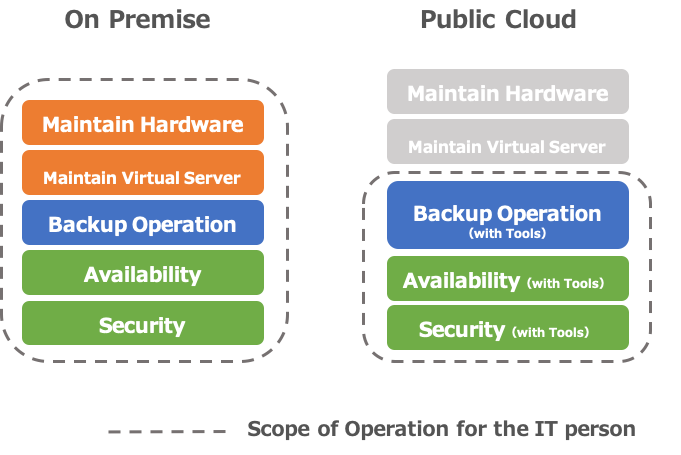
Companies moving to Amazon AWS can take advantage of lower costs and manpower resources when it comes to hardware procurement, provisioning, and maintenance.  But you need to take into account that when you decide to host applications on Amazon EC2 that anything above the Operating System layer is your responsibility.

When it comes to backup/availability guarantee/security measures, etc. for your Amazon EC2 environments, the priorities are the same as if they were on-premise applications. And Amazon provides some native tools and functionality.  But you need to decide if they are the right fit for requirements.

Security, Backup… What do you need to know when managing Amazon AWS environments?


So what are some of the AWS-specific considerations you need to keep in mind as you move to Amazon EC2?  And what are the right tools for you?  The time you invest upfront in designing your applications and how you will deploy and manage them will pay off.

Your first consideration should be how you will secure your Amazon EC2 applications.  Network design, such as “which ports to open” and “from where to allow access” must be considered in the same way as for your on-premise applications.  These can be configured in AWS using security groups and network ACLs (access control lists).

You can use the AWS Trusted Advisor functionality*, which automatically examines your AWS environment and points out whether or not it is set to the recommended settings, making it possible to check your company’s AWS environment for security issues.  We recommend checking with the AWS Trusted Advisor both at the time of implementation and periodically.

Another essential aspect of security is the management of authentication and access privileges.  AWS consolidates all of these into AWS Identity and Access Management (AWS IAM).  In addition to controlling who can access which EC2 instances, you can also use AWS IAM to set up access permissions from EC2 instances to other resources (such as DBs), etc.  Once you have migrated to AWS, the first thing you need to do is to set up the accounts and access restrictions properly in AWS IAM.

The next consideration is “how will I backup my applications on Amazon EC2?”  Amazon EC2 provides the ability to take snapshots, which allows you to do so.  In addition, using “Amazon Data Lifecycle Manager” makes it easy to set up periodic snapshots, as well as incremental backups.  Snapshot files are stored on the Amazon S3 storage service.  You are charged according to their capacity, so you need to be aware of the amount of data you have and set up such settings as “reduce the capacity by incremental backups” and “delete from old data.”

“Availability” needs to be considered in advance. The key is to operate the system in accordance with the priority level of the system.

The last consideration is availability.  With Amazon EC2 applications, as well as those that are on-premise, you should consider the level of availability required based on cost and system importance. However, if you use Amazon’s Multi-AZ deployment functionality, you can specify a redundant configuration between different data centers.  However, using Multi-AZ costs more than using a single-AZ configuration (although not as much as if you had redundant on-premise systems).  When designing your applications you need to consider whether Multi-AZ is required and how much you should invest in availability. Using SIOS clustering software allows you to create a clustering environment that fails over across availability zones and regions for maximum DR protection.

If you aren’t investing in failover, then you should at least be monitoring your applications and planning how to recover them when downtime is experienced.  You can use Amazon CloudWatch to easily monitor general items such as CPU, memory, and disks, and you can also program the Amazon EC2 Auto Recovery function to automatically recover instances when an error occurs in the EC2.

If your application is mission-critical, then you will want to invest in high availability protection that delivers at least 99.99% uptime. Get in touch with SIOS availability experts to make sure your application’s uptime is secured.

Reproduced with permission from SIOS
Filed Under: Clustering Simplified Tagged With: Amazon AWS, Amazon EC2, AppKeeper, Application availability, application monitoring

Why is AWS EC2 Application Monitoring So Hard?

August 2, 2020 by Jason Aw Leave a Comment

Why is AWS EC2 Application Monitoring So Hard?

Why is AWS EC2 Application Monitoring So Hard?

Congratulations! You’ve migrated your core applications to the AWS cloud.  Or, you are developing new “cloud-native” applications and hosting them in the cloud.  Perhaps you are taking advantage of Amazon EC2’s scalability and its elastic architecture.  Either way, you now want to ensure that those applications stay up and running, or that you are alerted quickly if and when something happens.

Because something will happen.  Our customer data shows that companies using only three EC2 instances experience downtime at least once a month.  That means unhappy users unable to access their applications. You need a monitoring solution to tell you what’s going on.

How to narrow down EC2 application monitoring solutions

The first step in your search for the perfect EC2 monitoring solution should be to understand your requirements and your own technical capabilities.  Monitoring solutions are not all alike.

Are you interested in a feature-rich solution that monitors a wide array of systems?  Or one that focuses on a core set of systems, such as your EC2 environment?

What do you want to do with the output from your application monitoring solution?  Do you want as much information as possible to help your developers’ troubleshoot issues?  Or are you looking for quick alerts and assistance in remediating from any failures?

And what is your technical appetite to install and manage another application?  Do you love scripting?  Or do you want something that is “set-it-and-forget-it”?

A search for “application performance monitoring solutions” on Google returns 1,170,000,000 results!  Jump into the Amazon AWS Marketplace and you’ll find 453 products listed in the DevOps – Monitoring category.  Having a clear sense of your requirements and your own technical capabilities will help you narrow down your search.

Monitoring applications running on Amazon EC2 with Amazon CloudWatch or other APM solutions

If you are hosting your applications on Amazon EC2, then you might consider using Amazon CloudWatch.   How familiar are you with standard and custom metrics?  You should know that you need quite a lot of technical expertise to run Amazon CloudWatch properly. Amazon CloudWatch is a great solution for users who need data and actionable insights to respond to system-wide performance changes, optimize resources and a unified view of their operational health.  But this all comes at a price in terms of the knowledge and experience needed to configure and manage Amazon CloudWatch properly.

Another choice is for you to evaluate and acquire one of the many commercially available application performance monitoring (“APM”) solutions on the market, such as from AppDynamics, Datadog, Dynatrace, or New Relic.  But keep in mind your requirements.  How broadly do you need to monitor?  And what do you intend to do with that information?  Are you ready to be overwhelmed with alerts?  And be aware that many APM solutions do nothing to help you recover beyond pinpointing the issue.  You still have to drop everything to manually restart services or reboot your instances.

Monitor applications running on Amazon EC2 using SIOS AppKeeper

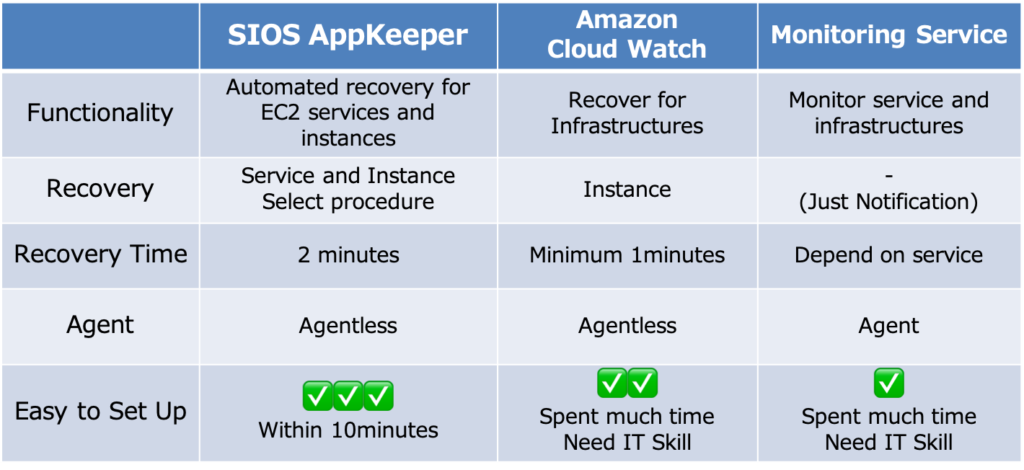
But there is another way.  SIOS AppKeeper is a SaaS service that can be configured to automatically discover any EC2 instances and their services. It then automatically take any number of actions if and when downtime is experienced.  So instead of getting alerts that something is wrong, you get notified that something happened and was automatically addressed.
Why-App_monitoring-hard-2-1024x470

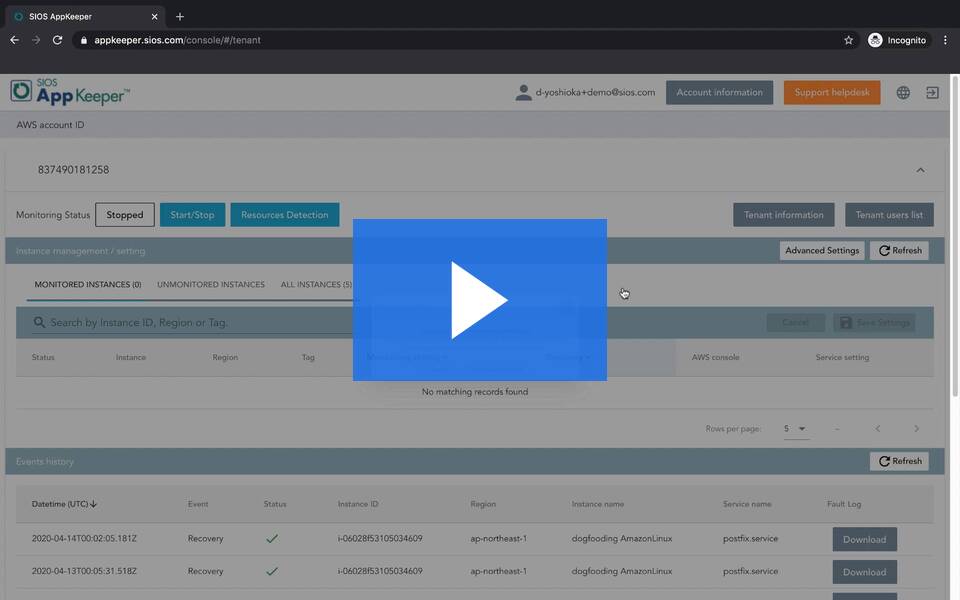
SIOS AppKeeper starts at only US $40 per instance per month. We invite you to view this short video to see how easy it is to install and use AppKeeper.

Why is AWS EC2 Application Monitoring So Hard?

One of our customers, Hobby Japan, a publishing company in Tokyo, was initially using Amazon CloudWatch but their understaffed IT team couldn’t respond fast enough to alerts. They wanted to leverage automation and moved to SIOS AppKeeper.  Since moving to AppKeeper they haven’t experienced any issues or unexpected downtime with their EC2 instance. Here’s a link to a case study on Hobby Japan.

Monitoring your cloud applications shouldn’t be a full-time job.  You want a monitoring solution that is easy to install and use, doesn’t overwhelm you with alerts, and hopefully takes care of systems impairments automatically.  We encourage you to try a 14-day free trial of SIOS AppKeeper by signing up here.

Article reproduced with permission from SIOS
Filed Under: Clustering Simplified Tagged With: Amazon AWS, Amazon EC2, AppKeeper, application monitoring

Deploy SQL Server Alwayson Failover Clusters In Amazon EC2 With AWS Cloud

February 12, 2018 by Jason Aw Leave a Comment

Webinar Invite!

DEPLOYING YOUR BUSINESS CRITICAL SQL SERVER APPS ON AMAZON EC2

Amazon Web Services (AWS) and SIOS Technology Corp, an AWS Partner Network (APN) Technology Partner, invite you to attend this live webinar to learn how to optimize mission critical SQL Server deployments on Amazon EC2.

Learn how to take advantage of the cost benefits and flexibility of Amazon EC2 while maintaining protection with native Microsoft Windows Server Failover Clustering – all without shared storage.

WHO SHOULD ATTEND:

Solution Architects, Developer, Development Leads and other SQL Professionals

PRESENTERS:

Miles Ward, Solutions Architect, Amazon Web Services

Tony Tomarchio, Director of Field Engineering, SIOS Technology Corp

DATE / TIME:

Wednesday, June 5, 2013 – 10AM PT / 1PM ET

CLICK HERE TO REGISTER

http://bit.ly/10VLtDu

Reproduced with permission from https://clusteringformeremortals.com/2013/05/23/webinar-invite-how-to-deploy-sql-server-alwayson-failover-clusters-in-amazon-ec2-with-awscloud-amazonaws/

Filed Under: Clustering Simplified Tagged With: Amazon EC2, Microsoft Windows Server Failover Clustering, Miles Ward, SIOS, SQL Server, Tony Tomarchio, Webinar

Deploy SQL Server Alwayson Failover Clusters In Amazon EC2 With AWS Cloud

February 11, 2018 by Jason Aw Leave a Comment

Webinar Invite!

DEPLOYING YOUR BUSINESS CRITICAL SQL SERVER APPS ON AMAZON EC2

Amazon Web Services (AWS) and SIOS Technology Corp, an AWS Partner Network (APN) Technology Partner, invite you to attend this live webinar to learn how to optimize mission critical SQL Server deployments on Amazon EC2.

Learn how to take advantage of the cost benefits and flexibility of Amazon EC2 while maintaining protection with native Microsoft Windows Server Failover Clustering – all without shared storage.

WHO SHOULD ATTEND:

Solution Architects, Developer, Development Leads and other SQL Professionals

PRESENTERS:

Miles Ward, Solutions Architect, Amazon Web Services

Tony Tomarchio, Director of Field Engineering, SIOS Technology Corp

DATE / TIME:

Wednesday, June 5, 2013 – 10AM PT / 1PM ET

CLICK HERE TO REGISTER

http://bit.ly/10VLtDu

Reproduced with permission from https://clusteringformeremortals.com/2013/05/23/webinar-invite-how-to-deploy-sql-server-alwayson-failover-clusters-in-amazon-ec2-with-awscloud-amazonaws/

Filed Under: Clustering Simplified Tagged With: Alwayson Failover Clusters, Amazon EC2, AWS Cloud, SQL Server

  • « Previous Page
  • 1
  • 2
  • 3
  • 4
  • …
  • 7
  • Next Page »

Recent Posts

  • Fail Open vs. Fail Closed: Why It’s a False Dilemma (and How True HA Fixes It)
  • The 5-Step Checklist for Validating Your Failover Setup
  • Managing an Inherited DataKeeper Cluster: Challenges and Best Practices
  • Setting Up Nginx Load Balancer on AWS
  • With Great Power: Cluster Maintenance Best Practices

Most Popular Posts

Maximise replication performance for Linux Clustering with Fusion-io
Failover Clustering with VMware High Availability
create A 2-Node MySQL Cluster Without Shared Storage
SAP for High Availability Solutions For Linux
Bandwidth To Support Real-Time Replication
The Availability Equation – High Availability Solutions.jpg
Choosing Platforms To Replicate Data - Host-Based Or Storage-Based?
Guide To Connect To An iSCSI Target Using Open-iSCSI Initiator Software
Best Practices to Eliminate SPoF In Cluster Architecture
Step-By-Step How To Configure A Linux Failover Cluster In Microsoft Azure IaaS Without Shared Storage azure sanless
Take Action Before SQL Server 20082008 R2 Support Expires
How To Cluster MaxDB On Windows In The Cloud

Join Our Mailing List

Copyright © 2026 · Enterprise Pro Theme on Genesis Framework · WordPress · Log in