SIOS SANless clusters

SIOS SANless clusters High-availability Machine Learning monitoring

  • Home
  • Products
    • SIOS DataKeeper for Windows
    • SIOS Protection Suite for Linux
  • News and Events
  • Clustering Simplified
  • Success Stories
  • Contact Us
  • English
  • 中文 (中国)
  • 中文 (台灣)
  • 한국어
  • Bahasa Indonesia
  • ไทย

Video: Application High Availability Will Become Universal | Predictions From SIOS Technology

February 5, 2024 by Jason Aw Leave a Comment

Video: Application High Availability Will Become Universal | Predictions From SIOS Technology

SIOS Technology is a high availability (HA) and disaster recovery (DR) solutions company providing application availability for critical mission-critical databases, applications, and services for their customers across Windows and Linux systems, and a variety of cloud platforms. Cassius Rhue, VP of Customer Experience at SIOS Technology, shares his 2024 predictions.

As reliance on applications continues to rise, there will be increasing pressure on IT teams to deliver efficient high availability and disaster recovery for applications that were traditionally considered non-essential in addition to mission-critical ones. Due to this shift, we will likely see an expansion of high-availability software solutions and services to meet this expectation.

With more companies expanding into the cloud and across different operating systems, more teams are also expected to cover a diverse set of operating systems, applications, and cloud platforms. Teams will be looking for applications and solutions that are consistent across these different operating systems and cloud environments to reduce complexity and improve cost efficiency.

HA solutions will also need to be consistent across the operating systems and cloud environments and we will see a drive toward cloud-agnostic HA. Companies need HA and DR solutions to be simple, automated, quick, and intelligent. As more organizations are migrating to the cloud, they will need to ensure they do not lose data in the process. HA solutions will need to bridge the gap between the old systems and the more modern ones.

2024 will see an increased focus on data retention, security access controls, and permissions prompting organizations to integrate more enhanced security measures into their high availability and disaster recovery solutions, services, and strategies. As the volume of data that is being collected continues to increase, organizations will also need more information about why failures have occurred. Automation and orchestration tools will likely play a central role in streamlining root cause analysis and providing intelligent responses.

SIOS Technology will continue to focus on its customers in the coming year, helping them avoid and reduce downtime, and ensuring their data and applications are available when the business needs them most. The company will continue to optimize its solution, providing additional adjacent services to benefit their customers, as well as, helping application providers and cloud providers form an effective HA strategy.

Reproduced with permission from SIOS

Filed Under: Clustering Simplified Tagged With: disaster recovery, High Availability

Ensuring Access To Critical Educational Applications

January 24, 2024 by Jason Aw Leave a Comment

Ensuring Access To Critical Educational Applications

Ensuring Access To Critical Educational Applications

Education and information technology (IT) are increasingly inextricable. Whether the IT in question is an application supporting a classroom whiteboard, the database supporting a university registration system, the learning management systems (LMS), or the building maintenance system controlling student access to the labs, dorms, and dining halls — if key components of your IT infrastructure suddenly go dark, neither teachers, administrators, nor students can accomplish what they are there to accomplish. The mission of the institution is interrupted. If the interruptions are too frequent, if the experiences of students, teachers, and administrators suffer, the reputation of the institution itself can suffer as well.

An IT infrastructure designed to ensure the high availability (HA) of applications crucial to the educational experience can minimize the risk of disruption and reputational loss that could occur if for any reason these systems become unresponsive. In this instance, an HA infrastructure is defined as one capable of ensuring the availability of key applications no less than 99.99% of the time. Put another way, that means that your critical applications won’t be unexpectedly offline for more than four minutes per month.

How do you achieve HA? That question is readily answered, but it is not the only question you need to ask. Just as important is this: Which applications are so critical that they warrant an HA configuration? At its heart, an IT infrastructure configured for HA has one or more sets of secondary servers and storage subsystems that are housed in a geographically distinct location (which could be a remote data center if your primary server resides on-premises or in a separate availability zone [AZ] if your servers reside in the cloud). If something causes the applications running on the primary server to stop responding, the HA software managing your application will immediately fail over the application to the secondary server, where your critical applications will start up again from the point at which the primary server stopped responding. Depending on the size and performance characteristics of the primary server you plan to replicate, that secondary server may be costly, so it’s unlikely you’re going to configure all your academic applications for HA. Once you determine which applications warrant the investment in HA, you’ll know where you need to build out an HA environment.

Choices for Achieving High Availability

Once you’ve chosen the applications you intend to protect, your options for achieving HA become clearer. Are they running on Windows or Linux? Does your database management system (DBMS) have built-in support for an HA configuration? If so, what are its limitations? If your critical applications are running on Windows and SQL Server, for example, you could enable HA using the Availability Group (AG) feature of SQL Server itself. Alternatively, you could configure HA using a third-party SANless clustering tool, which offers options that the AG services in SQL Server do not. If you’re trying to protect database servers from multiple vendors, or if some of your critical applications run on Windows while others run on Linux, your ability to manage HA will be facilitated by the use of an HA solution that supports multiple DBMS and OS platforms. Opting for a cluster solution that accommodates diverse DBMS and OS platforms simplifies management, in contrast to the potential complexity and cumbersomeness of handling multiple database-native HA services concurrently..

Ensuring High Availability via database-native HA solutions

If you’re using a database-native HA solution, such as the AG feature of SQL Server, the software will synchronously replicate all the data in your primary SQL Server database to an identical instance of that database on the secondary system server. If something causes the primary server to stop responding, the monitoring features in the AG component will automatically cause the secondary server to take over. Because the AG feature has replicated all the data in real time, the secondary server can take over immediately and there is virtually no interruption of service or loss of data.

Many database-native HA tools operate in a similar manner. There are a few caveats, though, when considering a database-native approach: If the HA services are bundled into the DBMS itself, they may replicate only the data associated with that DBMS. If other critical data resides on your primary server, that will not be replicated to the secondary server in a database-native HA scenario. There may be other limitations on what the database-native services will replicate as well. If you use the Basic AG functionality that is bundled into SQL Server Standard Edition, for example, each AG can replicate only a single SQL database to a single secondary location. You could create multiple Basic AGs if your applications involve multiple SQL databases, but you cannot control whether each AG fails over at the same time in a failover situation — and problems may arise if they do not. One way around this limitation would be to use the Always On AG functionality bundled into SQL Server Enterprise Edition, which enables the replication of multiple SQL databases to multiple secondary servers, but that can get very expensive from a licensing perspective if your applications don’t otherwise use any of the features of SQL Server Enterprise Edition.

Other database-native HA solutions may have similar constraints, so be sure to understand them before investing in such an approach.

Ensuring High Availability via SANless Clustering

As an alternative to the database-native approach to HA, you could use a third-party tool to create a SANless cluster. Just as in the AG configuration described above, the SANless clustering software automates the synchronous replication of data from the primary to the secondary server; it also orchestrates the immediate failover to the secondary server if the primary server becomes unresponsive. Because failover takes only seconds, administrator, faculty, and student access to your critical applications will remain virtually uninterrupted.

The critical differences between the SANless clustering and a database-native approach lie in the practical details. The SANless clustering approach is database agnostic. It replicates any data on a designated storage volume. That could include multiple databases from multiple vendors, text files, video files, or any other educational asset whose availability is important. This can save an institution a considerable amount of money if a database-native approach to HA would otherwise require an upgrade to a more expensive edition of the database. Finally, as noted earlier, if you are trying to protect applications and data running in multiple operating environments, a SANless clustering approach may be more manageable than individual database–native approaches. You can use SANless clustering to ensure HA in either Windows or Linux environments, which can eliminate the complexities that could accompany the deployment of database-native approaches that differ among operating environments.

Reproduced with permission from SIOS

Filed Under: Clustering Simplified Tagged With: DR, High Availability

Build High Availability with a HANA 3-Node HSR Cluster in AWS Using SIOS LifeKeeper

January 14, 2024 by Jason Aw Leave a Comment

Build High Availability with a HANA 3-Node HSR Cluster in AWS Using SIOS LifeKeeper

Build High Availability with a HANA 3-Node HSR Cluster in AWS Using SIOS LifeKeeper

Introduction: How to Ensure HA and DR in Your Database

Creating a highly available SAP HANA environment in AWS is a critical task for many businesses. This guide provides a detailed walkthrough for setting up a 3-node HANA System Replication (HSR) cluster using SIOS LifeKeeper in AWS, ensuring database resilience and high availability.

Prerequisites

  • AWS account with the ability to deploy EC2 instances.
  • SIOS LifeKeeper software
  • SIOS LifeKeeper evaluation or permanent license
  • SAP HANA software
  • Familiarity with AWS services and SAP HANA.

Step 1: Preparing Your AWS Environment

EC2 Instance Deployment

Deploy three EC2 instances in AWS. These instances will act as your HANA cluster’s primary, secondary, and tertiary nodes. Ensure they meet the hardware and software requirements for SAP HANA and SIOS LifeKeeper.  Make sure you follow the SAP HANA sizing guidelines when building your instance.

Network Configuration

Configure your VPC, subnets, and security groups to allow communication between the nodes and to enable access to necessary services.

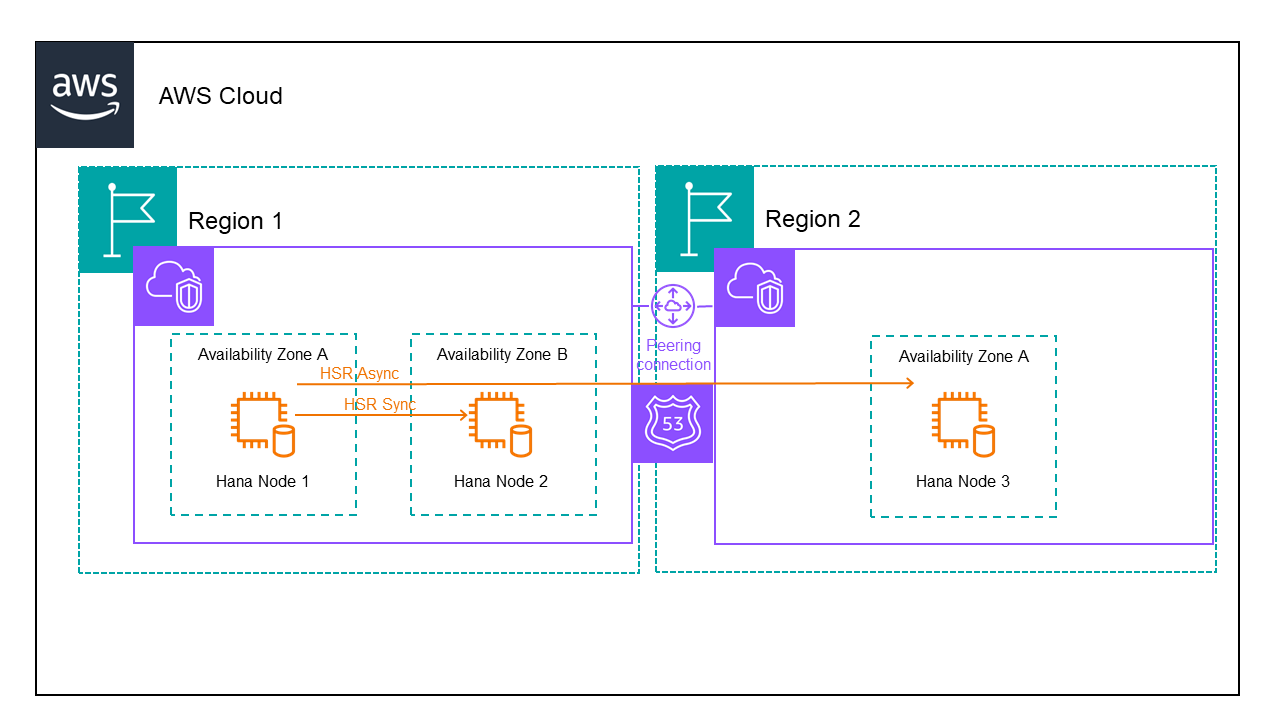
When configuring HANA nodes in different regions, you can protect the DNS name using the SIOS LifeKeeper for Linux Route53 Application Recovery Kit or ARK.  Following is the architecture for a 3 node HANA database in AWS:

When setting up the storage use separate EBS volumes for /usr/sap, /hana/data, /hana/log and /hana/shared.

We have 2 VPCs one for each region.  We need to setup peering between the VPCs and add routes to the routing table to ensure the servers can talk to each other.  We also need to modify the security group to allow traffic between the servers.

Finally we need to create a hosted zone containing both VPCs and add records for the domain and hostname we will use to communicate with the active HANA node.

Step 2: Installing and Configuring SAP HANA

Installation on Each Node

Install SAP HANA on each EC2 instance. Ensure that the versions are consistent across all nodes to avoid compatibility issues.  This is by far the most challenging process.

Start by determining your installation settings.  For mine, I am using the following:

SID: D11

  • HANA Instance number: 11
  • HANA db fqdn in Route53: saphana.sapdemo
  • Node1 hostname: sapdemohana1
  • Node2 hostname:sapdemohana2
  • Node3 hostname:sapdemohana3
  • Instance type: r5.4xlarge

Local Instance Storage:

  • 30GB / (root volume)
  • 15GB /usr/sap
  • 60GB /hana/shared*
  • 200GB /hana/data
  • 200GB /hana/log

*For this installation, this is storage that is not shared between these HANA database servers.  If you try to use shared storage, you will not be able to create an identical server because hdblcm will prevent the installation with an error about the SID and instance already existing.

Install the HANA server software on each node independently as if it were a standalone system.  Make sure all required libraries are installed, for RHEL 8 they are in SAP note 2772999.  You will need to make sure you create the symbolic link after installing compact-sap-c++-9-9.1.1-2.3.el7_6.x86_64.rpm by running: ln -s /opt/rh/SAP/lib64/compat-sap-++-10.so /usr/sap/lib/libstdc++.so.6

  • yum install  xorg-x11-server-Xorg xorg-x11-xauth -y #for the LifeKeeper GUI
  • yum install nfs-utils

Create partitions, format storage and attach it.  Create your swap file.

I create RSA keys on all my hosts and then allow the root ssh login between the hana nodes by adding the public key to the .ssh/authorized_keys file.  This will make installation much easier.

Mount your HANA installation media volume.

  • yum localinstall compat-sap-c++-10-10.2.1-11.el7_9.x86_64.rpm
  • yum localinstall compat-sap-c++-9-9.1.1-2.3.el7_6.x86_64.rpm
  • mkdir /usr/sap/lib
  • ln -s /opt/rh/SAP/lib64/compat-sap-++-10.so /usr/sap/lib/libstdc++.so.6
  • yum install compat-sap-c++-10 libatomic -y

Run hdblcm from the correct hana installation media directory.  Once you have successfully installed HANA on all nodes you are ready for the next step.

System Replication Setup

You will need to take a backup prior to enabling HSR:

  • su – <SID>adm  [ie. su -d11adm]
  • hdbsql -i <instance number>adm -u system -p <password> [ie. hdbsql -i 11 -u system -p “password123”]
  • BACKUP DATA USING FILE(‘/usr/sap/<SID>/HDB<instance number>’) [ie. BACKUP DATA USING FILE(‘/usr/sap/D11/HDB11’)

Repeat the backup process above on all nodes.

Configure HANA System Replication on each node:

Start the HDB instance on primary HANA System if it isn’t already running: sapcontrol -nr <instance number> -function StartSystem HDB [ie: sapcontrol -nr 11 -function StartSystem HDB]

Start the HSR at primary site: hdbnsutil -sr_enable –name=<primary site name> [ie. hdbnsutil -sr_enable –name=sapdemohana1

Stop the HDB instance on secondary HANA System: sapcontrol -nr <instance number> -function StopSystem HDB [ie. sapcontrol -nr 11 -function StopSystem HDB]

In the additional HANA systems, backup the KEY and DAT files and copy the primary KEY and DAT files to the required locations:

  • mv /usr/sap/<SID>/SYS/global/security/rsecssfs/data/SSFS_<SID>.DAT /usr/sap/<SID>/SYS/global/security/rsecssfs/data/SSFS_<SID>.DAT.BAK [ie.   mv /usr/sap/D11/SYS/global/security/rsecssfs/data/SSFS_D11.DAT /usr/sap/D11/SYS/global/security/rsecssfs/data/SSFS_D11.DAT.BAK]
  • mv /usr/sap/<SID>/SYS/global/security/rsecssfs/key/SSFS_<SID>.KEY /usr/sap/<SID>/SYS/global/security/rsecssfs/key/SSFS_<SID>.KEY.BAK [ie.   mv /usr/sap/D11/SYS/global/security/rsecssfs/key/SSFS_D11.KEY /usr/sap/D11/SYS/global/security/rsecssfs/key/SSFS_D11.KEY.BAK]
  • scp root@<primary node>:/usr/sap/<SID>/SYS/global/security/rsecssfs/data/SSFS_<SID>.DAT /usr/sap/<SID>/SYS/global/security/rsecssfs/data/SSFS_<SID>.DAT [ie. scp root@sapdemohana1:/usr/sap/D11/SYS/global/security/rsecssfs/data/SSFS_D11.DAT /usr/sap/D11/SYS/global/security/rsecssfs/data/SSFS_D11.DAT]
  • scp root@<primary node>:/usr/sap/<SID>/SYS/global/security/rsecssfs/key/SSFS_<SID>.KEY /usr/sap/<SID>/SYS/global/security/rsecssfs/key/SSFS_<SID>.KEY [ie. scp root@sapdemohana1:/usr/sap/D11/SYS/global/security/rsecssfs/key/SSFS_D11.KEY /usr/sap/D11/SYS/global/security/rsecssfs/key/SSFS_D11.KEY]

Make sure the owner of the key and dat files are <SID>adm sapsys:

  • [root@sapdemohana2 ~]# ls -l /usr/sap/D11/SYS/global/security/rsecssfs/data/
  • total 12
  • -rw-r–r– 1 d11adm sapsys 2960 Jan  3 22:19 SSFS_D11.DAT
  • -rw-r–r– 1 d11adm sapsys 2960 Jan  3 22:15 SSFS_D11.DAT.BAK

Register the additional HANA systems with primary HANA system – must be done as the admin user:

  • hdbnsutil -sr_register –name=<name of secondary HSR> –remoteHost=<primary host name of SAP HANA system> –remoteInstance=<remote instance number> –operationMode=<delta_datashipping | logreplay | logreplay_readaccess> –replicationMode=<sync | syncmem | async>

[ie. hdbnsutil -sr_register –name=sapdemohana2 –remoteHost=sapdemohana1 –remoteInstance=11 –operationMode=logreplay –replicationMode=sync]

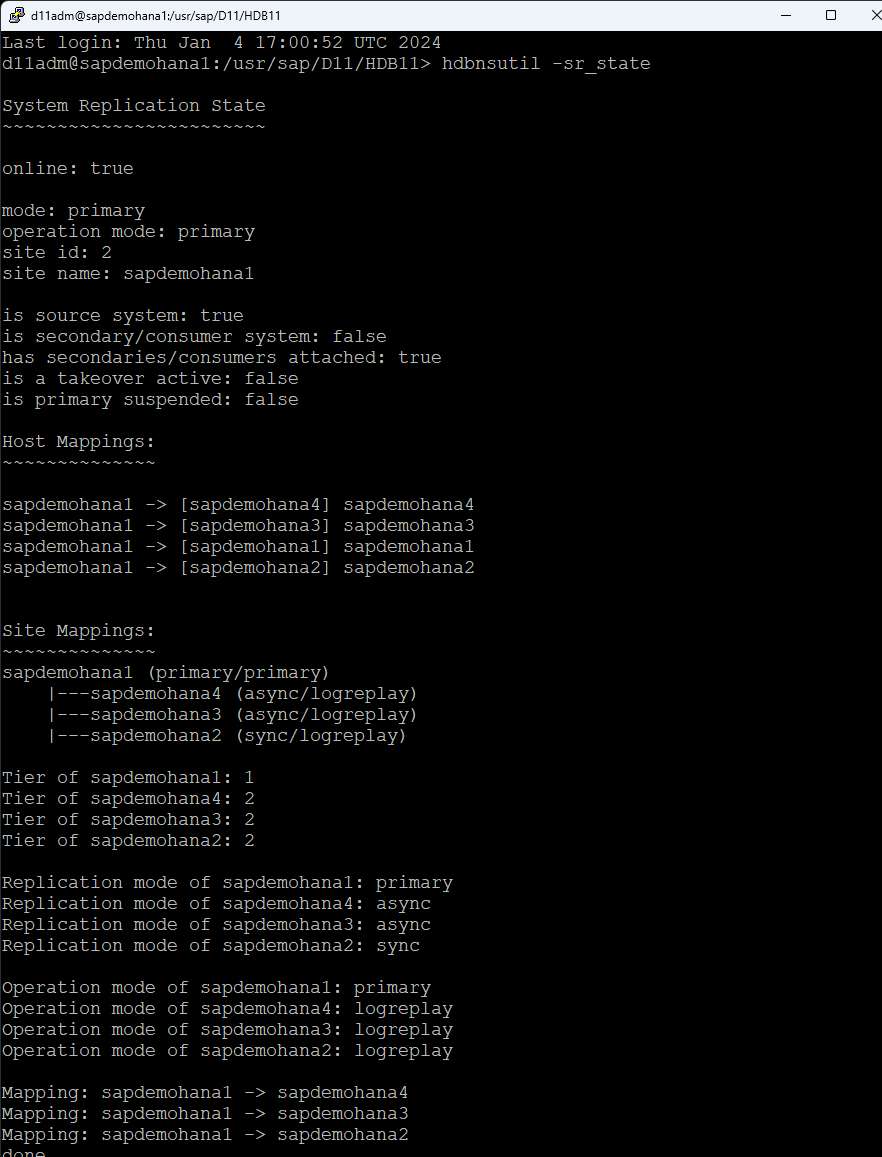
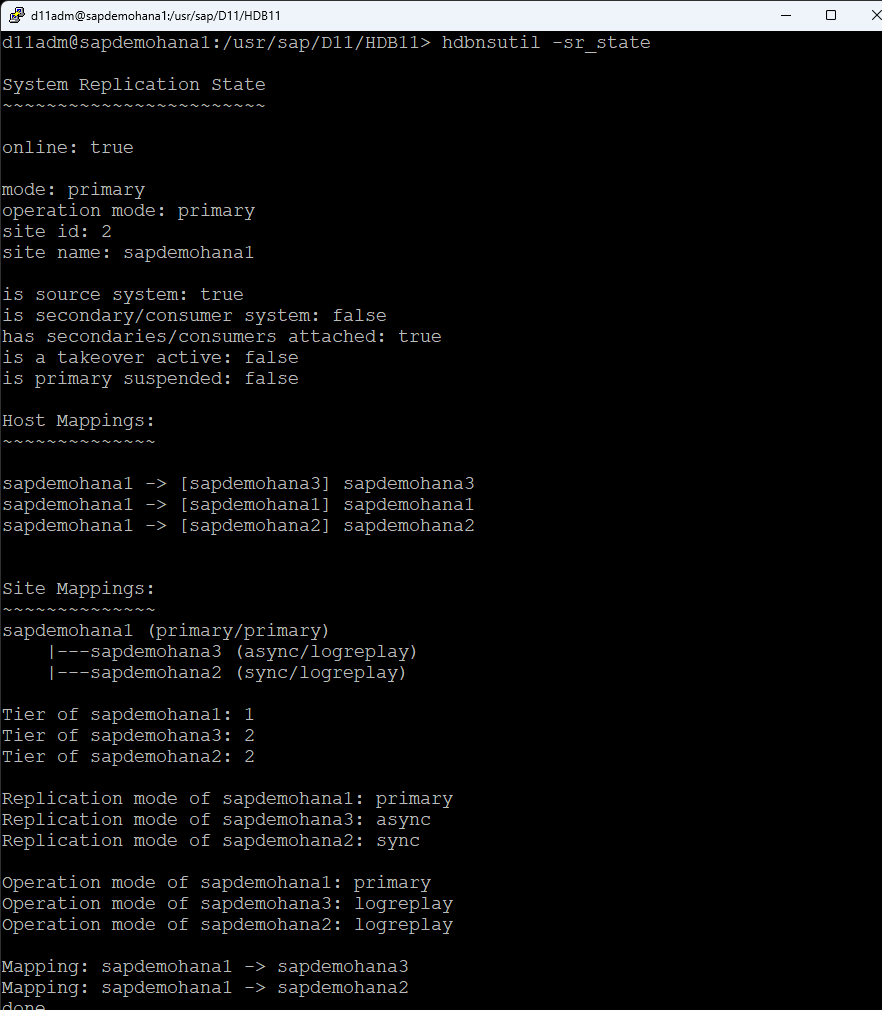
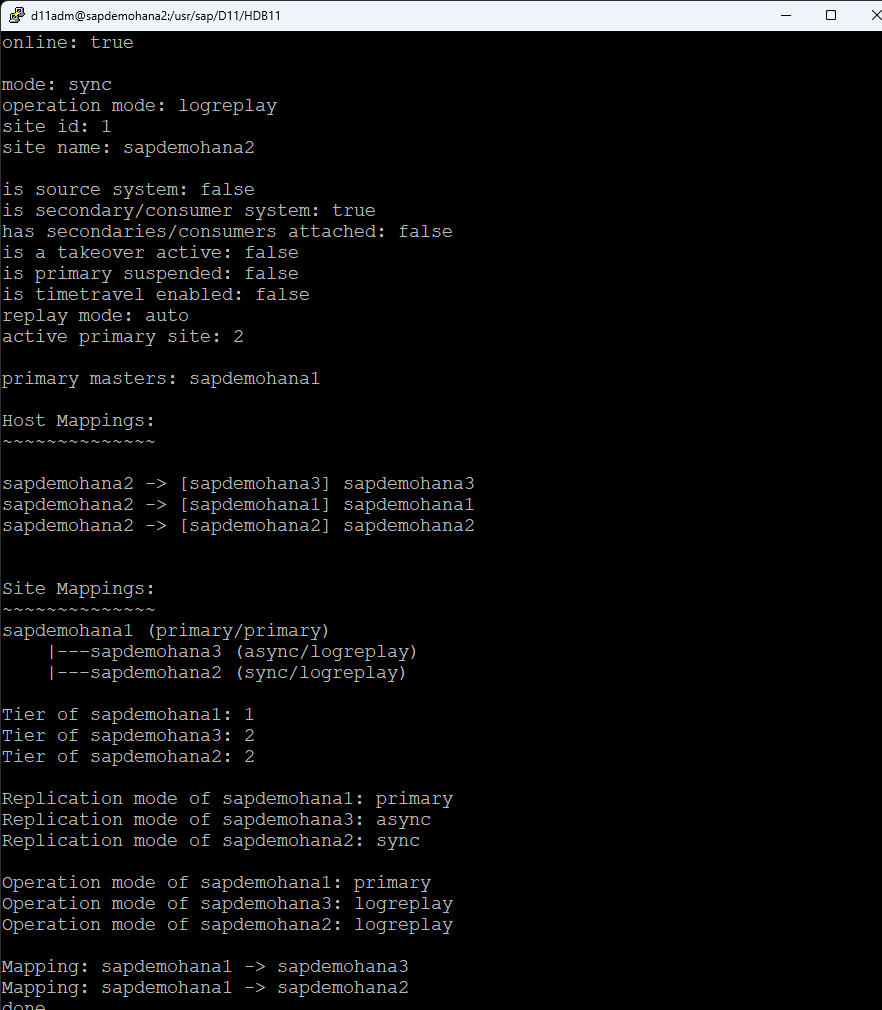
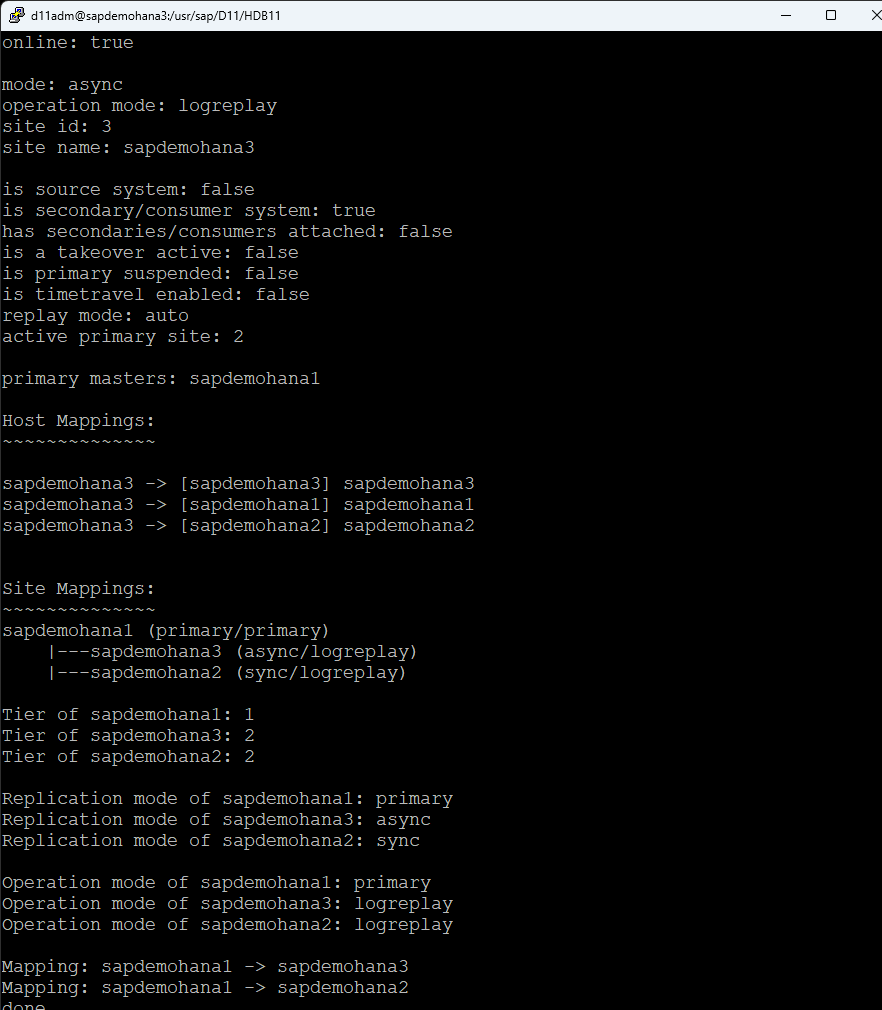
Check HSR status on all systems, run the following command as the admin user: d11adm@sapdemohana4:/usr/sap/D11/HDB11>hdbnsutil -sr_state

Once all systems are online you can move onto the next step.

Step 3: Installing SIOS LifeKeeper

AWS CLI Installation

Install AWS CLI and configure it with a key with the following permissions:

Route Table (backend) configuration:

  • ec2:DescribeRouteTables
  • ec2:ReplaceRoute
  • ec2:DescribeNetworkInterfaceAttribute
  • ec2:ModifyNetworkInterfaceAttribute
  • Elastic IP (frontend) configuration:
  • ec2:DescribeAddresses
  • ec2:AssociateAddress
  • ec2:DisassociateAddress

LifeKeeper Installation

Install SIOS LifeKeeper on each node. This involves running the installation script and following the setup wizard, which guides you through the necessary steps.  For this installation, I am using the networking, Route53 ARK and the database, SAP HANA ARK along with the witness functions.

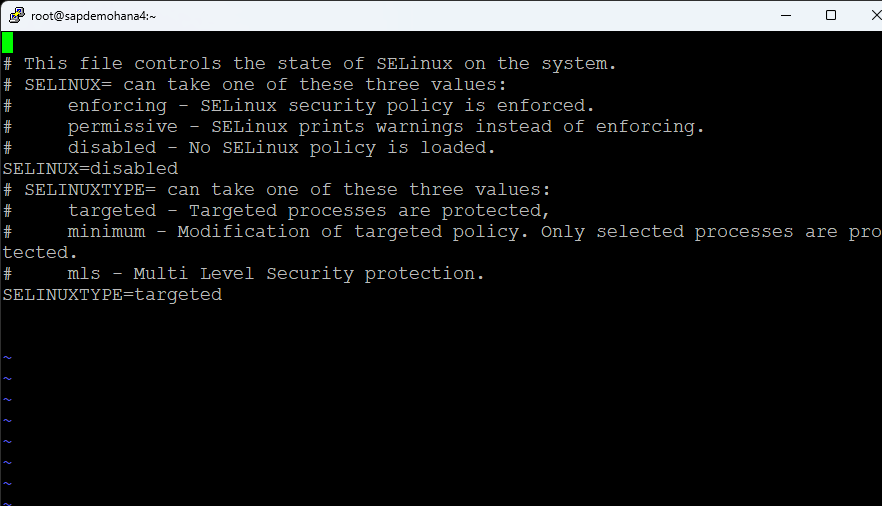
Edit the /etc/selinux/config file and disable selinux:

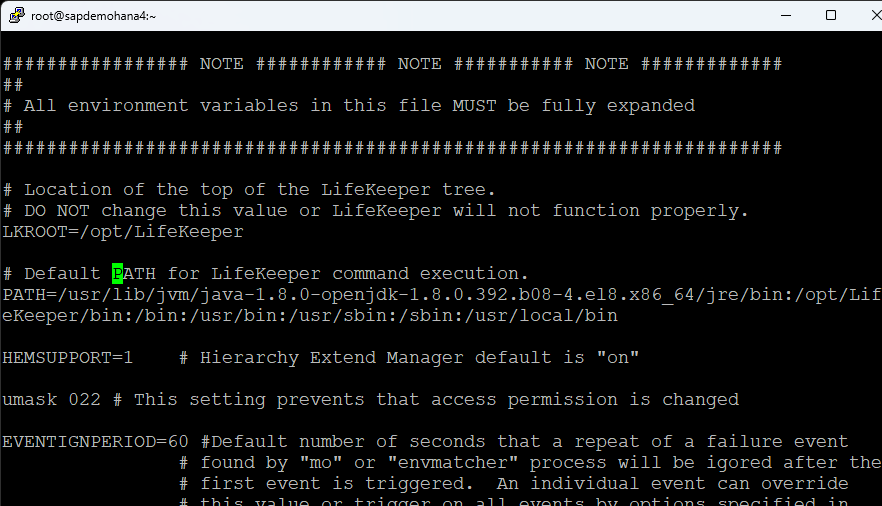
I also changed my hostname and edited the /etc/hosts file.  Finally edit the /etc/default/LifeKeeper file and add /usr/local/bin to the PATH:

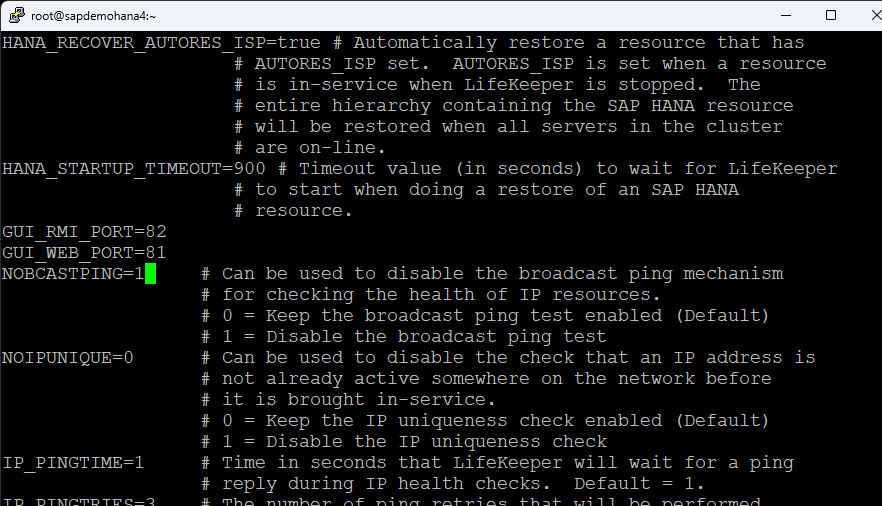
Change NOBCASTPING=1:

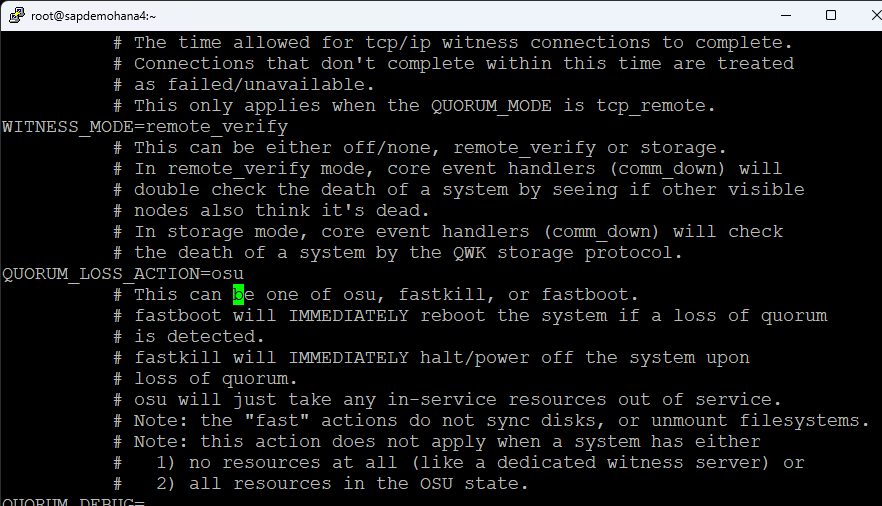
I also changed the QUORUM_LOSS_ACTION to osu:

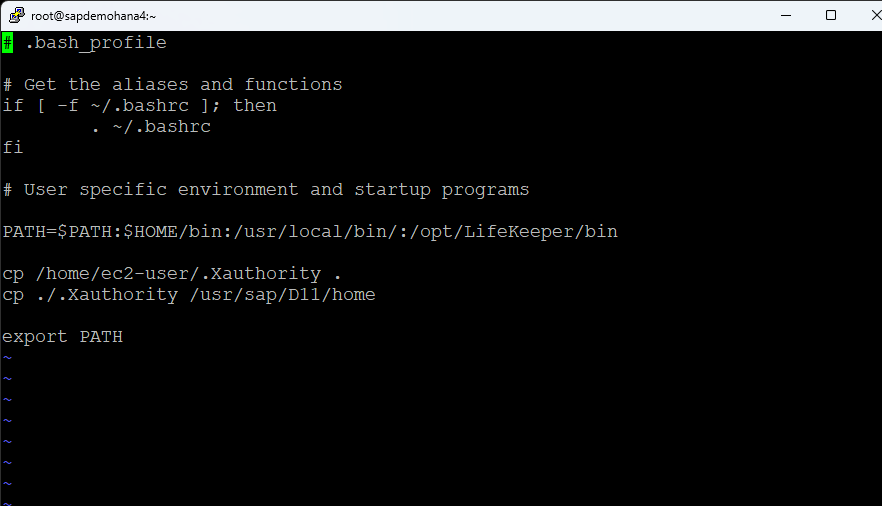
Make sure you have Xwindows working.  I remove the cp alias from .bashrc and add /opt/LifeKeeper/bin and /usr/local/bin to my .bash_profile along with copy the ec2-users .Xauthority file to root and the <SID>adm home directory so that Xwindows will work:

I change the root password and reboot.  Prior to launching the LifeKeeper GUI. make sure that HSR is online on all nodes and all nodes are registered:

Configuration

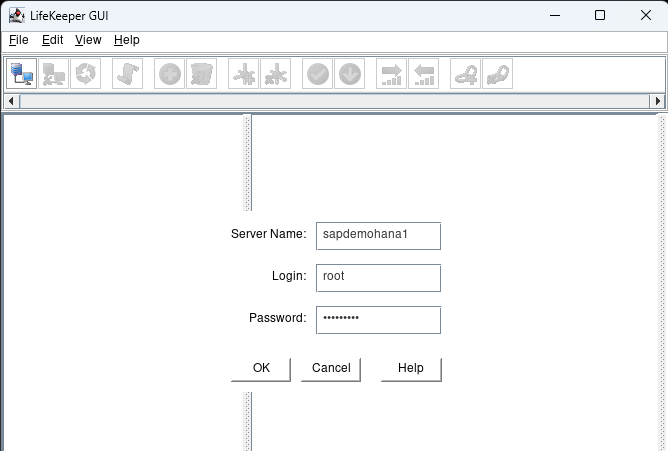
Launch the LifeKeeper GUI: lkGUIapp and login with the root user and password:

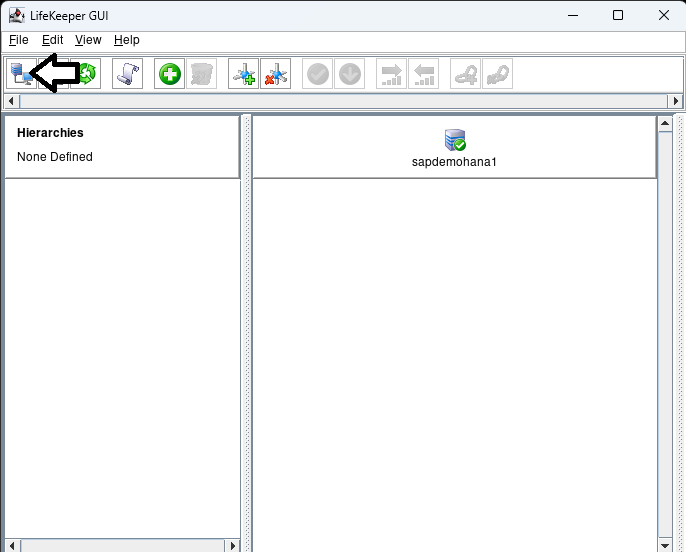
Click on the connect button to login to the additional nodes in the cluster:

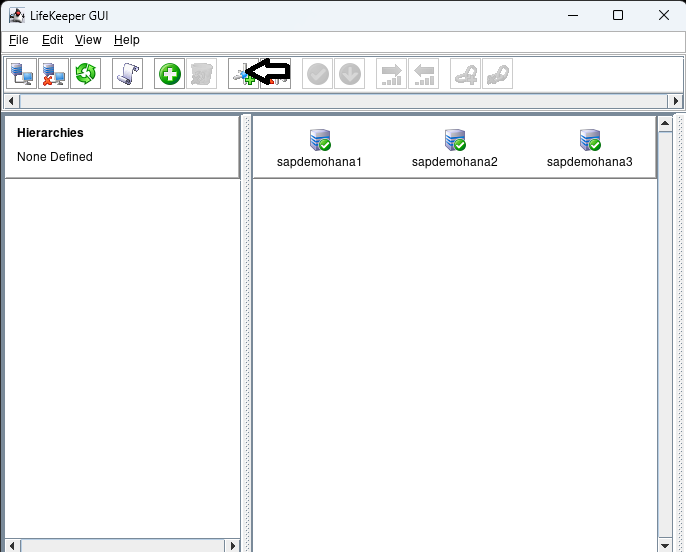
Once logged into all the nodes click on the Create Comm Path button:

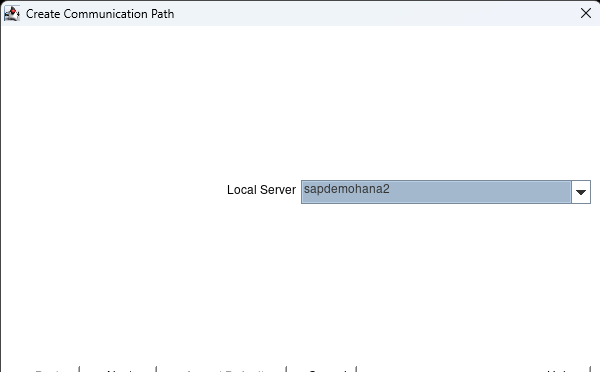
Hit next when it asks for the Local Server and then hold shift and select all the nodes:

hit Accept Defaults and hit done when it is complete.  Click on the Create Comm path button again and this time change to the second node:

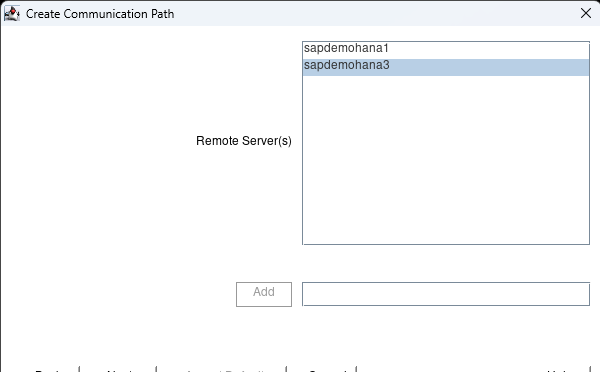
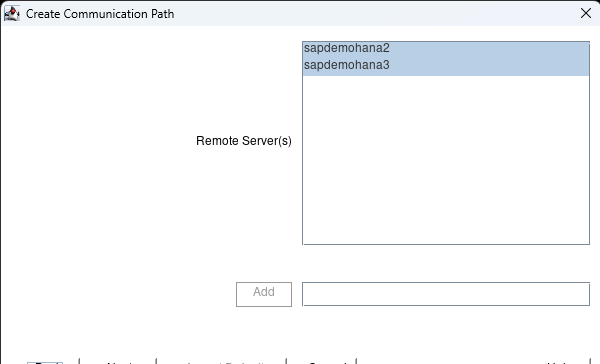
hit next and select the 3rd node:

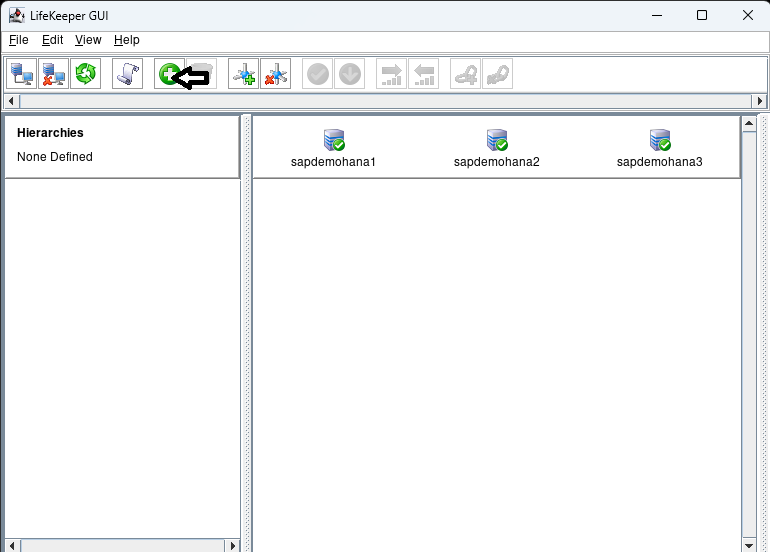
hit the next button until you can hit the Accept Defaults button.  When complete hit done.  Now click on the Create Resource Hierarchy button:

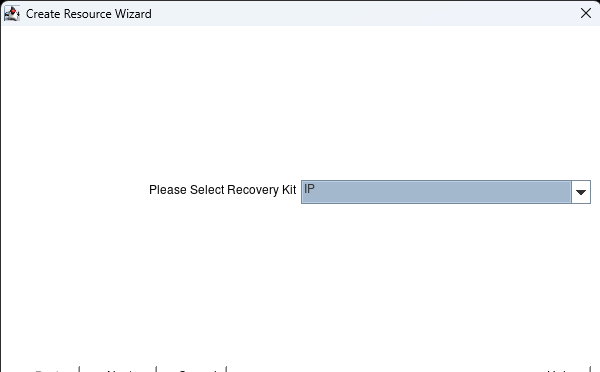
Select the IP kit and hit next:

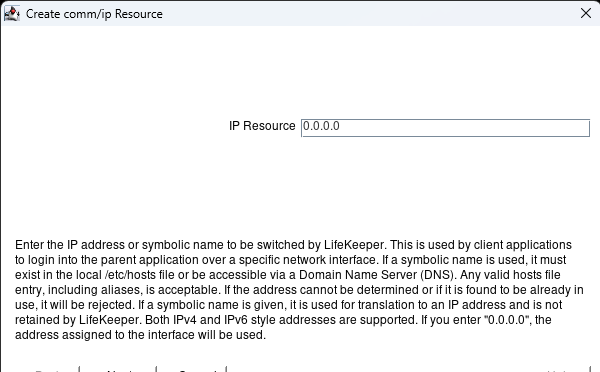
Hit next until you get to the IP resource page.  Here enter 0.0.0.0 and hit next:

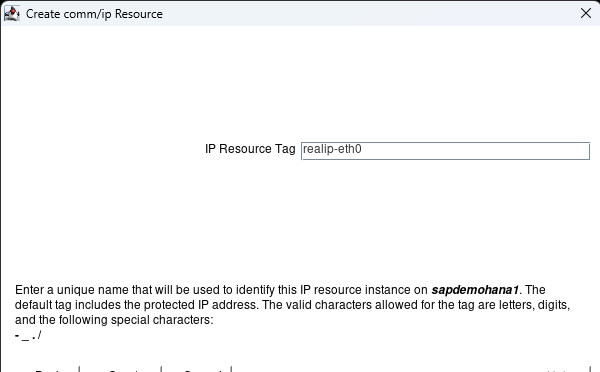
Hit next until you get to the Create button.  Hit the Create button:

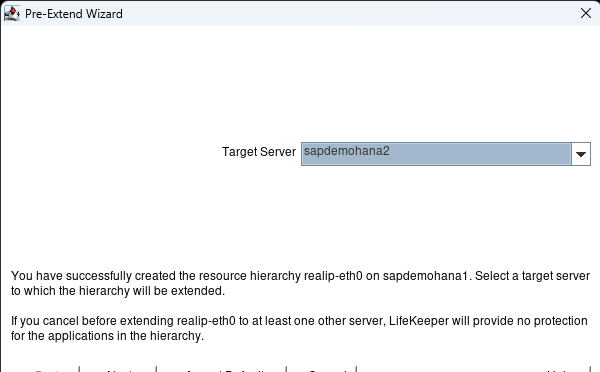
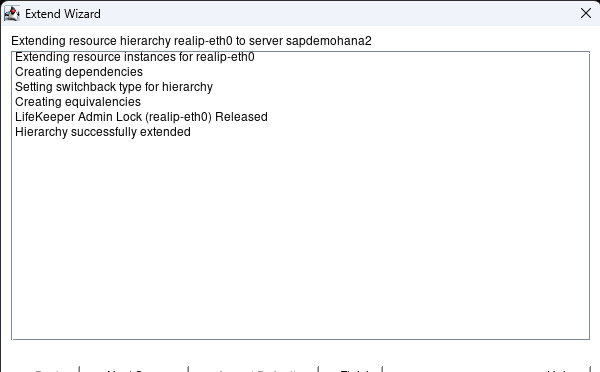
When it is complete hit next:  Hit Accept Defaults with the Target Server showing the second node:

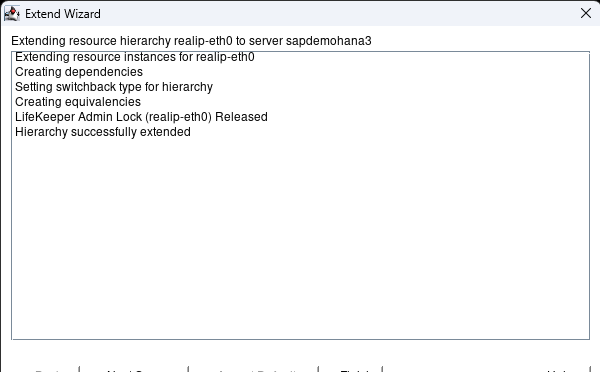
When complete hit Next Server:

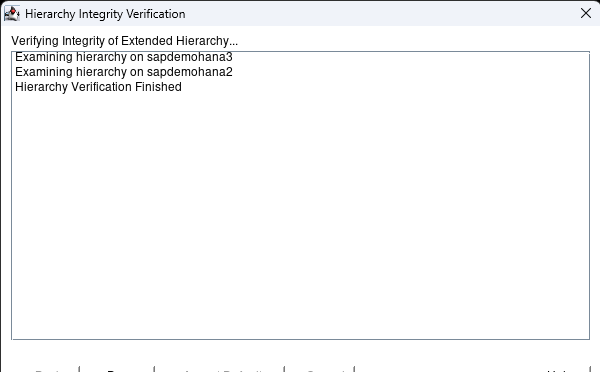
Hit Accept Defaults with the 3rd node showing and when complete hit Finish:

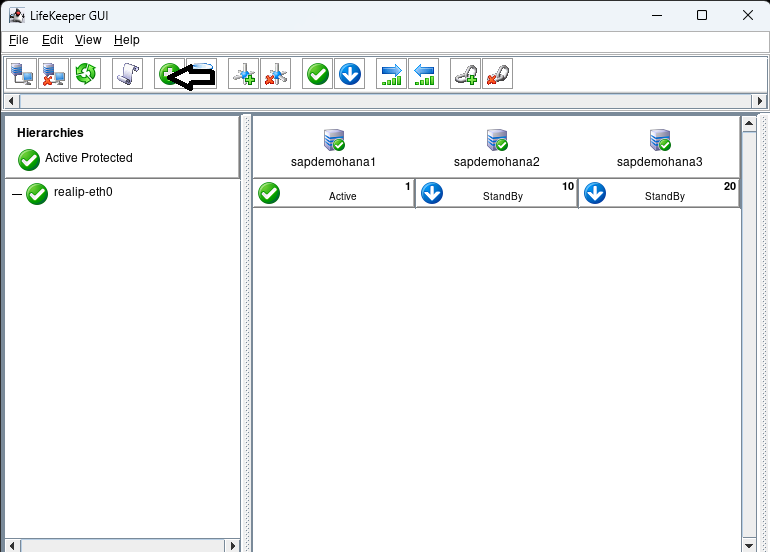
Hit done:

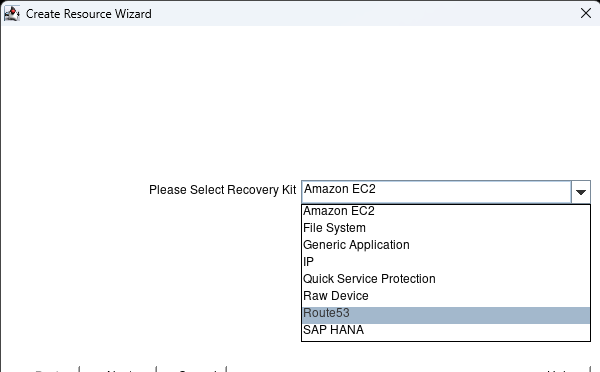
Now we have an IP resource we can add our Route53 resource which will change the dns entry to resolve the fqdn to the active nodes IP address.  In this case saphana.sapdemo will resolve to the ip address of sapdemohana1 (172.31.0.25).  Hit the Create Resource Hierarchy button to start the process:

Select Route53 and hit next:

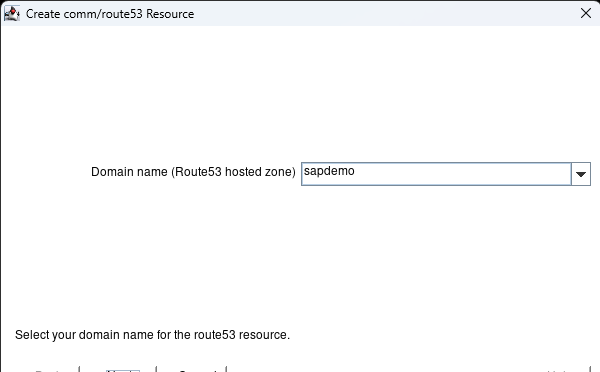
Keep hitting next until you get to the Domain Name. It should prepopulate with the active hosted zone name.  Hit Next.

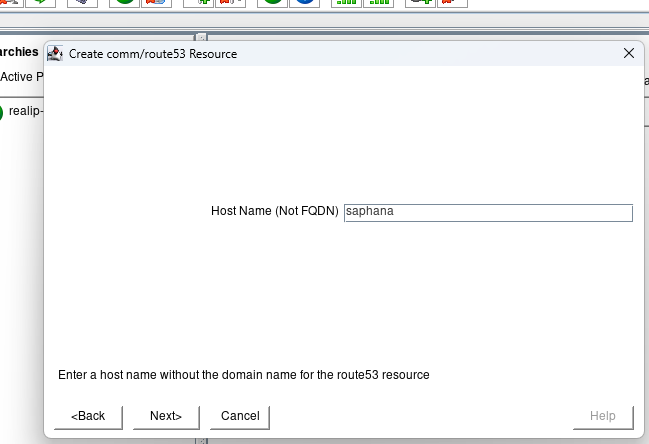
Enter the Host Name that everything will use to connect to the HANA database and hit next:

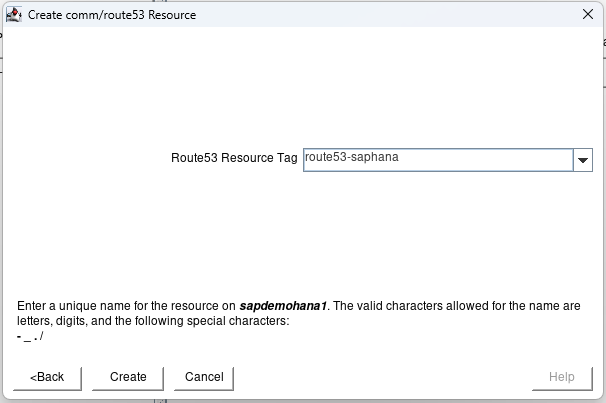
hit next until you get to the create button and click the create button.  When done hit Next:

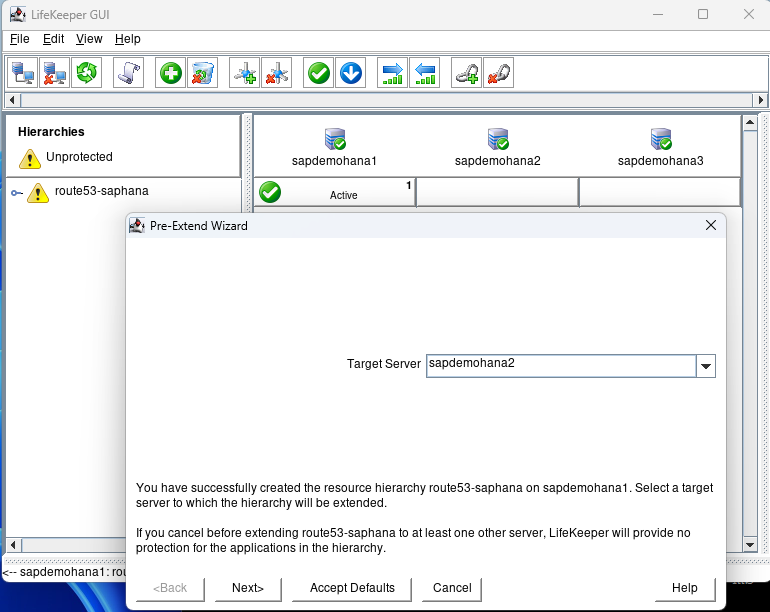
At the Pre-Extend Wizard hit Accept Defaults:

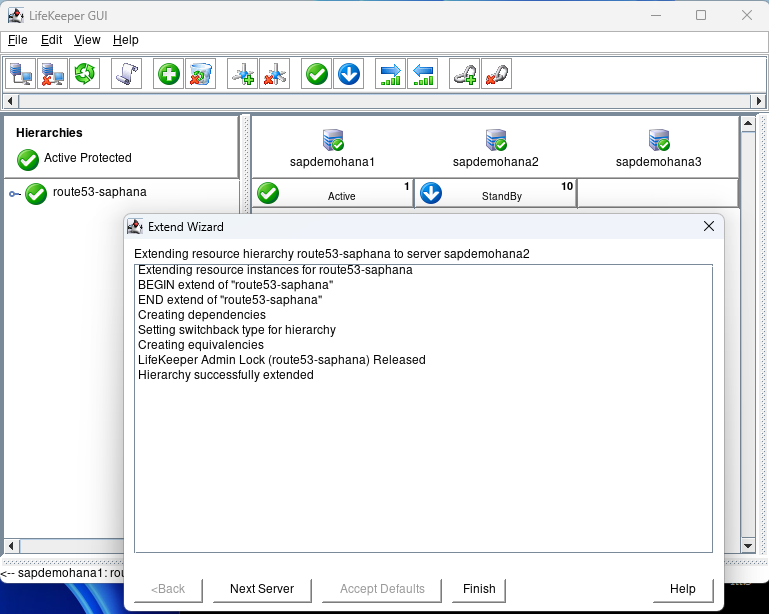
When done hit Next Server:

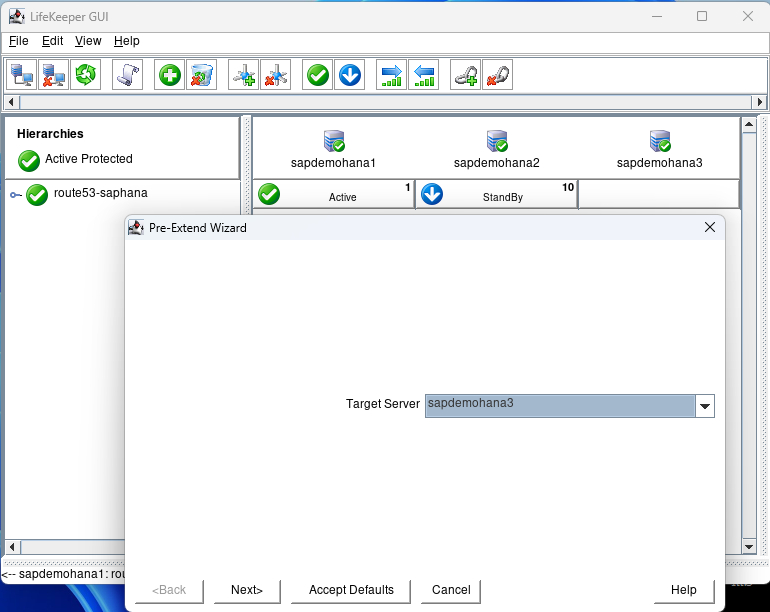
The Target Server will show the 3rd node.  Hit Accept Defaults:

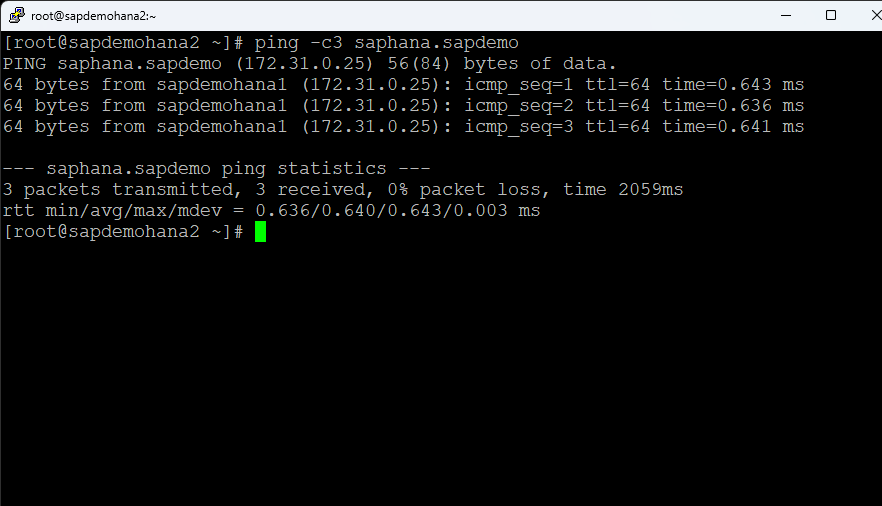
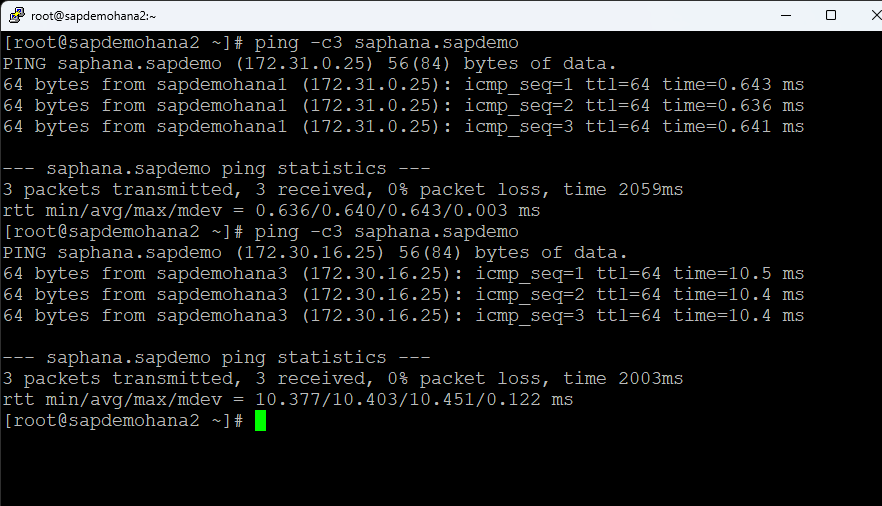
Hit Finish when done. Then hit Done. You can then expand the tree. Open a terminal session to the 2nd node and ping the fqdn for the HANA database [ie. ping -c3 saphana.sapdemo]

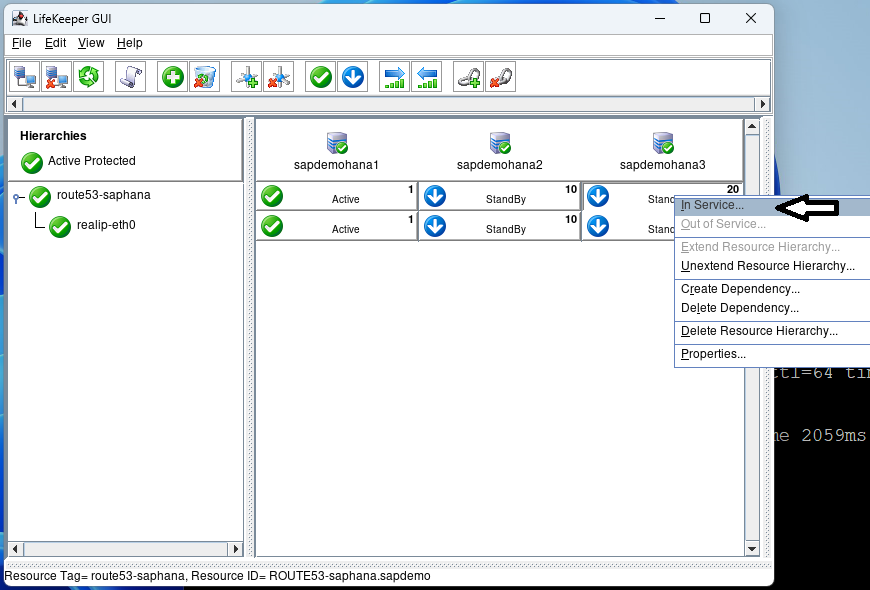
Right click on the top standby under sapdemohana3 and select In Service:

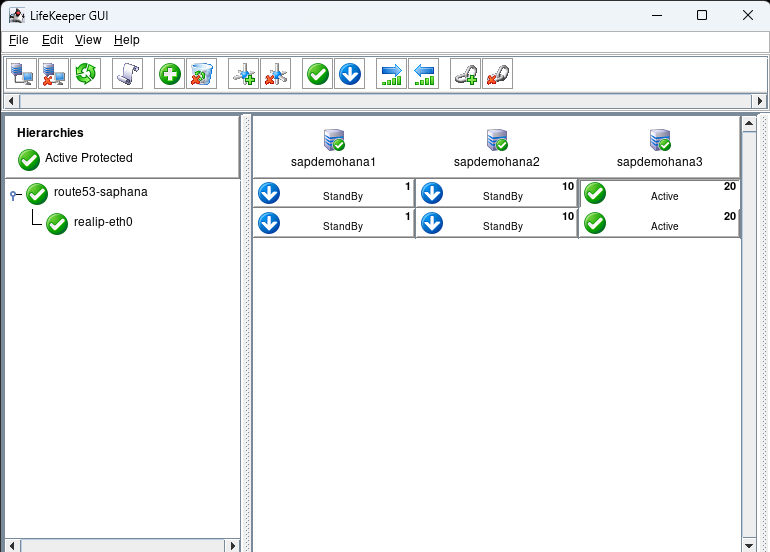
Hit In Service on the next screen and then hit Done when it is complete:

Go to the terminal window and repeat the ping test:

You can see that the hostname now resolves to sapdemohana3.  Put sapdemohana1 back into service before moving onto the next step.

Step 4: Integrating SAP HANA with SIOS LifeKeeper

Resource Hierarchy Creation

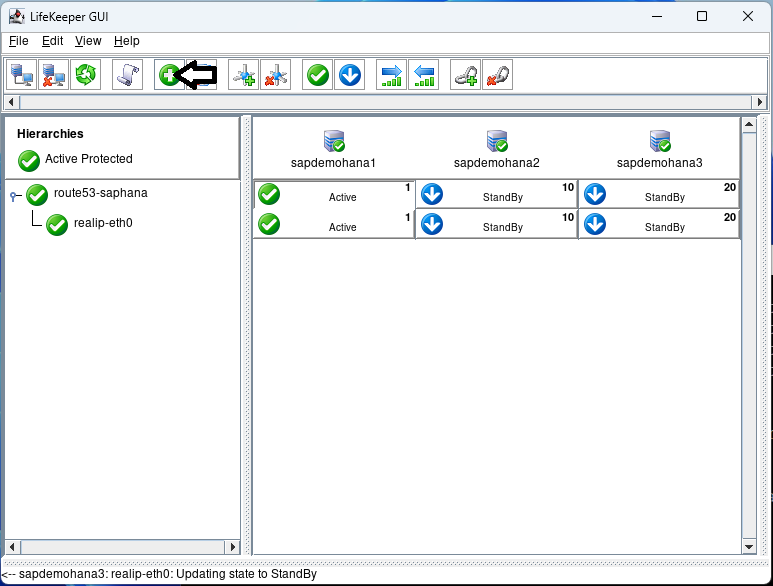
Using the LifeKeeper GUI, create a resource hierarchy for SAP HANA on each node. This setup is crucial for managing failover and recovery processes. Make sure that HSR is active on node1 and the additional nodes are registered:

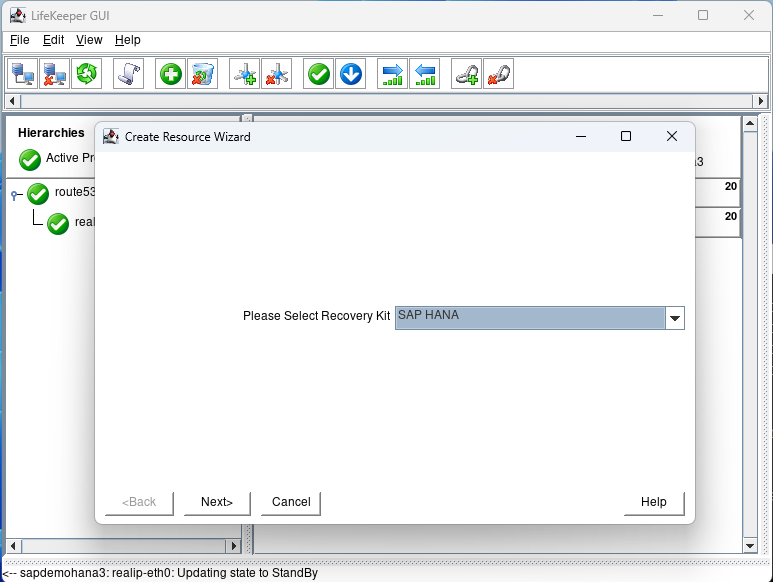
Click on the Create Resource button:

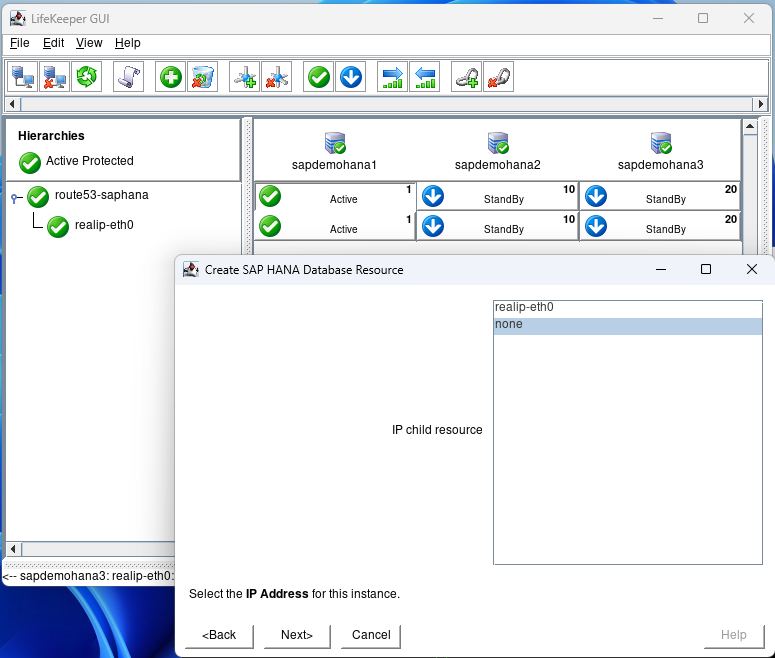
Select the SAP HANA recovery kit and hit next until you get to the IP Address screen:

Select none and hit next:

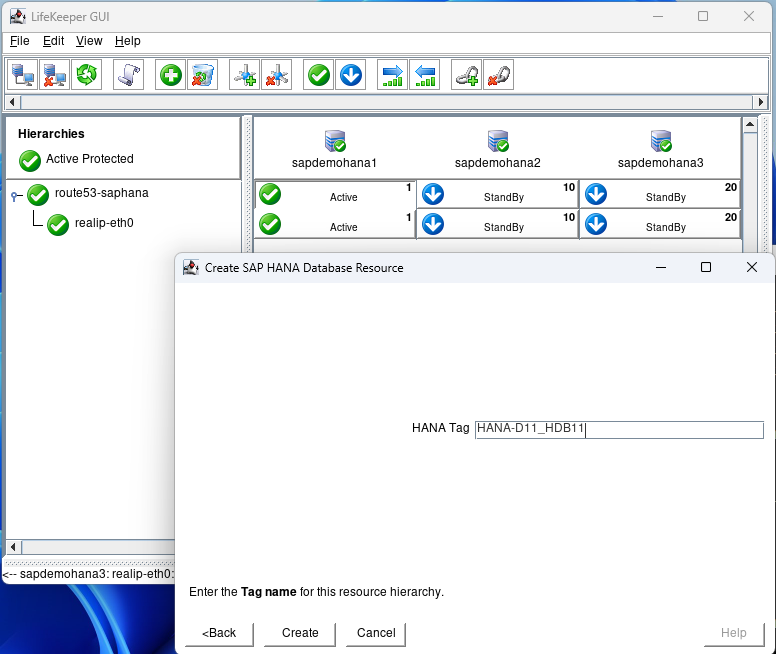
Hit next until you get to the Create screen and hit Create:

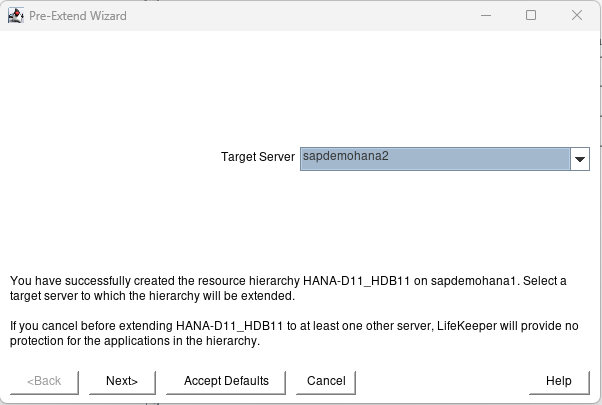
After creation hit next and then Accept Defaults for node2:

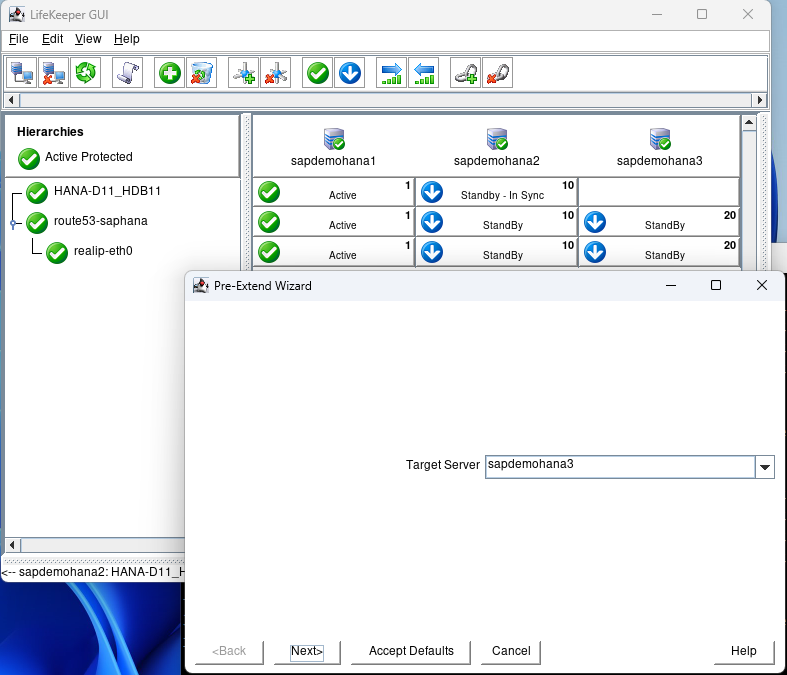
Again when node2 is complete hit Next Server and Accept Defaults:

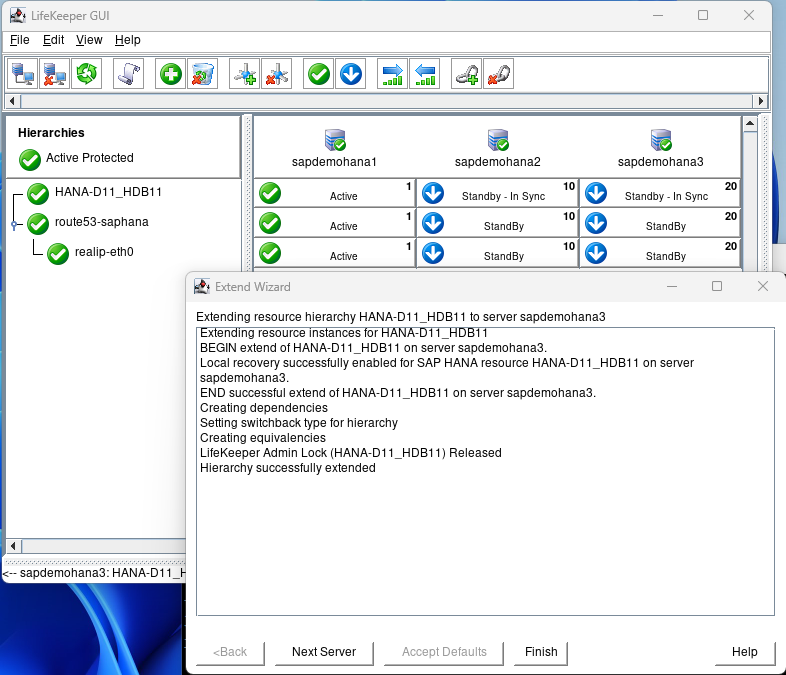
When complete hit Finish, then hit Done:

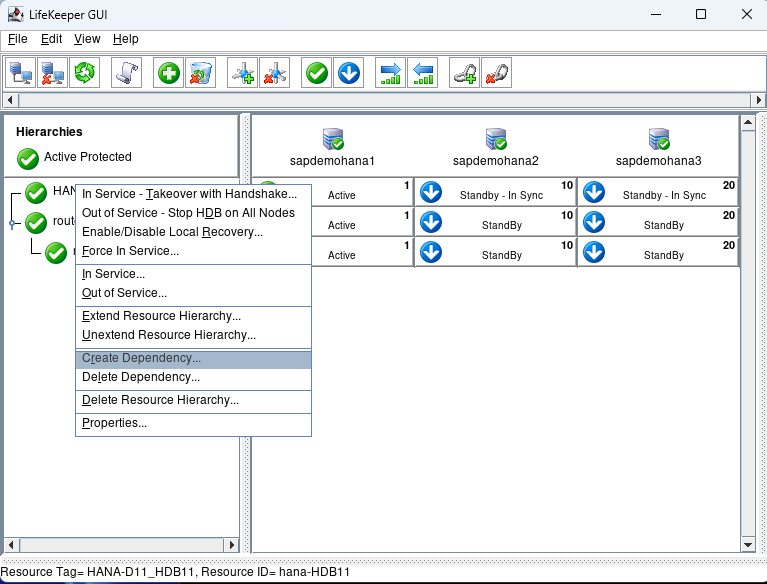
Right click on the Hana Hierarchy and select Create Dependency:

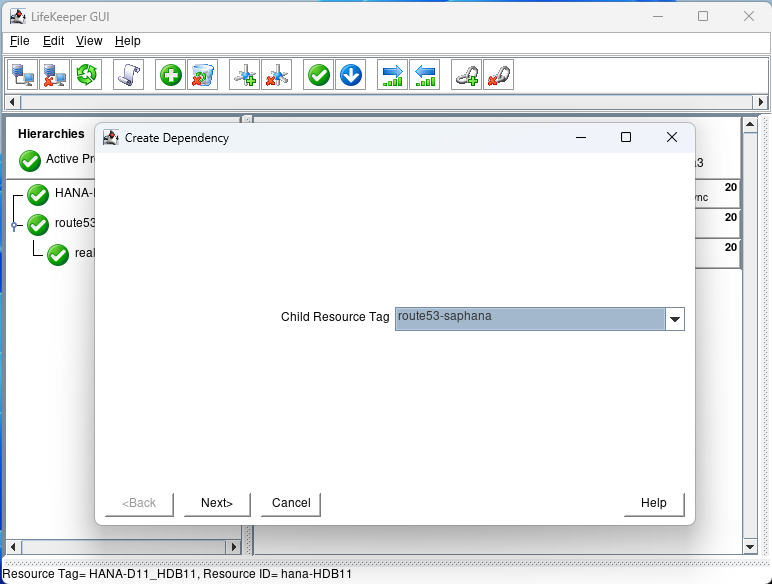
For the child Resource Tag select the route53 resource from the pulldown and hit next:

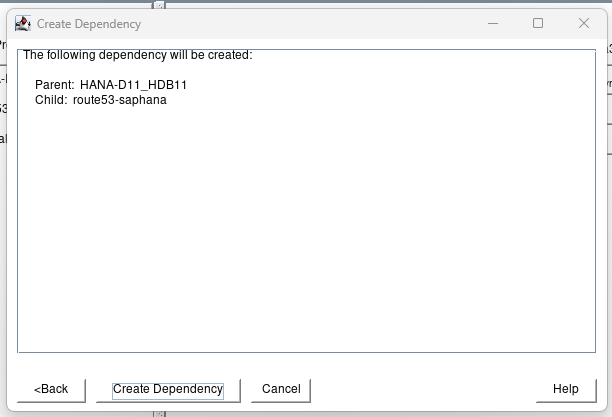
Click on Create Dependency:

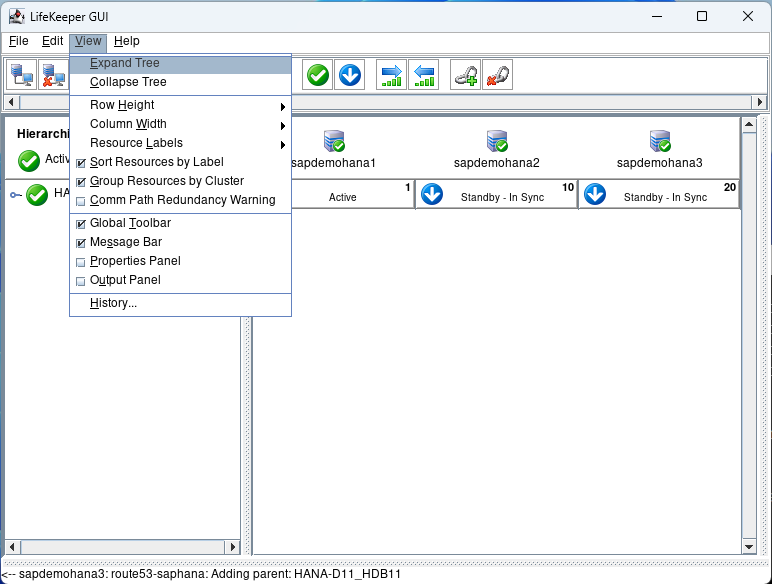
Click on Done.  Then select view Expand Tree:

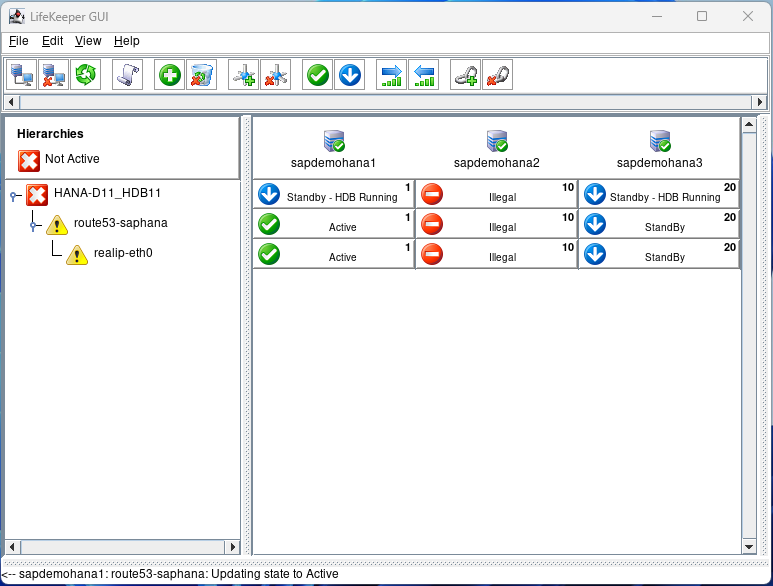
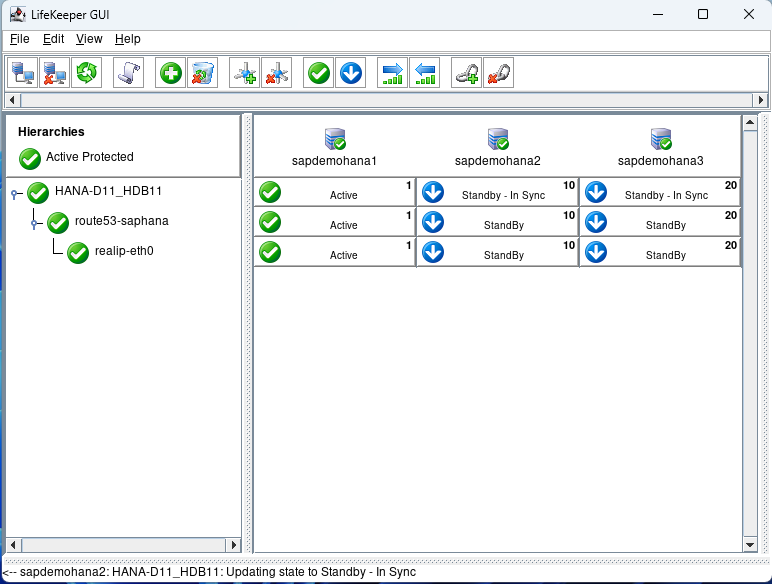
If everything is Green we are ready to test.

Step 5: Testing and Validation

Failover/Switchover Testing

Conduct thorough failover tests to ensure that the system correctly switches over to the secondary or tertiary node in case of a primary node failure. This testing should include scenarios like network failures, hardware issues, and software crashes.

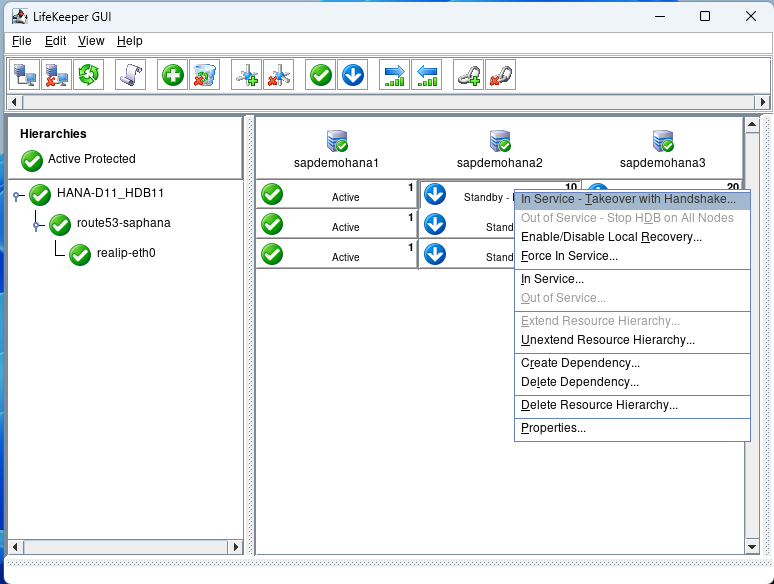
The first test we will perform is a switchover which would be used to perform maintenance activities or if you had a scheduled outage.  Right click on the 2nd node and select In Service – Takeover with Handshake…

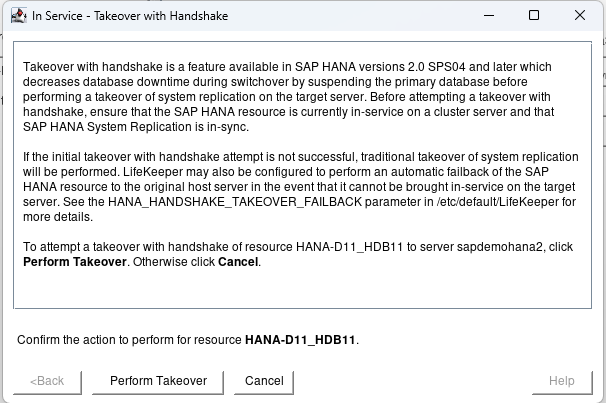
Hit Perform Takeover:

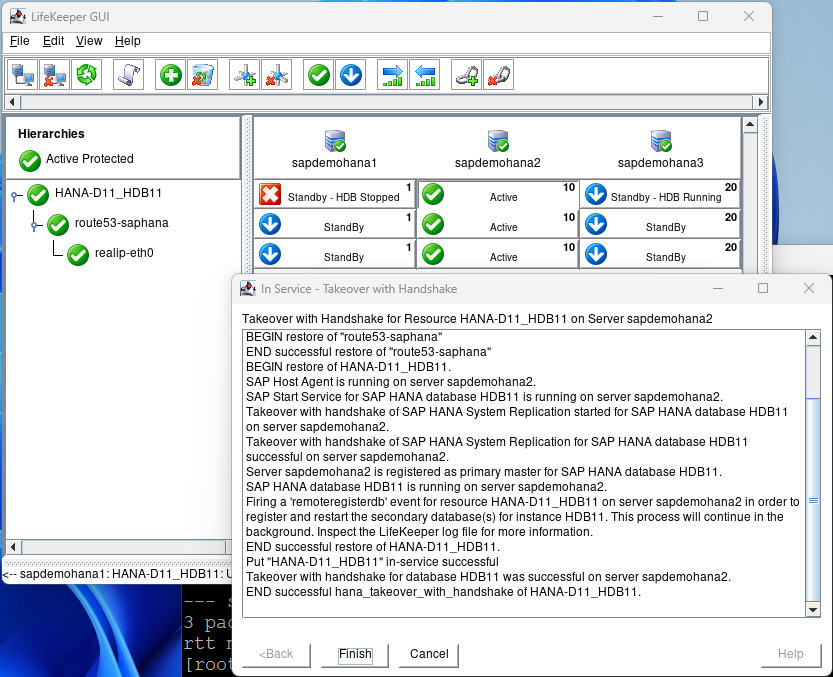
This test will switch to the 2nd node with the minimal downtime to users. When the 2nd node is up and running hit finish:

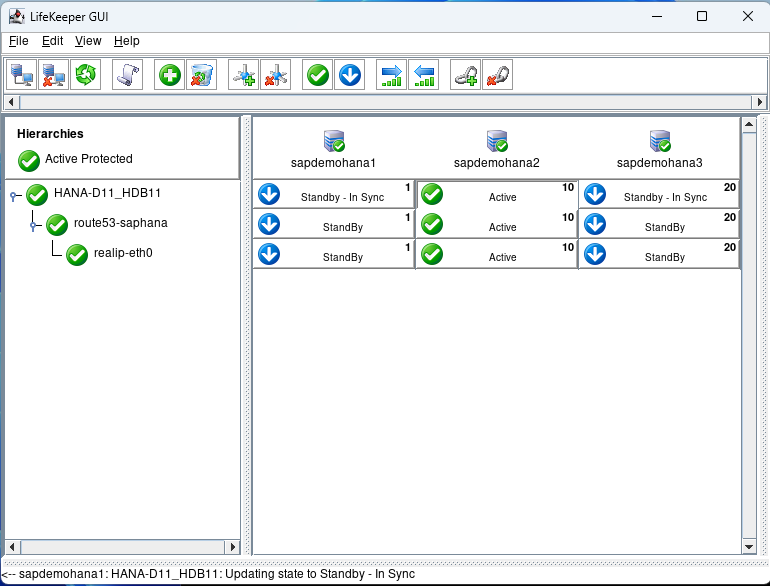
After some time node1 will come back into standby – In Sync.

Now we can perform a failover test.  Open a terminal to node 2 and type echo c > /proc/sysrq-trigger to simulate a system crash.  You will see node 1 take over because it has the highest priority of 1:

Eventually, everything will go back to normal:

There are a number of additional types of failure scenarios you may wish to test.  Just ensure that your standby nodes are in sync prior to starting your testing.

Data Synchronization Verification

Verify that data is correctly replicating across all nodes. Consistent data across nodes is crucial for the integrity of the HSR setup.

Performance Monitoring

Regularly monitor the performance of the SAP HANA instances and the LifeKeeper setup. Check for any anomalies or issues that could indicate potential problems.  Check the /var/log/lifekeeper.log file to ensure that everything is performing as expected.  You may need to adjust the Heartbeat timer and number of heartbeats missed based on the network performance.  These can be configured in the /etc/default/LifeKeeper file.  The tunables are LCMHBEATTIME and LCMNUMHBEATS.  You can also check the status of Lifekeeper from the command line with the command lcdstatus -q.

Conclusion

Setting up a 3-node HANA HSR cluster in AWS with SIOS LifeKeeper involves detailed planning and execution. By carefully following these steps, you can establish a robust, resilient, and highly available SAP HANA environment in the cloud, ensuring your critical data remains accessible and secure.  SIOS LifeKeeper for Linux makes the administration, monitoring, and maintenance of SAP HANA quick and easy.

SIOS provides resources and training for all our products.

Reproduced with permission from SIOS
Filed Under: Clustering Simplified Tagged With: Amazon AWS, High Availability, SIOS LifeKeeper for Linux

Video: Getting Down To The Basics, Why You Need High Availability

December 18, 2023 by Jason Aw Leave a Comment

Video: Getting Down To The Basics, Why You Need High Availability

High availability is all about making sure that mission-critical systems, applications, and services are available for customers when they need it. In this video, Cassius Rhue, VP of Customer Experience at SIOS Technology, shares his insights on high availability environments and the importance of having a dedicated HA support team.

Challenges associated with setting up high-availability (HA) environments:

  • Defining what HA means for the company: is it just four 9s or beyond?
  • Understanding the company’s goals and requirements: which applications need to be highly available, what are the interactions, how clients connect to those systems.
  • Planning out the architecture according to best practices, and then implementing where HA software is needed.
  • Consulting with or augmenting the team with HA experts in constructing HA systems, deploying HA software to increase the application and database availability, handling the replication of data and data availability between servers and systems and data centers.
  • Navigating silos. Each team in the IT infrastructure has to think beyond their silo to recognize that high availability impacts networking, compute resources, storage resources, the applications, and the database. It is a collective effort of the entire organization seeking to make sure they are resilient.

On the importance of HA Support:

  • Systems are becoming increasingly complex. People are busy with their roles, and it’s not their primary job to understand all the inner workings of every system.
  • Organizations tend to have DBAs, application experts, storage experts or AWS Certified architects, but you very rarely find an expert in high availability software.
  • It is critical to have a team that understands the complexity of HA systems, knows how to architect for best practices, knows the different use case scenarios, and is dedicated to helping you when issues arise.

On choosing an HA Support vendor:

  • Select a reputable HA organization that provides the level of support that meets your SLAs. SIOS Technology’s HA organization is available 24/7 and has award-winning support representatives.
  • Understand what their support agreements are.
  • Understand your levers for escalation when you don’t feel like you’re getting the proper level of support, e.g., Support Director, senior support member, etc.
  • Make sure you’re communicating and understanding one another, especially if there are language differences.

On how to get the most out of your HA Support vendor:

  • Notes: Keep good notes and details about the architecture, aka runbooks. This includes how systems are architected together, how they work, the versions, applications, and teams involved.
  • Notice: Give your support team as much advance notice about changes in your environment and about maintenance plans. This helps them align with your plans, check those plans, and helps them to be better prepared when you need to call in.
  • News: Share any news about your organization or about your environment with the support team, including personnel changes. And then follow their news about their software/product/ HA best practices.
  • Say no to taking shortcuts or not involving your support organization in advance.
  • Keep lines of communication open and ongoing.

Reproduced with permission from SIOS
Filed Under: Clustering Simplified Tagged With: disaster recovery, High Availability

How Manufacturers Can Use Failover Clustering to Avoid Downtime

December 8, 2023 by Jason Aw Leave a Comment

How Manufacturers Can Use Failover Clustering to Avoid Downtime

How Manufacturers Can Use Failover Clustering to Avoid Downtime

In manufacturing, ERP systems and databases like SAP, SAP HANA, Oracle Database, and SQL Server manage various processes throughout their operations. One of the challenges with this is downtime of any of these operations can be disruptive, even if only for a few minutes, not only for that particular operation but for others too. One of the most common ways to protect these workloads is using failover clustering.

In this video interview with TFiR, SIOS’ Ian Allton discusses high availability considerations for the manufacturing industry. He explains that one of the reasons why ‘failover clustering’ is the most common way to protect workloads is because it is cost-efficient and delivers upwards of 99.99% availability. Failover clustering software works by configuring a second server with the same specifications as the primary server, and then the failover clustering software monitors the operating system and the application. Should it detect an error or issue, it will failover the software from the primary server to the secondary server, avoiding an outage. Contact us for more information.

Tune in to this episode to learn more about how to avoid downtime.

Reproduced with permission from SIOS
Filed Under: Clustering Simplified Tagged With: disaster recovery, High Availability

  • « Previous Page
  • 1
  • …
  • 10
  • 11
  • 12
  • 13
  • 14
  • …
  • 52
  • Next Page »

Recent Posts

  • Active-Active vs. Active-Passive
  • Broadcom/VMware: Time To Decouple High Availability From Your Hypervisor
  • How To Improve Customer Satisfaction in Technical Support
  • Keeping Buildings Safe: High Availability in Maintenance and Security Systems
  • Designing High Availability Through Modularity and Abstraction

Most Popular Posts

Maximise replication performance for Linux Clustering with Fusion-io
Failover Clustering with VMware High Availability
create A 2-Node MySQL Cluster Without Shared Storage
SAP for High Availability Solutions For Linux
Bandwidth To Support Real-Time Replication
The Availability Equation – High Availability Solutions.jpg
Choosing Platforms To Replicate Data - Host-Based Or Storage-Based?
Guide To Connect To An iSCSI Target Using Open-iSCSI Initiator Software
Best Practices to Eliminate SPoF In Cluster Architecture
Step-By-Step How To Configure A Linux Failover Cluster In Microsoft Azure IaaS Without Shared Storage azure sanless
Take Action Before SQL Server 20082008 R2 Support Expires
How To Cluster MaxDB On Windows In The Cloud

Join Our Mailing List

Copyright © 2026 · Enterprise Pro Theme on Genesis Framework · WordPress · Log in