SIOS SANless clusters

SIOS SANless clusters High-availability Machine Learning monitoring

  • Home
  • Products
    • SIOS DataKeeper for Windows
    • SIOS Protection Suite for Linux
  • News and Events
  • Clustering Simplified
  • Success Stories
  • Contact Us
  • English
  • 中文 (中国)
  • 中文 (台灣)
  • 한국어
  • Bahasa Indonesia
  • ไทย

Roadblocks to Optimizing Application Performance in VMware Environments – Part II

February 6, 2017 by sios2017 Leave a Comment

This is the second blog post in a two-part series examining challenges IT teams face in optimizing application performance and other issues in VMware environments. The original text of this series appeared in an article on Data Informed.  

In part one of this series, we uncovered that IT teams are currently using multiple tools to understand application performance issues in VMware. Read on to learn about the other challenges IT teams are facing in virtual environments

Application Performance Issues Are Eating Away at Time and Resources

While IT professionals are consulting their VMware environment application monitoring tools, critical hours are ticking by. For smaller businesses that have limited IT staff, this can cause considerable delays in day-to-day operations. IT teams cannot afford to waste time chasing false positives or focusing their energy on areas of the environment that are not truly the root cause of their application performance issue. Additionally, many IT teams are inundated by alerts from their VMware environment monitoring tools, making it difficult to pinpoint which alerts are meaningless and which are worth diagnosing to solve a potential application performance issue.Application Performance Labor Hours
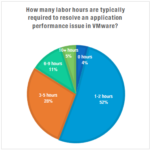
These interruptions are significant, considering that our recent survey found more than half of IT professionals are facing applications performance issues every month. Additionally, 44 percent indicated that it takes them more than three hours to resolve application performance issues as they arise. Overall, it’s clear that IT teams are frequently facing issues in VMware environments, and they are wasting critical manpower and resources solving these issues.

The Causes of Application Performance Issues Remains a Mystery.

Despite the wide variety of tools available and the volume of time spent solving business-critical application performance issues, IT professionals remain uncertain they can attack these problems head-on. Of the IT professionals surveyed, only 20 percent believe the strategies they implement to resolve application performance issues are 100 percent accurate the first time. Even more alarming, seven percent would characterize their application performance issue resolutions as an “educated guess.” And across the board, it is rare for IT teams to implement a perfect solution to a performance issue– they frequently require a level of adjustment or even a complete rework.

What’s Next?

This trend towards moving business-critical data off of physical servers and onto virtual environments will continue for the foreseeable future, and the relationships between VM applications, network devices, storage devices and services will only grow more complex. Many CIOs are turning to machine learning solutions to help them better understand their infrastructure and learn to optimize the relationships that exists between the different IT disciplines. As a result, the core approach used by IT professionals are changing from a traditional computer science approach to a data science-centric approach. We’ve also seen the rise of “AIOps” or algorithmic IT operations platforms in the last year. A term coined by Gartner to describe machine learning applications in IT, Gartner estimates only five percent of businesses currently have AIOps platforms in place. However, that number is expected to mushroom to 25 percent in the next two years as IT becomes increasingly complex and difficult to manage.

Read Roadblocks to Optimizing Application Performance in VMware Environments part one

Filed Under: Blog posts, News and Events

Roadblocks to Optimizing Application Performance in VMware Environments – Part I

January 26, 2017 by Margaret Hoagland Leave a Comment

This is the first post in a two-part series highlighting challenges IT teams face in optimizing VMware performance. The original text of this series appeared in an article on Data Informed.

When virtual computing first became popular, it was primarily used for non-business critical applications in pre-production environments, while critical applications were kept on physical servers. However, IT has warmed up to virtualization, recognizing the many benefits (reduced cost, increased agility, etc.) and moving more business-critical and database applications into virtual environments. In a recent survey of 518 IT professionals we conducted, we found that 81 percent of respondents are now running their business-critical applications, including SQL Server, Oracle or SAP, in their VMware environments.

VMware Performance Becomes Critical as More Important Applications Virtualized

While there are numerous benefits, virtualized environments introduce a new set of challenges for IT professionals. For IT teams tasked with finding and resolving VMware performance issues, specifically those that can impact business-critical applications, many find they are hitting the same cumbersome roadblocks related to tools, time and strategy.

IT Pros Need Multiple Tools to Gain a Holistic View of their VMware Environments.

vmware_performance_monitoring_toolsAccording to the survey results, 78 percent of IT professionals are using multiple tools– including application monitoring, reporting and infrastructure analytics– to identify the cause
of VMware performance issues for important applications. Even further, ten percent of IT professionals are using more than seven tools to understand their VMs and the issues that affect VMware performance. Optimizing VMWare performance and availability is incredibly complex, and the dynamic nature of these environments require highly advanced tools to address even the most standard performance issues.

Relying on several reporting tools every time an issue arises just isn’t sustainable for most IT teams. This is partly due to the fact that solving application performance issues requires a view of multiple IT disciplines or “silos” such as application, network, storage and compute. In larger organizations, that means each time an issue arises, representatives from each discipline need to come together and compare their findings– and the analysis results from the application team’s tool may point to a somewhat different cause than the storage team or the network team’s tool. The current strategy of relying on multiple tools and teams to evaluate each silo leaves IT with the manual, trial and error task of finding all the relevant data, assembling it and analyzing it to figure out what went wrong and what changed to cause the problem.

Stay tuned for part two of this series, where we’ll discuss issues related to time and resources wasted in uncovering issues, as well as finding the root cause of VMware performance issues.

Read Roadblocks to Optimizing Application Performance VMware Environments – Part II

Filed Under: Blog posts, News and Events Tagged With: #VMware application, deep learning, Machine Learning, VMware performance

Expert Advice on High Availability SQL Server and Machine Learning Analytics – Blogs, Webinars and Live Events

November 22, 2016 by sios2017 Leave a Comment

SIOS experts in high availability SQL Server cluster protection routinely share their knowledge and provide expert advice through webinars, blogs, and live events.

Blog Post: Step-by-Step Guide to High Availability SQL Server v.Next Linux High Availability
Click here to learn how to deploy a Linux VM in Azure running SQL Server and how to configure a 2-node failover cluster to make it highly available without the need for shared storage. https://clusteringformeremortals.com/category/high-availability/

Blog Post:  Deploying a Highly Available File Server in Azure IAAS (ARM) with SIOS DataKeeper This blog is a step-by-step guide to deploying a two-node File Server Failover Cluster in a single region of Azure using Azure Resource Manager.

Live Webinar: December 15, 2016 –  Webinar: Keeping the Peace with Your Sys Admins while Providing High Availability SQL Server. Join SQL Server MVP Dave Bermingham as he walks through common use cases that cause conflict between SQL DB Admins and VM Admins when SQL Server HA is involved. He will also describe a simple, conflict-free way for SQL Server admins to get what they need for a successful implementation of SQL Server. Register here.

Live Webinar: December 8, 2016 – Understanding vSphere Analytics: Machine Learning vs Threshold-based. Join David Davis, 8-time vExpert and Partner at ActualTechMedia and Experts from SIOS Technology in this real-world, practical, hands-on webinar! Find out the differences between different vSphere analytics approaches and how to choose a solution that’s best for you. Register here.

Recorded Webinar – VMware Guest Based SQL Server High Availability Clusters – Ways to Protect SQL and Maintain Flexibility. Watch this recorded webinar and hear Dave Bermingham, Microsoft Clustering and Datacenter MVP and Tony Tomarchio, Director of Field Engineering at SIOS discuss ways to create a high availability cluster to protect SQL in a VMware environment without sacrificing IT flexibility or important VMware features, and whether you can have a cluster and multi-site replication with VMware. Register here.

Filed Under: Blog posts, News and Events Tagged With: #high availability SQL Server, #ML, #SANLess, Azure, Machine Learning, SQL

IT Analytics for VMware: 5 Ways to Learn More About What Machine Learning Based Analytics Can Do for You

October 12, 2016 by Margaret Hoagland Leave a Comment

1. See Machine Learning IT Analytics in Action: Visit the SIOS Booth #307 at the 2016 PASS Summit Conference October 25-28th at
Washington Convention Center, Seattle, WA. Experience the power of SIOS iQ Machine Learning IT Analytics through an interactive demonstration using a Hololens augmented
reality headset. Learn more.

IT analytics with SIOS iQ machine learning based analytics

 2.  Attend the PASS the Bacon Breakfast panel discussion at PASS Summit on Thurs, October 25 at 6:50 AM. Hear experts David Klee, Founder Heraflux Technologies, Denny Cherry, principle, DC&AC, SQL expert Geoff Hiten, and others discussing techniques for improving SQL performance in VMware environments. and Registration required: click here for tickets.

3.  Visit the SIOS booth at VMUG Boston on November 3 at the Boston Hynes Convention Center, 900 Boylston Street, Boston, MA 02115. See SIOS iQ in action and enter to win our raffle. Learn more here.

4.  Attend our upcoming webinar: Save Big by Right Sizing Your SQL Server VMware Environment
October 20, 2016 at 1:00 PM ET, 10 AM PT
According to leading analysts, companies are overprovisioning VMware environments by as much as 80%, wasting tens of thousands of dollars annually in unnecessary server and storage acceleration hardware, VMware and application licenses, and capacity. Under-provisioning is equally problematic – causing performance issues and, putting failovers (and critical applications that rely on them) at risk. Join this webinar to learn simple techniques for ensuring you have the performance and capacity your business needs without over provisioning. Find out how to quickly determine how to strike the perfect balance to right size your VMware environment while optimizing SQL Server performance. Learn about new machine learning based analytics tools that can provide you with a clear breakdown of your current environment (vMem, vCPU, hosts, and more) and recommendations for a fully optimized environment with a detailed calculation of the savings.
Click here for more information and to register

5.  Attend All Things Open (October 25-27th) at Raleigh Convention Center, Raleigh, NC.
Hear SIOS CTO, Sergey Razin, Ph.D., present “Open Source: Transforming Machine Learning and AI” at 11:30 AM on October 26th.


Filed Under: Blog posts, News and Events Tagged With: IT Analytics, virtual

Optimize SQL Server Performance and 5 Other Things to Do at VMworld 2016

August 22, 2016 by sios2017 Leave a Comment

#1. Experience an Augmented Reality Guided Tour of SIOS iQ Machine Learning Analytics Solution for SQL Server Performance

Root cause of SQL Server performance issues with SIOS iQ machine learning analytics
SIOS iQ machine learning analytics with enhanced reality headset.

Try to improve your SQL Server performance in this fun augmented reality demo. See how you can save money by solving performance issues in one click. Identify wasted virtual resources.  Optimize your VMware application environment.

#2. Attend Breakout Session

SIOS CTO Sergey Razin, Ph.D., and SQL Sentry’s Brian Davis present – Use Cases in Performance Root Cause Resolution for SQL Server. They show you how to use vRealize Operations Manager, SIOS iQ Analytics, and SQL Sentry Performance Advisor. Learn best practices for identifying and resolving application performance issues in SQL Server. Identify SQL Server performance issues using VMware vRealize Operations Manager, characterize infrastructure root causes and recommended solutions with SIOS iQ machine learning analytics solutions, and define application-specific root causes with SQL Sentry Performance Advisor.  9/1/2016 for Use Cases in SQL Server Performance Root Cause Resolution.


#3.  Stop by SIOS Speaking Session in Tegile Booth #2057 to Learn Keys for Implementing Cost-Efficient Storage Accelerationtegile performance

SIOS Director of Field Engineering will be a guest presenter in the
Tegile booth #2057. He will talk about using machine learning analytics for a successful storage acceleration strategy. He will show how to use it to accelerate SQL Server performance.


#4.  Stop by Book Signing with vExpert Michael Corey in SIOS Booth #2361corey book

VMware vExpert and noted author Michael Corey will be in the SIOS booth on August 30 to sign his book Virtualizing SQL Server with VMware: Doing IT Right. The first 10 attendees to arrive at the book signing will receive a free copy. The book is also available in the show bookstore.


#5. Join Guest Presenter: SQL Sentry in SIOS Booth #2361 for Demo of Integration of SIOS iQ and SQL Sentry Performance Advisor

SQL_Sentry

Stop by SIOS Booth #2361 on Monday, August 29 at 2:00 PM-3:00 PM and Tuesday, August 30 at 11:00 AM to noon to see a demonstration by SQL Sentry’s Brian Davis for a live demonstration of integration of SIOS iQ with SQL Sentry Performance Advisor. Learn how this integration bridges a critical gap between IT infrastructure administrators and SQL Server administrators. See how easy it is to find and resolve SQL Server performance issues with SIOS iQ and SQL Sentry.

Filed Under: Blog posts, News and Events Tagged With: machine learning analytics, SQL Server Performance, VMware, Vmworld

  • « Previous Page
  • 1
  • 2
  • 3
  • 4
  • 5
  • 6
  • 7
  • Next Page »

Recent Posts

  • Broadcom/VMware: Time To Decouple High Availability From Your Hypervisor
  • How To Improve Customer Satisfaction in Technical Support
  • Keeping Buildings Safe: High Availability in Maintenance and Security Systems
  • Designing High Availability Through Modularity and Abstraction
  • The Critical Role of QA and Production Environments in High Availability

Most Popular Posts

Maximise replication performance for Linux Clustering with Fusion-io
Failover Clustering with VMware High Availability
create A 2-Node MySQL Cluster Without Shared Storage
SAP for High Availability Solutions For Linux
Bandwidth To Support Real-Time Replication
The Availability Equation – High Availability Solutions.jpg
Choosing Platforms To Replicate Data - Host-Based Or Storage-Based?
Guide To Connect To An iSCSI Target Using Open-iSCSI Initiator Software
Best Practices to Eliminate SPoF In Cluster Architecture
Step-By-Step How To Configure A Linux Failover Cluster In Microsoft Azure IaaS Without Shared Storage azure sanless
Take Action Before SQL Server 20082008 R2 Support Expires
How To Cluster MaxDB On Windows In The Cloud

Join Our Mailing List

Copyright © 2026 · Enterprise Pro Theme on Genesis Framework · WordPress · Log in