SIOS SANless clusters

SIOS SANless clusters High-availability Machine Learning monitoring

  • Home
  • Products
    • SIOS DataKeeper for Windows
    • SIOS Protection Suite for Linux
  • News and Events
  • Clustering Simplified
  • Success Stories
  • Contact Us
  • English
  • 中文 (中国)
  • 中文 (台灣)
  • 한국어
  • Bahasa Indonesia
  • ไทย

Microsoft Now Officially Supports The iSCSI Software Target 3.3

January 31, 2018 by Jason Aw Leave a Comment

iSCSI Software Target 3.3 is now available for download

Just a few weeks ago I wrote an article about how to configure the iSCSI Software Target 3.3 in a cluster environment. While it is great for labs and testing, up until today it was not supported in a production environment. Well…that all changes today! Microsoft just announced that the iSCSI Software Target 3.3 is a freely available download and can be used on a production network.

http://blogs.technet.com/b/josebda/archive/2011/04/04/microsoft-iscsi-software-target-3-3-for-windows-server-2008-r2-available-for-public-download.aspx

DataKeeper Cluster Edition – High Availability/Disaster Recovery solution at great price

This all starts to get interesting once you start considering the possibility of building shared nothing iSCSI Target clusters with DataKeeper Cluster Edition. Build 2-nodes locally for High Availability and then place a 3rd one in a remote data center for Disaster Recovery. Now that is a pretty sweet HA/DR solution without having to break the bank!
 Reproduced with permission from https://clusteringformeremortals.com/2011/04/04/microsoft-now-officially-supports-the-iscsi-software-target-3-3-in-production/

Filed Under: Clustering Simplified, Datakeeper Tagged With: iscsi

Hyper-V Replica Coming In Windows Server “Next”

January 31, 2018 by Jason Aw Leave a Comment

Watch new feature Hyper-V Replica

Here is an interesting video that demonstrates “Hyper-V Replica”, a new feature coming in the next version of Windows. Skip to the 39 minute mark to see the demonstration.

http://digitalwpc.com/Videos/AllVideos/Permalink/3cb3788c-5c47-4b9e-987c-0dec4194058b/#fbid=slfi0dmNMqP

It looks like a very welcome feature that certainly will make Hyper-V even more competitive when comparing the feature set vs. price between vSphere and Hyper-V, especially with the new pricing announced by VMware.

I’ll be very curious to see if this integrates with Windows Server Failover Clustering to allow you create shared nothing clusters as you can today with 3rd party replication software, which I’ve demonstrated using SteelEye DataKeeper Cluster Edition in an earlier blog post.

Reproduced with permission from https://clusteringformeremortals.com/2011/07/21/hyper-v-replica-coming-in-windows-server-%E2%80%9Cnext%E2%80%9D/

Filed Under: Clustering Simplified, Datakeeper Tagged With: Hyper V, SIOS DataKeeper Cluster Edition, VMware, vSphere, Windows Server Failover Clustering

Microsoft Multi-site Cluster Users Rejoice

January 25, 2018 by Jason Aw Leave a Comment

It Is Now Possible To Have Automatic Failover In A 3 Node Cluster!

Microsoft recently released a patch that allows you to specify whether or not a cluster node can vote in in a majority quorum model. This is particularly useful in a multisite cluster configuration that consists of an even number of nodes.

http://support.microsoft.com/kb/2494036

Consider the following…

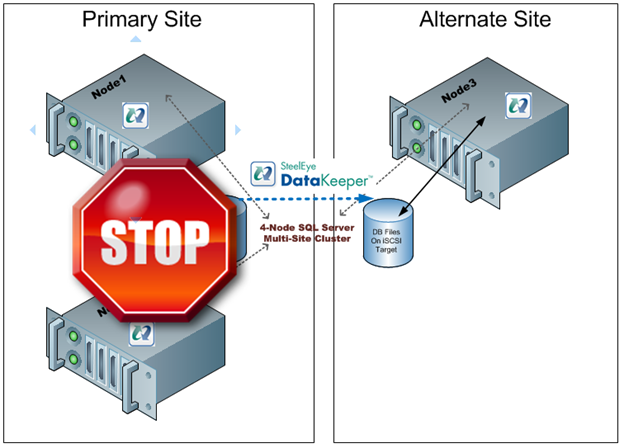
I have a two node cluster in a local site high availability and I wish to extend it to a 3rdlocation and add a single node for disaster recovery. Sound like a great plan as a multisite cluster is just about the most robust DR plan you can implement. However, you will not be able to take advantage of one of the best features of a multisite cluster – automatic recovery in the event of a site loss. If you were to lose your primary site the DR site only contains one cluster node (see Figure 1). This is just one vote out of three in the cluster so a majority cannot be obtained and Node3 will not come online automatically. The only way to make Node3 come online is to force the quorum online, which kind of defeats the purpose of multisite cluster by requiring human intervention for a failover to happen.

Figure 1 – In a typical 3 node multisite cluster if you lose the primary site the DR site cannot obtain majority so failover never occurs.

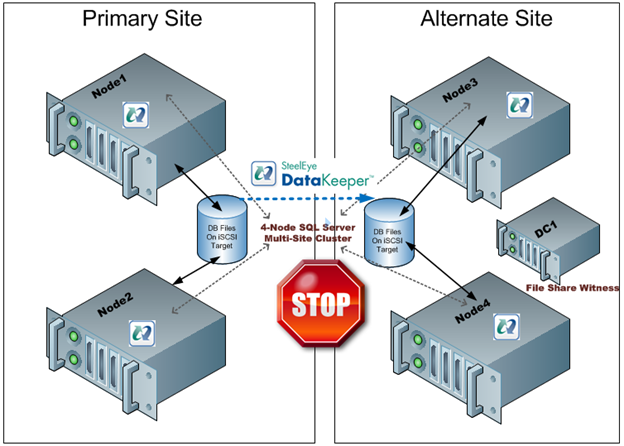
The only “safe” way to have automatic failover in a multisite cluster is to have an equal number of nodes in each site and to have a file share witness in a 3rd location with connectivity back to both the primary site and the DR site. This concept is a little difficult to grasp at first, so let me attempt to explain through illustrations.

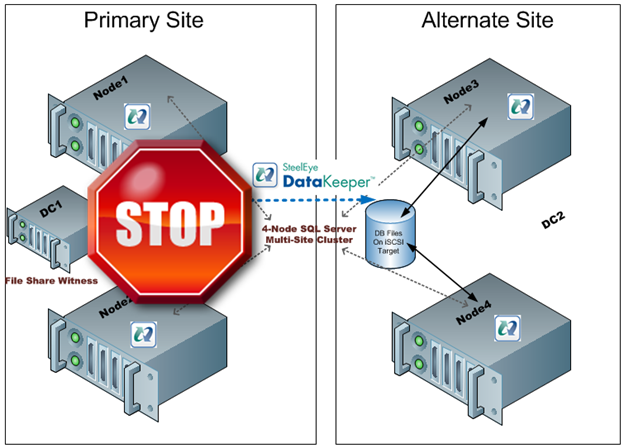
Figure 2- With an even number of nodes in both locations and the file share witness in the primary site a loss of the primary site would not result in a failover as the Alternate Site would only have 2 out of 5 votes, not a majority.
Figure 3 – If the file share witness was moved to the Alternate Site a failure of the WAN would cause a false failover as the Alternate Site would form a majority and come online.
Figure 4 – with the file share witness in a 3rd location failover will occur if the Primary Site is lost and false failovers are avoided in the case of connectivity failure between the Primary and Alternate Site.

As you can see, figure 4 represents the only reasonable configuration which supports automatic failover. However, this assumes that there are an equal number of nodes in each location. If you are stuck with the original 3-node configuration you are stuck as adding a file share witness does not help as you can never achieve a majority in the alternate site…until today! Microsoft release a patch that basically allows you to specify whether or not a node gets to vote or not. So what this means is you can build a 3-node cluster as illustrated in Figure 1, yet take advantage a file share witness in a 3rd location as illustrated in Figure 4. By simply telling one of the nodes in the Primary Site to note vote in the cluster you will allow the Alternate Site to form a majority with the file share witness and come online. Assuming connectivity to your 3rd location and Alternate Site is relatively reliable there really is no downside to the configuration shown in Figure 5.

Figure 5 – by disabling the vote on Node2 you can deploy a 3-node multisite cluster with a file share witness and safely support automatic failover to the DR site. The same concept can be applied to any cluster with an odd number of nodes.

While this is a great solution, you still need that 3rd location for the file share witness. If you don’t have that 3rd location you will just have to settle for a manual switchover and keep the file share witness in the primary site if you have an even number of nodes.

The PreventQuorum switch is also included as part of this hotfix which will also be of interest to people deploying multisite clusters. Well explore that option in a future article.

Get the hot fix here…

A hotfix is available to let you configure a cluster node that does not have quorum votes in Windows Server 2008 and in Windows Server 2008 R2

http://support.microsoft.com/kb/2494036

Reproduced with permission from https://clusteringformeremortals.com/2011/04/29/microsoft-multisite-cluster18-users-rejoice-it-is-now-possible-to-have-automatic-failover-in-a-3-node-cluster19/

Filed Under: Clustering Simplified, Datakeeper Tagged With: cluster, disaster recovery, Microsoft, multi-site

SQL Server Denali And Hadron

January 24, 2018 by Jason Aw Leave a Comment

Microsoft’s latest version of SQL, code named Denali, is currently in CTP. One of the most anticipated feature is something called HADRON. Basically, it is has been described as mirroring 2.0. The best features of HADRON as I can see compared to mirroring as it is in 2005/2008 are as follows:

  • You can query the mirror (now known as a replica)
  • You can have more than one replica
  • Database are grouped into availability groups to ensure related databases always fail over together
  • Support for replicating more than 10 databases

If you want a great preview, check out fellow MVP Brent Ozar’s post, SQL Server Denali Rocks!

From reading Brent’s post I gather Microsoft only plans to include this in the Enterprise version of SQL. That is too bad for the many customers running SQL Server Standard as traditionally there is a significant price jump to go from Standard to Enterprise. However, that is good news for the 3rd party replication vendors out there who are providing similar functionality today on SQL 2005/2008 on Standard and Enterprise Editions.

SteelEye DataKeeper Cluster Edition for SQL Server

While it is not an exact duplicate of HADRON, a multi-site cluster using SteelEye DataKeeper Cluster Edition for SQL Server gives you a great solution for HA/DR without requiring shared storage. So while we wait for Denali and all the application vendors to start supporting Denali you might want to have a look at what SteelEye DataKeeper Cluster Edition can do for you today!

Reproduced with permission from https://clusteringformeremortals.com/2010/12/10/sql-server-denali-and-hadron/

Filed Under: Clustering Simplified, Datakeeper Tagged With: DataKeeper, DataKeeper Cluster Edition, disaster recovery, Hadron, High Availability, SQL

The Difference Between Hyper-V Live Migration And Quick Migration

January 22, 2018 by Jason Aw Leave a Comment

With the launch of Windows Server 2008 R2 and the interest in DataKeeper replication solutions for Hyper-V, I have been pretty busy – which is a good thing! Recently, I have been speaking with some Microsoft Gold Partners who are busy installing Hyper-V at their customer locations and looking at some of the disaster recovery options, including multi-site Hyper-V clusters with SteelEye DataKeeper Cluster Edition. Many of the questions are the same each time and the demonstration is always the same. I figured it may be beneficial to produce a video that talks specifically about one of the questions – the difference between Live Migration and Quick Migration and when to use one vs. the other. This video that demonstrates Live Migration and Quick Migration while discussing some of the things to consider may be of interest to you.

 Reproduced with permission from https://clusteringformeremortals.com/2009/11/17/the-difference-between-hyper-v-live-migration-and-quick-migration/

Filed Under: Clustering Simplified, Datakeeper Tagged With: DataKeeper, Hyper V, Live Migration, migration, Quick Migration, Windows Server

  • « Previous Page
  • 1
  • …
  • 4
  • 5
  • 6
  • 7
  • 8
  • Next Page »

Recent Posts

  • Managing an Inherited DataKeeper Cluster: Challenges and Best Practices
  • Setting Up Nginx Load Balancer on AWS
  • With Great Power: Cluster Maintenance Best Practices
  • AI Is Moving Fast. Critical Applications Still Need to Stay Up.
  • What Is High Availability (HA)?

Most Popular Posts

Maximise replication performance for Linux Clustering with Fusion-io
Failover Clustering with VMware High Availability
create A 2-Node MySQL Cluster Without Shared Storage
SAP for High Availability Solutions For Linux
Bandwidth To Support Real-Time Replication
The Availability Equation – High Availability Solutions.jpg
Choosing Platforms To Replicate Data - Host-Based Or Storage-Based?
Guide To Connect To An iSCSI Target Using Open-iSCSI Initiator Software
Best Practices to Eliminate SPoF In Cluster Architecture
Step-By-Step How To Configure A Linux Failover Cluster In Microsoft Azure IaaS Without Shared Storage azure sanless
Take Action Before SQL Server 20082008 R2 Support Expires
How To Cluster MaxDB On Windows In The Cloud

Join Our Mailing List

Copyright © 2026 · Enterprise Pro Theme on Genesis Framework · WordPress · Log in