SIOS SANless clusters

SIOS SANless clusters High-availability Machine Learning monitoring

  • Home
  • Products
    • SIOS DataKeeper for Windows
    • SIOS Protection Suite for Linux
  • News and Events
  • Clustering Simplified
  • Success Stories
  • Contact Us
  • English
  • 中文 (中国)
  • 中文 (台灣)
  • 한국어
  • Bahasa Indonesia
  • ไทย

Azure Outage Post Mortem Part 3

November 8, 2018 by Jason Aw Leave a Comment

azure outage post mortem

Concluding The Azure Outage Post-Mortem Part 3

My previous blog posts, Azure Outage Post-Mortem – Part 1 and Azure Outage Post-Mortem Part 2, made some assumptions based upon limited information coming from blog posts and twitter. I just attended a session at Ignite which gave a little more clarity as to what actually happened. Sometime tomorrow you should be able to view the session for yourself.

BRK3075 – Preparing for the unexpected: Anatomy of an Azure outage

The official Root Cause Analysis will be published soon. In the meantime, here are some tidbits of information gleaned from the session.

The Cause

From the azure outage post mortem, the outage was NOT caused by a lightning strike as previously reported. Instead, due to the nature of the storm, there were electrical storm sags and swells. As a result, it locked out a chiller plant in the 1st datacenter. During this first outage they were able to recover the chiller quickly with no noticeable impact. Shortly thereafter, there was a second outage at a second datacenter which was not recovered properly. That began an unfortunate series of events.

2nd Outage

During this outage, Microsoft states that “Engineers didn’t triage alerts correctly – chiller plant recovery was not prioritized”. There were numerous alerts being triggered at this time. Unfortunately the chiller being offline did not receive the priority it should have. The RCA as to why that happened is still being investigated.

Microsoft states that of course redundant chiller systems are in place. However, the cooling systems were not set to automatically failover. Recently installed new equipment had not been fully tested. So it was set to manual mode until testing had been completed.

After 45 minutes, the ambient cooling failed, hardware shutdown, air handlers shut down because they thought there was a fire. Staff had been evacuated due to the false fire alarm. During this time temperature in the data center was increasing. Some hardware was not shut down properly, causing damage to some storage and networking.

After manually resetting the chillers and opening the air handlers, the temperature began to return to normal. It took about 3 hours and 29 minutes before they had a complete picture of the status of the datacenter.

The biggest issue was there was damage to storage. Microsoft’s primary concern is data protection. Microsoft will work to recover data to ensure no data loss. This of course took some time, which extend the overall length of the outage. The good news is that no customer data was lost. The bad news is that it seemed like it took 24-48 hours for things to return to normal. This was based upon what I read on Twitter from customers complaining about the prolonged outage.

Assumptions

Everyone expected that this outage would impact customers hosted in the South Central Region. But what they did not expect was that the outage would have an impact outside of that region. In the session, Microsoft discusses some of the extended reach of the outage.

Azure Service Manager (ASM)

This controls Azure “Classic” resources, AKA, pre-ARM resources. Anyone relying on ASM could have been impacted. It wasn’t clear to me why this happened. It appears that South Central Region hosts some important components of that service which became unavailable.

Visual Studio Team Service (VSTS)

Again, it appears that many resources that support this service are hosted in the South Central Region. This outage is described in great detail by Buck Hodges (@tfsbuck), Director of Engineering, Azure DevOps this blog post.

POSTMORTEM: VSTS 4 SEPTEMBER 2018

Azure Active Directory (AAD)

When the South Central region failed, AAD did what it was designed to due and started directing authentication requests to other regions. As the East Coast started to wake up and online, authentication traffic started picking up. Now normally AAD would handle this increase in traffic through autoscaling. But the autoscaling has a dependency on ASM, which of course was offline. Without the ability to autoscale, AAD was not able to handle the increase in authentication requests. Exasperating the situation was a bug in Office clients which made them have very aggressive retry logic, and no backoff logic. This additional authentication traffic eventually brought AAD to its knees.

They ran out of time to discuss this further during the Ignite session. One feature that they will be introducing will be giving users the ability to failover Storage Accounts manually in the future. So in the case where recovery time objective (RTO) is more important than (RPO), the user will have the ability to recover their asynchronously replicated geo-redundant storage in an alternate data center if Microsoft experience another extended outage in the future.

What You Can Do Now

Until that time, you will have to rely on other replication solutions such as SIOS DataKeeper Azure Site Recovery. Or application specific replication solutions which has the ability to replicate data across regions and put the ability to enact your disaster recovery plan in your control.

Read more about our azure outage post mortem
Reproduced with permission from Clusteringformeremortals.com
Filed Under: Clustering Simplified Tagged With: azure outage post mortem, Microsoft

Azure Outage Post Mortem Part 2

November 7, 2018 by Jason Aw Leave a Comment

 azure outage post mortem part 2

What happened? Here’s our Azure Outage Post Mortem Part 2

azure outage post mortem part 2

What happened? Here’s our Azure Outage Post Mortem Part 2

My previous blog post says that Cloud-to-Cloud or Hybrid-Cloud would give you the most isolation from just about any issue a CSP could encounter. However most of the downtime caused by this natural disaster could have been avoided if Availability Zones was available in the South Central region. Microsoft published a Preliminary RCA of the September 4th South Central Outage.

The most important part of that whole summary is as follows…

“DESPITE ONSITE REDUNDANCIES, THERE ARE SCENARIOS IN WHICH A DATACENTER COOLING FAILURE CAN IMPACT CUSTOMER WORKLOADS IN THE AFFECTED DATACENTER.”

What Does That Mean To You?

If your applications all run in the same datacenter, you are susceptible to the same type of outage in the future. In Microsoft’s defense, this really shouldn’t be news to you. This has always been true whether you run in Azure, AWS, Google or even your own datacenter. Failure to plan ahead with data replication to a different datacenter and a plan in place to quickly recover your applications is simply a lack of planning on your part.

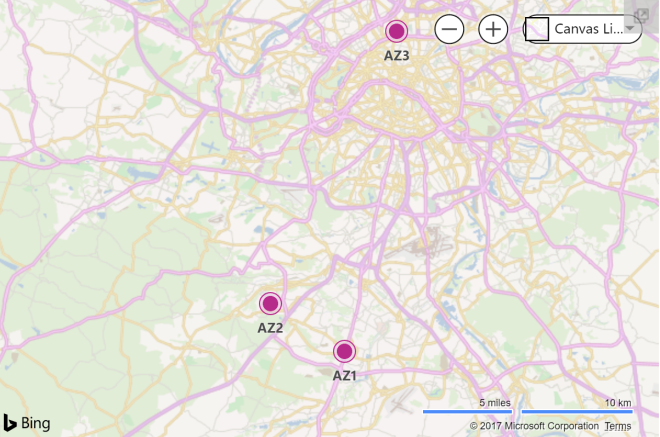
Microsoft didn’t publish exact Availability Zone locations. If you believe this map published here, you could guess that they are probably anywhere from a 2-10 miles apart from each other.

Azure Datacenters.png

In all but the most extreme cases, replicating data across Availability Zones should be sufficient for data protection. Some applications such as SQL Server have built in replication technology. However for a broad range of applications, operating systems and data types, do investigate block level replication SANless cluster solutions. SANless cluster solutions have traditionally been used for multisite clusters. But the same technology can also be used in the cloud across Availability Zones, Regions, or Hybrid-Cloud for high availability and disaster recovery.

Implementing a SANless cluster that spans Availability Zones, be it Azure, AWS or Google, is a pretty simple process given the right tools. As part of the azure outage post mortem, here are a few resources to help get you started.

Step-by-Step: Configuring a File Server Cluster in Azure that Spans Availability Zones

How to Build a SANless SQL Server Failover Cluster Instance in Google Cloud Platform

MS SQL Server v.Next on Linux with Replication and High Availability #Azure #Cloud #Linux

Deploying Microsoft SQL Server 2014 Failover Clusters in #Azure Resource Manager (ARM)

SANless SQL Server Clusters in AWS

SANless Linux Cluster in AWS Quick Start

Lessons From Azure Outage Post Mortem

If you are in Azure, you may also want to consider Azure Site Recovery (ASR). ASR lets you replicate the entire VM from one Azure region to another region. ASR will replicate your VMs in real-time and allow you to do a non-disruptive DR test whenever you like. It supports most versions of Windows and Linux and is relatively easy to set up.

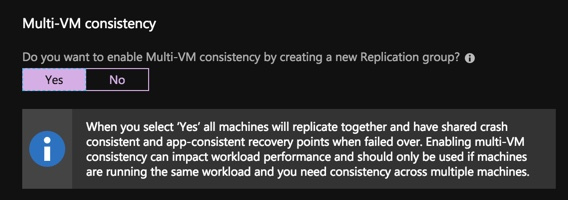
You can also create replication jobs that have “Multi-VM Consistency”. This means that servers must be recovered from the exact same point in time can be put together in this consistency group and they will have the exact same recovery point. Essentially, if you build a SANless cluster with DataKeeper in a single region for high availability, you have two options for DR. One is you could extend your SANless cluster to a node in a different region, or you could use ASR to replicate both nodes in a consistency group.

asr

What’s The Difference?

The trade off with ASR is that the RPO and RTO is not as good as you will get with a SANless multi-site cluster. Although it is easy to configure and works with just about any application. Just be careful. If your application exceeds 10 MBps in disk write activity on a regular basis, ASR will not be able to keep up. Also, clusters based on Storage Spaces Direct cannot be replicated with ASR and in general lack a good DR strategy when used in Azure.

For a while after Managed Disks were released, ASR did not fully support them until about a year later. Full support for Managed Disks was a big hurdle for many people looking to use ASR. Fortunately since about February of 2018, ASR fully supports Managed Disks. However, there is another problem that was just introduced.

With the introduction of Availability Zones, ASR is once again caught behind the times. They currently don’t support VMs that have been deployed in Availability Zones.

2018-09-25_00-10-24
Support matrix for replicating from one Azure region to another

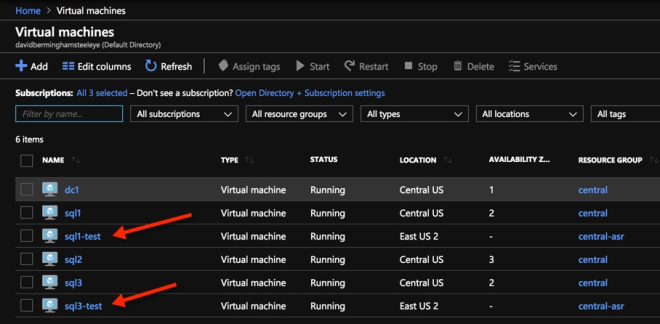
I went ahead and tried it anyway. It seems possible to configure replication and I was able to do a test failover.

ASR-and-AZ
I used ASR to replicate SQL1 and SQL3 from Central to East US 2 and did a test failover. Other than not placing the VMs in AZs in East US 2 it seems to work.

I’m hoping to find out more about this limitation at the Ignite conference. Although this limitation is not as critical as Managed Disk’s. Because Availability Zones aren’t widely available yet. So hopefully ASR will pick up support for Availability Zones as other regions light up Availability Zones and they are more widely adopted.

Read more about my analysis of the Azure Outage Post Mortem
Reproduced with permission from Clusteringformeremortals.com
Filed Under: Clustering Simplified Tagged With: Azure, azure outage post mortem

Azure Outage Post-Mortem Part 1

November 6, 2018 by Jason Aw Leave a Comment

Azure-Outage-Post-Mortem-pt-1

Azure Outage Post-Mortem

The first official Post-Mortems are starting to come out of Microsoft in regards to the Azure Outage that happened last week. This first Azure Outage Post-Mortem addresses the Azure DevOps outage specifically (previously known as Visual Studio Team Service, or VSTS). It gives us some additional insight into the breadth and depth of the outage. It confirms the cause of the outage. It also gives us some insight into the challenges Microsoft faced in getting things back online quickly. Additionally, it hints at some some features/functionality Microsoft may consider pursuing to handle this situation better in the future.

As I mentioned in my previous article, features such as the new Availability Zones being rolled out in Azure, might have minimized the impact of this outage. In the post-mortem, Microsoft confirms what I previously said.

The primary solution we are pursuing to improve handling datacenter failures is Availability Zones, and we are exploring the feasibility of asynchronous replication.

Other Preventions To Take

Until Availability Zones are rolled out across more regions the only disaster recovery options, you have are cross-region, hybrid-cloud or even cross-cloud asynchronous replication. Software based #SANless clustering solutions available today will enable such configurations. Providing a very robust RTO and RPO, even when replicating great distances.

With SaaS/PaaS solutions, you depend on the Cloud Service Provider (CSPs) to have an iron clad HA/DR solution in place. In this case, it seems as if a pretty significant deficiency was exposed. We can only hope that it leads all CSPs to take a hard look at their SaaS/PaaS offerings. As well as to address any HA/DR gaps that might exist. Until then, it is incumbent upon the consumer to understand the risks. They need to do what they can to mitigate the risks of extended outages, or just choose not to use PaaS/SaaS until the risks are addressed.

RTO or RPO?

The post-mortem really gets to the root of the issue…what do you value more, RTO or RPO?

I fundamentally do not want to decide for customers whether or not to accept data loss. I’ve had customers tell me they would take data loss to get a large team productive again quickly, and other customers have told me they do not want any data loss and would wait on recovery for however long that took.

It will be impossible for a CSP to make that decision for a customer. CSP won’t want to lose customer data, unless the original data is just completely lost and unrecoverable. In that case, a near real-time async replica is as good as you are going to get in terms of RPO in an unexpected failure.

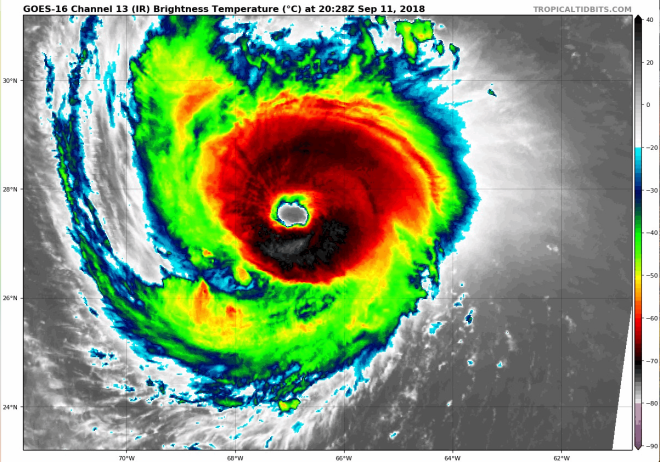
However, was this outage really unexpected and without warning? Modern satellite imagery and improvements in weather forecasting gave fair warning there was going to be significant weather related events in the area.

Hurricane Florence is heading down Southeast US as I write this post. Take proactive measures to move workloads out of impacted region if the data center is in the path. The benefit of a proactive disaster recovery vs a reactive disaster recovery are numerous. No data loss, ample time to address unexpected issues. It also includes managing human resources such that employees can worry about taking care of their families, rather than be at work.

Again, enacting a proactive disaster recovery would be a hard decision for a CSP to make on behalf of all their customers. Planned migrations across regions will incur some amount of downtime. This decision will have to be put in the hands of the customer. Take lessons from this Azure Outage Post-Mortem to educate your customers.

Slide 2.png
Hurricane Florence Satellite Image taken from the new GOES-16 Satellite, courtesy of Tropical Tidbits

Get Protected

So what can you do to protect your business critical applications and data? Let’s gleam some lessons from Azure Outage Post-Mortem. Cross-region, cross-cloud or hybrid-cloud models with software based #SANless cluster solutions are going a long way to address your HA/DR concerns. Furthermore, it’s got an excellent RTO and RPO for cloud based IaaS deployments. There are other options apart from application specific solutions. Software-based, block level volume replication solutions such SIOS DataKeeper and SIOS Protection Suite replicate all data and provide a data protection solution for both Linux and Windows platforms.

My oldest son just started his undergrad degree in Meteorology at Rutgers University. Imagine a day when artificial intelligence (AI) and machine learning (ML) processes weather related data from NOAA. They could trigger a planned disaster recovery migration two days before the storm strikes? I think I just found a perfect topic for his Master’s thesis. Or better yet, have him and his smart friends at the WeatherWatcher LLC get funding for a tech startup that applies AI and ML to weather related data to control proactive disaster recovery events.

I think we are just at the cusp of  IT analytics solutions. We can apply advanced machine-learning technology to cut the time and effort to ensure delivery of critical application services. SIOS iQ is one of the solutions leading the way in that field.

Batten down the hatches and get ready. Hurricane season is just starting and we are already in for a wild ride. If you would like to discuss your HA/DR strategy reach out to me on Twitter @daveberm.

Read other Azure Outage Post-Mortem here
Reproduced with permission from Clusteringformeremortals.com
Filed Under: Clustering Simplified Tagged With: Azure, azure outage post mortem

Recent Posts

  • Ensuring IT Resilience and Service Continuity in State and Local Government
  • SIOS LifeKeeper vs. Pacemaker in SUSE and Red Hat Environments
  • The Power of Approximation in Business Decisions and Communication
  • SAP Disaster Recovery: Techniques and Best Practices
  • Designing for High Availability and Disaster Recovery

Most Popular Posts

Maximise replication performance for Linux Clustering with Fusion-io
Failover Clustering with VMware High Availability
create A 2-Node MySQL Cluster Without Shared Storage
SAP for High Availability Solutions For Linux
Bandwidth To Support Real-Time Replication
The Availability Equation – High Availability Solutions.jpg
Choosing Platforms To Replicate Data - Host-Based Or Storage-Based?
Guide To Connect To An iSCSI Target Using Open-iSCSI Initiator Software
Best Practices to Eliminate SPoF In Cluster Architecture
Step-By-Step How To Configure A Linux Failover Cluster In Microsoft Azure IaaS Without Shared Storage azure sanless
Take Action Before SQL Server 20082008 R2 Support Expires
How To Cluster MaxDB On Windows In The Cloud

Join Our Mailing List

Copyright © 2026 · Enterprise Pro Theme on Genesis Framework · WordPress · Log in