SIOS SANless clusters

SIOS SANless clusters High-availability Machine Learning monitoring

  • Home
  • Products
    • SIOS DataKeeper for Windows
    • SIOS Protection Suite for Linux
  • News and Events
  • Clustering Simplified
  • Success Stories
  • Contact Us
  • English
  • 中文 (中国)
  • 中文 (台灣)
  • 한국어
  • Bahasa Indonesia
  • ไทย

The Essential Need for Always-On Applications

April 12, 2023 by Jason Aw Leave a Comment

The Essential Need for Always-On Applications

The Essential Need for Always-On Applications

From Mission-Critical to Everyday Operations

In today’s “always-on” world, technology plays a vital role in organizations’ efficiency and competitiveness. Some applications are classified as “mission critical,” signifying their essentiality to an organization’s core operations. These applications require high reliability and availability since any downtime or malfunction can have significant consequences. Additionally, everyday applications used in day-to-day business operations are critical to an organization’s success. Therefore, guaranteeing the high availability and reliability of all critical applications is crucial. In this blog, we will delve into why always-on applications are fundamental in today’s fast-paced and competitive business landscape. Additionally, we will explore what organizations can do to ensure their applications are highly available and reliable.

Customers and Employees Expect 24/7 Application Availability

First and foremost, customers and employees expect applications to be available 24/7, from any device and any location. In today’s digital age, application downtime or slow performance can lead to lost revenue, damage to reputation, and even the loss of customers. For example, consider an e-commerce website that experiences downtime during a critical sales period. Customers may become frustrated and abandon their shopping carts, resulting in lost revenue and potentially damaging the company’s reputation. Similarly, if an employee cannot access an essential application, they may not be able to complete their work, leading to lost productivity and potentially impacting the overall success of the organization.

Furthermore, as more organizations move their operations to the cloud, ensuring the availability and reliability of applications has become even more critical. In a cloud environment, complex systems, such as ERPs, may be running across multiple servers, data centers, and even geographic regions. This complexity can make it more challenging to identify and address issues quickly, making it essential for organizations to have robust monitoring and alerting systems in place to ensure they can respond promptly to any problems that arise.

How Organizations Can Ensure Applications Are Always-On

So, what can organizations do to ensure their applications are always-on? One approach is to implement a robust disaster recovery plan that includes redundant systems and failover mechanisms. This approach can help ensure that if one component fails, another can take over seamlessly without causing downtime or disruption. Organizations must also invest in the necessary infrastructure and tools to monitor their applications continuously and proactively address any issues before they become critical.

Additionally, organizations can leverage technologies such as automation to improve the availability and reliability of their applications. For example, automating routine tasks can help reduce the risk of human error, and address issues quickly before they become critical.

Whether they’re mission-critical or not, it’s vital to ensure that applications are available and reliable to maintain productivity, efficiency, and customer satisfaction. Organizations need to invest in the necessary infrastructure, tools, and processes to guarantee that their applications are highly available and reliable. They should also be ready to act quickly in response to any issues that may arise. Ultimately, an always-on approach to applications is a key factor for organizations to succeed in today’s fast-paced and highly competitive business environment.

Reproduced with permission from SIOS

Filed Under: Clustering Simplified Tagged With: Always-On Applications, disaster recovery, High Availability

The Industry’s Most Comprehensive Disaster Recovery for SAP HANA Databases

March 29, 2023 by Jason Aw Leave a Comment

The Industry’s Most Comprehensive Disaster Recovery for SAP HANA Databases

The Industry’s Most Comprehensive Disaster Recovery for SAP HANA Databases

If you’ve got SAP HANA databases, you know how essential it is to protect them from any downtime or disasters. Unfortunately, providing high availability clustering and disaster recovery protection for HANA databases can be a real headache. Configuring HA/DR with many clustering solutions is often a time-consuming and intricate process that involves lots of complicated scripting – while simultaneously addressing the source of the failure. And when things get that complex, it’s easy for errors to creep in, leading to unreliable failover and extended downtime. But don’t worry – in this blog, we’ll take a look at how the multi-target feature in the new V9.7.0 of SIOS LifeKeeper for Linux can make your life a lot easier by automating the failover and orchestrating the DR replication ensuring your HANA databases are always protected from local, site-wide and regional disasters. Read what analysts have to say about V9.7.0 of SIOS LifeKeeper for Linux.

Automated HA/DR for up to four cluster nodes

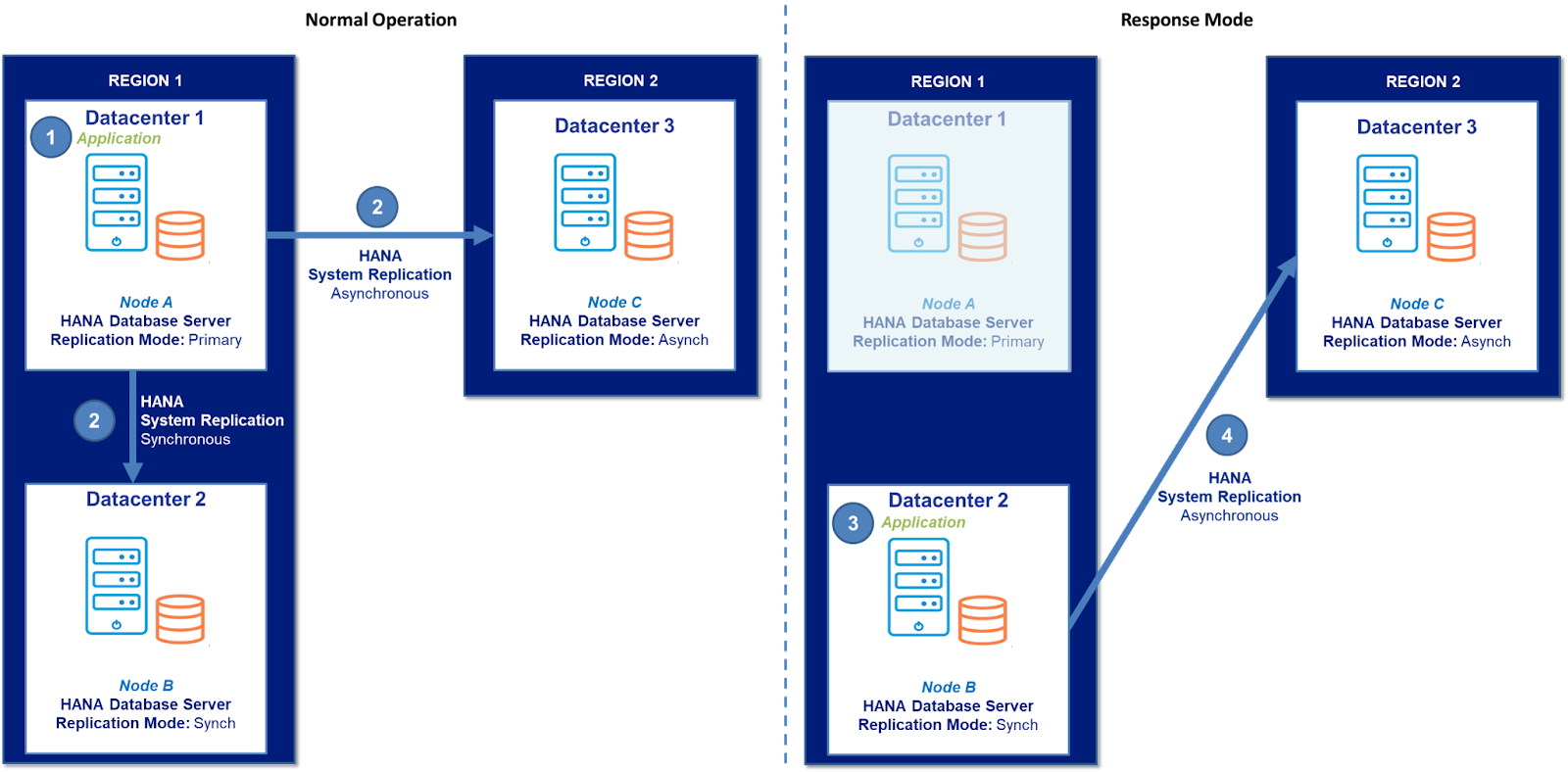
The new HANA Multitarget feature enables you to deploy a high availability environment where HANA operates on a primary node and can failover to up to three secondary nodes located in different cloud Availability Zones or on-premises disaster recovery locations.

SIOS LifeKeeper is an advanced clustering software that monitors the health of the entire IT stack – including network, storage, operating system, application, and hardware – and communicates with all associated cluster nodes. It also supports synchronous or asynchronous block-level replication of primary node storage to two or three secondary DR nodes using HANA System Replication (HSR). If it detects an issue with application or database availability, it automatically moves operation to a secondary node in the cluster and ensures that node now replicates to the DR node(s) – maintaining DR protection and eliminating the need for error-prone scripting.

The Industry’s Most Comprehensive Disaster Recovery for SAP HANA Databases

In normal operating conditions, the application (1) is running on primary node A located in Datacenter 1, Region 1. HSR is used to replicate storage from Node A to secondary nodes B and C (2). If SIOS LifeKeeper detects an application availability issue on Node A, it automatically orchestrates an application failover to Node B (3) and switches DR replication from Node B to Node C (4). When normal operation is restored to Node A, LifeKeeper automatically restores original replication settings with a single click.

SIOS LifeKeeper for Linux

SIOS LifeKeeper for Linux version 9.7.0 delivers the most comprehensive high availability protection from local, site-wide, and regional disasters. It ensures that your essential HANA database resumes operations quickly and reliably, so you can be confident that your mission-critical workload is protected.

In addition, to HANA Multitarget feature, SIOS LifeKeeper for Linux version 9.7 offers other new features and capabilities such as added support for WebSphere MQ v9.3, RHEL v9.0, SAP HANA on RHEL 8.6 and SLES 15 SP4, and SAP HANA on S/4HANA 2022.

How SIOS Can Help

If you are interested in purchasing SIOS LifeKeeper for Linux version 9.7, contact SIOS for more information or call toll-free (US) 866.318.0108 or international: +1.617.245.6955. Protect your business operations with SIOS LifeKeeper for Linux version 9.7 and gain the peace of mind of knowing that your HANA database is always available.

Reproduced with permission from SIOS
Filed Under: Clustering Simplified Tagged With: disaster recovery, SAP HANA Databases

8 Changes That Can Undermine Your High Availability Solution

March 2, 2023 by Jason Aw Leave a Comment

8 Changes That Can Undermine Your High Availability Solution

8 Changes That Can Undermine Your High Availability Solution

As VP of Customer Experience I have observed that most organizations are conscious and careful of deploying any tools or processes that could have an impact on their businesses’ high availability.  These companies typically go through great care with regards to HA including strict change vetting for any HA Clustering, DR, Security, or Backup solution changes.  Most companies understand changes to these tools needs to be carefully considered and tested so as to avoid impact to the overall application availability and system stability.  IT administrators are aware that even the most inconspicuous change in their HA Clustering, Disaster Recovery, Security, or Backup solution can lead to a major disruption.

However, changes in other workplace and productivity tools are most often not considered with the same diligence.

Eight changes that can be undermining your HA solution:

  1. Lost Documentation

Your existing tools often encapsulate a lot of documentation around the company, decisions, integrations, and overall HA architecture.  As teams transition to new tools, these documents are often lost, or access becomes blocked or hampered.

Suggested Improvement: Export and import all existing documents into the new tool.  Use archive storage and backups to retain complete copies of the data before the import.

  1. Lost Requirements

Similar to the lost documents, requirements are often the first thing to be lost when transferring tools.

Suggested Improvement: Document known requirements, export requirements related documents from any existing productivity tools.

  1. Lost History and Mindshare

Almost as important as the documentation and requirements is the history behind changes, revisions, and decisions. Many organizations keep historical information within workplace and office productivity tools.  Such information could include decisions around tools and solutions that have been previously evaluated.  When these workplace tools are changed or transitioned, this type of history can be lost. Existing tools often have a lot of tacit knowledge involved with them as well.  As the new tools are integrated, that knowledge and mindshare disappears. Two decades ago our team migrated bug tracking solutions.  The knowledge gap between the tools was huge and impacted multiple departments, including the IT team now tasked with managing, backing up, and resolving issues.

Suggested Improvement: Be sure to adequately train and transfer mindshare and knowledge between new tools. Be sure that history, context and decisions around the current tools and previous tools are documented before terminating the current tool

  1. Lost Access / Access control

Every new tool has a different set of security and access rules.  Often in the transition teams end up with too many admins, not enough admins, or too many restrictions on permissions.

Suggested Improvement: Map access and user controls, based on requirements and security rules, in advance and have a process for quick resolution.

  1. Lost Contacts

Email and contact system migrations are rarely seamless. Even upgrades between existing versions can have consequences.  One downside of a migration from one tool (Exchange to Gmail) could be lost contacts.  Our team worked with a customer who once called our support team for help obtaining their partner contacts.  Their transition for email systems had stalled and access to critical contacts was delayed.

Suggested Improvement: Plan for contact migration and validation.  Be sure that any critical contacts for your HA cluster are definitely a part of a validated migration step.

  1. Broken integration

Broken integrations is a very common item that impacts high availability, monitoring and alerting.  As companies move towards newer productivity tools, existing integrations may no longer work and require additional development.  As a relative example, a company previously using Skype for messaging, moved away to Slack.  Many of the tools that delivered messages via Skype needed to be adjusted. In your HA environment, a broken integration between dashboards or alert systems could mean critical notifications are not received in a timely manner.

Suggested Improvement: Map out any automated workflows to help identify integration points between tools.  Also work to identify any new requirements and integration opportunities.  Plan and test integrations during the proof of concept or controlled deployment phase.

  1. Lost Champions

Every tool set has a champion and a critic.  The champion may or may not be the same as your administrator.  The role of the champion changes within each organization and often with each tool, but what is common among them is their willingness to address issues, problems, or challenges with the new productivity tool for the benefit of themselves and others.  The champion is the first to find the new features, uncover and report new issues, and help onboard new people to the toolset.  Champions go beyond mindshare and history.  Often with the changing of tool sets, your team will lose a champion.

  1. Lost Productivity

New tools, even those not directly related to HA have an impact on your team’s productivity.  Even tools related to priority management, development and code repositories require ramp up and onboarding time.  This time often translates into lost productivity, which can translate into risks to your cluster. Make sure your processes related to all of the existing and new tools are documented well so that the change to a new tool does not cause confusion, break process flow and lead to even greater losses of productivity.

Suggested Improvement: Reduce the risk of lost productivity by using training tools, leveraging a product champion, and making sure that rollout focuses on shortening the learning curve

Changing workplace productivity tools so that you don’t undermine your high availability solution requires capturing requirements, identifying key documents, transferring mindshare, mapping dependencies, testing and configuring proper access, identifying a toolset champion. It’s making sure that your new tools actual improve productivity rather than pull your key resources away from maintaining uptime.

Cassius Rhue, VP Customer Experience

Reproduced with permission from SIOS
Filed Under: Clustering Simplified Tagged With: disaster recovery, High Availability

SIOS Technology Helps Telcos Navigate the Complexities of High Availability

November 30, 2022 by Jason Aw Leave a Comment

SIOS Technology Helps Telcos Navigate the Complexities of High Availability

In today’s connected world, high availability is not only essential — it is considered a lifeline of society and the economy. No internet means no cloud. Just a few minutes of downtime can cost companies millions of dollars and damage customer relationships. While cloud computing, edge computing, and IoT present many opportunities, they are also challenging to navigate.

In this ongoing series about high availability (HA) and disaster recovery (DR) for various industries, Harry Aujla, EMEA Pre-Sales Director of SIOS Technology Corp., discusses the importance of high availability in the telecom sector. He points out the challenges telcos are currently facing with high availability and how SIOS Technology is helping.

Check out the whole interview above to learn more.

Key highlights from this video interview:

  • The telecom sector is unique because it has a direct impact on most aspects of our professional and personal lives. We live in an interconnected society, so even if critical communication services are down for just a few minutes, it can cause havoc and lead to millions of dollars in lost revenue.
  • Telecom is constantly innovating and evolving with technologies such as 5G rollouts and cloud computing. Maintaining uptime and having high availability remain critical for customer facing systems and backend systems.
  • Aujla discusses how software-defined systems and decentralization are solving some of the challenges telcos face, particularly when considering agility and reliability.
  • Continuity is essential in the telco market, particularly since they deal with infrastructure critical systems, which are often protected with a fault tolerance solution. Aujla tells us that that means telcos often have an SLA of 99.99% availability (or five minutes of downtime per year).
  • Software-defined systems have enabled telcos to embrace digital transformation into the cloud, and to leverage the cost and flexibility that comes with cloud computing.
  • For VoIP systems, the cloud platform provider will only provide high availability services to a certain level within the solution stack, and the responsibility of maintaining SLAs within the cloud falls on VoIP providers and customers. Aujla explains how this is addressed by high availability tools.
  • For telcos, billing systems are considered critical. If customers cannot view or pay their bills, it will cause disruption for all parties involved, potentially affecting revenue and customer satisfaction. SIOS aims to deliver application availability and 99.99% SLAs.
  • IoT is a key use case of cloud computing, with data-capturing devices constantly feeding back into a central brain. Aujla explains why it makes sense to leverage the flexibility and agility cloud platforms offer.
  • Endpoints of IoT devices typically do not need high availability, but rather the data itself. However, the volume of data being collected today presents numerous challenges on the underlying infrastructure in terms of servers, storage, and networking. Aujla explains how this is driving cloud consumption and edge computing.
  • Cloud providers are geared towards availability of the infrastructure itself rather than monitoring what is happening inside the cloud instance where the IoT-centric applications could be running. For this reason, Aujla feels that it is up to customers to take responsibility for their application availability in the cloud.
  • SIOS has the ability to cluster and monitor applications and databases in the cloud, and should it detect failures, it can failover to the next available node in the cluster. Aujla explains how this improves the overall high availability SLA for protected applications.

Solutions

  • Learn more about SIOS solutions for data protection 
  • Check out SIOS Data Keeper Cluster Edition
  • Check out SIOS Lifekeeper for Linux

Connect with Harry Aujla (LinkedIn)

Reproduced with permission from SIOS

Filed Under: Clustering Simplified Tagged With: disaster recovery, High Availability

Create A Disaster Recovery Plan For Critical Applications

November 26, 2022 by Jason Aw Leave a Comment

Create A Disaster Recovery Plan For Critical Applications

Create A Disaster Recovery Plan For Critical Applications

Business-critical applications can be anything from your database servers, to your SAP infrastructure. These are the applications your business relies on. Organizations can’t afford to have these applications down. In this episode, we sat down with Dave Bermingham, Director of Customer Success at SIOS Technology, to discuss how to build a concrete disaster recovery strategy for business-critical applications.

Create A Disaster Recovery Plan For Critical Applications

Reproduced with permission from SIOS
Filed Under: Clustering Simplified Tagged With: Cloud, disaster recovery

  • « Previous Page
  • 1
  • …
  • 10
  • 11
  • 12
  • 13
  • 14
  • …
  • 26
  • Next Page »

Recent Posts

  • Fail Open vs. Fail Closed: Why It’s a False Dilemma (and How True HA Fixes It)
  • The 5-Step Checklist for Validating Your Failover Setup
  • Managing an Inherited DataKeeper Cluster: Challenges and Best Practices
  • Setting Up Nginx Load Balancer on AWS
  • With Great Power: Cluster Maintenance Best Practices

Most Popular Posts

Maximise replication performance for Linux Clustering with Fusion-io
Failover Clustering with VMware High Availability
create A 2-Node MySQL Cluster Without Shared Storage
SAP for High Availability Solutions For Linux
Bandwidth To Support Real-Time Replication
The Availability Equation – High Availability Solutions.jpg
Choosing Platforms To Replicate Data - Host-Based Or Storage-Based?
Guide To Connect To An iSCSI Target Using Open-iSCSI Initiator Software
Best Practices to Eliminate SPoF In Cluster Architecture
Step-By-Step How To Configure A Linux Failover Cluster In Microsoft Azure IaaS Without Shared Storage azure sanless
Take Action Before SQL Server 20082008 R2 Support Expires
How To Cluster MaxDB On Windows In The Cloud

Join Our Mailing List

Copyright © 2026 · Enterprise Pro Theme on Genesis Framework · WordPress · Log in