SIOS SANless clusters

SIOS SANless clusters High-availability Machine Learning monitoring

  • Home
  • Products
    • SIOS DataKeeper for Windows
    • SIOS Protection Suite for Linux
  • News and Events
  • Clustering Simplified
  • Success Stories
  • Contact Us
  • English
  • 中文 (中国)
  • 中文 (台灣)
  • 한국어
  • Bahasa Indonesia
  • ไทย

Webinar: Why Clustering for SQL Server High Availability?

May 24, 2019 by Jason Aw Leave a Comment

Why Clustering for SQL Server High Availability

Webinar: Why Clustering for SQL Server High Availability?

Webinar: Why Clustering for SQL Server High Availability?

When it comes to SQL Server high availability (HA), SQL Server Failover Cluster Instance (FCI) has been the standard since 1998 with the release of SQL Server 7. Dave Bermingham, Microsoft Cloud and Datacenter MVP and former Cluster MVP, reviews what clusters are, why you should use them for high availability, discusses SQL Server Failover Cluster Instance concepts and why it is an important part of your Mission Critical SQL Server deployment whether you run on-premises, in the cloud or in a hybrid cloud configuration.

Register Webinar: Why Clustering for SQL Server High Availability?

Filed Under: News posts Tagged With: Clustering, Failover Clusters, High Availability, SQL Server, SQL Server High Availability

Webinar: Delivering Microsoft SQL Server High Availability on AWS

May 24, 2019 by Jason Aw Leave a Comment

Delivering Microsoft SQL Server High Availability on AWS

Webinar: Delivering Microsoft SQL Server High Availability on AWS

You can use AWS services like Amazon EC2 and Amazon RDS to quickly build, deploy, scale and manage your SQL Server databases, which helps you build more agile applications. This webinar covers best practices for running SQL Server business-critical applications on AWS. Zlatan Dzinic, of AWS, and Dave Bermingham, of SIOS Technology Corp., discuss how to choose between Amazon EC2 and Amazon RDS, and above all, get an overview of the AWS highly reliable, scalable and low cost infrastructure combined with SIOS DataKeeper for high availability platform – providing customers with a powerful solution to ensure improved IT responsiveness and compelling ROI for business-critical applications.

Register Webinar: Delivering Microsoft SQL Server High Availability on AWS

Filed Under: News and Events Tagged With: AWS Cloud, High Availability, SQL Server, SQL Server High Availability

Webinar: Leveraging Storage Spaces Direct for SQL Server High Availability

May 20, 2019 by Jason Aw Leave a Comment

Leveraging Storage Spaces Direct for SQL Server High Availability


Webinar: Leveraging Storage Spaces Direct for SQL Server High Availability

Windows Server 2016 introduced storage capabilities that made it possible to deploy SQL Server failover clustered instances (FCI) without the traditional storage area network (SAN) arrays. In this webinar, learn how you can leverage Storage Spaces Direct (S2D) for deploying SQL Server failover clustered instances to provide high availability to your SQL Server databases. We also look at some of the things to watch out for when deploying SQL Server FCIs on S2D.

Register Webinar: Leveraging Storage Spaces Direct for SQL Server High Availability

Filed Under: News and Events Tagged With: disaster recovery - DR, Failover Clusters, High Availability, SQL Server Failover Clusters, SQL Server High Availability

On-Demand Webinar: SQL Server High Availability in the cloud

May 17, 2019 by Jason Aw Leave a Comment

SQL Server High Availability in the cloud

On-Demand Webinar: SQL Server High Availability in the cloud

On-Demand Webinar: SQL Server High Availability in the cloud

Experts Share FAQs, Common Misconceptions and Resources about High Availability in the Cloud

Watch the panel discussion with top cloud, Datacenter and SQL professionals as they cover best practices, frequently asked questions, and common mistakes they encounter in their professions.

This panel covers topics including SQL Server, upgrades, failover, cloud and best practices. They also point out easy to access resources you may need in the future.

Register Webinar: SQL in the cloud – FAQs, common misconceptions and resources to make your life easier

Filed Under: News and Events Tagged With: AWS QuickStart, HA clusters-cloud, SQL Server Failover Clusters, SQL Server High Availability

Achieving SQL Server High Availability Disaster Recovery With DataKeeper

March 26, 2019 by Jason Aw Leave a Comment

Achieve SQL Server High Availability, Disaster Recovery With A Mix Of Always On Availability Groups And SANless SQL Server Failover Cluster Instances

Introduction

The topic of mixing SQL Server Failover Cluster Instances (FCI) with Always On Availability Groups (AG) is pretty well documented. However, most of the available documentation documents configurations that assume the SQL Server FCI portion of the solution utilizes shared storage. What if I want to build a SANless SQL Server FCI using Storage Spaces Direct (S2D), can I still add a SQL Server AG to the mix? Unfortunately, the answer to this question is no. As of today, this combination of S2D based SQL Server FCI and Always On AG is not supported. I previously blogged about this S2D limitation here.

However, the good news is you CAN build a SANless SQL Server FCI with SIOS DataKeeper and still leverage Always On AG for things like readable secondaries. You still have to abide by the same rules that apply when mixing traditional SAN based SQL Server FCI and Always On AGs, but most part to achieve SQL Server high availability is about the same.

DataKeeper Synchronous replication is commonly used between nodes in the same data center or cloud region, but you may want to replicate asynchronously to an additional node in a different region for disaster recovery. In this case, if you ever do have to bring the DR node online after an unexpected failure, you will have to scrap the Always On AG configurations and reconfigure them. This requirement is very similar to to what Microsoft published here in regards to restoring asynchronous snapshots of SQL Server Always On AGs running inside VMs.

Availability Groups

Essentially, a SANLess SQL Server Failover Cluster Instance with DataKeeper looks like a single instance of SQL Server as far as the Always On Availability Group Wizard is concerned. The configuration of the Always On AG is exactly the same as if you were creating just an Always On AG between two Standalone (non-clustered) SQL Server instances.

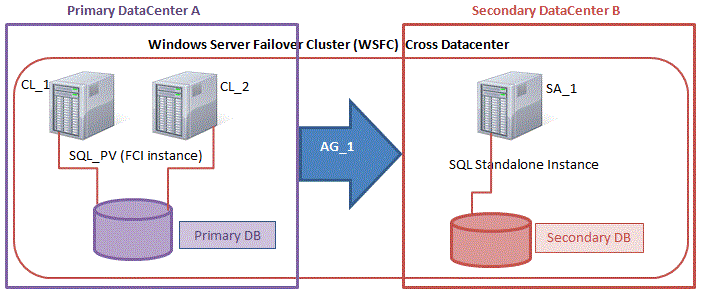
The real confusion arise in the fact that in this configuration all the servers reside in the same failover cluster. But the SQL Server FCI is only configured to run only on the cluster nodes where SQL Server was installed as a Clustered SQL Server Instance. The other nodes are in the same cluster. However, SQL is installed on those nodes as a Standalone SQL Server Instance, not a Clustered Instance. It’s a bit confusing. Essentially what is happening is that Always On AG’s leverage the WSFC quorum model and listeners. As such all the AG Replicas need to reside in the same WSFC, even though they typically do not run clustered instances of SQL Server. If you are completely confused that is okay, most people are confused when they first try to wrap their head around this hybrid configuration.

The real benefit in a configuration like this is that a SQL Server Failover Cluster Instance can be a better and more cost effective (more on this later*) High Availability solution than Always On AG in many circumstances, but it lacks the ability to offer a readable secondary replica. Adding an Always On AG readable secondary replica becomes a viable option to address this need. And using SIOS DataKeeper eliminates the need for a SAN for the SQL Server FCI, which opens up the possibility of configuring SQL Server FCIs where nodes reside in different data center, which also means support for SQL Server FCI’s that span Availability Zones in both Azure and AWS.

Please note that pictured below is just one possible configuration. Multiple FCI cluster nodes, multiple AGs and multiple Replicas are all supported. You are only limited by the limits imposed by your version of SQL Server.

This article seems to document the setup steps pretty well. Of course, instead of shared storage for the SQL FCI, you will use SIOS DataKeeper to build the FCI as I document here.

Image result for SQL Server FCI with Availability Groups

Basic Availability Groups

As of SQL Server 2016 a scaled down “Basic Availability Groups” became available in SQL Server Standard Edition, making this configuration possible even in SQL Server Standard Edition. Basic AGs are limited to a single database per Availability Group, a Single Replica (2-nodes). However, they do not support a readable secondary replica so their use cases in this hybrid configuration are very limited.

Distributed Availability Groups

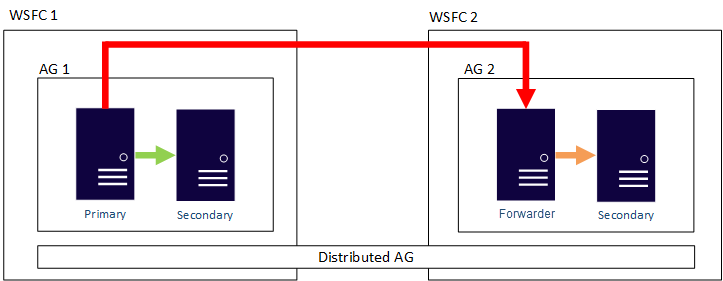
Distributed AGs were introduced in SQL Server 2016 are also supported in this hybrid configuration. Distributed AGs are very similar to regular AGs, but the Replicas do not need to reside in the same cluster, or even in the same Windows Domain. Microsoft documents the the main use cases of Distributed Availability Groups as follows:

  • Disaster recovery and easier multi-site configurations
  • Migration to new hardware or configurations, which might include using new hardware or changing the underlying operating systems
  • Increasing the number of readable replicas beyond eight in a single availability group by spanning multiple availability groups
Image result for distributed availability groups

Summary

If you like the idea of SQL Server FCIs for SQL Server high availability, but want the flexibility of read-only secondary replicas, this hybrid solution might just be the thing you are looking for. Traditional SAN based SQL Server FCIs, and even Storage Spaces Direct (S2D) based FCIs, limit you to a single data center. SIOS DataKeeper frees you from the limits of your SAN and enables configurations such as SQL Server FCI that span Availability Zones or Cloud Regions. It also eliminates the reliance on the SAN, allowing you to leverage locally attached high speed storage devices without giving up your SQL Server Failover Cluster Instance.

* How to Save Money

Earlier I promised I would tell you how to save money by doing this all with SQL Server Standard Edition. If you can live with readable replicas that are point in time based snapshots, you can skip Always On AGs completely and just use the SIOS DataKeeper target side snapshot feature to periodically take an application consistent snapshot of the volumes on the target server without impacting ongoing replication or availability. Here’s how…

http://discover.us.sios.com/rs/siostechnology/images/10-Ways-Save-AlwaysOn-vs-Failover-Clustering.pdf

Create a 2-node SQL Server FCI with SQL Server Standard Edition and save a boatload of money on SQL licenses. And yet still replicate the data to a 3rd node outside the cluster for reporting or DR purposes. If you take a snapshot of the volumes on this third server these snapshots are read-right accessible. This way, you can mount those databases from a standalone instance of SQL Server to run month end reports, copy to archives, or you might even want to use those snapshot to quickly and easily update your QA and Test/Dev environments with the latest SQL data.

I hope you found guide to create to achieve SQL Server high availability, disaster recovery with a mix of Always On Availability Groups and SANless SQL Server Failover Cluster Instances useful.

Reproduced with permission from Clusteringformeremortals.com

Filed Under: Clustering Simplified Tagged With: High Availability, SQL Server Failover Cluster Instance, SQL Server High Availability

  • « Previous Page
  • 1
  • 2
  • 3
  • 4
  • Next Page »

Recent Posts

  • Keeping Buildings Safe: High Availability in Maintenance and Security Systems
  • Designing High Availability Through Modularity and Abstraction
  • The Critical Role of QA and Production Environments in High Availability
  • The Danger of Turn It Off, Turn It Back On Again Thinking in High Availability
  • SIOS Partnerships

Most Popular Posts

Maximise replication performance for Linux Clustering with Fusion-io
Failover Clustering with VMware High Availability
create A 2-Node MySQL Cluster Without Shared Storage
SAP for High Availability Solutions For Linux
Bandwidth To Support Real-Time Replication
The Availability Equation – High Availability Solutions.jpg
Choosing Platforms To Replicate Data - Host-Based Or Storage-Based?
Guide To Connect To An iSCSI Target Using Open-iSCSI Initiator Software
Best Practices to Eliminate SPoF In Cluster Architecture
Step-By-Step How To Configure A Linux Failover Cluster In Microsoft Azure IaaS Without Shared Storage azure sanless
Take Action Before SQL Server 20082008 R2 Support Expires
How To Cluster MaxDB On Windows In The Cloud

Join Our Mailing List

Copyright © 2026 · Enterprise Pro Theme on Genesis Framework · WordPress · Log in