SIOS SANless clusters

SIOS SANless clusters High-availability Machine Learning monitoring

  • Home
  • Products
    • SIOS DataKeeper for Windows
    • SIOS Protection Suite for Linux
  • News and Events
  • Clustering Simplified
  • Success Stories
  • Contact Us
  • English
  • 中文 (中国)
  • 中文 (台灣)
  • 한국어
  • Bahasa Indonesia
  • ไทย

Windows Server 8 Developer Preview Running On VMware Workstation 8

February 1, 2018 by Jason Aw Leave a Comment

Starting up Windows Server 8

I’m pretty excited that I was able to get Windows Server 8 up and running on my laptop today. I wasn’t really looking forward to having to boot from VHD just to check out some of the features. I really wanted to run multiple copies at the same time so I could check out some of the cool new clustering features, so once again, booting my laptop from a VHD really wasn’t going to give me the experience I needed. I do have some servers running Hyper-V that would have been fine, but I really like having something quick and easy on my laptop that I can fire up anywhere at any time. VMware Workstation has been my go to virtualization platform for my Windows 7 laptop for quite some time due to the lack of a real client based hypervisor alternative from Microsoft.

Getting the VM to work

When I downloaded Windows Server 8 Developer Preview Edition from MSDN earlier this week, I was assuming I was getting an installation ISO. What I discovered was that I actually downloaded a pre-installed VHD. I haven’t gone back yet to check to see if there is an ISO. From reading the blogs it appears there is an ISO available somewhere, so I probably just grabbed the wrong file. Without a Hyper-V player available for Windows 7 (well, maybe VirtualBox?), I decided to get really crazy and try out the free Starwind V2V Converter and turn it into a bootable VMDK file. This way I could still launch it in VMware Workstation.

I found the Starwind V2V Converter to be very straight forward and soon enough I had a VMDK file ready to launch in VMware Workstation. What I found out was that you cannot run Windows Server 8 Developer Preview in VMware Workstation 7. You need the newly released Workstation 8. In VMware Workstation you get a message that begins as follows…

*** VMware Workstation internal monitor error ***
vcpu-0:NOT_IMPLEMENTED vmcore/vmm/intr/apic.c:1903

So, I went ahead and upgrade to Workstation 8 and tried to turn on the converted VMDK file. At first I got a message about hardware being changed and the VM would not start. But after I adjusted the processor so that it match the processor that I have (1 CPU, 2 Core), the VM launched! One other setting you need to make sure to set right is the operating system version. Since Windows 8 is not an option yet, choose Windows 7. Windows 7 x64 doesn’t work – make sure you choose Windows 7!
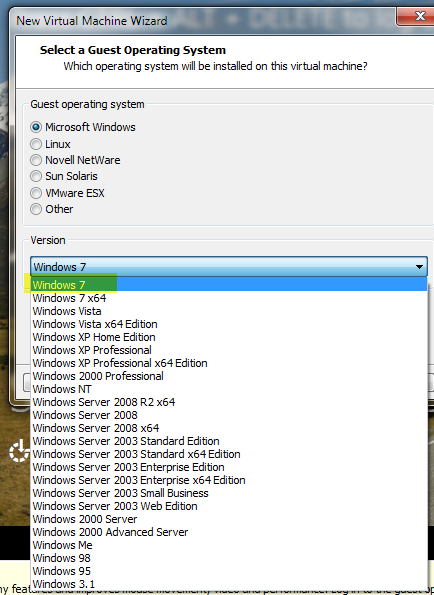
Windows Server 8 Developer Preview Running On VMware Workstation 8

VMware tools didn’t work

I tried to install the VMware tools. Unfortunately, it didn’t work out so well for me. I got a black screen with a pointer after the tools were installed. I would avoid installing the VMware tools for the time being until they come out with VMware tools specific for Windows 8.

Here is my first view of Windows 8. I’ll be writing more about the HA features and Hyper-V next week once I start poking around
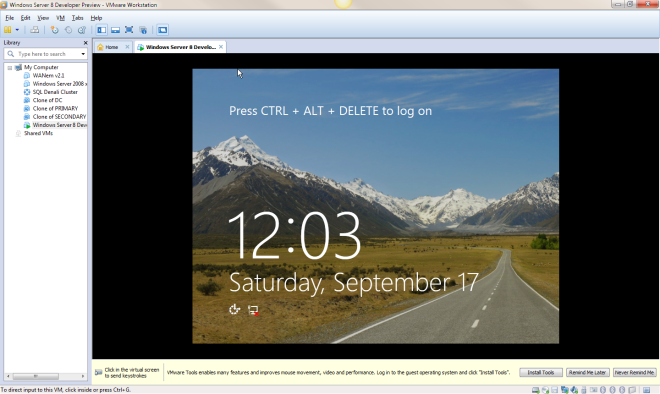
Windows Server 8 Developer Preview Running On VMware Workstation 8

Reproduced with permission from https://clusteringformeremortals.com/2011/09/17/windows-server-8-developer-preview-running-on-vmware-workstation-8/

Filed Under: Clustering Simplified Tagged With: VMware, Windows Server 8

Sacrifice High Availability For High Performance?

January 31, 2018 by Jason Aw Leave a Comment

Mosey on over to the Fusion-io website and read my guest post in their blog, Do You Have to Sacrifice High Availability for High Performance?

Invitation to join our Webinar

After you are done there, view the joint SIOS and Fusion-io webinar “SQL Server 2008 – High Performance and High Availability Through Fusion-io and SIOS”. Part of this webinar includes some VERY interesting benchmark information…you won’t want to miss it!

Reproduced with permission from https://clusteringformeremortals.com/2011/08/23/do-you-have-to-sacrifice-high-availability-for-high-performance/

Filed Under: Clustering Simplified Tagged With: Fusion-io, High Availability, High Performance, SIOS, SQL Server 2008, Webinar

Microsoft Now Officially Supports The iSCSI Software Target 3.3

January 31, 2018 by Jason Aw Leave a Comment

iSCSI Software Target 3.3 is now available for download

Just a few weeks ago I wrote an article about how to configure the iSCSI Software Target 3.3 in a cluster environment. While it is great for labs and testing, up until today it was not supported in a production environment. Well…that all changes today! Microsoft just announced that the iSCSI Software Target 3.3 is a freely available download and can be used on a production network.

http://blogs.technet.com/b/josebda/archive/2011/04/04/microsoft-iscsi-software-target-3-3-for-windows-server-2008-r2-available-for-public-download.aspx

DataKeeper Cluster Edition – High Availability/Disaster Recovery solution at great price

This all starts to get interesting once you start considering the possibility of building shared nothing iSCSI Target clusters with DataKeeper Cluster Edition. Build 2-nodes locally for High Availability and then place a 3rd one in a remote data center for Disaster Recovery. Now that is a pretty sweet HA/DR solution without having to break the bank!

 Reproduced with permission from https://clusteringformeremortals.com/2011/04/04/microsoft-now-officially-supports-the-iscsi-software-target-3-3-in-production/

Filed Under: Clustering Simplified, Datakeeper Tagged With: iscsi

Hyper-V Replica Coming In Windows Server “Next”

January 31, 2018 by Jason Aw Leave a Comment

Watch new feature Hyper-V Replica

Here is an interesting video that demonstrates “Hyper-V Replica”, a new feature coming in the next version of Windows. Skip to the 39 minute mark to see the demonstration.

http://digitalwpc.com/Videos/AllVideos/Permalink/3cb3788c-5c47-4b9e-987c-0dec4194058b/#fbid=slfi0dmNMqP

It looks like a very welcome feature that certainly will make Hyper-V even more competitive when comparing the feature set vs. price between vSphere and Hyper-V, especially with the new pricing announced by VMware.

I’ll be very curious to see if this integrates with Windows Server Failover Clustering to allow you create shared nothing clusters as you can today with 3rd party replication software, which I’ve demonstrated using SteelEye DataKeeper Cluster Edition in an earlier blog post.

Reproduced with permission from https://clusteringformeremortals.com/2011/07/21/hyper-v-replica-coming-in-windows-server-%E2%80%9Cnext%E2%80%9D/

Filed Under: Clustering Simplified, Datakeeper Tagged With: Hyper V, SIOS DataKeeper Cluster Edition, VMware, vSphere, Windows Server Failover Clustering

SQL Server Denali Demonstration

January 31, 2018 by Jason Aw Leave a Comment

SQL Server Denali Hadron Multi-site Cross Subnet Failover Video Demonstration

The crowd has spoken and the SQL Server Team has answered! Denali is the first version of SQL Server to support the cross subnet failover feature which first introduced in Windows Server 2008 Failover Clustering. It seems like we have been waiting forever for the SQL team to support this feature. Now, the wait is finally drawing to an end.

The following is a link to a 5 minute video. It demonstrates a 3-node cluster Denali cluster with two nodes in the primary datacenter, and one node in the Disaster Recovery site in a separate subnet.

http://screencast.com/t/ni1zqMOIv

I will be demonstrating this solution at Tech-Ed 2011 in Atlanta this week. Stop by the SIOS Technology booth and come have a look for yourself at the SQL Server Denali multi-site cluster demonstration using SteelEye DataKeeper. We would be happy to share our technology and further explain how it could benefit your projects.

Reproduced with permission from https://clusteringformeremortals.com/2011/05/15/sql-server-denali-hadron-multisite-cross-subnet-failover-video-demonstration/

Filed Under: Clustering Simplified Tagged With: cross subnet failover, Demonstration, Denali, disaster recovery, Microsoft, SIOS DataKeeper Cluster Edition, SQL Server, Tech-Ed 2011, Windows Server 2008 Failover Clustering

  • « Previous Page
  • 1
  • …
  • 106
  • 107
  • 108
  • 109
  • 110
  • …
  • 114
  • Next Page »

Recent Posts

  • 3 Common Configuration Mistakes That Cause Clusters to Break
  • Guide: Deploying a Multi-Zone and Multi-Region SQL Server FCI in Azure
  • High Availability for On-Premises Data Centers
  • How APM Tools and High Availability Clusters Improve Network Resilience
  • Selecting the Right Storage for SQL Server High Availability in the Cloud

Most Popular Posts

Maximise replication performance for Linux Clustering with Fusion-io
Failover Clustering with VMware High Availability
create A 2-Node MySQL Cluster Without Shared Storage
SAP for High Availability Solutions For Linux
Bandwidth To Support Real-Time Replication
The Availability Equation – High Availability Solutions.jpg
Choosing Platforms To Replicate Data - Host-Based Or Storage-Based?
Guide To Connect To An iSCSI Target Using Open-iSCSI Initiator Software
Best Practices to Eliminate SPoF In Cluster Architecture
Step-By-Step How To Configure A Linux Failover Cluster In Microsoft Azure IaaS Without Shared Storage azure sanless
Take Action Before SQL Server 20082008 R2 Support Expires
How To Cluster MaxDB On Windows In The Cloud

Join Our Mailing List

Copyright © 2026 · Enterprise Pro Theme on Genesis Framework · WordPress · Log in