SIOS SANless clusters

SIOS SANless clusters High-availability Machine Learning monitoring

  • Home
  • Products
    • SIOS DataKeeper for Windows
    • SIOS Protection Suite for Linux
  • News and Events
  • Clustering Simplified
  • Success Stories
  • Contact Us
  • English
  • 中文 (中国)
  • 中文 (台灣)
  • 한국어
  • Bahasa Indonesia
  • ไทย

9 Signs You Have an Application Availability Problem

November 27, 2020 by Jason Aw Leave a Comment

9 Signs You Have an Application Availability Problem

9 Signs You Have an Application Availability Problem

You’ve heard the saying “recognizing a problem is the first step in solving it.”  But, many small, medium, and surprisingly, even large enterprise businesses aren’t aware that their application availability isn’t what it should be.

Read on for these nine signs that you still have an application availability problem:

1. You spend more time restarting an application than using it

Application crashes may be a fact of life, but if your application is down more often than it is up, that is a problem.

2. You’ve started to snooze through the alert storm in your inbox or control center

You have deployed alerts for application or server downtime, but the alert storm has so overwhelmed your inbox that you have silenced them all.

3. You have one data center for all your critical operations

A single data center for operations may sound convenient, but one well intended but misdirected construction crew has been known to turn single data centers into costly unavailability zones.

4. Your idea of data protection involves backup retrieval and archives

Your data protection strategy is critical. Data replication technology and site to site, region to region replication has become a mainstay, so if your replication or data protection strategy is non-existent or involves a lengthy jog to the vault this could be a big problem.

5. Your recovery procedures always require manual intervention

Manual intervention itself is not a problem. Some events are so difficult and complex that some amount of manual effort could be required.  But, if manual intervention is always the first, second and third order of business after a server or application outage, that is a problem.

6. Your RTO is measured in days not hours or minutes

How are you measuring your recovery time objective (RTO)? Do you measure your RTO in days or hours instead of minutes per month?  True, every business has a tolerance level for their RTO.  However, your RTO should not be a function of server rebuilds and gross instabilities in your architecture.

7. You don’t know your RPO because your standby is never reliably in sync

You’ve checked the box on reliable monitoring and recovery of your application, and taken it a step further to provide a standby cluster ready system.  Great job.  But, before I let you off the hook, what is your recovery point objective (RPO)? An RPO should be something more accurate than “somewhere between day 0 and last night.”

8. Single points of failure don’t just exist, they are the norm

Where are your single points of failure?  Your budget may not allow you to eliminate every single point of failure, but if you can identify a single point of failure in every major category and every critical component of your enterprise…

9. Your last disaster made local, regional, or national news 

If the last major storm, grid failure, or failure event put a blight on your business due to downtime, then higher availability is the next order of business.

Downtime costs your business in terms of customers, productivity, and peace of mind.  Unaddressed risks have a definite impact on your business and reputation.  If these warning signings are there, you may have an availability problem.  And, if you ignore them you’ll likely have even bigger problems soon thereafter, hence the importance of application availability.

— Cassius Rhue, VP, Customer Experience

Reproduced with permission from SIOS

Filed Under: Clustering Simplified Tagged With: Amazon AWS, Application availability, application monitoring, High Availability, high availability - SAP, SQL Server High Availability

Migrating to the cloud? Here’s how your DevOps priorities should change when you move to Amazon EC2

September 27, 2020 by Jason Aw Leave a Comment

Migrating to the cloud? Here’s how your DevOps priorities should change when you move to Amazon EC2


Migrating to the cloud? Here’s how your DevOps priorities should change when you move to Amazon EC2

A majority of companies migrating to the cloud, or creating “cloud-native” applications, are doing so with Amazon Web Services (AWS).  AWS offers a lot of cost and functionality advantages.  Companies who have adopted industry-standard developer operations (“DevOps”) best practices for monitoring and managing their on-premise environments often ask themselves how they adapt to their new cloud environments and applications.

How will DevOps priorities change when you move from on-premise applications to Amazon EC2?  Here’s an explanation of the differences between the two and what you should keep in mind.

DevOps priorities in the cloud?  The same. But different.

We often hear customers say that operations will be easier when they move to AWS. We caution them that moving to the cloud (or even AWS) does not mean that they no longer need to monitor and manage their applications.

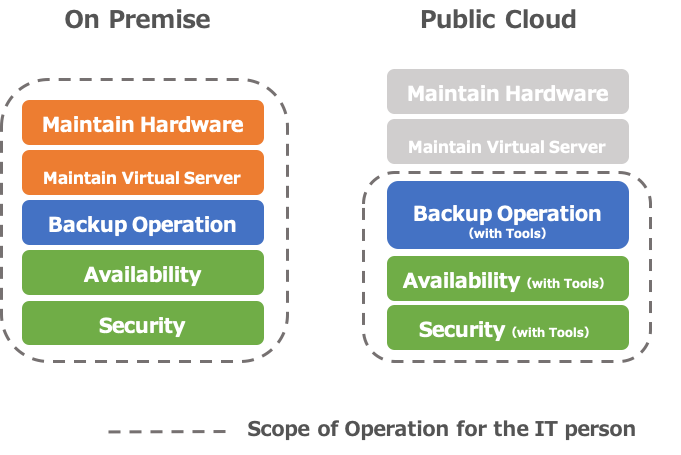
Companies moving to Amazon AWS can take advantage of lower costs and manpower resources when it comes to hardware procurement, provisioning, and maintenance.  But you need to take into account that when you decide to host applications on Amazon EC2 that anything above the Operating System layer is your responsibility.

When it comes to backup/availability guarantee/security measures, etc. for your Amazon EC2 environments, the priorities are the same as if they were on-premise applications. And Amazon provides some native tools and functionality.  But you need to decide if they are the right fit for requirements.

Security, Backup… What do you need to know when managing Amazon AWS environments?


So what are some of the AWS-specific considerations you need to keep in mind as you move to Amazon EC2?  And what are the right tools for you?  The time you invest upfront in designing your applications and how you will deploy and manage them will pay off.

Your first consideration should be how you will secure your Amazon EC2 applications.  Network design, such as “which ports to open” and “from where to allow access” must be considered in the same way as for your on-premise applications.  These can be configured in AWS using security groups and network ACLs (access control lists).

You can use the AWS Trusted Advisor functionality*, which automatically examines your AWS environment and points out whether or not it is set to the recommended settings, making it possible to check your company’s AWS environment for security issues.  We recommend checking with the AWS Trusted Advisor both at the time of implementation and periodically.

Another essential aspect of security is the management of authentication and access privileges.  AWS consolidates all of these into AWS Identity and Access Management (AWS IAM).  In addition to controlling who can access which EC2 instances, you can also use AWS IAM to set up access permissions from EC2 instances to other resources (such as DBs), etc.  Once you have migrated to AWS, the first thing you need to do is to set up the accounts and access restrictions properly in AWS IAM.

The next consideration is “how will I backup my applications on Amazon EC2?”  Amazon EC2 provides the ability to take snapshots, which allows you to do so.  In addition, using “Amazon Data Lifecycle Manager” makes it easy to set up periodic snapshots, as well as incremental backups.  Snapshot files are stored on the Amazon S3 storage service.  You are charged according to their capacity, so you need to be aware of the amount of data you have and set up such settings as “reduce the capacity by incremental backups” and “delete from old data.”

“Availability” needs to be considered in advance. The key is to operate the system in accordance with the priority level of the system.

The last consideration is availability.  With Amazon EC2 applications, as well as those that are on-premise, you should consider the level of availability required based on cost and system importance. However, if you use Amazon’s Multi-AZ deployment functionality, you can specify a redundant configuration between different data centers.  However, using Multi-AZ costs more than using a single-AZ configuration (although not as much as if you had redundant on-premise systems).  When designing your applications you need to consider whether Multi-AZ is required and how much you should invest in availability. Using SIOS clustering software allows you to create a clustering environment that fails over across availability zones and regions for maximum DR protection.

If you aren’t investing in failover, then you should at least be monitoring your applications and planning how to recover them when downtime is experienced.  You can use Amazon CloudWatch to easily monitor general items such as CPU, memory, and disks, and you can also program the Amazon EC2 Auto Recovery function to automatically recover instances when an error occurs in the EC2.

If your application is mission-critical, then you will want to invest in high availability protection that delivers at least 99.99% uptime. Get in touch with SIOS availability experts to make sure your application’s uptime is secured.

Reproduced with permission from SIOS
Filed Under: Clustering Simplified Tagged With: Amazon AWS, Amazon EC2, AppKeeper, Application availability, application monitoring

What If We Eliminated Apache Downtime?

August 30, 2020 by Jason Aw Leave a Comment


Eliminate Apache web server downtime with SIOS AppKeeper Monitoring

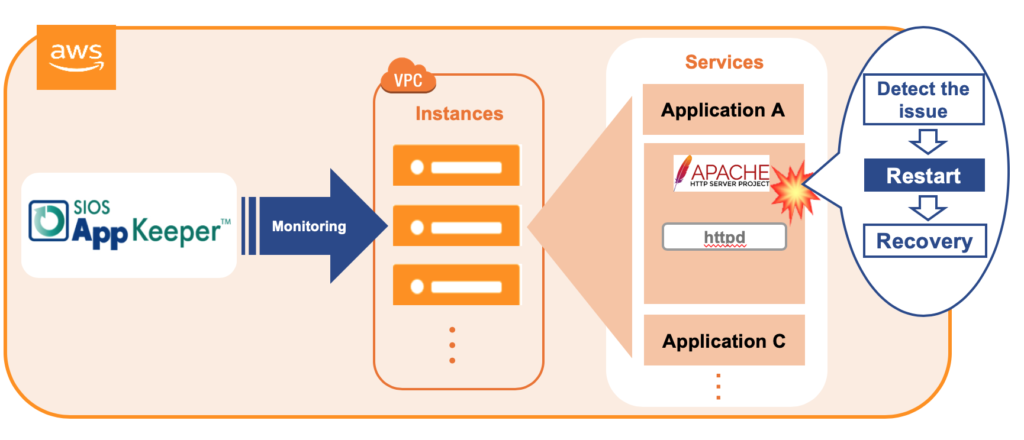
Eliminate* Apache web server downtime with SIOS AppKeeper Monitoring

Today Apache webservers are the most popular webservers on the Internet.  Companies are deploying mission-critical, customer-facing applications built on Apache using cloud platforms such as Amazon AWS, Microsoft Azure, and Google Cloud Platform.  So you can bet that they are investing a lot of time and money in monitoring those applications and trying to reduce downtime. But what if we told you we could eliminate the need for manual intervention via automated monitoring and restarting applications when your Apache web servers are down?

Before we go into how we can do that, let’s step back for a minute and look at choices that companies have when it comes to monitoring and managing their Apache web servers and those critical applications.

How to monitor and protect your Apache web servers from unnecessary downtime

Anyone deploying applications using Apache webservers is either considering monitoring the health of their webservers themselves or outsourcing that task to a third party.

When it comes to monitoring cloud applications running on Amazon Web Services, a popular choice is to use Amazon CloudWatch.  Some companies are even extending the functionality of CloudWatch by creating some levels of automation by developing scripts or by using AWS Lambda.  But configuring Amazon CloudWatch properly with custom metrics and setting up AWS Lambda requires a certain amount of technical expertise that may be beyond that of many companies.  And then there is a cost and effort required to maintain any scripts as the applications evolve.

Another choice is to invest in a comprehensive Application Performance Monitoring (“APM”) solution from a vendor such as New Relics, Dynatrace, DataDog, or LogicMonitor. These can be very appropriate if you want to monitor more than just your AWS environment. APM solutions are very configurable and will provide you with a lot of data in terms of information about what happened.

But have you reduced your downtime?  Probably not.  What you have done is invested in a system that will alert you immediately if and when your Apache webservers go down, and will overload you with data (or “alert storms”) as you try to get things running again.

Some companies have decided to outsource the responsibility for monitoring and managing their applications to a trusted third party (often a “managed service provider” or MSP). In return for a base monthly fee, the MSP monitors applications and offers a core set of services, often bound by a Service Level Agreement. When alerts are received, they investigate. In some cases, these investigations can require (costly) escalations. If and when applications go down, the MSP will then take control and restart services or reboot instances where they can.  But these remediation actions are often an extra expense.

There has to be a better way.

How automated monitoring and restart with SIOS AppKeeper eliminates Apache Webserver downtime

Based on our customer experience, the average company with only three EC2 instances experiences downtime at least once a month.  “The site is down!  Drop everything. Find out what needs to be done!”  What you need to do is reduce the need for these unnecessary fire drills.

SIOS AppKeeper is a SaaS service that is easy to install and configure and monitors any services and applications running on Amazon EC2, such as your Apache httpd service.  When an anomaly is detected, AppKeeper automatically restarts the service, and if that doesn’t work it reboots the entire instance. No more reading through logs to pinpoint the reason for the failure, or escalation to developers to restart your service. Or expensive outsourcing fees.  AppKeeper provides “set-it-and-forget-it” functionality so that you can eliminate downtime.

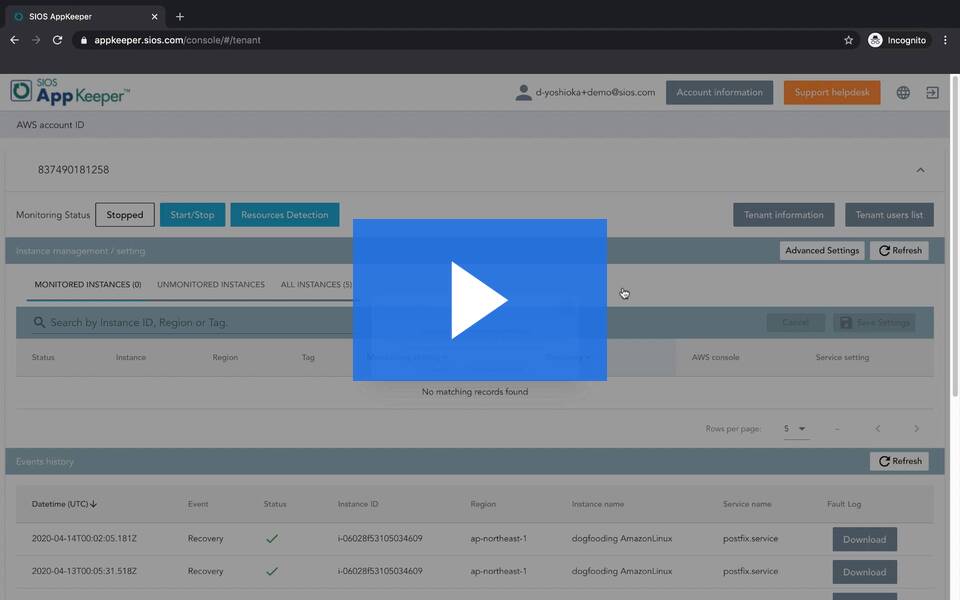
Today hundreds of companies rely on AppKeeper to keep their cloud environments running. We invite you to check out the video below for a demonstration of how AppKeeper protects Apache webservers.  And if you like what you see, please feel free to sign up for a free 14-day trial of AppKeeper.

What If We Eliminated Apache Downtime

*Based on customer data, AppKeeper addresses 85% of application service failures. So in almost nine times out of ten AppKeeper sends out an email notifying customers that downtime was detected and the services were restarted or the instances were rebooted automatically.  Isn’t that better than panicking and digging through log files before manually restarting everything?

See related post: Why is AWS EC2 Application Monitoring So Hard?


Reproduced with permission from SIOS
Filed Under: Clustering Simplified Tagged With: Amazon AWS, Apache Availability, Application availability

Why is AWS EC2 Application Monitoring So Hard?

August 2, 2020 by Jason Aw Leave a Comment

Why is AWS EC2 Application Monitoring So Hard?

Why is AWS EC2 Application Monitoring So Hard?

Congratulations! You’ve migrated your core applications to the AWS cloud.  Or, you are developing new “cloud-native” applications and hosting them in the cloud.  Perhaps you are taking advantage of Amazon EC2’s scalability and its elastic architecture.  Either way, you now want to ensure that those applications stay up and running, or that you are alerted quickly if and when something happens.

Because something will happen.  Our customer data shows that companies using only three EC2 instances experience downtime at least once a month.  That means unhappy users unable to access their applications. You need a monitoring solution to tell you what’s going on.

How to narrow down EC2 application monitoring solutions

The first step in your search for the perfect EC2 monitoring solution should be to understand your requirements and your own technical capabilities.  Monitoring solutions are not all alike.

Are you interested in a feature-rich solution that monitors a wide array of systems?  Or one that focuses on a core set of systems, such as your EC2 environment?

What do you want to do with the output from your application monitoring solution?  Do you want as much information as possible to help your developers’ troubleshoot issues?  Or are you looking for quick alerts and assistance in remediating from any failures?

And what is your technical appetite to install and manage another application?  Do you love scripting?  Or do you want something that is “set-it-and-forget-it”?

A search for “application performance monitoring solutions” on Google returns 1,170,000,000 results!  Jump into the Amazon AWS Marketplace and you’ll find 453 products listed in the DevOps – Monitoring category.  Having a clear sense of your requirements and your own technical capabilities will help you narrow down your search.

Monitoring applications running on Amazon EC2 with Amazon CloudWatch or other APM solutions

If you are hosting your applications on Amazon EC2, then you might consider using Amazon CloudWatch.   How familiar are you with standard and custom metrics?  You should know that you need quite a lot of technical expertise to run Amazon CloudWatch properly. Amazon CloudWatch is a great solution for users who need data and actionable insights to respond to system-wide performance changes, optimize resources and a unified view of their operational health.  But this all comes at a price in terms of the knowledge and experience needed to configure and manage Amazon CloudWatch properly.

Another choice is for you to evaluate and acquire one of the many commercially available application performance monitoring (“APM”) solutions on the market, such as from AppDynamics, Datadog, Dynatrace, or New Relic.  But keep in mind your requirements.  How broadly do you need to monitor?  And what do you intend to do with that information?  Are you ready to be overwhelmed with alerts?  And be aware that many APM solutions do nothing to help you recover beyond pinpointing the issue.  You still have to drop everything to manually restart services or reboot your instances.

Monitor applications running on Amazon EC2 using SIOS AppKeeper

But there is another way.  SIOS AppKeeper is a SaaS service that can be configured to automatically discover any EC2 instances and their services. It then automatically take any number of actions if and when downtime is experienced.  So instead of getting alerts that something is wrong, you get notified that something happened and was automatically addressed.
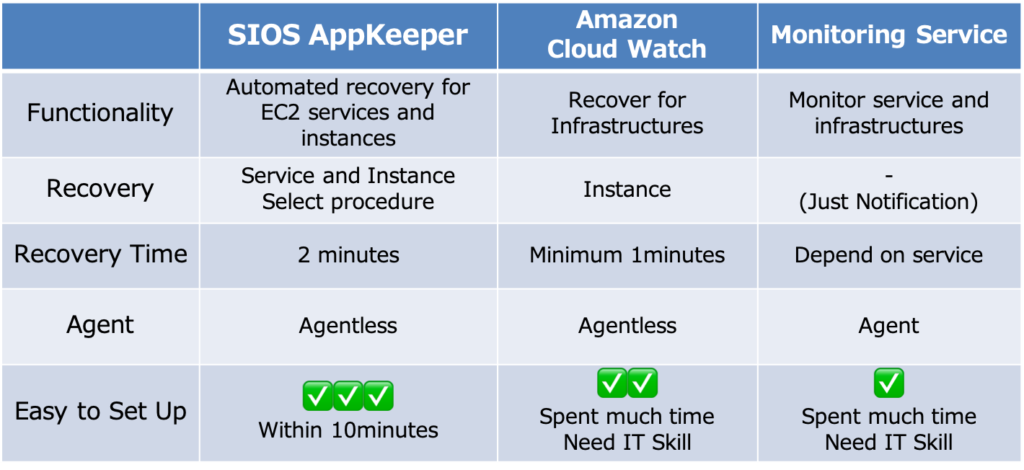
Why-App_monitoring-hard-2-1024x470

SIOS AppKeeper starts at only US $40 per instance per month. We invite you to view this short video to see how easy it is to install and use AppKeeper.

Why is AWS EC2 Application Monitoring So Hard?

One of our customers, Hobby Japan, a publishing company in Tokyo, was initially using Amazon CloudWatch but their understaffed IT team couldn’t respond fast enough to alerts. They wanted to leverage automation and moved to SIOS AppKeeper.  Since moving to AppKeeper they haven’t experienced any issues or unexpected downtime with their EC2 instance. Here’s a link to a case study on Hobby Japan.

Monitoring your cloud applications shouldn’t be a full-time job.  You want a monitoring solution that is easy to install and use, doesn’t overwhelm you with alerts, and hopefully takes care of systems impairments automatically.  We encourage you to try a 14-day free trial of SIOS AppKeeper by signing up here.

Article reproduced with permission from SIOS
Filed Under: Clustering Simplified Tagged With: Amazon AWS, Amazon EC2, AppKeeper, application monitoring

What is Amazon CloudWatch?

July 12, 2020 by Jason Aw Leave a Comment

What is Amazon CloudWatch


What is Amazon CloudWatch?

What you can do with CloudWatch and some hurdles to consider

With AWS boasting a dominant share of the cloud market, many companies are migrating their on-premises systems to the cloud with Amazon AWS.  So, how should a system running in the AWS environment be managed?

In this blog post, we will introduce the features of Amazon CloudWatch, a monitoring service provided by AWS, as well as the challenges of implementing it and how to solve them.

Using Amazon CloudWatch to closely monitor your AWS environment

To ensure that you have a stable cloud environment, it is important to detect anomalies (“system impairments”) quickly and respond in a timely manner.  Monitoring becomes an important and necessary task for any organization moving to the cloud.  This is no different than if you were managing on-premises applications and infrastructure. So, how should you monitor in an AWS environment?  One choice is to use Amazon CloudWatch, which monitors CPU, memory, and disk usage and notifies you when a predetermined threshold is exceeded.  Plus, you can set up your own metrics to monitor various items such as application logs.

The best part about Amazon CloudWatch is that it’s a service provided by AWS itself.  It has a high affinity with Amazon EC2 and other AWS services, so it can quickly respond to frequent functional extensions and specification changes, and can easily support AWS Auto Scaling, which automatically increases or decreases resources according to the load.  Amazon CloudWatch provides precise monitoring tailored to each environment’s unique circumstances.

Amazon CloudWatch implementation challenges

While Amazon CloudWatch is an ideal fit for organizations with experienced cloud engineers and DevOps teams, there are some things the average users should be aware of.

Amazon CloudWatch is effective for monitoring an organization’s AWS environment, but it requires a certain level of skill and knowledge to configure and deploy.  Especially when you set your own metrics, are setting up alerts, or taking into account Auto Scaling, the complexity increases. For example, If you’re setting up monitoring, it’s easy, but if you’re setting up email, rebooting, AutoScaling, etc., depending on the resource situation, it can be difficult.

If you want to automate the recovery process with instructions such as “restart the server when an error occurs”, you must first create a recovery scenario with an AWS Lambda script that provides a detailed description of the conditions and actions to be taken.  How familiar is your team with AWS Lambda?

The principal advantage of Amazon CloudWatch is that you can monitor your environment closely, but in order to do that, you must properly design in advance for each system what items to monitor and when, threshold values, etc.  These design tasks can take a lot of time.  Of course, your mission-critical systems need to be closely monitored in this way, but this level of detail and sophistication is not appropriate for all systems. For some, such as internal websites or WordPress servers, you will want to minimize your operating and labor costs. In such cases, we would like to suggest you consider a tool that can be more easily operated and managed.

For mission-critical applications, you need high availability protection with SIOS clustering software. Add SIOS DataKeeper software to a Windows Server Failover Clustering environment to create a SANless cluster in Amazon EC2 that fails over across availability zones and regions.  Use SIOS Protection Suite for Linux for application-aware clustering designed to simplify complexity and orchestrate failover according to application-specific best practices.

 Contact the SIOS availability experts today to learn more about achieving maximum uptime for your mission-critical applications.

Reproduced from SIOS

Filed Under: Clustering Simplified Tagged With: Amazon AWS, AppKeeper, Application availability, application monitoring

  • « Previous Page
  • 1
  • 2
  • 3
  • 4
  • 5
  • 6
  • Next Page »

Recent Posts

  • Guide: Deploying a Multi-Zone and Multi-Region SQL Server FCI in Azure
  • High Availability for On-Premises Data Centers
  • How APM Tools and High Availability Clusters Improve Network Resilience
  • Selecting the Right Storage for SQL Server High Availability in the Cloud
  • Disaster Recovery Planning in an Unpredictable World

Most Popular Posts

Maximise replication performance for Linux Clustering with Fusion-io
Failover Clustering with VMware High Availability
create A 2-Node MySQL Cluster Without Shared Storage
SAP for High Availability Solutions For Linux
Bandwidth To Support Real-Time Replication
The Availability Equation – High Availability Solutions.jpg
Choosing Platforms To Replicate Data - Host-Based Or Storage-Based?
Guide To Connect To An iSCSI Target Using Open-iSCSI Initiator Software
Best Practices to Eliminate SPoF In Cluster Architecture
Step-By-Step How To Configure A Linux Failover Cluster In Microsoft Azure IaaS Without Shared Storage azure sanless
Take Action Before SQL Server 20082008 R2 Support Expires
How To Cluster MaxDB On Windows In The Cloud

Join Our Mailing List

Copyright © 2026 · Enterprise Pro Theme on Genesis Framework · WordPress · Log in