SIOS SANless clusters

SIOS SANless clusters High-availability Machine Learning monitoring

  • Home
  • Products
    • SIOS DataKeeper for Windows
    • SIOS Protection Suite for Linux
  • News and Events
  • Clustering Simplified
  • Success Stories
  • Contact Us
  • English
  • 中文 (中国)
  • 中文 (台灣)
  • 한국어
  • Bahasa Indonesia
  • ไทย

High Availability Applications For Business Operations – An Interview

February 1, 2019 by Jason Aw Leave a Comment

About High Availability Applications For Business Operations – An Interview with Jerry Melnick

We are in conversation with Jerry Melnick, President & CEO, SIOS Technology Corp. Jerry is responsible for directing the overall corporate strategy for SIOS Technology Corp. and leading the company’s ongoing growth and expansion. He has more than 25 years of experience in the enterprise and high availability software markets. Before joining SIOS, he was CTO at Marathon Technologies where he led business and product strategy for the company’s fault tolerant solutions. His experience also includes executive positions at PPGx, Inc. and Belmont Research. There he was responsible for building a leading-edge software product and consulting business focused on supplying data warehouse and analytical tools.

Jerry began his career at Digital Equipment Corporation. He led an entrepreneurial business unit that delivered highly scalable, mission-critical database platforms to support enterprise-computing environments in the medical, financial and telecommunication markets. He holds a Bachelor of Science degree from Beloit College with graduate work in Computer Engineering and Computer Science at Boston University.

What is the SIOS Technology survey and what is the objective of the survey?

SIOS Technology Corp. with ActualTech Media conducted a survey of IT staff to understand current trends and challenges related to the general state of high availability applications in organizations of all sizes. An organization’s HA applications are generally the ones that ensure that a business remains in operation. Such systems can range from order taking systems to CRM databases to anything that keeps employees, customers, and partners working together.

We’ve learned that the news is mixed when it comes to how well high availability applications are supported.

Who responded to the survey?

For this survey, we gathered responses from 390 IT professionals and decision makers from a broad range of company sizes in the US. Respondents managed databases, infrastructure, architecture, systems, and software development as well as those in IT management roles.

What were some of the key findings uncovered in the survey results?

The following are key findings based on the survey results:

  • Most (86%), but not all, organizations are operating their HA applications with some kind of clustering or high availability mechanism in place.
  • A full 95% of respondents report that they have an occasional failure in the underlying HA services that support their applications.
  • Ninety-eight (98%) of respondents to our survey indicated that they see either regular or occasional application performance issues.
  • When such issues occur, for most organizations, it takes between three and five hours to identify the cause and correct the issue and it takes using between two and four tools to do so.
  • Small companies are leading the way by going all-in on operating their HA applications in the cloud. More than half (54%) of small companies intend to be running 50% or more of their HA applications in the cloud by the end of 2018.
  • For companies of all sizes, control of the application environment remains a key reason why workloads remain on premises. 60% of respondents indicating that this has played a factor in retaining one or more HA application on-premises rather than moving it into the cloud.

Tell us about the Enterprise Application Landscape. Which applications are in use most; and which might we be surprised about?

We focused on tier 1 mission critical applications, including Oracle, Microsoft SQL Server, SAP/HANA. For most organizations operating these kinds of services, they are the lifeblood. They hold the data that enables the organization to achieve its goals.

56% of respondents to our survey are operating Oracle workloads while 49% are running Microsoft SQL Server. Rounding out the survey, 28% have SAP/HANA in production. These are all clearly critical workloads in most organizations, but there are others. For this survey, we provided respondents an opportunity to tell us what, beyond these three big applications, they are operating that can be considered mission critical. Respondents that availed themselves of this response option indicate that they’re also operating various web databases, primarily from Amazon, as well as MySQL and PostgresQL databases. To a lesser extent, organizations are also operating some NoSQL services that are considered mission critical.

How often does an application performance issue affect end users?

Application performance issues are critical for organizations. 98% of respondents indicating these issues impact end users in some way ranging from daily (experienced by 18% of respondents) to just one time per year (experience by 8% of respondents) and everywhere in between. Application performance issues lead to customer dissatisfaction and can lead to lost revenue and increased expenses. But, there appears to be some disagreement around such issues depending on your perspective in the organization. Respondents holding decision maker roles have a more positive view of the performance situation than others. Only 11% of decision makers report daily performance challenges compared to around 20% of other respondents.

Is it easier to resolve cloud-based application performance issues?

Most IT pros would like to fully eliminate the potential for application performance issues that operate in a cloud environment. But the fact is that such situations can and will happen. There is a variety of tools available in the market to help IT understand and address application performance issues. IT departments have, over the years, cobbled together troubleshooting toolkits. In general, the fewer tools you need to work with to resolve a problem, the more quickly you can bring services back into full operation. That’s why it’s particularly disheartening to learn that only 19% of responses turn to a single tool to identify cloud application performance issues. This leaves 81% of respondents having to use two or more tools. But, it gets worse. 11% of respondents need to turn to five or more tools in order to identify performance issues with the cloud applications

So now we know cloud-based application performance issues can’t be totally avoided, how long until we can expect a fix?

The real test of an organization’s ability to handle such issues comes when measuring the time it takes to recover when something does go awry. 23% of respondents can typically recover in less than an hour. Fifty-six percent (56%) of respondents take somewhere between one and three hours to recover. After that 23% take 3 or more hours. This isn’t to say that these people are recovering from a complete failure somewhere. They are reacting to a performance fault somewhere in the application. And it’s one that’s serious enough to warrant attention. A goal for most organizations is to reduce the amount of time that it takes to troubleshoot problems. This will reduce the amount of time it takes to correct them.

Do future plans about moving HA applications to the cloud show stronger migration?

We requested information from respondents around their future plans as they pertain to moving additional high availability applications to the cloud. Nine percent (9%) of respondents indicate that all of their most important applications are already in the cloud. By the end of 2018, one-half of respondents expect to have more than 50% of their HA applications migrated to the cloud. While 29% say that they will have less than half of the HA applications in such locations. Finally, 12% of respondents say that they will not be moving any more HA applications to the cloud in 2018.

How would you sum up the SIOS Technology survey results?

Although this survey and report represent people’s thinking at a single point in time, there are some potentially important trends that emerge. First, it’s clear that organizations value their mission-critical applications, as they’re protecting them via clustering or other high availability technology. A second takeaway is that even with those safeguards in place, there’s more work to be done, as those apps can still suffer failures and performance issues. Companies need to look at the data and ask themselves. Therefore, if they’re doing everything they can to protect their crucial assets. You can download the report here.

Contact us if you would like to enjoy High Availability Applications in your project.

Reproduced from Tech Target
Filed Under: News and Events Tagged With: High Availability, high availability applications, Jerry Melnick, SIOS

Ensure High Availability for SQL Server on Amazon Web Services

January 30, 2019 by Jason Aw Leave a Comment

Ensure High Availability for SQL Server on Amazon Web Services

Database and system administrators have long had a wide range of options for ensuring that mission-critical database applications remain highly availability. Public cloud infrastructures, like those provided by Amazon Web Services, offer their own, additional high availability options backed by service level agreements. But configurations that work well in a private cloud might not be possible in the public cloud. Poor choices in the AWS services used and/or how these are configured can cause failover provisions to fail when actually needed. This article outlines the various options available for ensuring High Availability for SQL Server in the AWS cloud.

Options

For database applications, AWS gives administrators two basic choices. Each of which has different high availability (HA) and disaster recovery (DR) provisions: Amazon Relational Database Service (RDS) and Amazon Elastic Compute Cloud (EC2).

RDS

RDS is a fully managed service suitable for mission-critical applications. It offers a choice of six different database engines, but its support for SQL Server is not as robust as it is for other choices like Amazon Aurora, My SQL and MariaDB. Here are some of the common concerns administrators have about using RDS for mission-critical SQL Server applications:

  • Only a single mirrored standby instance is supported,
  • Agent Jobs are not mirrored and, therefore, must be created separately in the standby instance,
  • Failures caused by the database application software are not detected,
  • Performance-optimized in-memory database instances are not supported,
  • Depending on the Availability Zone assignments (over which the customer has no control) performance can be adversely affected,
  • SQL Server’s more expensive Enterprise Edition is needed for the data mirroring feature available only with Always On Availability Groups.

Elastic Compute Cloud

The other basic choice is the Elastic Compute Cloud with its substantially greater capabilities. This makes it the preferred choice when HA and DR are of paramount importance. A major advantage of EC2 is the complete control it gives admins over the configuration, and that presents admins with some additional choices.

Picking The Operating System

Perhaps the most consequential choice is which operating system to use: Windows or Linux. Windows Server Failover Clustering is a powerful, proven and popular capability that comes standard with Windows. But WSFC requires shared storage, and that is not available in EC2. Because Multi-AZ, and even Multi-Region, configurations are required for robust HA/DR protection, separate commercial or custom software is needed to replicate data across the cluster of server instances. Microsoft’s Storage Spaces Direct (S2D) is not an option here, as it does not support configurations that span Availability Zones.

The need for additional HA/DR provisions is even greater for Linux, which lacks a fundamental clustering capability like WSFC. Linux gives admins two equally bad choices for high availability: Either pay more for the more expensive Enterprise Edition of SQL Server to implement Always On Availability Groups; or struggle to make complex do-it-yourself HA Linux configurations using open source software work well.

Comparisons

Both of these choices undermine the cost-saving rationale for using open source software on commodity hardware in public cloud services. SQL Server for Linux is only available for the more recent (and more expensive) versions, beginning in 2017. And the DIY HA alternative can be prohibitively expensive for most organizations. Indeed, making Distributed Replicated Block Device, Corosync, Pacemaker and, optionally, other open source software work as desired at the application-level under all possible failure scenarios can be extraordinarily difficult. Which is why only very large organizations have the wherewithal (skill set and staffing) needed to even consider taking on the task.

Owing to the difficulty involved implementing mission-critical HA/DR provisions for Linux, AWS recommends using a combination of Elastic Load Balancing and Auto Scaling to improve availability. But these services have their own limitations that are similar to those in the managed Relational Database Service.

All of this explains why admins are increasingly choosing to use failover clustering solutions designed specifically for ensuring HA and DR protections in a cloud environment.

Failover Clustering Purpose-Built for the Cloud

The growing popularity of private, public and hybrid clouds has led to the advent of failover clustering solutions purpose-built for a cloud environment. These HA/DR solutions are implemented entirely in software that creates, as implied by the name, a cluster of servers and storage with automatic failover to assure high availability at the application level.

Most of these solutions provide a complete HA/DR solution that includes a combination of real-time block-level data replication, continuous application monitoring and configurable failover/failback recovery policies. Some of the more sophisticated solutions also offer advanced capabilities like support for Always on Failover Cluster Instances in the less expensive Standard Edition of SQL Server for both Windows and Linux. They also offer WAN optimization to maximize multi-region performance. There’s also manual switchover of primary and secondary server assignments to facilitate planned maintenance. Including the ability to perform regular backups without disruption to the application.

Most failover clustering software is application-agnostic, enabling organizations to have a single, universal HA/DR solution. This same capability also affords protection for the entire SQL Server application. And that includes the database, logons, agent jobs, etc., all in an integrated fashion. Although these solutions are generally also storage-agnostic, enabling them to work with shared storage area networks, shared-nothing SANless failover clustering is usually preferred for its ability to eliminate potential single points of failure.

Support for Always On Failover Cluster Instances (FCIs) in the less expensive Standard Edition of SQL Server, with no compromises to availability or performance, is a major advantage. In a Windows environment, most failover clustering software supports FCIs by leveraging the built-in WSFC feature. It makes the implementation quite straightforward for both database and system administrators. Linux is becoming increasingly popular for SQL Server and many other enterprise applications. Some failover clustering solutions now make implementing HA/DR provisions just as easy as it is for Windows by offering application-specific integration.

Typical Three-Node SANless Failover Cluster

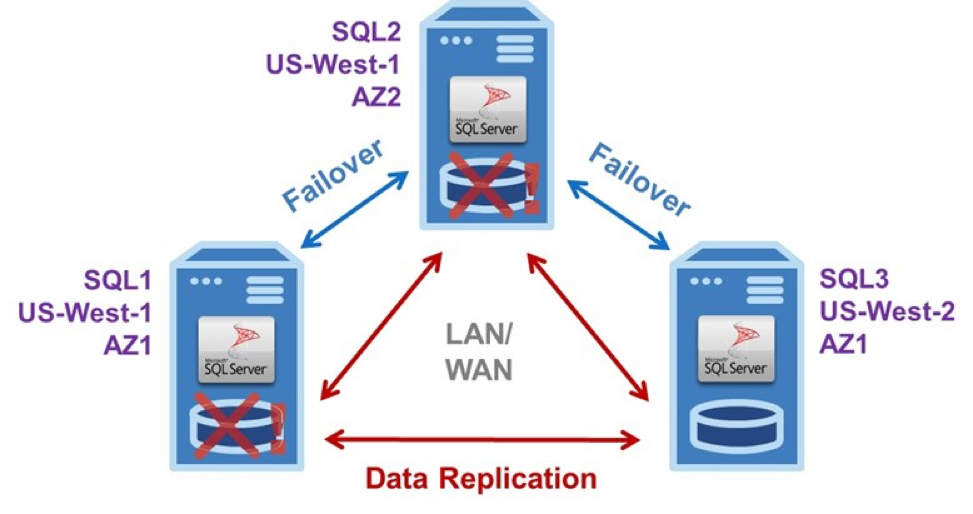
The example EC2 configuration in the diagram shows a typical three-node SANless failover cluster configured as Virtual Private Cloud (VPC) with all three SQL Server instances in different Availability Zones. To eliminate the potential for an outage in a local disaster affecting an entire region, one of the AZs is located in a different AWS region.

High Availability for SQL Server

This three-node SANless failover cluster, with one active and two standby server instances, can handle two concurrent failures with minimal downtime and no data loss.

A three-node SANless failover cluster affords carrier-class HA and DR protections. The basic operation is the same in the LAN and/or WAN for Windows or Linux. Server #1 is initially the primary or active instance that replicates data continuously to both servers #2 and #3. It experiences a problem. Then it triggers an automatic failover to server #2, which now becomes the primary replicating data to server #3.

Failure Detected

If the failure was caused by an infrastructure outage, the AWS staff would begin immediately diagnosing and repairing whatever caused the problem. Once fixed, it could be restored as the primary, or server #2 could continue in that capacity replicating data to servers #1 and #3. Should server #2 fail before server #1 is returned to operation, as shown, server #3 would become the primary after a manual failover. Of course, if the failure was caused by the application software or certain other aspects of the configuration, it would be up to the customer to find and fix the problem.

SANless failover clusters can be configured with only a single standby instance, of course. But such a minimal configuration does require a third node to serve as a witness. The witness is needed to achieve a quorum for determining the assignment of the primary. This important task is normally performed by a domain controller in a separate AZ. Keeping all three nodes (primary, secondary and witness) in different AZs eliminates the possibility of losing more than one vote if any zone goes offline.

It is also possible to have two- and three-node SANless failover clusters in hybrid cloud configurations for HA and/or DR purposes. One such three-node configuration is a two-node HA cluster located in an enterprise data center with asynchronous data replication to AWS or another cloud service for DR protection—or vice versa.

In clusters within a single region, where data replication is synchronous, failovers are normally configured to occur automatically. For clusters with nodes that span multiple regions, where data replication is asynchronous, failovers are normally controlled manually to avoid the potential for data loss. Three-node clusters, regardless of the regions used, can also facilitate planned hardware and software maintenance for all three servers while providing continuous DR protection for the application and its data.

Maximise High Availability for SQL Server

By offering 55 availability Zones spread across 18 geographical Regions, the AWS Global Infrastructure affords enormous opportunity to maximize High Availability for SQL Server by configuring SANless failover clusters with multiple, geographically-dispersed redundancies. This global footprint also enables all SQL Server applications and data to be located near end-users to deliver satisfactory performance.

With a purpose-built solution, carrier-class high availability need not mean paying a carrier-like high cost. Because purpose-built failover clustering software makes effective and efficient use of EC2’s compute, storage and network resources, while being easy to implement and operate, these solutions minimize any capital and all operational expenditures, resulting in high availability being more robust and more affordable than ever before.

Reproduced from TheNewStack

Filed Under: News and Events Tagged With: High Availability, high availability for sql server, SQL Server

Managing Cost of Cloud for High-Availability Applications

January 23, 2019 by Jason Aw Leave a Comment

Cost of Cloud for High-Availability Applications - SIOS APAC

Cost of Cloud for High-Availability Applications

Shortly after contracting with a cloud service provider, a bill arrives that causes sticker shock. There are unexpected and seemingly excessive charges. Those responsible seem unable to explain how this could have happened. The situation is urgent because the amount threatens to bust the IT budget unless cost-saving changes are made immediately. So how do we manage the Cost of Cloud for High-Availability Applications?

This cloud services sticker shock is often caused by mission-critical database applications. Especially these tend to be the most costly for a variety of reasons. These applications need to run 24/7. They require redundancy, which involves replicating the data and provisioning standby server instances. Data replication requires data movement, including across the wide area network (WAN). And providing high availability can result in higher costs to license Windows to get Windows Server Failover Clustering (versus using free open source Linux), or to license the Enterprise Edition of SQL Server to get Always On Availability Groups.

Before offering suggestions for managing Cost of Cloud for High-Availability Applications, it is important to note that the goal here is not to minimize those costs. But instead to optimize the price/performance for each application. In other words, it is appropriate to pay more when provisioning resources for those applications that require higher uptime and throughput performance. It is also important to note that a hybrid cloud infrastructure—with applications running in whole or in part in both the private and public cloud—will likely be the best way to achieve optimal price/performance.

Understanding Cloud Service Provider Business And Pricing Models

The sticker shock experience demonstrates the need to thoroughly understand how cloud services are priced and managing Cost of Cloud for High-Availability Applications. Only then can the available services be utilized in the most cost-effective manner.

All cloud service providers (CSPs) publish their pricing. Unless specified in the service agreement, that pricing is constantly changing. All hardware-based resources, including physical and virtual compute, storage, and networking services, inevitably have some direct or indirect cost. These are all based to some extent on the space, power, and cooling these systems consume. For software, open source is generally free. But all commercial operating systems and/or application software will incur a licensing fee. And be forewarned that some software licensing and pricing models can be quite complicated. So be sure to study them carefully.

In addition to these basic charges for hardware and software, there are potential á la carte costs for various value-added services. This includes security, load-balancing, and data protection provisions. There may also be “hidden” costs for I/O to storage or among distributed microservices, or for peak utilization that occurs only rarely during “bursts.”

Because every CSP has its own unique business and pricing model, the discussion here must be generalized. And, in general, the most expensive resources involve compute, software licensing, and data movement. Together they can account for 80% or more of the total costs. Data movement might also incur separate WAN charges that are not included in the bill from the CSP.

Storage and networking within the CSP’s infrastructure are usually the least costly resources. Solid state drives (SSDs) normally cost more than spinning media on a per-terabyte basis. But SSDs also deliver superior performance, so their price/performance may be comparable or even better. And while moving data back to the enterprise can be expensive, moving data from the enterprise to the public cloud can usually be done cost-free (notwithstanding the separate WAN charges).

Formulating Strategies For Optimizing Price/Performance

Covering the Cost of Cloud for High-Availability Applications needs meticulous checks. Here are some suggestions for managing resource utilization in the public cloud in ways that can lower costs while maintaining appropriate service levels for all applications. This include those that require mission-critical, high uptime and throughput.

In general, right-sizing is the foundational principle for managing resource utilization for optimal price/performance. When Willie Sutton was purportedly asked why he robbed banks, he replied, “Because that’s where the money is”. In the cloud, the money is in compute resources, so that should be the highest priority for right-sizing.

For new applications, start with minimal virtual machine configurations for compute resources. Add CPU cores, memory and/or I/O only as required to achieve satisfactory performance. All virtual machines for existing applications should eventually be right-sized. Begin with those that cost the most. Reduce allocations gradually while monitoring performance constantly until achieving diminishing returns.

It is worth noting that a major risk associated with right-sizing is the potential for under-sizing. However it can result in unacceptably poor performance. Unfortunately, the best way to assess an application’s actual performance is with a production workload, making the real world the right place to right-size. Fortunately, the cloud mitigates this risk by making it easy to quickly resize configurations on demand. So right-size aggressively where needed. However be prepared to react quickly in response to each change.

Storage, in direct contrast to compute, is generally relatively inexpensive in the cloud. But be careful using cheap storage, because I/O might incur a separate—and costly—charge with some services. If so, make use of potentially more cost-effective performance-enhancing technologies such as tiered storage, caching, and/or in-memory databases, where available, to optimize the utilization of all resources.

Software licenses can be a significant expense in both private and public clouds. For this reason, many organizations are migrating from Windows to Linux, and from SQL Server to less-expensive commercial and/or open source databases. But for those applications for which “premium” operating system and/or application software is warranted, check different CSPs to see if any pricing models might afford some savings for the configurations required.

Finally, all CSPs offer discounts, and combinations of these can sometimes achieve a savings of up to 50%. Examples include pre-paying for services, making service commitments, and/or relocating applications to another region.

Creating And Enforcing Cost Containment Controls

Self-provisioning for cloud services might be popular with users. But without appropriate controls, this convenience makes it too easy to over-utilize resources, including those that cost the most.

Begin the effort to gain better control by taking full advantage of the monitoring and management tools all CSPs offer. This is likely to encounter a learning curve of course. Because the CSP’s tools may be very different from, and potentially more sophisticated than, those being used in the private cloud.

One of the more useful cost containment tools involves the tagging of resources. Tags consist of key/value pairs and metadata associated with individual resources. And some can be quite granular. For example, each virtual machine, along with the CPU, memory, I/O, and other billable resources it uses, might have a tag. Other useful tags might show which applications are in a production versus development environment, or to which cost center or department each is assigned. Collectively, these tags could constitute the total utilization of resources reflected in the bill.

Organizations that make extensive use of public cloud services might also be well-served to create a script. Include loading information from all available monitoring, management, and tagging tools into a spreadsheet or similar application for detailed analyses and other uses, such as chargeback, compliance, and trending/budgeting. Ideally, information from all CSPs and the private cloud would be normalized for inclusion in a holistic view to enable optimizing price/performance for all applications running throughout the hybrid cloud.

Handling The Worst-Case Use Case: High Availability Applications

In addition to the reasons cited in the introduction for why high-availability applications are often the most costly, all three major CSPs—Google, Microsoft, and Amazon—have at least some high availability-related limitations. Examples include failovers normally being triggered only by zone outages and not by many other common failures; master instances only being able to create a single failover replica; and the use of event logs to replicate data, which creates a “replication lag” that can result in temporary outages during a failover.

None of these limitations is insurmountable, of course—with a sufficiently large budget. The challenge is finding a common and cost-effective solution for implementing high-availability across public, private, and hybrid clouds. Among the most versatile and affordable of such solutions is the storage area network (SAN)-less failover cluster. These high-availability solutions are implemented entirely in software that is purpose-built to create. As implied by the name, a shared-nothing cluster of servers and storage with automatic failover across the local area network and/or WAN to assure high availability at the application level. Most of these solutions provide a combination of real-time block-level data replication, continuous application monitoring, and configurable failover/failback recovery policies.

Some of the more robust SAN-less failover clusters also offer advanced capabilities. For example WAN optimization to maximize performance and minimize bandwidth utilization, robust support for the less-expensive Standard Edition of SQL Server. And let’s not forget manual switchover of primary and secondary server assignments for planned maintenance, and the ability to perform routine backups without disruption to the applications.

Maintaining The Proper Perspective

While trying out some of these suggestions in your hybrid cloud, endeavor to keep the monthly CSP bill in its proper perspective. With the public cloud, all costs appear on a single invoice. By contrast, the total cost to operate a private cloud is rarely presented in such a complete, consolidated fashion. And if it were, that total cost might also cause sticker shock. A useful exercise, therefore, might be to understand the all-in cost of operating the private cloud—taking nothing for granted—as if it were a standalone business such as that of a cloud service provider. Then those bills from the CSP for your mission-critical applications might not seem so shocking after all.

Article from www.dbta.com

Filed Under: News and Events Tagged With: Cloud, cost of cloud for high availability applications, High Availability

Challenges in High Availability For Mission-Critical Applications in SME

January 20, 2019 by Jason Aw Leave a Comment

high availability

Survey On State Of Performance And High Availability For Mission-Critical Applications In SME

According to a new survey by SIOS Technology, in partnership with ActualTech Media Research, a full 98% of cloud deployments experience some type of performance issue every year.

The survey was designed to understand current challenges and trends related to the state of performance and high availability for mission-critical applications in small, medium and large companies. A total of 390 IT professionals and decision-makers responded, collectively representing a cross-section those responsible for managing databases, infrastructure, architecture, cloud services and software development. Tier-1 applications explicitly identified include Oracle, Microsoft SQL Server and SAP/HANA.

There are some clear trends. A few surprises that we didn’t see coming, and that might surprise you as well.

■ Small companies are leading the way to the public cloud with 54% planning to move more than half their mission-critical applications there by the end of 2018, which compares to 42% of large companies

■ For companies of all sizes, having complete control over the application environment was cited by 60% of the respondents as a key reason for why their mission-critical workloads remain on premises

■ Most (86%) organizations are using some form of failover clustering or other high availability mechanism for their mission-critical applications

■ Almost as many (95%) report having experienced a failure in their failover provisions

It’s evident that organizations are finally moving their critical applications to the cloud. And at a greater pace than we could have imagined a few years ago. But they’re still in the early days of adoption, placing mature operations a few years away. Here are some more details.

Misery Loves Company

A mere 2% of respondents claimed they never experience any application performance issues that ever affect any end users. The rest of us mere mortals claim to experience such issues. Here are the stats on average.

  • Daily (18%)
  • 2-3 times per week (17%)
  • Once per week (10%)
  • 2-3 times per month (15%)
  • Once per month (11%)
  • 3-5 times per year (18%)
  • Only once per year (8%)

The responses were reasonably consistent among Decision Makers, IT Staff, and Data & Development Staff with one notable exception: Decision Makers perceive a lower occurrence of performance issues than staff does. Nearly half (46%) of Decision Makers responded that performance issues occur 3-5 times per year or less (compared to 23-25% for staff). Only 11% responded that issues occur daily (compared to 20-21% for staff).

Rapid Response to the Rescue

One possible explanation for this apparent discrepancy is IT Staff being made aware of problems affecting performance with an automated alert. This is followed by a rapid response to find and fix the cause.

The survey asked about high availability provisions failing (something that is certain to affect performance!). 77% learn of the problem via an alert from monitoring tools. Another 39% learn from a user complaint. (Note that multiple responses were permitted.)

As for remediation, it takes more than 5 hours to fix a problem only 3% of the time. Nearly a quarter (23%) are fixed in less than an hour and over half (56%) are fixed in 1-3 hours. Finally, 18% are fixed in 3-5 hours. Small companies are able to resolve problems more quickly (31% in less than an hour) than large ones (only 11% in less than an hour). This likely because the former utilizes the public cloud more extensively and has less complex configurations.

Culprits In The Cloud

When asked about the cause of performance issues that arise in the cloud, the main culprits are the application or the database being used. Together they account for 64% of the issues. It is important to note that this question did not distinguish between who is responsible for the managing the application and/or database, which would likely be the cloud service provider for a managed service. Additional causes include issues with the service provider (17%) or the infrastructure (15%). In 4% of the cases, the issue remained a mystery.

Written by Jerry Melnick, President and CEO of SIOS Technology
Reproduced from APMdigest

Filed Under: News and Events Tagged With: High Availability

Dynamic Utilization – More Affordable High Availability, Drive Migration To Cloud

January 18, 2019 by Jason Aw Leave a Comment

Dynamic Utilization Will Make High Availability More Affordable, Further Driving Migration to the Cloud.jpg

Dynamic Utilization Will Make High Availability More Affordable, Further Driving Migration to the Cloud

On-demand provisioning in the cloud is nothing new. What will be new are more cost-effective options for high availability and disaster recovery in hybrid and purely public cloud configurations. Such on-demand HA and DR will leverage dynamic utilization of resources spread among multiple datacenters and geographical regions, and make achieving high service levels more affordable for more applications.

Both HA and DR require redundancy to ensure reliable, rapid recovery from failures.

HA failover clustering replicates the full operational environment of the primary VM, including the CPU, memory and storage resources, in a secondary VM. All data is then also replicated in real-time to the secondary, which remains idle unless and until the primary fails. Having one or more fully redundant secondary VMs creates a cluster that is effectively in a continual state of self-test, thereby ensuring it is prepared for automatic and rapid failover.

Basic DR configurations, by contrast, lack the capabilities needed for fast failover

Consider Azure Site Recovery, for example. Microsoft positions ASR as being DR-as-a-service. And the growing DRaaS market now includes offerings from nearly a dozen providers. With ASR, primary VMs are replicated to secondaries in other Azure regions, or from on-premises instances to the Azure cloud. But the data is not replicated in real-time. The service is unable to automatically detect and failover from many causes of application-level downtime.

Underlying Issue

Many potential points of failure are simply not covered by DRaaS and other cloud availability services. In general, complete loss of service is detected. But faults due to application or OS software, as well as failures in discrete resources like network or storage are not detected. As a consequence, an application service may be disrupted-potentially for an extended period-without being detected by the cloud’s own recovery facilities.

SIOS DataKeeper and SIOS Protection Suite from SIOS Technology

When high availability is of paramount importance, comprehensive fault detection is essential to avoiding application-level downtime. This objective is readily achieved with purpose-built failover clustering technology, such as SIOS DataKeeper and SIOS Protection Suite from SIOS Technology, which is capable of automatically detecting a broad range of causes of downtime in both the software and the underlying physical and virtual resources. These software-only clusters are layered atop the cloud to provide a complete HA/DR solution that includes data replication, continuous application-level monitoring and configurable failover/failback recovery policies.

DRaaS Offerings

Failover clustering software can be configured for HA or DR alone, or for a combination of HA and DR. DR normally has a standby VM in another region in a configuration referred to as a GeoCluster. As with DRaaS offerings, WAN bandwidth limitations cause some “replication lag” for the data, and potentially some data loss under certain failure scenarios. But unlike with DRaaS, broad classes of failure are detected automatically at the cloud platform and application levels, and can be remedied immediately to assure service continuity.

While failover clustering, with its ability to minimize both recovery point and recovery time objectives (RPO/RTO), affords comprehensive service protection compared to DRaaS, the need to fully configure costly redundant and idle resources remains. Fortunately, this issue is being addressed by emerging cluster management techniques that can orchestrate a full recovery through the dynamic allocation of resources at the time of failure.

A New Approach

The standby VM, while operating in standby mode, is configured only with the resources needed to handle its minimalist role of a data replication target for the primary VM. When a failure occurs, the cluster immediately and dynamically reconfigures the standby VM with the complete complement of resources needed to deliver the level of performance required for its fully operational role of the primary VM. This dynamic utilization enables HA and DR protections to benefit from significant cost savings without sacrificing the availability and reliability benefits of clustering.

Conclusion

Both HA failover clusters and DRaaS, whether operating separately or in concert, can have roles to play in making the continuum of HA and DR protections more affordable for the full spectrum of enterprise applications-from those that can tolerate some data loss and extended periods of downtime, to those that require an RPO of zero (no data loss) and an RTO of less than five minutes under all possible failure scenarios.


About the Author

Jerry Melnick is President and CEO at SIOS Technology, where he is responsible for directing the overall corporate strategy and leading the company’s ongoing growth and expansion. He has more than 25 years of experience in the enterprise and high availability software markets. Before joining SIOS, he was CTO at Marathon Technologies where he led business and product strategy for the company’s fault tolerant solutions. His experience also includes executive positions at PPGx, Inc. and Belmont Research, where he was responsible for building a leading-edge software product and consulting business focused on supplying data warehouse and analytical tools. Jerry began his career at Digital Equipment Corporation where he led an entrepreneurial business unit that delivered highly scalable, mission critical database platforms to support enterprise-computing environments in the medical, financial and telecommunication markets. He holds a Bachelor of Science degree from Beloit College with graduate work in Computer Engineering and Computer Science at Boston University.

Filed Under: News and Events Tagged With: High Availability

  • « Previous Page
  • 1
  • …
  • 44
  • 45
  • 46
  • 47
  • 48
  • …
  • 56
  • Next Page »

Recent Posts

  • What Is High Availability (HA)?
  • Surviving the Friday Night Crash: From Scrappy Bare Metal to Seamless Data Replication
  • Grounded: What Missing Percona Live Amsterdam Taught Me About HA
  • SIOS LifeKeeper vs. Red Hat High Availability Add-On:
  • The State of Application Resilience: 2026 SIOS High Availability Survey

Most Popular Posts

Maximise replication performance for Linux Clustering with Fusion-io
Failover Clustering with VMware High Availability
create A 2-Node MySQL Cluster Without Shared Storage
SAP for High Availability Solutions For Linux
Bandwidth To Support Real-Time Replication
The Availability Equation – High Availability Solutions.jpg
Choosing Platforms To Replicate Data - Host-Based Or Storage-Based?
Guide To Connect To An iSCSI Target Using Open-iSCSI Initiator Software
Best Practices to Eliminate SPoF In Cluster Architecture
Step-By-Step How To Configure A Linux Failover Cluster In Microsoft Azure IaaS Without Shared Storage azure sanless
Take Action Before SQL Server 20082008 R2 Support Expires
How To Cluster MaxDB On Windows In The Cloud

Join Our Mailing List

Copyright © 2026 · Enterprise Pro Theme on Genesis Framework · WordPress · Log in