SIOS SANless clusters

SIOS SANless clusters High-availability Machine Learning monitoring

  • Home
  • Products
    • SIOS DataKeeper for Windows
    • SIOS Protection Suite for Linux
  • News and Events
  • Clustering Simplified
  • Success Stories
  • Contact Us
  • English
  • 中文 (中国)
  • 中文 (台灣)
  • 한국어
  • Bahasa Indonesia
  • ไทย

What To Know About Moving Your SQL Server 2008/2008 R2 to Azure

July 12, 2019 by Jason Aw Leave a Comment

Moving your SQL Server 2008/2008 R2 to Azure – Everything Enterprises Need to Know!

Date: July 30, 2019

Location: Webinar

Support for SQL Server 2008 and 2008 R2 ends July 9th. What does that mean for your Enterprise workloads? Should you take advantage of Microsoft’s free security updates by moving to Azure or Azure Stack? What are all of your options? What should you do? Is there still time?

Join Microsoft SQL Database Senior Program Manager, Mine Tokus, and SIOS Technical Evangelist and Microsoft Cloud and Datacenter Management MVP, Dave Bermingham, as they cover all of your remaining questions regarding the EOS for SQL Server 2008/R2; what to expect for your SQL Server workloads after EOS, expectations for a move to Azure; Availability and Disaster Recovery options and more.

Tuesday, July 30, 2019
1:00:00 PM EDT | 5:00:00 PM UTC

Register now

The Webinar is presented by Dave Bermingham, Microsoft Cloud and Datacenter Management MVP, and SIOS Technology Corp Technical Evangelist and Mine Tokus, Microsoft Senior Premier Engineer.
 

Filed Under: Event posts Tagged With: SQL Server

Achieving Application Consistent Recovery Points of SQL Server 2008 R2 With Azure Site Recovery In Azure

June 20, 2019 by Jason Aw Leave a Comment

Achieving Application Consistent Recovery Points of SQL Server 2008 R2 With Azure Site Recovery In Azure

Achieving Application Consistent Recovery Points of SQL Server 2008 R2 With Azure Site Recovery In Azure

If you want to use ASR to replicate SQL Server 2008 R2 standalone or clustered instances, you will need to update the SQL Writer  to 2012 or later.

You can use SQL express version as it is a free download.

https://www.microsoft.com/en-us/download/details.aspx?id=29062

Once downloaded, navigate to the download location and run the executable with /x.  This will give you an option to specify a location to extract the files to.

ENU\x64\SQLEXPRADV_x64_ENU.exe /x

Once the extraction completes, navigate to the extracted location and the following location:

SQL\1033_enu_lp\x64\setup\x64

Within that folder you should find SQLWriter.msi.  Run this on the system where you want to update the SQL writer.

You now will be able to use ASR to do application consistent recovery points of SQL Server 2008 R2.

Reproduced with permission from Clusteringformeremortals.com

Filed Under: Clustering Simplified Tagged With: Azure, SQL Server

New Azure “SQL Server Settings” Blade In The Azure Portal

May 30, 2019 by Jason Aw Leave a Comment

New Azure SQL Server Settings Blade In The Azure Portal

New Azure “SQL Server Settings” Blade In The Azure Portal

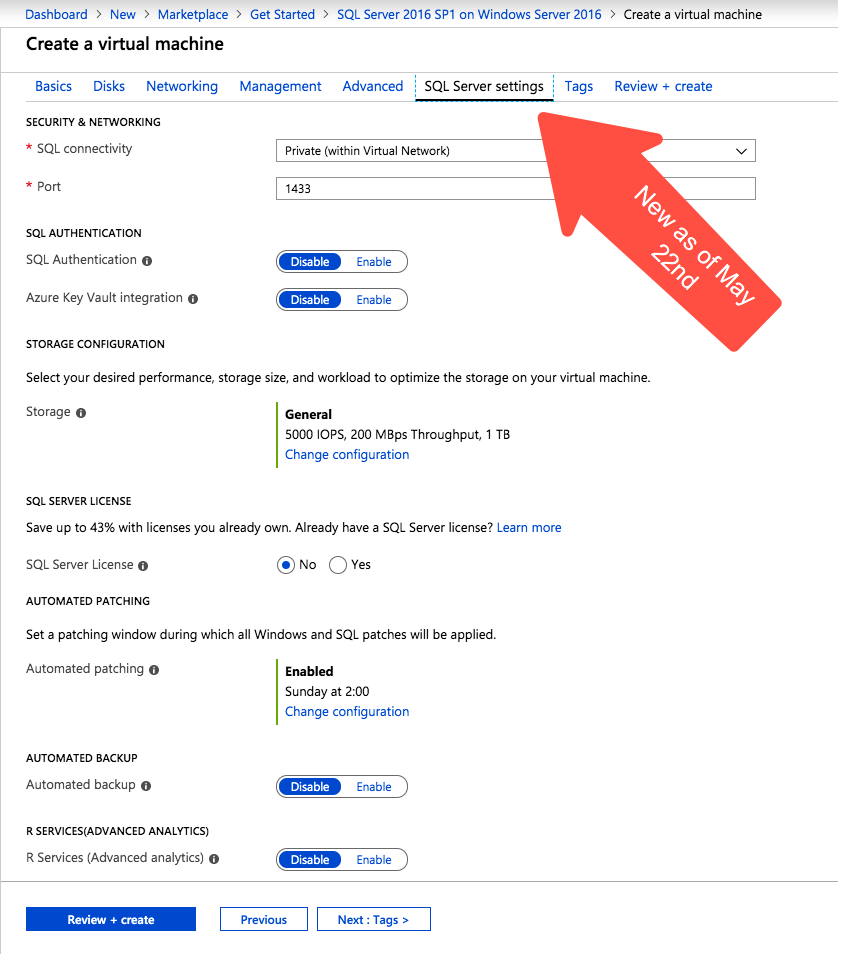
There is a new blade in the Azure portal when creating a new SQL Server virtual machine. I’ve been looking for an announcement regarding this new Azure portal experience but to no avail. This feature wasn’t available when I took the screen shots for my last post on creating a SQL Server 2008 R2 FCI in Azure on April 19th. I presume it must be relatively new.

New Azure "SQL Server Settings" Blade In The Azure Portal
New Azure “SQL Server Settings” blade on the Azure portal

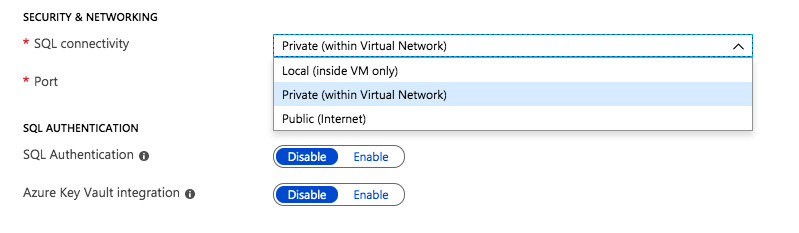
Most of the settings are pretty self explanatory. Under Security and Networking, you can specify the port you want SQL to listen on. It also appears as if the Azure Security Group will be updated to allow different levels of access to the SQL instance: Local, Private or Public. Authentication options are also exposed in this new SQL Server settings blade.

Security, Networking and Authentication options are part of your SQL Server deployment

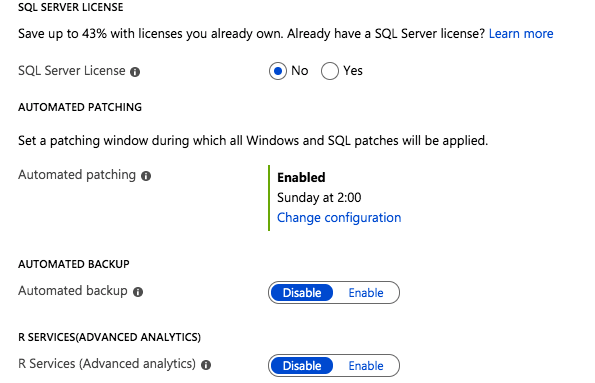
The rest of the features include licensing, patching and backup options. In addition, if you are deploying the Enterprise Edition of SQL Server 2016 or later, you also have the option to enable SQL Server R Services for advanced analytics.

Licensing, Patching, Backup and R Services options can be automatically configured

All of those options are welcome additions to the Azure portal experience when provisioning a new SQL Server instance. I’m sure the seasoned DBA probably has a list of a few dozen other options they would like to tweak before a SQL Server deployment, but this is certainly a step in the right direction.

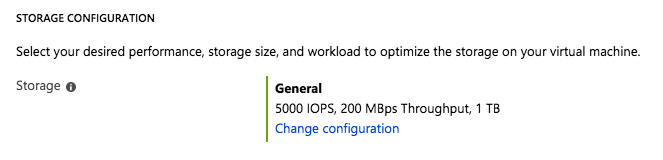
Storage Configuration Options

The most interesting new feature I have found on this blade is the Storage Configuration option.

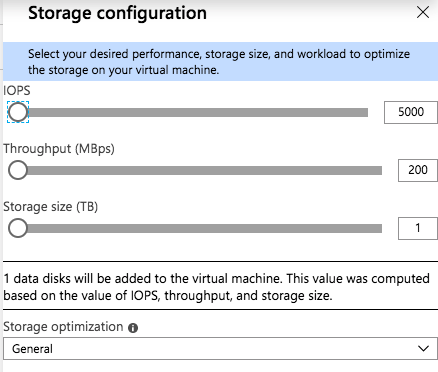
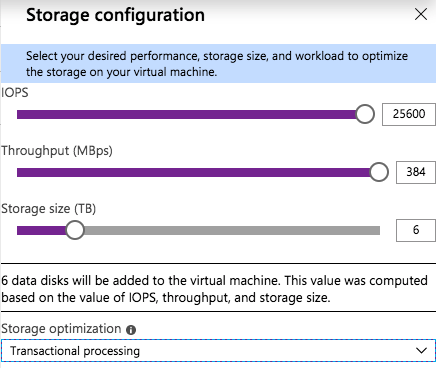
When you click on Change Configuration, you get the following blade.

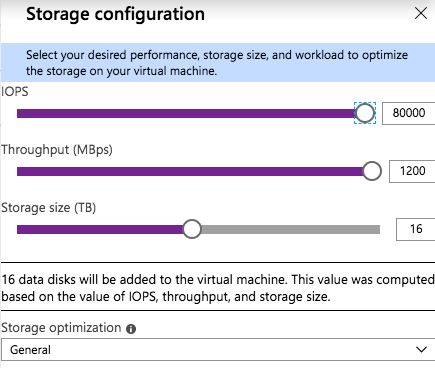
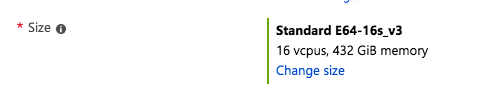
As you slide the IOPS slider to the right you will see the number of data disks increase, the Storage Size increase, and the Throughput increase. You will be limited to the max number of IOPS and disks supported by that instance size. You see in the screenshot below I am able to go as high as 80,000 IOPS when provisioning storage for a Standard E64-16s_v3 instance.

The Standard E64-16s_v3 instance size supports up to 80,000 IOPS

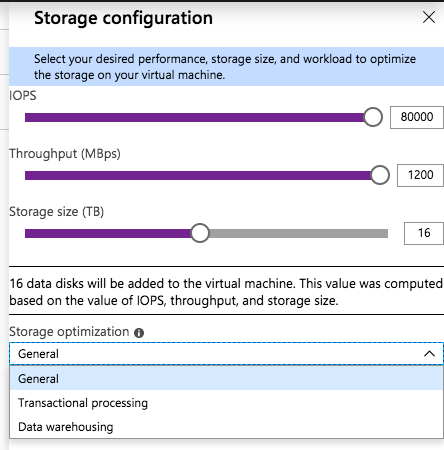
There is also a “Storage optimization” option. I haven’t tried all the different combinations to know exactly what the Storage optimization setting does. If you know how the different options change the storage configuration, leave me a comment, or we will just wait for the official documentation to be released.

For my test, I provisioned a Standard DS13 v2 instance and maxed out the IOPS at 25600, the max IOPS for that instance size. I also optimized the storage for Transactional processing.

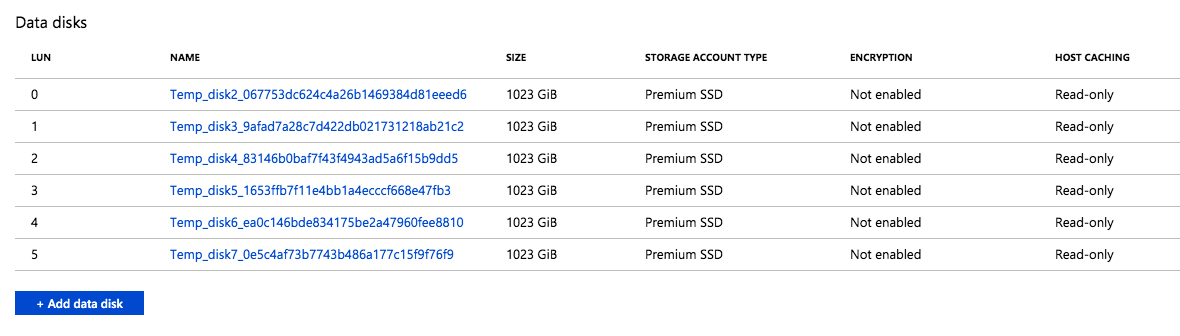
I found that when this instance was provisioned, six P30 premium disk were attached to the instance. This makes sense, since each P30 delivers 5000 IOPS, so it would take at least six of them to deliver the 25,600 IOPS requested. This also increased the Storage Size to 6 TB, since each P30 gives you one 1 TB of storage space. The Read-only host caching was also enabled on these disks.

The six disks were automatically provisioned and attached to the instance

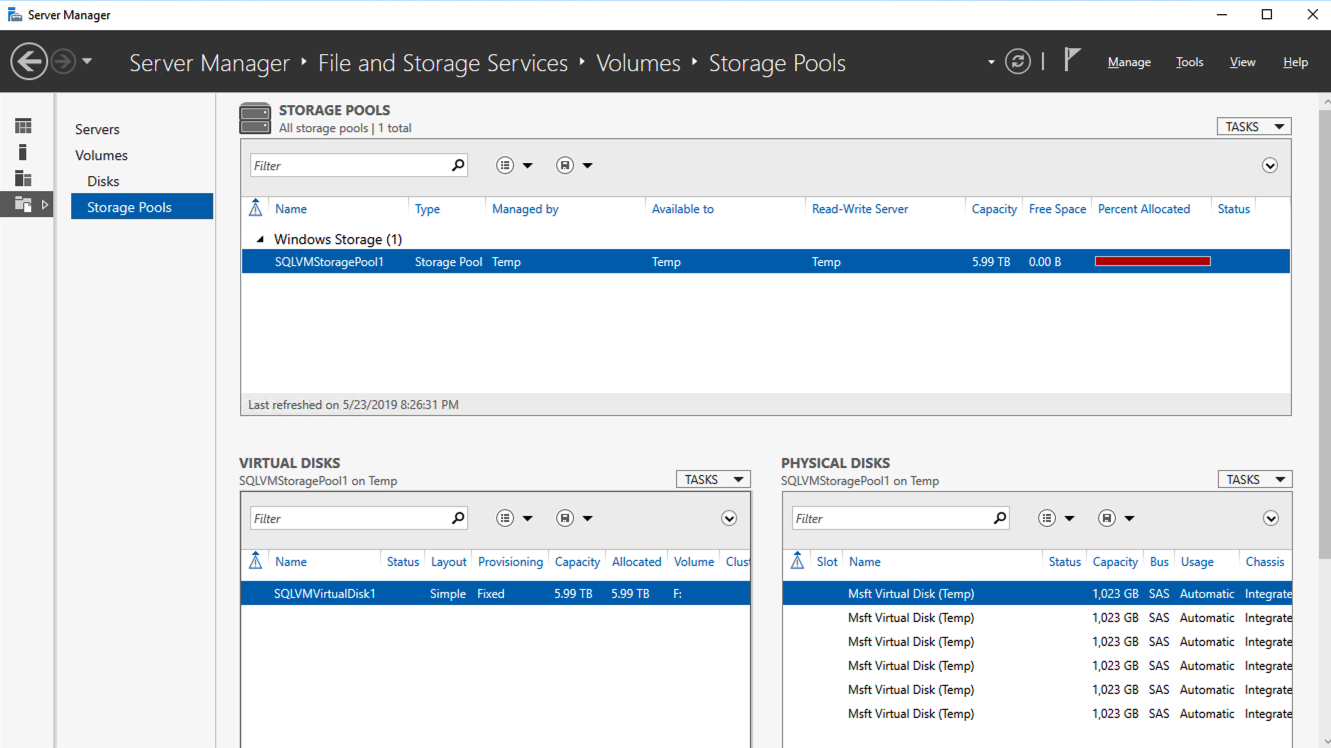
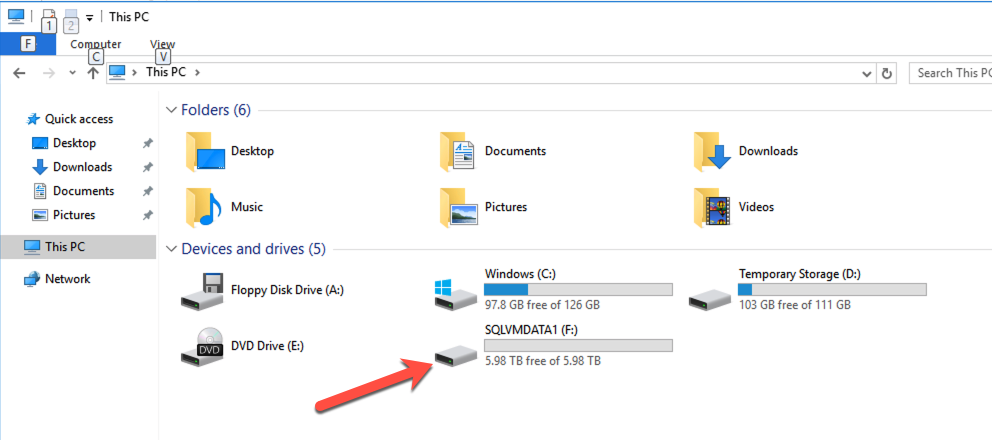
I logged in to the instance to see what Azure had done with those disk. Fortunately, they had done exactly what I would have done; they created a single Storage Pool with the six P30 disks and created a Simple (aka, RAID 0) Storage Space and provisioned a single 6 TB F:\ drive.

This storage configuration wizard validates some of the cloud storage assumptions I made in my previous blog post, Storage Considerations for Running SQL Server in Azure. It seems like a single, large disk should suffice in most circumstances.

A Simple Storage Space consisting of the six P30s are presented as a single F:\ drive

This storage optimization is not available in every Azure Marketplace offering. For example, if you are moving SQL Server 2008 R2 to Azure for the extended security updates, you will find that this storage optimization in not available in the SQL2008R2/Windows Server 2008 R2 Azure Marketplace image. Of course, Storage Spaces was not introduced until Windows Server 2012, so that makes sense. I did verify that this option is available with the SQL Server 2012 SP4 on Windows Server 2012 R2Azure Marketplace offering.

There is a minor inconvenience however. In addition to adding this new Storage configuration option on SQL Server settings blade, they also removed the option to add Data Disks on the Disks blade. Let’s say I wanted to provision additional storage without creating a Storage Space. To do that, I would have to create the instance first and then come back and add Data disks after it the virtual machine is provisioned.

Final Thoughts

All of the SQL Server configuration options in this new Azure blade are welcome additions. I would love to see the list tunable settings grow. Information text should include guidance on current best practices for each tunable.

What SQL Server or Windows OS tunables would you like to see exposed as part of the provisioning process to make your life as a DBA easier? These tunables make your life easier. They would also make the junior DBA look like a season pro by guiding them through all the current SQL Server configuration best practices.

I think the new Storage configuration option is probably the most compelling new addition. Prior to the Storage configuration wizard, users had to be aware of the limits of their instance size, the limits of the storage they were adding. On top of that, have the wherewithal to stripe together multiple disks in a Simple Storage Space to get the maximum IOPS. A few years ago, I put together a simple Azure Storage Calculator to help people make these decisions. My calculator is currently outdated. That said, this new Storage configuration option may make it obsolete anyway.

I would love to see this Storage configuration wizard included as a standard offering in the Disks blade of every Windows instance type. Instead in just the SQL Server instances. I would let the user choose to use the new Storage configuration  “Wizard” experience. Or even the “Classic” experience where you manually add and manage storage.

Reproduced with permission from Clusteringformeremortals.com

Filed Under: Clustering Simplified Tagged With: Azure, SQL Server

Webinar: Availability Options and Requirements for SQL Server 2008 in Azure

May 25, 2019 by Jason Aw Leave a Comment

Availability Options and Requirements for SQL Server 2008 in Azure

Webinar: Availability Options and Requirements for SQL Server 2008 in Azure

Time is running out for your SQL Server 2008/2008 R2 instances. On July 9th the extended support date for SQL Server 2008/2008 R2 officially runs out. This means no more security updates will be issued. But wait, there is an option. By moving your SQL Server 2008/2008 R2 Instances to Azure, Microsoft will provide an additional three years of Extended Security Updates at no additional charge Running. Before taking the plunge on moving your SQL Server 2008/2008 R2 instances to Azure, you need to understand the availability options and requirements to ensure that your high availability and disaster recovery concerns are addressed.

Learn how to deploy SQL Server 2008 /2008 R2 Failover Cluster Instances in Azure properly. This includes addressing the lack of a shared storage option as well as networking requirements including the Internal Load Balancing requirements. Azure Site Recovery will be introduced as a viable alternative as a disaster recovery option which allows for a robust RPO/RTO in an entirely different Azure region.

Register Webinar: Availability Options and Requirements for SQL Server 2008 in Azure

Filed Under: News and Events Tagged With: Azure Cloud, High Availability, SQL Server, SQL Server 2008

Webinar: Understanding Disaster Recovery Options for SQL Server

May 24, 2019 by Jason Aw Leave a Comment

Understanding Disaster Recovery Options for SQL Server

Webinar: Understanding Disaster Recovery Options for SQL Server

Webinar: Understanding Disaster Recovery Options for SQL Server

Yes – you need a disaster recovery plan! Your SQL Server data depends on it.

On this webinar, Dave Bermingham, Microsoft Datacenter and Cloud MVP, explains the difference between Disaster Recovery, Business Continuity and High Availability and why each is a critical component for any business’ survival. Discover what key components should be included in your Disaster Recovery, Business Continuity plans and explore some of the tools available to help achieve your Disaster Recovery, Business Continuity goals.

Concerned about end of support for SQL Server 2008?  See how SIOS helps customers prepare for SQL Server 2008 EOS.

Filed Under: News posts Tagged With: Business Continuity, disaster recovery, disaster recovery - DR, High Availability, SQL Server

  • « Previous Page
  • 1
  • …
  • 5
  • 6
  • 7
  • 8
  • 9
  • …
  • 19
  • Next Page »

Recent Posts

  • SIOS LifeKeeper vs. Red Hat High Availability Add-On:
  • The State of Application Resilience: 2026 SIOS High Availability Survey
  • Where Should HA “Live”? Matching Placement to Your Availability Targets
  • Why 99.99% Uptime Doesn’t Mean 100% Uptime
  • Webinar: Resilience by Design – Keeping Mission-Critical Workloads Running on AWS

Most Popular Posts

Maximise replication performance for Linux Clustering with Fusion-io
Failover Clustering with VMware High Availability
create A 2-Node MySQL Cluster Without Shared Storage
SAP for High Availability Solutions For Linux
Bandwidth To Support Real-Time Replication
The Availability Equation – High Availability Solutions.jpg
Choosing Platforms To Replicate Data - Host-Based Or Storage-Based?
Guide To Connect To An iSCSI Target Using Open-iSCSI Initiator Software
Best Practices to Eliminate SPoF In Cluster Architecture
Step-By-Step How To Configure A Linux Failover Cluster In Microsoft Azure IaaS Without Shared Storage azure sanless
Take Action Before SQL Server 20082008 R2 Support Expires
How To Cluster MaxDB On Windows In The Cloud

Join Our Mailing List

Copyright © 2026 · Enterprise Pro Theme on Genesis Framework · WordPress · Log in