SIOS SANless clusters

SIOS SANless clusters High-availability Machine Learning monitoring

  • Home
  • Products
    • SIOS DataKeeper for Windows
    • SIOS Protection Suite for Linux
  • News and Events
  • Clustering Simplified
  • Success Stories
  • Contact Us
  • English
  • 中文 (中国)
  • 中文 (台灣)
  • 한국어
  • Bahasa Indonesia
  • ไทย

Webinar: Understanding the Availability Chain and its Impact on SQL Server

September 17, 2022 by Jason Aw Leave a Comment

Understanding the Availability Chain and its Impact on SQL Server

Webinar: Understanding the Availability Chain and its Impact on SQL Server

Register for the On-Demand Webinar

There are many factors to consider when evaluating the efficacy of your SQL Server availability. In this webinar, SIOS Technical Evangelist and Microsoft Cloud and Datacenter MVP, Dave Bermingham, outlines the key components that make access to your application possible. He discusses the chain of availability and how to determine your risk of downtime and failure for each link – and how to protect your most critical business applications.

Register for the On-Demand Webinar

Reproduced with permission from SIOS

Filed Under: Clustering Simplified Tagged With: availability chain, SQL Server, Webinar

Disaster: Live! SQL Server from Disaster to Operational

August 28, 2022 by Jason Aw Leave a Comment

Disaster Live! SQL Server from Disaster to Operational

Disaster: Live! SQL Server from Disaster to Operational

What happens in a SQL Server disaster? Here’s your chance to be part of the action.

This webinar guides you through a few simulated disasters of SQL Server. Walk away from this webinar with a DR plan and a checklist to ensure your business operations run as expected in the event of an outage.

Register here
Reproduced with permission from SIOS

Filed Under: Clustering Simplified Tagged With: Cloud, disaster recovery, SIOS Datakeeper, SQL Server, Windows Server

RTO vs. RPO: Learning the Difference to Achieve Your Operational Goals

October 10, 2021 by Jason Aw Leave a Comment

RTO vs RPO Learning the Difference to Achieve Your Operational Goals

RTO vs. RPO: Learning the Difference to Achieve Your Operational Goals

In addition to 99.99% availability time, high availability environments also need to meet stringent recovery time and recovery point objectives, RTO and RPO, respectively. RTO and RPO are two key parameters that businesses should define before creating their business continuity and disaster recovery plans. Both metrics help to design the recovery process, and to define the recovery time limits, the frequency of backups, and the recovery procedures. Although RTO and RPO may seem alike, there are core differences you should consider. Read on to understand the difference between RTO vs. RPO.

To be clear, RTO is a measure of the time elapsed from application failure to restoration of application operation. It is a measure that dictates how much time you have to recover after disaster strikes. On the other hand, RPO is a measure of how up-to-date the data is when application availability has been restored after a downtime issue. It is often described as the maximum amount of data loss that can be tolerated when a failure happens.

Things to consider for evaluating your disaster recovery plan

First, it’s important to define the criticality of the application and its associated data to core business operations. How much does a minute of downtime or data loss for this application cost the company? Next, consider the potential set of disasters against which you would like to protect your organization. Some disasters that require data recovery and backup include:

  • Data loss: This may be as simple as someone deleting a folder, or as complex as a case of ransomware or an infected database.
  • Application loss: This refers to when changes to security, an update, or system configurations negatively impact services.
  • System loss: This includes when hardware fails, or, virtual server crashes.
  • Datacenter loss: This includes data centers that are on-premises and in public clouds
  • Business location loss: In this instance, a disaster might include an electrical outage, fire, flooding, or even a chemical spill outside the building. The business facilities require recovery to an alternate location.

Reducing an organization’s RPO and RTO

It’s important to consider the RTO and RPO as they apply to different types of data. Organizations that do a file-level backup of a database, rather than investing in an offsite virtual environment, will see longer recovery times and limits to how recently updated that data will be once recovered.

Consider the possible disasters, match them with the data sets that need to be protected, and then identify the recovery objectives. These steps will then provide you the information necessary to build tactical backup solutions that meet your recovery time objective and recovery point objective.

What is RTO and RPO in SQL Server?

SQL Server allows users to set up automated log backups to be restored from a standby server. With this log shipping, users can recover a fairly recent database copy—depending on the RTO and RPO of that process. Those RTO and RPO requirements are set by users, depending on their needs, budget, and any technological network limitations.

However, SQL Server RTO and RPO are not necessarily straightforward. In many cases, the process isn’t as fast as a client may imagine. They may have an ideal RPO in mind, but slow network speeds or an incorrectly configured backup can throttle this process. In addition, restoring a log backup in this way can involve transferring large amounts of data, and this process can easily exceed the determined acceptable RTO.

Since SQL Server is typically a business-critical application, customers can easily justify HA/DR protection for it – usually in the form of a failover cluster that can failover across cloud availability zones and regions for disaster recovery. This can be accomplished easily by adding SIOS DataKeeper to a Windows Server Failover Clustering environment or by using SIOS Protection Suite in a Linux environment. Both of these solutions will deliver not only 99.99% availability but also RPO of zero and RTO of mere seconds.

Now that you know…

Ultimately, data loss prevention for business continuity is a crucial requirement for any business. Take the time to consider how you will meet your RTO and RPO goals, no matter how large or small your business is, or what internal IT operations you support. SIOS high availability clusters deliver an RPO of zero and an RTO of mere minutes.

Learn more about SIOS DataKeeper for Windows or SIOS Protection Suite for Linux

To request a free trial, let us know here.

Reproduced from SIOS

Filed Under: Clustering Simplified Tagged With: disaster recovery, RPO, RTO, SQL Server

Six Reasons Not to Buy SIOS High Availability Software . . . If You Dare

October 25, 2020 by Jason Aw Leave a Comment

Six Reasons Not to Buy SIOS High Availability Software . . . If You Dare

Six Reasons Not to Buy SIOS High Availability Software . . . If You Dare

Six Reasons Not to Buy SIOS High Availability Software . . . If You Dare

You need SIOS Protection Suite (for Linux or Windows) or SIOS DataKeeper Cluster Edition for high availability protection for business critical applications.

UNLESS

1. You prefer free solutions only.

I get it. There are definitely times when I do the same thing when I need to learn a new skill, get a quick tip, drop a few pounds, or set up a quick demo. Rather than signing up for a subscription, purchasing a license, or investing in a combination of the two, I have gone the free route.

However, the saying often holds true, you get what you pay for. Free trials are fine. Permanently free high availability is like gas station sushi – is the risk really worth it? Be sure that free doesn’t prevent you from utilizing the fullness available for optimizing uptime and increasing availability. Make sure you aren’t passing over a reasonably priced high availability solution that is proven to protect your mission-critical applications.

2. Being a single solution shop solution is more important than meeting your HA needs.

We were a “Ford tough” family for decades. Seriously. I understand what it is like to be a one solution shop. My dad owned a Ford truck for work, a Ford Mustang for leisure, a Ford 3600 tractor for the farm, and a Ford minivan for family travel. There was even a season where we received model toy cars with the brandished blue oval as well.

But, when my wife and I were branching out on our own family needs, we broke away from the single solution to address needs that fell out of the Ford wheelhouse (at the time). You may be a single shop buyer, but if your needs have changed and the HA provider or solution hasn’t kept up, consider whether expanding the solution set will eliminate risks, improve success, or be worth the investment in a complementary solution for those new needs. When we needed a reliable, gas efficient, sleek, family friendly, and economical solution for our family, we supplemented Ford tough with a Honda Odyssey. If you are a single stop shop, and you are not worried about vendor lock-in best of luck.

3. You are more of a do it yourself-er coder.

You like coding. You like to write a lot of scripts, and don’t mind pulling out your bash, ksh, perl, python, powershell, batch or command tool kit and wiring things up yourself. You value the joy in flexibility and adding your own tweaks.

I love writing code as well, but there are times when the last thing I want to do is spend time writing a lot of code and scripts for a problem that is solved, proven, and off the shelf ready. For the do-it-yourself admin, off-the-shelf may not be your preference, but consider whether 20 years of expertise and experience should be rehashed and re-architected for your enterprise. But, if you have to get the code writing fix in, High Availability Software SIOS provides the Generic Application Recovery Kit for you to get in a coding fix.

4. You need Ubuntu support (or Solaris).

Your environment is unique. You have customers who’ve cut their teeth on Solaris and are hanging on to it for dear life. Or you’ve got those who have fully embraced the Linux realm and have moved to Ubuntu. In either case, you look at the SIOS products matrix and Ubuntu isn’t currently a match for your SIOS version. Bummer!

While this is true, consider the rich and vast features and flavors of support that are still available. While there are parts of your enterprise that have dug in on Solaris and others that have raced to embrace Ubuntu and newer variants of Linux, it is more likely that you need a solution capable of supporting RHEL, OEL, SuSE, CentOS and possibly Windows as well. Be sure not to single out a high availability solution by what it doesn’t provide and consider the depth of what it does.

5. You don’t run a hybrid of anything in your environment.

I heard it in the middle of a movie last week. The lead character commented on the idea of moving forward with some new idea of an overly excited owner. The classic line: “Sometimes the juice isn’t worth the squeeze.” In your mind you feel that you aren’t running a hybrid environment. Your applications are critical, but not complex. The moving parts are simple- a database, front end and a supporting application. It makes sense that you might not want to “complicate” things with additional processes, products, solutions or services, and you may feel like the juice isn’t worth the squeeze.

Before you make that final decision for a High Availability Software, assess whether a non-hybrid environment is the same as a simple environment. Consider whether or not the moving parts are as simple as you imagine or whether a solution with failover orchestration would be beneficial to reducing your overall RTO and increasing your RPO.

6. Endorsements from HA experts and experience don’t matter.

I bought a set of headphones online in mid-April. As I suspected, I discovered that anyone can do bluetooth headphones. But, not everyone can do them well. Ergonomically, the “new to market” headphones are a nightmare. Pairing was a breeze, but accidental unpairing is a constant battle. The sound quality is amazing, but that amplifies my annoyance when the headphones randomly chirp – loudly and clearly – for system sounds or at the end of a song.

You may believe that high availability and application monitoring can be done by anyone and that experience doesn’t matter. However, consider your own experiences and mine and ask if you’d really want to trust your enterprise environment to a group that just started thinking about the complexities of hybrid environments, or the dependencies and application-centric knowledge needed for the applications you use most frequently.

When deciding the right High Availability Software for your environment, consider carefully whether you want to go without the many best in class features, hardened and tested solutions, knowledgeable experts, broad swath of supported applications and environments, and industry leading experience and decades of insight. Then after careful consideration, choose wisely.

-Cassius Rhue, Vice President, Customer Experience, SIOS

Reproduced with permission from SIOS

Filed Under: Clustering Simplified Tagged With: Application availability, disaster recovery, High Availability, SQL Server

Solution Brief: High Availability for SQL Server in Amazon Cloud Environments

May 17, 2020 by Jason Aw Leave a Comment

High Availability for SQL Server

Solution Brief: High Availability for SQL Server in Amazon Cloud Environments

SIOS software provides a simple, cost-efficient way to provide high availability protection for SQL Server in the Amazon Web Services Cloud. Add SIOS DataKeeper Cluster Edition software to a Windows Server Failover Clustering Environment such as SQL Server Always On Failover Cluster Instance (FCI) to create a cloud-friendly SANless cluster. Use AWS Quickstart deployment templates to create a SIOS SANless cluster in minutes.

Fast, Cost-Efficient Way to Add High Availability

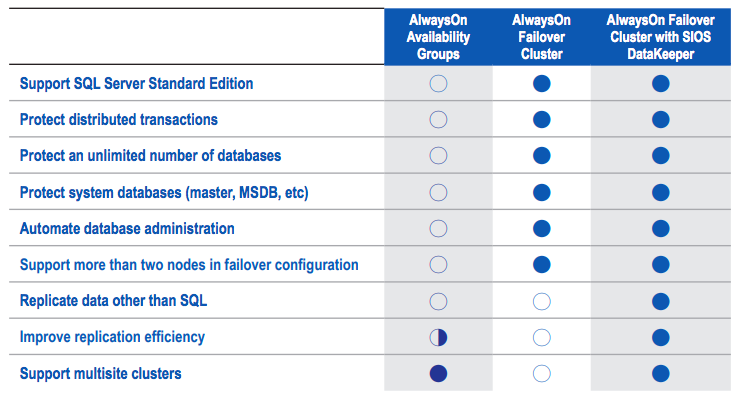
Like all traditional failover clustering solutions, SQL Server FCI environments require the use of a shared storage. This requirement makes them impractical or impossible in public cloud environments, including Amazon Web Services. SIOS SANless clustering software eliminates this requirement in an environment that is fully integrated with Windows Server Failover Clustering. SIOS software adds the flexibility to protect your business critical applications such as SQL Server Standard or Enterprise Edition in Windows or Linux and any combination of physical, virtual, and cloud environments.

Fast, Efficient Synchronization

SIOS software uses highly efficient block-level replication to synchronize storage in all cluster nodes in realtime to create a SANless cluster. By replicating data volumes at the block level, SIOS software use significantly fewer system resources, makes more efficient use of the available bandwidth and transfers more data faster across than file-based replication alternatives. As a result, SIOS software delivers incredibly fast replication speeds—without hardware accelerators or compression devices. You get efficient storage without the cost or configuration limitations of a traditional SAN-based environment.

Failover Across Availability Zones for Disaster Protection

It keeps real-time copies of data synchronized across multiple nodes and across EC2 Availability Zones (AZs) for availability and disaster protection.

High Availability with SQL Server Standard Edition

SIOS DataKeeper Cluster Edition software can be used with SQL Server Standard Edition FCI to create a cost-efficient high availability cluster without the need for more costly SQL Server Enterprise Edition licenses.

Solution Brief: High Availability for SQL Server in Amazon Cloud Environments

Key Benefits

Enables Clustering in the Cloud

• Makes cluster failover protection in cloud environments possible by eliminating the need for shared storage.

• Fully integrated with Windows Server Failover Clustering (WSFC)

Protection for Applications and Data

• High availability and disaster protection in a cloud environment.

Ease of Use

• AWS Quick Start deployment templates

• Intuitive console for easy ongoing AWS monitoring and management.

Download our Solution Brief High Availability for SQL Server in Amazon Cloud Environments

Filed Under: Clustering Simplified Tagged With: Amazon Web Services Cloud, High Availability, SQL Server

  • « Previous Page
  • 1
  • …
  • 4
  • 5
  • 6
  • 7
  • 8
  • …
  • 19
  • Next Page »

Recent Posts

  • SIOS LifeKeeper vs. Red Hat High Availability Add-On:
  • The State of Application Resilience: 2026 SIOS High Availability Survey
  • Where Should HA “Live”? Matching Placement to Your Availability Targets
  • Why 99.99% Uptime Doesn’t Mean 100% Uptime
  • Webinar: Resilience by Design – Keeping Mission-Critical Workloads Running on AWS

Most Popular Posts

Maximise replication performance for Linux Clustering with Fusion-io
Failover Clustering with VMware High Availability
create A 2-Node MySQL Cluster Without Shared Storage
SAP for High Availability Solutions For Linux
Bandwidth To Support Real-Time Replication
The Availability Equation – High Availability Solutions.jpg
Choosing Platforms To Replicate Data - Host-Based Or Storage-Based?
Guide To Connect To An iSCSI Target Using Open-iSCSI Initiator Software
Best Practices to Eliminate SPoF In Cluster Architecture
Step-By-Step How To Configure A Linux Failover Cluster In Microsoft Azure IaaS Without Shared Storage azure sanless
Take Action Before SQL Server 20082008 R2 Support Expires
How To Cluster MaxDB On Windows In The Cloud

Join Our Mailing List

Copyright © 2026 · Enterprise Pro Theme on Genesis Framework · WordPress · Log in