SIOS SANless clusters

SIOS SANless clusters High-availability Machine Learning monitoring

  • Home
  • Products
    • SIOS DataKeeper for Windows
    • SIOS Protection Suite for Linux
  • News and Events
  • Clustering Simplified
  • Success Stories
  • Contact Us
  • English
  • 中文 (中国)
  • 中文 (台灣)
  • 한국어
  • Bahasa Indonesia
  • ไทย

Expand Your High Availability Metrics

September 20, 2020 by Jason Aw Leave a Comment

Expand Your High Availability Metrics

Expand Your High Availability Metrics

In the technology field, we love data. We love data about data and all the metrics and measures that our tools can bring. We’ve created industries around analytics, products that capture every detail from thousands of connected devices. We love metrics and measures. In many instances within the higher availability space, we love the high availability metrics that tell us how quickly a system recovered from the failure. We calculate and track the time between detection and remediation, and we obsess over knowing and measuring how much transactional data would be lost in a disaster, system failure, or disk crash.

Ironically, in high availability and disaster recovery (HA/DR) systems, there are some metrics that don’t get enough attention.

Here are eight other high availability metrics you should be watching to manage your environment:

1.  Security alerts

Availability isn’t just about application monitoring and recovery.  Systems that are publicly available are always under attack.  If you aren’t monitoring security alerts and warnings, your applications may be running flawlessly, while your intellectual property is being funneled flawlessly out the door.

2. Idle connections

Idle connections sound harmless, but they are about as harmless as the green leafy kudzu on a southern lawn.  Idle connections take up resources and threaten to fill database pools, congest networks, and stifle performance.  Furthermore, idle connections can indicate a problem in the application layer or database configuration.

3. Long-running queries, commands, or jobs

This applies not just to database queries or jobs, but also to commands and backups.  Long running queries, commands and jobs can be an indicator of poor system health, slow disk speeds, CPU or other resource contention, or deeper systematic, application compatibility or OS problems.

4. Disk IO

Disk IO typically refers to the input/output operations of the system related to disk activity. Measuring disk I/O can help identify bottlenecks, poor hardware configurations, improperly sized disk or poorly tuned disk layouts for a given workload.  Monitoring disk I/O can help tell you if the long running queries are a function of poor sql syntax, poorly coded applications, or latency and access problems.

5. Memory

We all think about how much memory is being used, but memory monitoring goes beyond measuring and looking at free versus used.  Monitoring memory helps you look into bottlenecks, leaks, identify improperly sized systems, understand load, load average, and spikes.  In addition, knowing about memory intensive patterns can help you tune your availability suite to avoid false failures.

6. Disk Space

As VP of Customer Experience I once had the unfortunate experience of waking up early in the morning for an emergency call.  The customer was facing a down production system after a power outage.  When they tried to restart their system their protected applications failed to start.  After a quick check of the error logs it was clear that the root drive was 100% full.  The application could not write to any of the file systems.  Disk space monitoring is available in many forms and ways and having it as a metric can prevent unnecessary problems and costly last-minute scrambles to add more. .

7. Errors and alerts

Errors, alerts, and recovery messages in the logs are another good metric to consider.  Your availability solution may be keeping your clients online and happy, but it may also be masking an issue that will need your attention soon.  Adding log monitoring for FATAL, PANIC, and key ERROR messages can help you identify issues that your availability solution is frequently recovering from, such as database crashes, application panics or core dumps, or fatal errors requiring a cold restart.

8. Recovery numbers

Similar to monitoring errors and alerts, the recovery numbers can tell you a lot about the health of your system’s availability.  If you are averaging more than one application recovery per week, you’re likely experiencing something more than your normal availability protection.  And while the recovery was successful in restarting your application or system, too many of these false or even real recoveries isn’t healthy.

The list of HA/DR metrics that we can monitor and the tools to monitor them are growing by leaps and bounds.  Be sure that you and your team consider expanding your current data capture and analysis to include those that make for the best higher availability system possible.

— Cassius Rhue, VP, Customer Experience

Reproduced with permission from SIOS

Filed Under: Clustering Simplified Tagged With: Application availability, High Availability, high availability - SAP, SQL Server High Availability

Automated recovery for Microsoft IIS Applications running on Amazon EC2

September 14, 2020 by Jason Aw Leave a Comment

Automated Recovery For Microsoft IIS Applications Running on Amazon EC2

A Better Choice For Reducing IIS Downtime

Microsoft’s IIS (Internet Information Services) is the fourth most popular web server in use today, with a 7.8% market share behind Apache, Nginx, and Cloudflare (source W3Techs.com, 8/12/20). And many IIS customers are running their IIS applications on Amazon EC2.

IIS is a versatile, extensible, and highly configurable web server. IIS includes some important functionality to ensure that applications are running properly, such as Application Pools and remote management capabilities to allow administrators to manage IIS remotely using PowerShell.

Deciding How To Monitor And Manage IIS Applications

When it comes to managing and monitoring IIS applications, customers have a number of options. They are either focused on improving the performance of applications running on IIS, or monitoring and addressing any failures.

Microsoft does include some native functionality to help you optimize and manage your applications running on IIS. If you and your team are very technical, then you may be comfortable using PowerShell or another scripting language to manage IIS Application Pools. Doing this allows you to automatically recycle your pools and virtual memory when certain time or request thresholds are met.

But this does not help you if your IIS applications experience a failure.  To monitor your IIS servers, you need to look to monitoring (“APM”) tools that can alert you to any failures and provide you with details about what failed.  These include commercial solutions such as from SolarWinds, AppDynamics, Dynatrace, Datadog, and New Relic.  How you decide between them depends on your requirements, the scope and sophistication of their features, and the user interface and the simplicity of the set-up process. APM solutions are great at alerting you when something goes wrong and why, but they don’t always help you get back up and running if your IIS servers are down.

A Better Choice For Reducing IIS Downtime

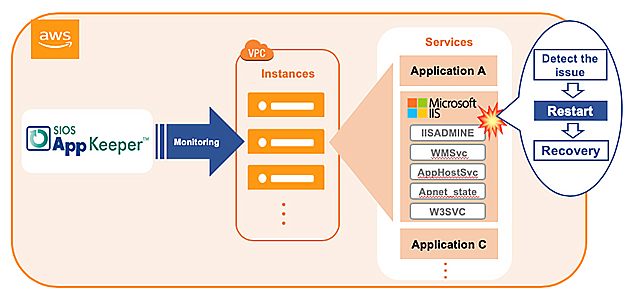
If you are looking for a solution that not only monitors your IIS servers running on Amazon EC2 but also eliminates downtime, then we encourage you to check out SIOS AppKeeper monitoring solutions. AppKeeper continuously monitors and automatically recovers applications, such as those running on IIS, if they experience service interruptions and downtime.

Let’s look at how AppKeeper EC2 monitoring solution helps reduce IIS downtime:

  • AppKeeper monitors your EC2 services and instances. Once you install and configure AppKeeper (which only takes about 10 minutes) you specify which Amazon EC2 instances and services it should monitor, and what actions should be taken if a systems impairment is experienced.
  • AppKeeper alerts you if any systems failures are detected with your IIS webservers.  You receive an alert by email or SMS and can see the details of the failure events and what actions were taken.

  • AppKeeper lauches automatic restarting services and rebooting instances if necessary upon the detection of system failures. You no longer have to respond to any alerts and troubleshoot what happened before restarting. AppKeeper does that automatically for you.

By going beyond simply managing IIS server performance or monitoring to automatic remediation, AppKeeper eliminates downtime and provides the peace of mind you deserve.

Today hundreds of companies rely on AppKeeper to keep their cloud environments running. We invite you to check out the video below see how easy it is to install and use AppKeeper.

Video: Installing AppKeeper and recovering from AWS EC2 failures Demo

And if you like what you see, please feel free to sign up for a free 14-day trial of AppKeeper.

Reproduced with permission from SIOS

Filed Under: Clustering Simplified Tagged With: Application availability, application monitoring, IIS

What If We Eliminated Apache Downtime?

August 30, 2020 by Jason Aw Leave a Comment


Eliminate Apache web server downtime with SIOS AppKeeper Monitoring

Eliminate* Apache web server downtime with SIOS AppKeeper Monitoring

Today Apache webservers are the most popular webservers on the Internet.  Companies are deploying mission-critical, customer-facing applications built on Apache using cloud platforms such as Amazon AWS, Microsoft Azure, and Google Cloud Platform.  So you can bet that they are investing a lot of time and money in monitoring those applications and trying to reduce downtime. But what if we told you we could eliminate the need for manual intervention via automated monitoring and restarting applications when your Apache web servers are down?

Before we go into how we can do that, let’s step back for a minute and look at choices that companies have when it comes to monitoring and managing their Apache web servers and those critical applications.

How to monitor and protect your Apache web servers from unnecessary downtime

Anyone deploying applications using Apache webservers is either considering monitoring the health of their webservers themselves or outsourcing that task to a third party.

When it comes to monitoring cloud applications running on Amazon Web Services, a popular choice is to use Amazon CloudWatch.  Some companies are even extending the functionality of CloudWatch by creating some levels of automation by developing scripts or by using AWS Lambda.  But configuring Amazon CloudWatch properly with custom metrics and setting up AWS Lambda requires a certain amount of technical expertise that may be beyond that of many companies.  And then there is a cost and effort required to maintain any scripts as the applications evolve.

Another choice is to invest in a comprehensive Application Performance Monitoring (“APM”) solution from a vendor such as New Relics, Dynatrace, DataDog, or LogicMonitor. These can be very appropriate if you want to monitor more than just your AWS environment. APM solutions are very configurable and will provide you with a lot of data in terms of information about what happened.

But have you reduced your downtime?  Probably not.  What you have done is invested in a system that will alert you immediately if and when your Apache webservers go down, and will overload you with data (or “alert storms”) as you try to get things running again.

Some companies have decided to outsource the responsibility for monitoring and managing their applications to a trusted third party (often a “managed service provider” or MSP). In return for a base monthly fee, the MSP monitors applications and offers a core set of services, often bound by a Service Level Agreement. When alerts are received, they investigate. In some cases, these investigations can require (costly) escalations. If and when applications go down, the MSP will then take control and restart services or reboot instances where they can.  But these remediation actions are often an extra expense.

There has to be a better way.

How automated monitoring and restart with SIOS AppKeeper eliminates Apache Webserver downtime

Based on our customer experience, the average company with only three EC2 instances experiences downtime at least once a month.  “The site is down!  Drop everything. Find out what needs to be done!”  What you need to do is reduce the need for these unnecessary fire drills.

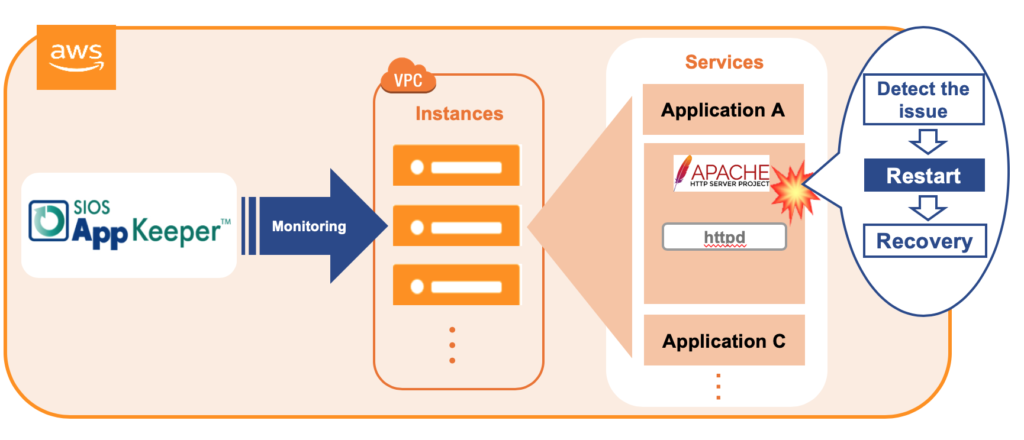
SIOS AppKeeper is a SaaS service that is easy to install and configure and monitors any services and applications running on Amazon EC2, such as your Apache httpd service.  When an anomaly is detected, AppKeeper automatically restarts the service, and if that doesn’t work it reboots the entire instance. No more reading through logs to pinpoint the reason for the failure, or escalation to developers to restart your service. Or expensive outsourcing fees.  AppKeeper provides “set-it-and-forget-it” functionality so that you can eliminate downtime.

Today hundreds of companies rely on AppKeeper to keep their cloud environments running. We invite you to check out the video below for a demonstration of how AppKeeper protects Apache webservers.  And if you like what you see, please feel free to sign up for a free 14-day trial of AppKeeper.

What If We Eliminated Apache Downtime

*Based on customer data, AppKeeper addresses 85% of application service failures. So in almost nine times out of ten AppKeeper sends out an email notifying customers that downtime was detected and the services were restarted or the instances were rebooted automatically.  Isn’t that better than panicking and digging through log files before manually restarting everything?

See related post: Why is AWS EC2 Application Monitoring So Hard?


Reproduced with permission from SIOS

Filed Under: Clustering Simplified Tagged With: Amazon AWS, Apache Availability, Application availability

Planning is Key to Enterprise Availability (and to a Happy Marriage)

July 30, 2020 by Jason Aw Leave a Comment

Planning is Key to Enterprise Availability (and to a Happy Marriage)

Planning is Key to Enterprise Availability (and to a Happy Marriage)

Planning dates and getaways, fabulously romantic dinners are a great part of loving your spouse well.  Seminars and workshops overflowing with tips for improving your relationship abound in nearly every area of the world.

But, listen in on the training session provided by SIOS Technology Corp. Project Manager for Professional Services, Edmond Melkomian, and you’ll quickly learn that planning dinners and anniversary retreats aren’t the only way to love your spouse well.

In a recent class on SIOS Protection Suite for Linux, Edmond shared three tips that help you love your spouse well in an enterprise world: plan, plan, plan.

1.   “Plan to plan” your enterprise availability solution

1.   “Plan to plan” your enterprise availability solution

In his course, Edmond Melkomian asked students to name the first thing you should do when deploying an enterprise solution.  His answer, “Plan, plan, plan.”  It seems obvious, but the first step is to start making the plan.  A fairly decent start for a plan includes developing the details for each of the project phases, such as milestones, checkpoints, risks, risk mitigation and strategies, stakeholders, timelines, stakeholder communication plans.  A decent plan will also include details about kickoff, sign-off and closure, and resources (staffing, management, legal/contracts).

Plan to create, review, modify, and update your plan throughout the solution lifecycle.

2.   Plan what to deploy for enterprise availability

Plan what to deploy.  It is likely that a large portion of your enterprise infrastructure exists beyond the realm of the current team’s lifespan with your company.  As you migrate to the cloud, or update your availability strategy, it is worth the time and effort to make a plan regarding what to deploy.  Focus your plan on ensuring that you deploy redundancy at all critical components, network, compute, storage, power, cooling, and applications.  All data centers and cloud providers typically ensure cooling, power, and network redundancy to start.

A number of firms offer architectural teams, cloud solution providers, availability experts, application architects, and migration specialists who help teams discover critical and sometimes hidden dependencies as well as high risk areas vulnerable to Single Points of Failure (SPOF’s).  This investigative work will feed into your plan of what to deploy and/or update in your availability strategy.

Plan on reviewing what you need to deploy.

3.   Plan to keep a QA/pre-production cluster for reliable availability

When I was in the SIOS Technology Corp. development team, I’ll never forget a Friday night call with a long time, but frantic customer.  Earlier in the month a frequent customer unsuccessfully deployed a new software solution into a production environment.  The result was a massive failure.  He called our 800 number at 4:30pm (EST) on Friday.  Why do I recall that exact time?  Friday was date night.  My wife and I had dinner plans, a babysitter for the six girls on standby (by the hour), and hopes for a romantic and relaxing evening.  I was just about to head out for the day when the phone rang.  After a tense first hour, we were back up and running.  This unfortunate episode could have been avoided or mitigated by keeping a UAT or QA system on hand.

As Harrison Howell, the Software Engineer for Customer Experience at SIOS Technology Corp. noted in his blog 6-common-cloud-migration-challenges the limits of on-prem are no longer the same limits.

Customers coming from an on-prem system need to remember that resources are no longer a limiting factor. In the cloud, systems can be effortlessly copied and run in isolation of production, something not trivial on-premises. On-demand access to IT resources allows UAT of HA and DR to expand beyond “shut down the primary node”. Networks can be sabotaged, kernels can be panicked, even databases can be corrupted and none of this will impact production! Identifying and testing these scenarios improves HA and DR posture.

Plan on deploying and keeping a UAT system for HA and DR testing.  As Harrison mentions, “identifying and testing [issues]” “improves [your overall] HA and DR posture,” and that improves your chances of a successful date night.

4.   Plan regular maintenance and updates (including documentation)

Lastly, plan times for regular maintenance and updates to maintain Enterprise Availability.  Your enterprise needs to remain highly available to remain highly profitable and successful.  Environments don’t remain stagnant, and patches, security updates, expansion, and general maintenance are a regular occurrence from inception to retirement.  Creating a plan for how and when you will incorporate updates and maintenance into your enterprise will ensure that you are not only kept up to date, but that you minimize risks and downtime while doing it.  Be sure to include in your plan the use of a test system.  Develop a planned routine and process for validating patches, kernel and OS updates, and security software, and don’t forget to update the project documentation and future plans as you go and grow.

If you can remember to plan for a highly redundant, highly reliable and highly available system upfront, plan to keep a QA/Pre-production cluster after Go-Live, and plan for regular maintenance and updates you will also be able to keep your plans with your spouse for date night.  And not just date night, but you’ll also be able to keep your night’s free from 3am wake up calls due to down production systems.  This is my tip for loving your spouse well.

I love my wife and so I help customers deploy SIOS Technology Corp.’s DataKeeper Cluster Edition and SIOS Protection Suite for Windows and Linux products as a part of a highly available enterprise protection solution.  Contact SIOS.

— Cassius Rhue, VP, Customer Experience

Article reproduced with permission from SIOS
 

Filed Under: Clustering Simplified Tagged With: Application availability, High Availability

What is Amazon CloudWatch?

July 12, 2020 by Jason Aw Leave a Comment

What is Amazon CloudWatch


What is Amazon CloudWatch?

What you can do with CloudWatch and some hurdles to consider

With AWS boasting a dominant share of the cloud market, many companies are migrating their on-premises systems to the cloud with Amazon AWS.  So, how should a system running in the AWS environment be managed?

In this blog post, we will introduce the features of Amazon CloudWatch, a monitoring service provided by AWS, as well as the challenges of implementing it and how to solve them.

Using Amazon CloudWatch to closely monitor your AWS environment

To ensure that you have a stable cloud environment, it is important to detect anomalies (“system impairments”) quickly and respond in a timely manner.  Monitoring becomes an important and necessary task for any organization moving to the cloud.  This is no different than if you were managing on-premises applications and infrastructure. So, how should you monitor in an AWS environment?  One choice is to use Amazon CloudWatch, which monitors CPU, memory, and disk usage and notifies you when a predetermined threshold is exceeded.  Plus, you can set up your own metrics to monitor various items such as application logs.

The best part about Amazon CloudWatch is that it’s a service provided by AWS itself.  It has a high affinity with Amazon EC2 and other AWS services, so it can quickly respond to frequent functional extensions and specification changes, and can easily support AWS Auto Scaling, which automatically increases or decreases resources according to the load.  Amazon CloudWatch provides precise monitoring tailored to each environment’s unique circumstances.

Amazon CloudWatch implementation challenges

While Amazon CloudWatch is an ideal fit for organizations with experienced cloud engineers and DevOps teams, there are some things the average users should be aware of.

Amazon CloudWatch is effective for monitoring an organization’s AWS environment, but it requires a certain level of skill and knowledge to configure and deploy.  Especially when you set your own metrics, are setting up alerts, or taking into account Auto Scaling, the complexity increases. For example, If you’re setting up monitoring, it’s easy, but if you’re setting up email, rebooting, AutoScaling, etc., depending on the resource situation, it can be difficult.

If you want to automate the recovery process with instructions such as “restart the server when an error occurs”, you must first create a recovery scenario with an AWS Lambda script that provides a detailed description of the conditions and actions to be taken.  How familiar is your team with AWS Lambda?

The principal advantage of Amazon CloudWatch is that you can monitor your environment closely, but in order to do that, you must properly design in advance for each system what items to monitor and when, threshold values, etc.  These design tasks can take a lot of time.  Of course, your mission-critical systems need to be closely monitored in this way, but this level of detail and sophistication is not appropriate for all systems. For some, such as internal websites or WordPress servers, you will want to minimize your operating and labor costs. In such cases, we would like to suggest you consider a tool that can be more easily operated and managed.

For mission-critical applications, you need high availability protection with SIOS clustering software. Add SIOS DataKeeper software to a Windows Server Failover Clustering environment to create a SANless cluster in Amazon EC2 that fails over across availability zones and regions.  Use SIOS Protection Suite for Linux for application-aware clustering designed to simplify complexity and orchestrate failover according to application-specific best practices.

 Contact the SIOS availability experts today to learn more about achieving maximum uptime for your mission-critical applications.

Reproduced from SIOS

Filed Under: Clustering Simplified Tagged With: Amazon AWS, AppKeeper, Application availability, application monitoring

  • « Previous Page
  • 1
  • …
  • 4
  • 5
  • 6
  • 7
  • Next Page »

Recent Posts

  • 3 Common Configuration Mistakes That Cause Clusters to Break
  • Guide: Deploying a Multi-Zone and Multi-Region SQL Server FCI in Azure
  • High Availability for On-Premises Data Centers
  • How APM Tools and High Availability Clusters Improve Network Resilience
  • Selecting the Right Storage for SQL Server High Availability in the Cloud

Most Popular Posts

Maximise replication performance for Linux Clustering with Fusion-io
Failover Clustering with VMware High Availability
create A 2-Node MySQL Cluster Without Shared Storage
SAP for High Availability Solutions For Linux
Bandwidth To Support Real-Time Replication
The Availability Equation – High Availability Solutions.jpg
Choosing Platforms To Replicate Data - Host-Based Or Storage-Based?
Guide To Connect To An iSCSI Target Using Open-iSCSI Initiator Software
Best Practices to Eliminate SPoF In Cluster Architecture
Step-By-Step How To Configure A Linux Failover Cluster In Microsoft Azure IaaS Without Shared Storage azure sanless
Take Action Before SQL Server 20082008 R2 Support Expires
How To Cluster MaxDB On Windows In The Cloud

Join Our Mailing List

Copyright © 2026 · Enterprise Pro Theme on Genesis Framework · WordPress · Log in