SIOS SANless clusters

SIOS SANless clusters High-availability Machine Learning monitoring

  • Home
  • Products
    • SIOS DataKeeper for Windows
    • SIOS Protection Suite for Linux
  • News and Events
  • Clustering Simplified
  • Success Stories
  • Contact Us
  • English
  • 中文 (中国)
  • 中文 (台灣)
  • 한국어
  • Bahasa Indonesia
  • ไทย

5 Signs That It Will Take More Than A Blog Post To Fix Your High Availability

December 8, 2020 by Jason Aw Leave a Comment

5 signs that it will take more than a blog post to fix your high availability

5 Signs That It Will Take More Than A Blog Post To Fix Your High Availability

The signs are there. The warning lights are flashing.  In your gut, you can sense it. Maybe you can’t sleep.  Your problems with high availability are deep. But, maybe you are not quite sure.

1. If you think your cloud SLA is all you need for high availability

Cloud solutions have provided great advancements in increased hardware availability and resilience. However, application high availability requires more than just selecting the right hypervisor or cloud provider. Your strategy for high availability cannot stop with the SLA provided by the cloud or a virtualization provider. As quoted by Wired, “The almost four-day Amazon outage of April 2011 did not breach Amazon’s EC2 SLA, which as a FAQ explains, “guarantees 99.95% availability of the service within a Region over a trailing 365 period.” In this DZone article, our own David Bermingham breaks down the differences between cloud SLAs and application availability in detail. If you want a highly available infrastructure, it must include monitoring, recovery, and resilience at the data and application layers as well.

2. If you are just using the high availability clustering that came with your open source operating system

If so, then chances are you didn’t select your database based on what was bundled with the OS, so why would you select your HA solution based on that criteria alone. Bundled tools go a long way in providing extra assurance, possibilities, and capabilities. However, despite the ease of access, bundled tools and OS clustering software are not always capable of meeting your SLA, RPO, RTO, and availability requirements. If your enterprise has a combination of Operating Systems, your team will likely need help navigating different tools and understanding how they integrate together. It’s kind of like choosing the hedge clippers and push reel mower left on the curb to shape “Azalea” on the 13th hole par 5 (at Augusta). Both lawn mowers are designed to cut grass but how much time do you have? How are you going to handle the complexity? Which would you trust? Your strategy for high availability requires more than just considering the conveniences of what is bundled with the OS, otherwise, you’d be running MySQL instead of SAP HANA.

3. If you think that enterprise application licensing, such as SQL Enterprise or Oracle Enterprise, is the same thing as enterprise high availability

In addition to increased cost, many enterprise application licenses also increase the ability of the application to recover in some high availability scenarios. However, it is highly unlikely that your entire enterprise is based on a single application. Your high availability is going to require more than just a highly available database solution. You’ll need an enterprise grade application monitoring and recovery solution with a breadth of support for all of your applications and databases. In addition, you’ll need the ability to manage and replicate not just database data, but critical application and configuration data as well. Availability for a single database or a simple application is one thing – but HA for a complex, multipart application and supporting database is very different. More services, more parts that need to be coordinated, more complex architecture to orchestrate, more specific best practices to adhere to before, during and after failover/switchover. More than what your enterprise license paid for.

4. If your downtime is growing and your uptime is shrinking

The pace of life is ever increasing in many fields. When was the last time your team recovered from backup, manually restarted the applications that were deemed critical, or restarted a set of failed virtual machines or nodes? The pace of your outage events cannot continue to outpace sustainability, or your team’s ability to move beyond firefighting to fire prevention and fire proofing. “You can only run so hard so long (Carey Nieuwhof).” For some of you, you’ve been firefighting for too long, and your outages are becoming more common than your up-time.

5. If your first failover test was on the production server

A recent client remarked that it is simply impossible to test for every possible disaster scenario. As new software is created, deployed, updated, and patched the challenges in higher availability are increasing. But, your live, production data is not the place to find out what does not play well together. And while Go-Live and Post-Go-Live will always have their share of surprises, the inability to actually failover and run on the backup node should not be one of them.

Scouring blogs can provide you with helpful tips and insights to define, redefine, and improve your higher availability. But, if the warning signs are going off that you’ve traded true availability for some semblance of ‘just enough’, then it will take more than a blog post, or scouring every blog post in the availability world for that matter, to fix your HA.

– Cassius Rhue, Vice President, Customer Experience

Reproduced with permission from SIOS

Filed Under: Clustering Simplified Tagged With: Amazon AWS, Application availability, application monitoring, High Availability, high availability - SAP, SQL Server High Availability

9 Signs You Have an Application Availability Problem

November 27, 2020 by Jason Aw Leave a Comment

9 Signs You Have an Application Availability Problem

9 Signs You Have an Application Availability Problem

You’ve heard the saying “recognizing a problem is the first step in solving it.”  But, many small, medium, and surprisingly, even large enterprise businesses aren’t aware that their application availability isn’t what it should be.

Read on for these nine signs that you still have an application availability problem:

1. You spend more time restarting an application than using it

Application crashes may be a fact of life, but if your application is down more often than it is up, that is a problem.

2. You’ve started to snooze through the alert storm in your inbox or control center

You have deployed alerts for application or server downtime, but the alert storm has so overwhelmed your inbox that you have silenced them all.

3. You have one data center for all your critical operations

A single data center for operations may sound convenient, but one well intended but misdirected construction crew has been known to turn single data centers into costly unavailability zones.

4. Your idea of data protection involves backup retrieval and archives

Your data protection strategy is critical. Data replication technology and site to site, region to region replication has become a mainstay, so if your replication or data protection strategy is non-existent or involves a lengthy jog to the vault this could be a big problem.

5. Your recovery procedures always require manual intervention

Manual intervention itself is not a problem. Some events are so difficult and complex that some amount of manual effort could be required.  But, if manual intervention is always the first, second and third order of business after a server or application outage, that is a problem.

6. Your RTO is measured in days not hours or minutes

How are you measuring your recovery time objective (RTO)? Do you measure your RTO in days or hours instead of minutes per month?  True, every business has a tolerance level for their RTO.  However, your RTO should not be a function of server rebuilds and gross instabilities in your architecture.

7. You don’t know your RPO because your standby is never reliably in sync

You’ve checked the box on reliable monitoring and recovery of your application, and taken it a step further to provide a standby cluster ready system.  Great job.  But, before I let you off the hook, what is your recovery point objective (RPO)? An RPO should be something more accurate than “somewhere between day 0 and last night.”

8. Single points of failure don’t just exist, they are the norm

Where are your single points of failure?  Your budget may not allow you to eliminate every single point of failure, but if you can identify a single point of failure in every major category and every critical component of your enterprise…

9. Your last disaster made local, regional, or national news 

If the last major storm, grid failure, or failure event put a blight on your business due to downtime, then higher availability is the next order of business.

Downtime costs your business in terms of customers, productivity, and peace of mind.  Unaddressed risks have a definite impact on your business and reputation.  If these warning signings are there, you may have an availability problem.  And, if you ignore them you’ll likely have even bigger problems soon thereafter, hence the importance of application availability.

— Cassius Rhue, VP, Customer Experience

Reproduced with permission from SIOS

Filed Under: Clustering Simplified Tagged With: Amazon AWS, Application availability, application monitoring, High Availability, high availability - SAP, SQL Server High Availability

Six Reasons Not to Buy SIOS High Availability Software . . . If You Dare

October 25, 2020 by Jason Aw Leave a Comment

Six Reasons Not to Buy SIOS High Availability Software . . . If You Dare

Six Reasons Not to Buy SIOS High Availability Software . . . If You Dare

Six Reasons Not to Buy SIOS High Availability Software . . . If You Dare

You need SIOS Protection Suite (for Linux or Windows) or SIOS DataKeeper Cluster Edition for high availability protection for business critical applications.

UNLESS

1. You prefer free solutions only.

I get it. There are definitely times when I do the same thing when I need to learn a new skill, get a quick tip, drop a few pounds, or set up a quick demo. Rather than signing up for a subscription, purchasing a license, or investing in a combination of the two, I have gone the free route.

However, the saying often holds true, you get what you pay for. Free trials are fine. Permanently free high availability is like gas station sushi – is the risk really worth it? Be sure that free doesn’t prevent you from utilizing the fullness available for optimizing uptime and increasing availability. Make sure you aren’t passing over a reasonably priced high availability solution that is proven to protect your mission-critical applications.

2. Being a single solution shop solution is more important than meeting your HA needs.

We were a “Ford tough” family for decades. Seriously. I understand what it is like to be a one solution shop. My dad owned a Ford truck for work, a Ford Mustang for leisure, a Ford 3600 tractor for the farm, and a Ford minivan for family travel. There was even a season where we received model toy cars with the brandished blue oval as well.

But, when my wife and I were branching out on our own family needs, we broke away from the single solution to address needs that fell out of the Ford wheelhouse (at the time). You may be a single shop buyer, but if your needs have changed and the HA provider or solution hasn’t kept up, consider whether expanding the solution set will eliminate risks, improve success, or be worth the investment in a complementary solution for those new needs. When we needed a reliable, gas efficient, sleek, family friendly, and economical solution for our family, we supplemented Ford tough with a Honda Odyssey. If you are a single stop shop, and you are not worried about vendor lock-in best of luck.

3. You are more of a do it yourself-er coder.

You like coding. You like to write a lot of scripts, and don’t mind pulling out your bash, ksh, perl, python, powershell, batch or command tool kit and wiring things up yourself. You value the joy in flexibility and adding your own tweaks.

I love writing code as well, but there are times when the last thing I want to do is spend time writing a lot of code and scripts for a problem that is solved, proven, and off the shelf ready. For the do-it-yourself admin, off-the-shelf may not be your preference, but consider whether 20 years of expertise and experience should be rehashed and re-architected for your enterprise. But, if you have to get the code writing fix in, High Availability Software SIOS provides the Generic Application Recovery Kit for you to get in a coding fix.

4. You need Ubuntu support (or Solaris).

Your environment is unique. You have customers who’ve cut their teeth on Solaris and are hanging on to it for dear life. Or you’ve got those who have fully embraced the Linux realm and have moved to Ubuntu. In either case, you look at the SIOS products matrix and Ubuntu isn’t currently a match for your SIOS version. Bummer!

While this is true, consider the rich and vast features and flavors of support that are still available. While there are parts of your enterprise that have dug in on Solaris and others that have raced to embrace Ubuntu and newer variants of Linux, it is more likely that you need a solution capable of supporting RHEL, OEL, SuSE, CentOS and possibly Windows as well. Be sure not to single out a high availability solution by what it doesn’t provide and consider the depth of what it does.

5. You don’t run a hybrid of anything in your environment.

I heard it in the middle of a movie last week. The lead character commented on the idea of moving forward with some new idea of an overly excited owner. The classic line: “Sometimes the juice isn’t worth the squeeze.” In your mind you feel that you aren’t running a hybrid environment. Your applications are critical, but not complex. The moving parts are simple- a database, front end and a supporting application. It makes sense that you might not want to “complicate” things with additional processes, products, solutions or services, and you may feel like the juice isn’t worth the squeeze.

Before you make that final decision for a High Availability Software, assess whether a non-hybrid environment is the same as a simple environment. Consider whether or not the moving parts are as simple as you imagine or whether a solution with failover orchestration would be beneficial to reducing your overall RTO and increasing your RPO.

6. Endorsements from HA experts and experience don’t matter.

I bought a set of headphones online in mid-April. As I suspected, I discovered that anyone can do bluetooth headphones. But, not everyone can do them well. Ergonomically, the “new to market” headphones are a nightmare. Pairing was a breeze, but accidental unpairing is a constant battle. The sound quality is amazing, but that amplifies my annoyance when the headphones randomly chirp – loudly and clearly – for system sounds or at the end of a song.

You may believe that high availability and application monitoring can be done by anyone and that experience doesn’t matter. However, consider your own experiences and mine and ask if you’d really want to trust your enterprise environment to a group that just started thinking about the complexities of hybrid environments, or the dependencies and application-centric knowledge needed for the applications you use most frequently.

When deciding the right High Availability Software for your environment, consider carefully whether you want to go without the many best in class features, hardened and tested solutions, knowledgeable experts, broad swath of supported applications and environments, and industry leading experience and decades of insight. Then after careful consideration, choose wisely.

-Cassius Rhue, Vice President, Customer Experience, SIOS

Reproduced with permission from SIOS
Filed Under: Clustering Simplified Tagged With: Application availability, disaster recovery, High Availability, SQL Server

Reducing downtime for WordPress sites hosted on Amazon EC2

October 19, 2020 by Jason Aw Leave a Comment


Reducing downtime for WordPress sites hosted on Amazon EC2

Going from ignorance to bliss with SIOS AppKeeper

WordPress is an open-source content management system (CMS) used by millions of companies to create websites, blogs, or apps.  According to estimates, there are over 75 million websites today that use WordPress and many companies are beginning to host their WordPress instances on Amazon EC2. Users love WordPress for its flexibility and the ease with which you can create and modify layouts.  If you are using WordPress for your website, then you are in good company.

With so many users relying on WordPress to power their websites, you can imagine that there is a rich set of third-party tools (plugins and services) designed to meet the needs of those users.  Some of these plugins are to add security functionality, such as scanners to probe for vulnerabilities.  Because more plugins can lead to more vulnerabilities.

Trust, but verify.  Why monitoring WordPress uptime matters.

Deploying a website or application running on WordPress without monitoring it properly would be like leaving your car running outside with the keys in it.  You’ll want to protect your investment.  For companies managing WordPress sites (or any applications, for that matter), there are three primary reasons to monitor:

  1. To understand the visitors and optimize their experience;
  2. To monitor the speed of the site and ensure that it meets expected service level agreements (SLAs); and
  3. To ensure that you maximize uptime.  Downtime can mean (serious) lost revenue for any e-commerce sites running on WordPress.

You believe your WordPress site is working properly, but you really want to know what is going on.  The goal of monitoring should be to know quickly what is going on and why, allowing you to respond quickly to any issues.

There is a wide range of tools available to help WordPress users monitor their sites.  Some are very focused on WordPress, such as ManageWP and JetPack, while others are industry-standard solutions that apply to many different CMSs and applications.  Some go “deep” and are focused on one element of monitoring, such as Google Analytics and its focus on visitor analytics, while others try to go “broad” and address all three key aspects of monitoring.  What you decide to use depends on your budget, your requirements, and your technical capabilities.

Here at SIOS, we believe that the best of breed approach makes sense.  We focus on monitoring applications and ensuring that our customers’ experience as little downtime as possible with those applications.  Many of our customers are using SIOS AppKeeper today to monitor and protect their WordPress sites running on Amazon EC2.

SIOS AppKeeper – simple but powerful monitoring and automated remediation for WordPress sites

Many WordPress monitoring solutions (from free plugins to low-cost freemium services) will tell you when your WordPress site is down.  And depending on the sophistication (and cost) of your monitoring solution, it may tell you why your WordPress site is down.  But will it help you reduce downtime and automatically restart your services or reboot your instances when downtime is experienced?

Many companies host their WordPress sites on Amazon EC2 using either Apache or NGINX webservers.  SIOS AppKeeper is a SaaS service that can be configured to automatically discover WordPress sites or applications running on Amazon EC2 instances and their services, and then automatically take any number of actions if and when downtime is experienced.  So instead of only getting alerts that something is wrong, you get notified that something happened and was automatically addressed.

Downtime matters.  If you are running an e-commerce site using WordPress, then downtime will result in lost revenue.  How much revenue?  Simply divide your annual revenues by 365 days and 24 hours (Annual revenue/365/24) to understand your revenue per hour.  In 2013 Google experienced a 5-minute outage that cost them $545,000 in revenue. Now, you may not be Google, but you certainly do want to eliminate downtime wherever possible.

Now imagine what happens when you receive an alert that your WordPress site is down.  Are you ready to respond immediately?  Do you know what should be addressed to get your WordPress site back up and running?  According to our customer research, the average customer using only three Amazon EC2 instances experiences downtime at least once a month.

SIOS AppKeeper monitors Amazon EC2 and alerts you to any downtime AND takes action to remediate the situation, by either restarting your Amazon EC2 services or rebooting your instances.

AppKeeper addresses over 85% of our customers’ Amazon EC2 downtime issues automatically.  This means that you get notified that a failure was identified and addressed, without you having to drop everything or lose any significant revenue.

Today hundreds of companies rely on AppKeeper to keep their cloud environments running. We invite you to check out the video below see how easy it is to install and use AppKeeper.

Video: Installing AppKeeper and recovering from AWS EC2 failures Demo

And if you like what you see, please feel free to sign up for a free 14-day trial of AppKeeper. AppKeeper starts at only US$40 per instance per month.

Reproduced with permission from SIOS

Filed Under: Clustering Simplified Tagged With: Amazon EC2, AppKeeper, Application availability, application monitoring

Migrating to the cloud? Here’s how your DevOps priorities should change when you move to Amazon EC2

September 27, 2020 by Jason Aw Leave a Comment

Migrating to the cloud? Here’s how your DevOps priorities should change when you move to Amazon EC2


Migrating to the cloud? Here’s how your DevOps priorities should change when you move to Amazon EC2

A majority of companies migrating to the cloud, or creating “cloud-native” applications, are doing so with Amazon Web Services (AWS).  AWS offers a lot of cost and functionality advantages.  Companies who have adopted industry-standard developer operations (“DevOps”) best practices for monitoring and managing their on-premise environments often ask themselves how they adapt to their new cloud environments and applications.

How will DevOps priorities change when you move from on-premise applications to Amazon EC2?  Here’s an explanation of the differences between the two and what you should keep in mind.

DevOps priorities in the cloud?  The same. But different.

We often hear customers say that operations will be easier when they move to AWS. We caution them that moving to the cloud (or even AWS) does not mean that they no longer need to monitor and manage their applications.

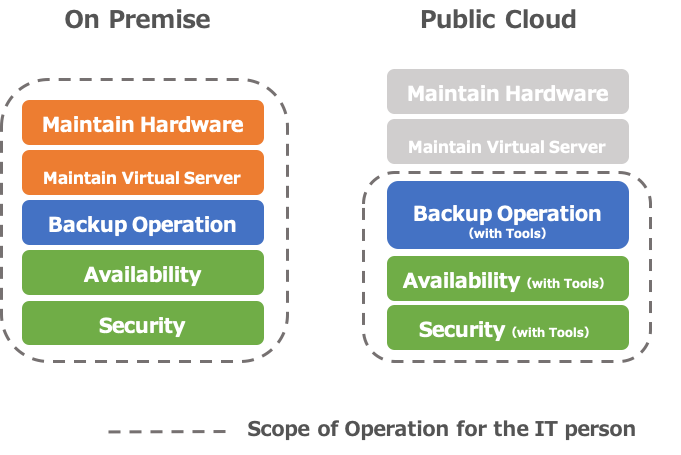
Companies moving to Amazon AWS can take advantage of lower costs and manpower resources when it comes to hardware procurement, provisioning, and maintenance.  But you need to take into account that when you decide to host applications on Amazon EC2 that anything above the Operating System layer is your responsibility.

When it comes to backup/availability guarantee/security measures, etc. for your Amazon EC2 environments, the priorities are the same as if they were on-premise applications. And Amazon provides some native tools and functionality.  But you need to decide if they are the right fit for requirements.

Security, Backup… What do you need to know when managing Amazon AWS environments?


So what are some of the AWS-specific considerations you need to keep in mind as you move to Amazon EC2?  And what are the right tools for you?  The time you invest upfront in designing your applications and how you will deploy and manage them will pay off.

Your first consideration should be how you will secure your Amazon EC2 applications.  Network design, such as “which ports to open” and “from where to allow access” must be considered in the same way as for your on-premise applications.  These can be configured in AWS using security groups and network ACLs (access control lists).

You can use the AWS Trusted Advisor functionality*, which automatically examines your AWS environment and points out whether or not it is set to the recommended settings, making it possible to check your company’s AWS environment for security issues.  We recommend checking with the AWS Trusted Advisor both at the time of implementation and periodically.

Another essential aspect of security is the management of authentication and access privileges.  AWS consolidates all of these into AWS Identity and Access Management (AWS IAM).  In addition to controlling who can access which EC2 instances, you can also use AWS IAM to set up access permissions from EC2 instances to other resources (such as DBs), etc.  Once you have migrated to AWS, the first thing you need to do is to set up the accounts and access restrictions properly in AWS IAM.

The next consideration is “how will I backup my applications on Amazon EC2?”  Amazon EC2 provides the ability to take snapshots, which allows you to do so.  In addition, using “Amazon Data Lifecycle Manager” makes it easy to set up periodic snapshots, as well as incremental backups.  Snapshot files are stored on the Amazon S3 storage service.  You are charged according to their capacity, so you need to be aware of the amount of data you have and set up such settings as “reduce the capacity by incremental backups” and “delete from old data.”

“Availability” needs to be considered in advance. The key is to operate the system in accordance with the priority level of the system.

The last consideration is availability.  With Amazon EC2 applications, as well as those that are on-premise, you should consider the level of availability required based on cost and system importance. However, if you use Amazon’s Multi-AZ deployment functionality, you can specify a redundant configuration between different data centers.  However, using Multi-AZ costs more than using a single-AZ configuration (although not as much as if you had redundant on-premise systems).  When designing your applications you need to consider whether Multi-AZ is required and how much you should invest in availability. Using SIOS clustering software allows you to create a clustering environment that fails over across availability zones and regions for maximum DR protection.

If you aren’t investing in failover, then you should at least be monitoring your applications and planning how to recover them when downtime is experienced.  You can use Amazon CloudWatch to easily monitor general items such as CPU, memory, and disks, and you can also program the Amazon EC2 Auto Recovery function to automatically recover instances when an error occurs in the EC2.

If your application is mission-critical, then you will want to invest in high availability protection that delivers at least 99.99% uptime. Get in touch with SIOS availability experts to make sure your application’s uptime is secured.

Reproduced with permission from SIOS
Filed Under: Clustering Simplified Tagged With: Amazon AWS, Amazon EC2, AppKeeper, Application availability, application monitoring

  • « Previous Page
  • 1
  • …
  • 3
  • 4
  • 5
  • 6
  • 7
  • Next Page »

Recent Posts

  • Business Continuity Planning for High Availability and Disaster Recovery
  • 3 Common Configuration Mistakes That Cause Clusters to Break
  • Guide: Deploying a Multi-Zone and Multi-Region SQL Server FCI in Azure
  • High Availability for On-Premises Data Centers
  • How APM Tools and High Availability Clusters Improve Network Resilience

Most Popular Posts

Maximise replication performance for Linux Clustering with Fusion-io
Failover Clustering with VMware High Availability
create A 2-Node MySQL Cluster Without Shared Storage
SAP for High Availability Solutions For Linux
Bandwidth To Support Real-Time Replication
The Availability Equation – High Availability Solutions.jpg
Choosing Platforms To Replicate Data - Host-Based Or Storage-Based?
Guide To Connect To An iSCSI Target Using Open-iSCSI Initiator Software
Best Practices to Eliminate SPoF In Cluster Architecture
Step-By-Step How To Configure A Linux Failover Cluster In Microsoft Azure IaaS Without Shared Storage azure sanless
Take Action Before SQL Server 20082008 R2 Support Expires
How To Cluster MaxDB On Windows In The Cloud

Join Our Mailing List

Copyright © 2026 · Enterprise Pro Theme on Genesis Framework · WordPress · Log in