SIOS SANless clusters

SIOS SANless clusters High-availability Machine Learning monitoring

  • Home
  • Products
    • SIOS DataKeeper for Windows
    • SIOS Protection Suite for Linux
  • News and Events
  • Clustering Simplified
  • Success Stories
  • Contact Us
  • English
  • 中文 (中国)
  • 中文 (台灣)
  • 한국어
  • Bahasa Indonesia
  • ไทย

SIOS Protection Suite for Linux Quick Service Protection

February 6, 2021 by Jason Aw Leave a Comment

How to add custom application support to SIOS Protection Suite - SIOS Protection Suite for Linux Quick Service Protection

Using SIOS Protection Suite for Linux Quick Service Protection Resource

On a recent engagement with the SIOS Professional Services team, a customer inquired about how to protect a custom application with the SIOS Protection Suite for Linux solution. One of the highly experienced high availability experts at SIOS Technology Corp., helped understand the customer’s application and laid out the methods SIOS provides for custom application support.

SIOS Protection Suite for Linux provides multiple methods for adding high availability and application monitoring to custom applications.  These options include the following:

  • Creating a custom application recovery kit (ARK)1
  • Creating a generic application resource hierarchy
  • Creating a quick service protection resource
Type Coding Complexity Monitoring Recovery
Custom Application Recovery Kit Resource1 Highest Highest Highest
Generic Application Resource Medium High High
Quick Service  Protection Resource Low Medium Medium

Definitions Used in Chart

Monitoring – defined as the ability to make a determination of the availability, accessibility and functioning of the protected application, database or service.  A low level of application, database, or service monitoring provides basic coverage, such as a check for a running process, existence of a pid_file, or that the status command returns a ‘true’ result when executed.  Note: A ‘true’ or ‘0 (zero)’ return code does not mean that the application, database, or service is running. But only that the command executed was able to successfully complete with a positive (‘true’ or ‘0 (zero)’) status result.  The highest level of monitoring indicates that application specific knowledge is applied to determine the health and functioning of the application beyond lower level methods such as process status, ps output, or systemd status returns.  The highest level of monitoring typically applies knowledge of recommended order of healthcheck operations, knowledge of dependencies, and analysis of the results obtained from status and monitoring commands.

Recovery – defined as the ability to restart a failed application, database or service.  A low level of recovery capability implies that commands for a restart are issued and expected output are obtained from the issuance of the command.  The highest level of monitoring indicates that application-specific knowledge is applied to determine how to initiate an orderly restart of the application, database, or service, which may require knowledge of recommended order of operations, dependencies, rollbacks or other related remediation of a failed service.

Solution:  Quick Service Protection Resource

In this engagement, the customer’s application had systemd compatibility. Based on their overall requirements for avoiding coding, minimal monitoring needs, and simple recovery procedures, we recommended the Quick Service Protection (QSP) Resource.

The QSP resource works to quickly add support of a systemd service to the SIOS Protection Suite for Linux resource protection.  In the case of Customer Example.com, they have a systemd compatible service, with the minimal required definition needed to start and stop their application.

[Unit]

Description=SIOS ‘as-is’ Example Service 2020

After=network.target

[Service]

Type=simple

Restart=always

RestartSec=3

User=root

ExecStart=/example_app/bin/exampleapp start

ExecStop=/example_app/bin/exampleapp stop

[Install]

WantedBy=multi-user.target

Example.com systemd file

SIOS recommends that prior to attempting the protection of the resource with the SIOS Protection Suite for Linux product, verify via systemctl that the example application stops and starts accordingly:

# systemctl status example

* example.service – SIOS ‘as-is’ Example Service 2020

Loaded: loaded (/usr/lib/systemd/system/example.service; disabled; vendor preset: disabled)

Active: inactive (dead)

# systemctl start example

# systemctl status example

* example.service – SIOS ‘as-is’ Example Service 2020

Loaded: loaded (/usr/lib/systemd/system/example.service; disabled; vendor preset: disabled)

Active: active (running) since Fri 2020-08-21 14:53:27 EDT; 5s ago

Main PID: 19937 (exampleapp)

CGroup: /system.slice/example.service

`-19937 /usr/bin/perl /example_app/bin/exampleapp start

# systemctl stop example

# systemctl status example

* example.service – SIOS ‘as-is’ Example Service 2020

Loaded: loaded (/usr/lib/systemd/system/example.service; disabled; vendor preset: disabled)

Active: inactive (dead)


After verifying that the application functions correctly via systemd, restart the service and ensure that the service is running.

# systemctl start example

# systemctl status example

* example.service – SIOS ‘as-is’ Example Service 2020

Loaded: loaded (/usr/lib/systemd/system/example.service; disabled; vendor preset: disabled)

Active: active (running) since Fri 2020-08-21 15:59:44 EDT; 3min 2s ago

Main PID: 30740 (exampleapp)

Refer to the SIOS Protection Suite for Linux Quick Service Protection Suite documentation for additional details on the resource create process.

Using the SPS-L UI select the Create option, indicated in the Global UI Resource Toolbar by the following icon:   SIOS Global US Resource

Once the create wizard is launched, select the Quick Service Protection option in the Create Resource Wizard Window

 

In the next prompt for  ‘Switchback Type’, choose whether you will use intelligent switchback or automatic switchback.
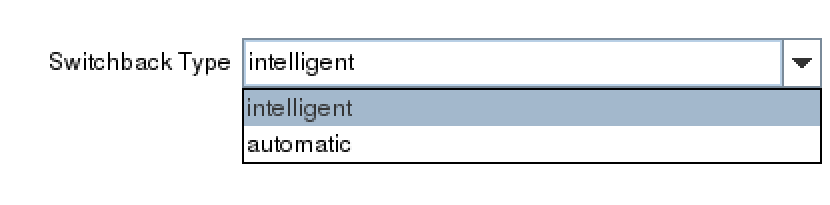
After selecting the ‘Switchback Type’,  the Server dialogue appears allowing you to choose the primary server for the custom application.
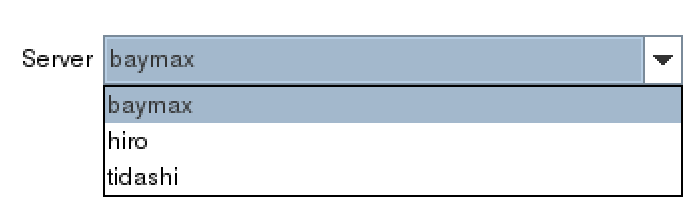
 

(Note: If the service requires storage, be sure to choose the same primary server previously selected for the storage resources.)

In the Service Name dialog box, find the service for your custom application.
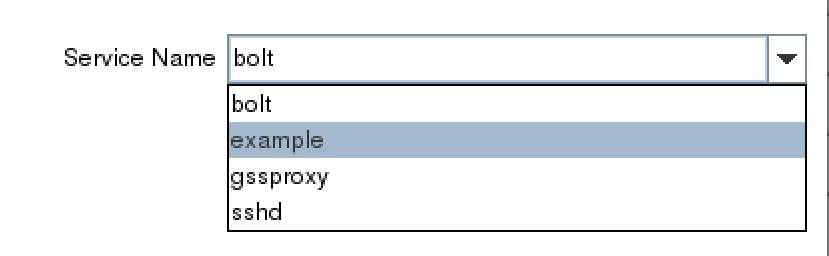
Once you’ve selected the correct service, example, determine whether you will enable monitoring or disable the monitoring service.  Refer to the documentation to gain an understanding of the monitoring provided by the QSP resource.2

 

Next, choose a resource tag.  A resource tag should be a meaningful name that will help your IT team quickly identify which SPS-L resource protects your application or service.

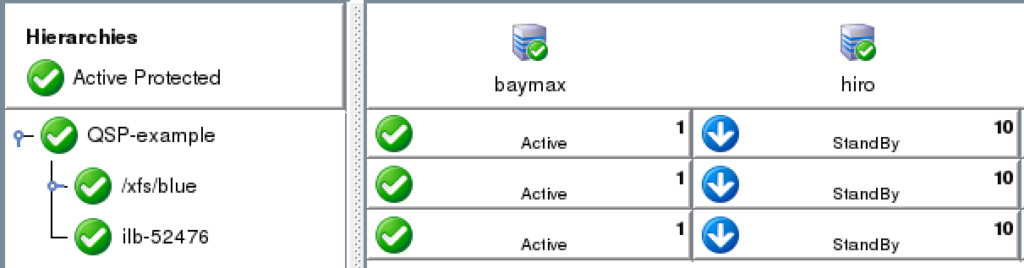
Lastly, follow the final dialogue to complete the resource creation process.  Once the resource is created, use the UI to extend the resource to additional servers. If necessary, create dependencies between the newly protected custom service/application and any other required resources such as storage or IP resources.
 

NOTES:

1 Creating a customer application recovery kit can be accomplished via an engagement with the SIOS Technology Corp. Professional Services Team.  For more information contact professional-services@us.sios.com

2 The QSP Recovery Kit quickCheck can only perform simple health (using the “status” action of the service command). QSP doesn’t guarantee that the service is provided or the process is functioning. If complicated starting and/or stopping is necessary, or more robust health checking operations are necessary, using a Generic Application or Custom Application ARK is recommended

Reproduced from SIOS

Filed Under: Clustering Simplified Tagged With: Application availability, clusters, High Availability, high availability - SAP, SAP S/4HANA

How to Understand & Respond to Availability Alerts

January 29, 2021 by Jason Aw Leave a Comment

Understand & Respond to Availability Alerts

Houston We Have a Problem (or How to Understand & Respond to Availability Alerts)

A Successful Failure

Houston we have a problem!  It is an iconic line that reminds countless space buffs and movie fans about the great difficulty, potential disaster, and the perilous state of the Apollo 13 space mission – a mission NASA now calls “A Successful Failure.”  Ignoring your own application availability alerts may not go down in history as a defining moment, but can also wreak similar havoc

Now back to 1970:

“A routine stir of an oxygen tank ignited damaged wire insulation inside it, causing an explosion that vented the contents of both of the Service Module’s (SM) oxygen tanks to space. Without oxygen, needed for breathing and for generating electric power, the SM’s propulsion and life support systems could not operate. The Command Module’s (CM) systems had to be shut down to conserve its remaining resources for reentry, forcing the crew to transfer to the Lunar Module (LM) as a lifeboat. With the lunar landing canceled, mission controllers worked to bring the crew home alive.”

An explosion of oxygen tanks triggered alarms, warnings, pressure and voltage drops, interrupted communications, and then the now famous radio communication between the astronauts and Mission Control.  But what if, after the explosion, the crew did nothing? What if they never checked on the explosion, never responded to the warnings and gauges, and never informed Mission Control of there being an issue?  What if Mission Control, after being notified or alerted back at their dashboard in the control center, never attempted to provide any assistance?  What if the team buried their heads in the sand, or resigned themselves to fate and chance, never tried to learn, improvise, or improve from the failure they encountered?  The result would have been tragic!  It may have made it to a documentary, but hardly a blockbuster movie featuring an iconic line.

What Do You Do When an Alert is Triggered in Your Environment?

Space walks are a far cry from our own day to day activities, unless of course you work for NASA, but recent blogs on Apollo 13 do spark a question applicable to availability.  What do you do when there is an alert triggered in your environment? Do you just ignore it?  Do you downplay it, waiting to see if the alerts, log messages, or other indicators will just go away?  Do you contact your vendor support to understand how you can disable these alerts, warnings, and messages?  Or do you say, “We have a problem here and we need to work it out”?

As a VP of Customer Experience at SIOS Technology Corp. we have experienced both sides of alerts and indicators.  We have painstakingly walked with customers who chose to ignore warnings, turning off critical alerts that indicated issues, ranging from application thresholds to network instability to potential data inconsistency.  And we have also seen customers who have tuned into their alerts, investigated why their alarms were going off, uncovered the root cause and enjoyed the fruit of their labor.  This fruit is most often the sweet reward of improved stability, innovation and learning, or an averted disaster.

4 things you can do when you your availability product triggers an alert

1. Determine if the type and criticality of the availability alert.

Is the alert or error indicative of a warning, an error, or a critical issue? A good place to assist you and your team with understanding criticality is to consult with available documentation. Check the product documentation, online forums, knowledge base articles (KBA), and internal team data and process manuals.

2. Assess the immediacy of the alert. 

For warnings and errors, how likely are they to progress into a critical issue or event.  For critical issues and alerts, this may be obvious but an assessment, even of critical events will provide some guidance on your next steps; self-correction, issue isolation, or immediate escalation.

3. Consult additional sources. 

What other sources can you access to make a determination about the alert condition? For example, if the alert is storage related, are there other tools that can expose the health of your storage?  If the issue is a network alert, are there hypervisor tools, traffic tools, NIC statistics, or other specialized monitoring tools deployed to help with analysis.

4. Contact support.

In other words, if you are unsure, alert Mission Control. After determining the type, assessing the immediacy, and consulting additional sources, it is a good idea to contact your vendor for support.  A warning about a threshold for API calls may seem innocent. But if the API calls will fail once such a limit is reached, this could be cause for immediate action. Getting the authority of the specialist can be helpful in keeping peace of mind and avoiding disaster.

An experienced vendor like SIOS can help you quickly identify the causes of problems and recommend the best solution.

Repeatedly ignoring problems in your availability environment can lead to unexpected, but no less devastating results. Addressing the problems indicated by alerts, log messages, warning indicators, or other installed and configured indicators gives your customers, your business, your teams, and yourself the “opportunity to solve the problems,” before it becomes a disaster. And at the same time, strengthens your availability strategy and infrastructure.  Which will you choose?

–  Cassius Rhue, VP, Customer Experience

Reproduced from SIOS

Filed Under: Clustering Simplified Tagged With: Application availability, application monitoring, disaster recovery, High Availability, high availability - SAP, SQL Server High Availability

Should I Still Use Zabbix In AWS?

January 16, 2021 by Jason Aw Leave a Comment

Should I Still Use Zabbix In AWS

Should I Still Use Zabbix In AWS?

Amazon EC2 monitoring

For mission-critical applications, ERPs, and databases, such as SQL Server, SAP, HANA, and Oracle your application monitoring needs are best served by a clustering software like SIOS Protection Suite that monitors the full application stack (on-premises or in the cloud). If it detects an application issue, it orchestrates the failover of application operation to a standby node automatically.

However, for applications that don’t require high availability clustering, Zabbix has a high market share as an integrated OSS monitoring tool.  Although it has been widely used in on-premise environments, there are many examples of Zabbix being used in AWS environments.  In spite of the fact that AWS also has monitoring services such as Amazon CloudWatch, why should you use Zabbix?  This section explains the benefits of monitoring EC2 instances and other instances, as well as the configuration process.

Why use Zabbix instead of Amazon CloudWatch?

In an AWS environment, all of the infrastructure is operated by AWS, but you must be responsible for the operation of the Amazon EC2 instances themselves and the applications built on Amazon EC2. In other words, you must monitor the applications to ensure that they are operating properly, and you must take action when a problem occurs.  For non-mission-critical applications, Zabbix is a good candidate for this kind of monitoring tool.

Zabbix has the advantage of being able to monitor not only on-premises, but also cloud and virtual environments in an integrated manner.

Whereas the standard Amazon CloudWatch is limited to monitoring AWS resources (CPU, memory, etc.), Zabbix allows you to monitor even the state of your applications in detail. The following is a list of other advantages of Zabbix.

Integrated monitoring of environments with multiple AWS accounts

Amazon CloudWatch performs monitoring on a per AWS account basis.  Zabbix can monitor an environment of multiple AWS accounts, that can be monitoring business systems consisting of multiple accounts.  It can also detect anomalies not only by simple alerts based on thresholds, but also by multiple thresholds and conditions in combination. 

It can be configured Detailed notifications to suit the actual conditions of operation

Amazon CloudWatch can notify you with a message in the event of an anomaly.  For example, if your system is down for maintenance, you don’t need to be notified by message.  This is where Zabbix allows you to configure these cases in a way that allows you to suppress unwanted messages.  This way you can ensure that you are only notified when something is really wrong that needs to be addressed.

No retention period for metrics (monitoring log)

With Amazon CloudWatch, metrics can be stored for up to 15 months.  Moreover, you can only store metrics in hourly increments for 15 months, and if the monitoring interval is set to less than 60 seconds, you can only store them for a maximum of 3 hours.  Zabbix allows for long-term storage of metrics without changing the granularity of information.

How to monitor AWS environment with Zabbix

If you want to use Zabbix in an AWS, you will need to create an Amazon EC2 and DB instance and install Zabbix on it.  After installation, the process of configuring Zabbix is basically the same as on-premise, except that you will need to set up the following

  1. User account (in addition to the Admin user of Zabbix, you will need to create a user for production use)
  2. Zabbix host agent (determines where the data is collected from)
  3. Items (setting what data to collect)
  4. Triggers (defining what state the data is in that is abnormal)
  5. Actions (defining the actions to be taken when an error occurs)

In addition, you can configure AWS-specific settings, such as creating a user in AWS IAM with the necessary permissions for Zabbix, which will allow Zabbix to monitor applications and other aspects of your AWS environment.

Use the right tool for your monitoring needs

Not all corporate systems operate in isolation, but many systems are linked together to exchange data and ensure consistency as a whole.  In these environments, Zabbix is a great tool for monitoring and detecting anomalies across multiple servers and systems.  For example, if a DB-based web application has an anomaly on the web application server, it is possible to disable the data, for example.

On the other hand, Zabbix has a lot of configuration options, so you will have to decide what to monitor and how, and what conditions are abnormal.

On the other hand, Zabbix has a lot of settings, so you have to design the operation exactly what to monitor and what to do about it, and what to do about it. Of course, for critical systems such a design is essential, however, for relatively simple systems, such as “if a process stops, just restart it”, there is no match for Zabbix monitoring.

For mission-critical applications, SIOS Protection Suite includes application recovery kits that provide application-specific monitoring of the entire application environment, server, storage and network as well as failover orchestration according to application-specific best practices on Amazon EC2.

Don’t trust your application availability and monitoring to just anyone.  Get in touch with the availability experts at SIOS to see how we can help you.

Reproduced from SIOS

Filed Under: Clustering Simplified Tagged With: Application availability, application monitoring, Zabbix

How To Choose A Cloud When You Need High Availability

January 8, 2021 by Jason Aw Leave a Comment

How to Choose a Cloud when you need High Availability

How To Choose A Cloud When You Need High Availability

Understand the cloud market

A number of analyst firms are predicting an ever-increasing number of deployments of applications, databases, and solutions in the cloud. According to Gartner, firms are “moving to the cloud at an increasing rate.”[1] In fact, Gartner and other analysts expect the pace of cloud migration and deployment will continue to accelerate, driven in large part by the pace of innovation in the cloud. In a TechTarget article by Kurt Marko, of MarkoInsights, Marko notes that the pace of innovation that is “being undertaken in the cloud likely can’t be replicated on premises due to the elastic, scalable, and on-demand nature of managed public cloud services.”

We see more and more companies that had been using the cloud only for DevOps applications and databases that were not essential to their business, are now moving mission-critical applications, ERPs and databases that require high availability protection to the cloud.

If you are considering a move to the cloud – and it seems likely that you are – there are several keys to understand when you need high availability.

Familiarize yourself with the cloud high availability options

To plan for the proper availability solution for a cloud or hybrid cloud deployment, consider what the pain points are with regards to both availability (99.9% uptime) and high availability (99.99% uptime). You also need to understand the options that are available for high availability with an eye towards your plans to migrate to the cloud. Notable analysts and experts suggest looking for solutions that will not only mitigate and reduce the pain of migrating your workloads, but will also provide a balanced and comprehensive approach to availability throughout the lifespan of your cloud architecture. Note, it is also wise to consider solutions that can provide protection and high availability for portions of your workload that may one day repatriate from the cloud back to your on-premises environment.

Here are ten things to consider when comparing your availability options in the cloud: 

1. The deployment method. Is it possible to deploy the availability solution you are considering  using an image, CLI, UI, or other repeatable solution such as cloud formation template or packaged scripts.

2. The system requirements. Most notably, consider the operating system (OS), disk, CPU, and memory requirements.

3. The deployment environments. Do your availability options support on-premises only, one or more public clouds, or can they support a mixture, and/or hybrid cloud deployment. Is there a SaaS offering available as well?

4. The breadth and depth of application protection. “Breadth” meaning what types of applications, databases, front-ends, networking, and infrastructure components can be protected?  Is there a flexible framework for adding new applications and variants? “Depth” meaning – is the solution application-aware – and able to maintain application-specific best practices throughout the application failover/failback processes?

5. Performance requirements. We often think of RTO and RPO, but what about other performance needs of your solution. Will your availability solution cause performance issues on failover?

6. Resilience requirements. How large a cluster can the availability solution support?, How many faults and failures can it detect and recover from. How will replication be handled while keeping metadata in sync?

7. Supportability and maintenance. Does the availability vendor have experience with a wide range of availability needs and configurations? Do they have longevity, and a support system designed to address issues that may go beyond their solution? Can they help you minimize disruption and planned downtime during your system management and maintenance (patches, upgrades, and general maintenance).

8. Total cost of ownership. There are entire industries and services dedicated to helping you calculate the total cost of ownership, so we won’t cover that here. Suffice it to say, your calculations will be unique to your organization, cloud provider, applications, and IT team. You should consider whether your availability solution vendor can help you identify strategies for saving utilization, licensing, and other costs? Does the solution automate manual tasks, reduce IT labor time?

9. Licensing and pricing model. How do you consume the cost of the software? Is there a subscription fee, subscription model, pay-as-you-go offering, bring your own license (BYOL), or combination of flexible options. How will you enable the product licensing?  Is there a license server, licensing service, or encrypted key based on virtual machine deployment details, such as address, hostname, MAC address.

10. The impact on IT staff. How much training with the solution require? How much manual intervention will be needed in the event of an application failure event or disaster? Will it require specialized scripting that needs to be maintained? Who will be responsible for ongoing maintenance?

Weigh the benefits and trade-offs

Like every important decision, you need to understand your tradeoffs and choose the best balance to meet your needs. For example, I recently asked a friend to recommend a good walking shoe. I bought a pair he raved about – noting how lightweight they were, how strong and durable the fabric, and how stylish they were.  I went for my first long walk-run in them, and I donated my first pair of “one run” shoes immediately thereafter. When I went to ‘Fleet Feet’ to get an expert’s opinion I ended up with a heavier shoe, with more breathable fabric (also less durable), and an unrivaled level of hideousness. I made a tradeoff between appearance and function that worked for my needs and budget.

Like running shoes, there is no silver bullet solution that will be the right fit for every company, every application, every database, and every possible server and architecture. You are officially free to stop looking for it. Instead, settle into the activity of weighing the trade-offs to determine what is the right fit for your company’s needs. Think about your tradeoffs. For example, if you’re sure you will be a full Microsoft shop, the importance of GCP and AWS support should be a little lower in your evaluation process.

Take your IT infrastructure dynamics into account

Think holistically about availability in your entire IT infrastructure – both on premises and in the cloud. The reasons to do so are best explained with another analogy. In 2018, I was the coordinator for an outreach program feeding the homeless and hungry in Columbia, South Carolina. Our group met once a week to serve a meal and a message of hope to over 100 men, women and children. When we considered expanding – adding more days of the week, more hours, or additional services, we had to think well beyond simple scheduling requirements. Knowing that we were providing a critical service to clients who depend on us, we had to consider all the factors that affected our ability to deliver those services consistently for the long-term, such as: cost, ages of our team members, outside obligations, alternative methods to achieve our goals, risk factors, and other dynamics within our parent organization.

When you are choosing your solution, after you’ve understood the market, familiarized yourself with options, and weighed the trade-offs, the last step is to take into account the various other dynamics in your overall environment. Will the solution meet the needs of your business as a whole? Will your critical data be protected from loss? Will your end-user productivity be protected from downtime? What training will be required to move to the cloud and how will that impact your ability to manage or maintain the solution that you choose? What IT roles will be added, removed, or changed in your cloud journey?  Will any responsibilities for application availability move to any line-of-business owners? And how will the shifts in responsibilities, or team make up improve or decrease your overall potential for success. Consider whether your team needs to take a step-by-step approach, migrating smaller workloads first.

As VP of Customer Experience, I have seen a wide range of cloud migrating planning – some straightforward others extremely disruptive. In one instance a customers’ move to the cloud was highly contentious because management saw it as an opportunity to eliminate an entire IT department. I’m not suggesting that you play politics, but you should be aware of all of the factors at play in these complex projects.

Migrating to the cloud is supposed to save money, time and resources while affording improvements in availability and resilience. Regardless of which cloud you choose, make sure that you consider these tips and select the corresponding availability solution that gives you the flexibility to deliver the protection you need in the configuration you want.

Learn more about cloud high availability options with SIOS.

– Cassius Rhue, VP of Customer Experience, SIOS

Reproduced with permission from SIOS

Filed Under: Clustering Simplified Tagged With: Amazon AWS, Amazon EC2, Application availability, Cloud, clusters, High Availability

Calculating Application Availability In The Cloud

December 18, 2020 by Jason Aw Leave a Comment

Calculating Application Availability In The Cloud

Calculating Application Availability In The Cloud

When deploying business critical applications in the cloud, you want to make sure they are highly available. The good news is that if you plan properly, you can achieve 99.99% (4-nines) of availability or more. However, calculating your true availability may not be as straightforward as it seems.

When considering availability, you must consider the key components that make access to your application possible, which I’ll call the availability chain. Component of the availability chain are:

  • Compute
  • Network
  • Storage
  • Application
  • Dependent services

Your application is only as available as your weakest link, and your downtime increases exponentially with each additional link you add to the chain.  Let’s examine each of the links.

Compute Availability

Each of the three major cloud service providers have some similarities. One thing in common across all three platforms is the service level agreements (SLA) they will commit to for compute.

The SLA for all three public cloud providers for VMs when you have two or more VMs configured across different availability zones is 99.99%. Keep in mind, this SLA only guarantees the remote accessibility of one of the VMs at any given time, it makes no promises as to the availability of the services or application(s) running inside the VM. If you deploy a single VM within a single datacenter, this SLA varies from “90% of each hour” (AWS) to 99.5% (Azure and GCP) or 99.9% (Azure single VM when using Premium SSD).

True high availability starts at 99.99%, so the first step is to ensure your application is available is to make sure the application is distributed across two or more VMs that span availability zones. With two VMs spread across two availability zones, giving you 99.99% availability of at least one of those VMs, you could theorize that if you had three VMs spread across three availability zones your availability would be even greater than 99.99%. Although the cloud providers’ SLA will never guarantee beyond 99.99% availability regardless of the number of availability zones in use, if you use pure statistics you might come to the conclusion that your availability could jump to as high as 99.999999% or 8-nines of availability, 26.30 milliseconds downtime per month.

1-(.0001*.0001) = .99999999

99.999999% availability with three availability zones?

Don’t go around quoting that number. But just keep in mind that it makes sense that if two availability zones can give you 99.99% availability. It stands to reason that three availability zones is going to give you something significantly more than 99.99% availability.

Compute is just one link in the availability chain. We still have to address network, storage and other dependent services, which all represent possible points of failure.

Network Availability

In order for your application to be available, every network hop between the client and the application and all the resources that the application depends on, must be available and working within tolerable latency ranges. You need to understand the network links between database servers, application servers, web servers and clients to know precisely where the network might fail. Remember, the more links in your availability chain the lower your overall availability will be.

Although network availability betweens VMs in the same vNet are covered under the standard compute SLA, there are other network services that you may be utilizing. Here are just a few examples of network services you could be utilizing which would impact overall application availability.

Express Route – 99.95%
VPN Gateway – 99.9% through 99.95%
Load Balancer – 99.99%
Traffic Manager – 99.99%
Elastic Load Balancer – 99.99%
Direct Connect – 99.9% – 99.99%

Building on what we have learned so far, let’s take a look at the availability of an application that is deployed across two availability zones.

99.99% compute availability

99.99% load balancer availability

.9999 * .9999 = .9998

99.98% availability = ~9 minutes downtime per month

Now that we have addressed compute and network availability, let’s move on to storage.

Storage Availability

Now here is where the story gets a little hairy. Have a look at the following storage SLAs

https://azure.microsoft.com/en-us/support/legal/sla/storage/v1_5/

https://cloud.google.com/storage/sla

https://aws.amazon.com/compute/sla/

It seems pretty clear that Azure and Google are giving you a 99.9% SLA on block storage solutions. AWS doesn’t mention EBS specifically here. They only talk about VMs and measure their single instance VMs availability by the hour instead of by the month as the other cloud providers do. For sake of discussion, lets use the 99.9% availability guarantee that both Azure and GCP have published.

Building upon our previous example, let’s add some storage to the equation.

99.99% compute availability

99.99% load balancer availability

99.9% managed disk

.9999 * .9999 * .999 = .9988

99.88% availability = ~53 minutes of downtime per month.

53 minutes of downtime is a lot more than the 9 minutes of downtime we calculated in our previous example. What can we do to minimize the impact of the 99.9% storage availability? We have to build more redundancy in the storage!

Fortunately, we usually include storage redundancy when planning for application availability. For instance, when we stand up web servers, each web server will typically store data on the locally attached disk. When deploying domain controllers, Microsoft Active Directory takes care of replicating AD information across all the domain controllers. In the case of something like SQL Server, we leverage things Always On Availability Groups or SIOS DataKeeper to keep the data in sync across locally attached disks.

The more copies of the data we have distributed across different availability zones, the more likely we will be able to survive a failure.

For example, an application that stores its data across two different disks in different availability zones will benefit from the redundancy and instead of 99.9% availability it is more likely to achieve 99.9999% availability of the storage.

1 – (.001 * .001) = .999999

If we throw that into the previous equation, the picture starts to look a little brighter.

.9999 * .9999 * .999999 = .9998

99.98% availability = ~9 minutes of downtime

By duplicating the data across multiple AZs, and therefore multiple disks, we have effectively mitigated the downtime associated with cloud storage.

Application And Dependent Services Availability

You’ve done all you can do to ensure compute, network, and storage availability. But what about the application itself? Some applications can scale out and provide redundancy by load balancing between multiple instances of the same application. Think of your typical web server farm where you may typically load balance web requests between five servers. If you lose one server, the load balancer simply removes it from its rotation until it is once again responsive.

Other applications require a little more care and monitoring. Take SQL Server for instance. Typically Always On Availability Groups or Failover Cluster Instances are used to monitor database availability and take recovery actions should a database become unresponsive due to application or system level failures. While there is no published SLA for SQL Server availability solutions, it is commonly accepted that when configured properly for high availability, a SQL Server can provide 99.99% availability.

You may rely on other cloud based services, like hosted Active Directory, hosted DNS, microservices, or even the availability of the cloud portal itself should all be factored into your overall availability equation.

Summary

Application availability is the sum of all the moving parts. Skimping in just one area can exponentially impact the overall availability of your application. Take your time and investigate all the links in your availability chain for weakness including compute, network, storage, application and dependent services.

In general the numbers presented here are hopefully worst case scenarios and your actual availability should exceed the published SLAs. Do your homework and be wary of any service that can not guarantee 99.99% availability, the typical threshold of what is considered highly available.

Human error and security were not addressed in this article. You can make your application as highly available as possible. However, if you have not taken steps to secure your application against external threats and stupid human mistakes then all bets are off when it comes to availability.

Reproduced with permission from Clusteringformeremortals

Filed Under: Clustering Simplified Tagged With: Application availability, Cloud

  • « Previous Page
  • 1
  • 2
  • 3
  • 4
  • 5
  • 6
  • 7
  • Next Page »

Recent Posts

  • 3 Common Configuration Mistakes That Cause Clusters to Break
  • Guide: Deploying a Multi-Zone and Multi-Region SQL Server FCI in Azure
  • High Availability for On-Premises Data Centers
  • How APM Tools and High Availability Clusters Improve Network Resilience
  • Selecting the Right Storage for SQL Server High Availability in the Cloud

Most Popular Posts

Maximise replication performance for Linux Clustering with Fusion-io
Failover Clustering with VMware High Availability
create A 2-Node MySQL Cluster Without Shared Storage
SAP for High Availability Solutions For Linux
Bandwidth To Support Real-Time Replication
The Availability Equation – High Availability Solutions.jpg
Choosing Platforms To Replicate Data - Host-Based Or Storage-Based?
Guide To Connect To An iSCSI Target Using Open-iSCSI Initiator Software
Best Practices to Eliminate SPoF In Cluster Architecture
Step-By-Step How To Configure A Linux Failover Cluster In Microsoft Azure IaaS Without Shared Storage azure sanless
Take Action Before SQL Server 20082008 R2 Support Expires
How To Cluster MaxDB On Windows In The Cloud

Join Our Mailing List

Copyright © 2026 · Enterprise Pro Theme on Genesis Framework · WordPress · Log in