SIOS SANless clusters

SIOS SANless clusters High-availability Machine Learning monitoring

  • Home
  • Products
    • SIOS DataKeeper for Windows
    • SIOS Protection Suite for Linux
  • News and Events
  • Clustering Simplified
  • Success Stories
  • Contact Us
  • English
  • 中文 (中国)
  • 中文 (台灣)
  • 한국어
  • Bahasa Indonesia
  • ไทย

Minimizing Downtime with High Availability

January 29, 2022 by Jason Aw Leave a Comment

Minimizing Downtime with High Availability

Minimizing Downtime with High Availability

Downtime has become more costly than ever before for modern businesses. The ITIC 2021 Hourly Cost of Downtime Survey found that in 91% of organizations, one hour of downtime in a business-critical system, database, or application costs an average of more than $300,000, and for 18% of large enterprises, the cost of an hour of downtime exceeds $5 million.

High availability (HA) is an attribute of a system, database, or application that’s designed to operate continuously and reliably for extended periods. The goal of HA is to reduce or eliminate unplanned downtime for critical applications. This is achieved by eliminating single points of failure by incorporating redundant components and other technologies in the design of a business-critical system, database, or application.

SLAs and HA Metrics

Service-level agreements (SLAs) are used by service providers to guarantee that a customer’s business-critical systems, databases, or applications are up and running when the business needs them.

IDC has created an SLA model that defines uptime requirements at five levels as follows:

  • AL4 (Continuous Availability – System Fault Tolerance): No more than 5 minutes and 15 seconds of planned and unplanned downtime per year (99.999% or “five-nines” availability)
  • AL3 (High Availability – Traditional Clustering): No more than 52 minutes and 35 seconds of planned and unplanned downtime per year (99.99% or “four-nines” availability)
  • AL2 (Recovery – Data Replication and Backup): No more than 8 hours, 45 minutes, and 56 seconds of planned and unplanned downtime per year (99.9% or “three-nines” availability)
  • AL1 (Reliability – Hot Swappable Components): No more than 87 hours, 39 minutes, and 29 seconds of planned and unplanned downtime per year (99% or “two-nines” availability)
  • AL0 (Unprotected Servers): No availability or uptime guarantee

 According to ITIC, 89% of surveyed organizations now require “four-nines” availability for their business-critical systems, databases, and applications, and 35% of those organizations further endeavor to achieve “five-nines” availability.

In addition to uptime and availability, two other important HA metrics are Recovery Time Objectives (RTOs) and Recovery Point Objectives (RPOs). RTO is the maximum tolerable duration of any outage and RPO is the maximum amount of data loss that can be tolerated when a failure happens. Unlike RTO and RPO metrics for disaster recovery which are typically defined in hours and days, RTO and RPO metrics for business-critical systems, databases, and applications are often only a few seconds (RTO) and zero (RPO).

HA Clustering

HA clustering typically consists of server nodes, storage, and clustering software.

Traditional Clustering

A traditional, on-premises HA cluster is a group of two or more server nodes connected to shared storage (typically, a storage area network, or SAN) that are configured with the same operating system, databases, and applications (see Figure 1).
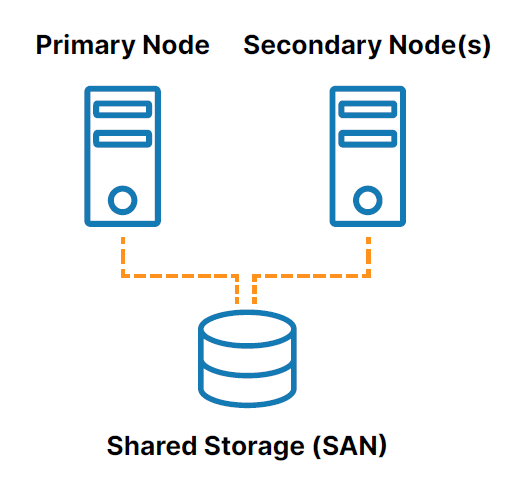
Traditional server clustering with shared storage
Figure 1: Traditional server clustering with shared storage

One of the nodes is designated as the primary (or active) node and the other(s) are designated as secondary (or standby) nodes. If the primary node fails, clustering allows a system, database, or application to automatically fail over to one or more secondary nodes and continue operating with minimal disruption. Since the secondary node is connected to the same storage, operation continues with zero data loss.

However, the use of shared storage in the traditional clustering model creates several challenges, including:

  • The shared storage itself is a single point of failure that can potentially take all of the connected nodes in the cluster offline.
  • SAN storage can also be costly and complex to own and manage.
  • Shared storage in the cloud can add significant, unnecessary cost and complexity and some cloud providers don’t even offer a shared storage option.

SANless Clustering

SANless or “shared nothing” clusters (see Figure 2) address the challenges associated with shared storage. In these configurations, every cluster node has its own local storage. Efficient host-based, block-level replication is used to synchronize storage on the cluster nodes, keeping them identical. In the event of a failover, secondary nodes access an identical copy of the storage used by the primary node.
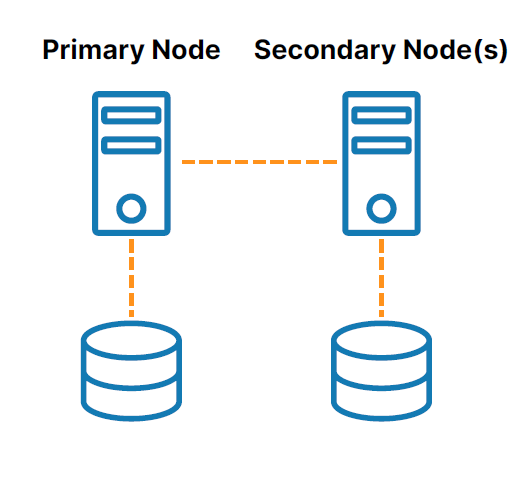
HA clustering with SANless or “shared-nothing” storage
Figure 2: HA clustering with SANless or “shared-nothing” storage

Clustering Software

Clustering software lets you configure your servers as a cluster so that multiple servers can work together to provide HA and prevent data loss. A variety of clustering software solutions are available for Windows, Linux distributions, and various virtual machine hypervisors. However, each of these solutions limits your flexibility and deployment options and introduces various challenges such as technical complexity and expensive licensing.

Don’t Wait for Disaster to Strike

HA is crucial for business-critical systems, databases, and applications. But with the myriad platforms available, complexity ramps up significantly. That’s why an application-aware solution makes so much sense. What you need is a trusted partner who has extensive expertise in high availability—a partner like SIOS, which has the technological know-how to ensure that your business stays up and running.

Don’t wait for an outage or disaster to find out if you have the resiliency your business needs. Schedule a personalized demo today at https://us.sios.com to see what SIOS can do for your business.

Reproduced from SIOS

Filed Under: Clustering Simplified Tagged With: Clustering, disaster recovery, High Availability

Four Reasons To Use An Avoidance Strategy In High Availability

November 28, 2021 by Jason Aw Leave a Comment

Four Reasons To Use An Avoidance Strategy In High Availability

Four Avoidance Strategies for Improving Cluster Resilience, Performance, and Outcomes

Simple Steps for Deployment in SIOS Protection Suite Cluster Environment


Avoiding something – we’ve all done it before.  An old flame we see in the store while walking with our spouse, a salesperson when we aren’t “ready to buy”, and even a boss while we are out on “vacation”.  When I was the manager of a development team, I caught a glimpse of a direct report browsing in a store while they were supposed to be out of the office sick.  They ducked between clothing racks and scurried down the next aisle and hurried away.  We’ve all done it before, and in some cases, for mental health, physical health, or reasons that remain private and personal, we all need some measures of avoidance.  Even in HA.  So, how do you add avoidance to your High Availability environment, and why?

Four reasons to use an avoidance strategy in High Availability

  • Better Performance (minimizing server overload)

One reason to use avoidance strategies in HA is to increase application and server performance.  Consider the case of three servers running production workloads, let’s call them Server Alpha, Server Beta, Server Gamma.  Servers Alpha and Beta are running critical applications backed by a database, while Server Gamma is running reports and data transformation jobs.  In the event of a failure of Server Alpha, a failover to Server Beta would traditionally occur.  However, because server Beta is already running a large workload, the resulting additional application load might result in an undesirable server overload and poor performance for both applications.  So it might be wise to deploy an avoidance strategy to make sure that Server Gamma is chosen as the failover target.

  • Performance Optimization

Consider again the scenario of three servers,  Alpha, Beta, and Gamma.  Servers Alpha and Beta are scaled to handle peak workloads, while Server Gamma is a cost-optimized server.  In the event of a failure of Server Alpha and Server Beta, a failover will occur to the cost-optimized server, Gamma.  However, this server is not scaled to handle peak workloads, nor the workloads of both Server Alpha and Server Beta at the same time.  In this instance, an avoidance strategy can be used to optimize performance by automatically moving one or both of the workloads from Server Gamma as soon as another host is available.

  • HA Optimization

HA Optimization is another scenario for deploying avoidance strategies. Like the performance optimization strategy, HA optimization is used to ensure that your environment can survive most failure scenarios and that your applications are optimized to provide the highest level of availability possible at any point in time.  HA optimization is important for an application such as SAP with replicated enqueue processes.  In any SAP environment, you do not want the ASCS (ABAP SAP Central Service) and ERS (enqueue replication services)  instance residing on the same server for extended periods of time because of the risk of lost locks and canceled jobs. To prevent this from occurring you can use an avoidance strategy that causes the ERS and ASCS instances to always run on opposite cluster nodes.  Consider the case of three servers running production workloads, let’s call them Servers Alpha, Beta, Gamma.  Server Alpha is running the ASCS instance, while Server Beta is running the ERS instance.  Server Gamma functions as a third node for failovers of both Server Beta (ERS) and Server Alpha (ASCS).  If Beta crashes, you wouldn’t want the ERS resource running on the same node as the ASCS instance.  To ensure this operation, you can deploy an avoidance strategy that automatically checks first and ensures the two applications are on separate servers, and maintain SAP ASCS/ERS best practices for lock failover.

  • DR Avoidance

Suppose you have two data centers: City Alpha and City Beta which are about 70 miles apart with most of your clients centrally located between them. However, due to recent changes in internal organizations, mergers/closures and acquisitions, and governance requirements, your IT team has to add a third data center that is located in City Gamma, which is about 350 miles from Alpha and Beta.  Now the resources which were primarily protected in Alpha and Beta are also extended to the Gamma location.  Given that most of the users and teams are near the Alpha and Beta locations and even the most extreme users are located in neighboring cities, your team needs to avoid a failover to the Gamma location. Like the other strategies, a DR avoidance seeks to optimize performance, in/out regional data costs, latency, and client access by avoiding the DR node should only one node within either region fail.  It would also ensure that even if both nodes fail after different times, failover always occurs to the other node in the cluster or data center before moving to DR.

So, how do you deploy an avoidance strategy?

Many providers have affinity rules that can be configured, while others use a combination of server priorities or manual steps.  In the case of the SIOS Protection Suite for Linux, you can use a number of built-in methods including:

  • Resource prioritization

In the event of a failure, resources will fail over to the server where they have the lowest remaining priority and cascade to any additional servers (Alpha, Beta, and Gamma).  Server Alpha is the primary server for Resource.HR, Server Beta is the primary server for Resource.MFG, and Server Gamma is the backup server for all resources/servers.  Using resource prioritization, Resource.HR would have a priority of one (1) on Server Alpha and a priority of two (2) on Server Gamma.  While Resource.MFG could have a priority one (1) on Server Beta and a priority of two (2) on Server Gamma.  If customers wanted to optimize the use of the environment, then Resource.HR could have a priority of three (3) on Server Beta and Resource.MFG could have a priority of three (3) on Server Alpha.  In the event of a failure of Server Alpha, the resource Resource.HR would fail to Server Gamma first before trying to come in-service (be restored) on Server Alpha.

SIOS Protection Suite for Linux (UI and CLI) allow users to specify a priority for each server and resource combination.

  • Policy or affinity rules

Policy rules can also be used to prevent a resource recovery from occurring on a given server and thereby allowing a resource to avoid a specified server that may be running a more critical or resource-intensive workload.  Typical policies include:

            • Constraint policies that will block an application from a specific server by default.
            • Resource policies that will block an application from a server that does not have sufficient resources
            • Temporal policies that define a time period that resources are allowed or disallowed from a system
            • Custom policies that define preferred servers or possible application ownership abilities within the cluster

The SIOS Protection for Linux CLI allows users to specify policy rules which can disable failover to a specific resource for a specified server, provide temporal policies guarding failures, disable failures of a specific application type, constraint policies, and custom policies.

  • Specific Avoidance Resources

The most granular way to establish a resource avoidance strategy is to deploy specific avoidance scripts within each hierarchy.  This method will allow the user to configure specific applications, (eg app1 and app2), to avoid one another whenever possible while allowing other applications to run without restriction.  In the case of our three servers, Alpha, Beta, and Gamma, and three resources app1, app2, and app3 this method would provide the greatest flexibility.  In this example, app1 and app2 will seek to avoid collocation when a server fails, but app3 will fail to the next available node based on priorities without any collocation restrictions.

For additional examples of avoidance strategies and resources, consider the SIOS Protection Suite for Linux documentation.  If a customer has two applications, app1 and app2, that they require to run on different nodes whenever possible, the customer can create two avoidance terminal leaf node resources using the SIOS Protection Suite for Linux gen/app resource and the ‘/opt/LifeKeeper/lkadm/bin/avoid_restore’ script.

Reproduced from SIOS


Filed Under: Clustering Simplified Tagged With: disaster recovery, failover clustering, High Availability, performance, strategy

Disaster Recovery Fundamentals

November 8, 2021 by Jason Aw Leave a Comment

Disaster Recovery Fundamentals

Disaster Recovery Fundamentals

Disaster recovery overview


Disaster recovery refers to the ability to quickly restore/repair a system and minimize damage in the event of a sitewide or even regional failure. Disaster recovery is a crucial part of business continuity management and having a robust disaster recovery protocol in place will help prevent unnecessary data loss and expense associated with system downtime.

What constitutes the ‘disaster’ part of disaster recovery? This could refer to a natural disaster such as earthquakes, floods, etc. but also a wide range of events such as “fire,” “terrorism,” “unauthorized intrusion,” “large-scale hacking,” and “long-term large-scale power outages.” Anything that has the potential to cause catastrophic damage to an IT system if it were to fail.

The Real Impact of System Failure

In addition to potential physical damages and data loss associated with a system failure, the lack of a disaster recovery plan can cause unrecoverable revenue loss for businesses. For every minute of system downtime, this means lost sales and opportunities, potential negative customer experience, tarnished business reputation and high expense in emergency IT repair.

The Importance of Disaster Recovery

For a company that provides mission-critical services, building a business continuity system that can handle unexpected system downtime is essential. Having the ability to prevent failure in the first place, and to quickly recover in the event a local failure or even a sitewide or regional disaster occurs will help to protect data, maintain rapport with customers, and save time and potentially devastating financial loss.

It’s important to recognize that catastrophic system failure is something that will happen, not something that may happen, so putting a proper disaster recovery plan in place will protect your business.

Disaster Recovery Challenges


While a disaster recovery protocol is essential, it is not without its challenges to set up and implement. Here are some common barriers to proper disaster recovery implementation:

Challenge 1: Geographic separation.
The essence of disaster protection is keeping systems and data in a location that is geographically separated from the primary data center or cloud instance so that, in the event of a disaster or cloud outage, the secondary systems can be brought online and operation can continue.

Challenge 2: Network bandwidth Requirements
Replicating data to an offsite location for disaster recovery can mean added network bandwidth requirements and latency issues.

Challenge 3: Data volume continues to increase
The storage capacity requirements on the disaster recovery site will increase over time. A proper disaster recovery plan needs to establish “protection priority” to clarify which data should be protected and optimize available storage resources.

Challenge 4: Recovery procedure at the time of recovery
If a system goes down due to a disaster, service recovery is required. Often, companies find their data is scattered in multiple locations and there aren’t standardized procedures for and recovery, resulting in immense loss of time and expenses. Developing a clear, standardized restoration procedure will eliminate this headache and allow for quick action when it matters most.

Data backup vs Availability Protection

Traditionally, data backup – essentially a process of making a copy of data and applications and moving it to an offsite location — has been performed for the purpose of protecting data in case of IT equipment failure/failure and for recordkeeping/archiving in compliance with regulatory requirements such as the HIPAA (Healthcare Information Portability Accountability Act). To recover operation, any servers, storage, and other hardware, as well as networking affected by the incident need to be replaced or repaired. Servers have to be configured and applications have to be restored, brought back online and connected to recovered data. These steps can months.

Without an availability protection process in place, recovery operations with backup alone can be a time-consuming and expensive process. Availability processes keep fully operational systems ready to take over in the event of a disaster, enabling resumption of service in minutes.

Here are some other common reasons an effective disaster recovery plan is important:

Disaster recovery indicators


The main metrics for disaster recovery are “RPO” and “RTO”.

RPO (Recovery Point Objective)
RPO indicates the point from the time of disaster occurrence to what time in the past the data recovery is guaranteed.

If “RPO = < 5 minutes

When aiming for “RPO = 0 (zero data loss)”, an availability protection mechanism such as failover clustering is required.

RTO (Recovery Time Objective)
RTO is an index that shows how much time your business can allow to pass from initial downtime to restoration of operation.  “RTO = 1 month or more”, you may be able to handle data recovery by only doing remote backup and securing a substitute device. But if your “RTO = within a minutes”, failover clustering is required.

Selecting a Disaster Recovery Method


When determining the right disaster recovery method for your business, consider these important factors:

  • Criticality of business processes and tolerance for impact
  • The data type and capacity that you want to protect
  • Recovery requirements – your RPO and RTO
  • Budget

Focus on Business Impact

While IT departments take the technical lead in developing disaster recovery measures for IT systems, business owners must consider the impact and extent of system outages to the business impact of each system stop” to ensure the least harmful impact to the business.

Protected data type (data integrity)

It is important to classify the type and importance of protected data. For data that does not require very precise consistency (such as file servers), a simple primary storage backup may be sufficient.

On the other hand, ERP systems and databases such as SQL Server, Oracle, and SAP have multiple services and parts that need to be located on specific servers, started up in specific orders, and managed according to a variety of application-specific best practices. They typically require high availability protection and an application-aware clustering solution to orchestrate failover.

——————————————————————————————————————

Key Disaster Recovery Terms


Remote backup – essentially keeping a copy of applications and data in a geographically separated remote location.

Synchronous Storage Mirroring
Keeping a local and remote copy of storage synchronized for DR protection. In this method, data is written to local storage and immediately replicated to remote storage. The local storage is not “committed” until the process of writing data to the remote location has been completed. This process keeps both locations identical, eliminating discrepancies that may result if data-in-transit at the time of an event fails to write on the remote location. Data integrity is guaranteed between the primary and backup sites.

Asynchronous Storage Mirroring.
This method writes data to the local storage then replicates it to the remote location. It enables greater network utilization efficiency and reduced bandwidth contention when geographic separation causes latency.

“Cold standby” and “hot standby”

Cold standby
A process of keeping a copy of data or secondary system offline in case of disaster. If the primary system goes down, the systems and software have to be manually started up – in some cases configured – and data has to be restored before operation can continue.

Hot standby
This is a process of keeping secondary systems operational and switching over to them in the event of downtime on the primary system.

Disaster Recovery Method Cost Comparisons


The smaller the RPO and RTO, the shorter the downtime, but the cost will increase accordingly.

Considering the cost and asset value of each type of data, it is necessary to find the optimum method for what level of protection is required. A balance between in-house implementation and outsourcing of services will impact costs.

To learn more about high availability and disaster recovery solutions at SIOS, click here.

Reproduced from SIOS

Filed Under: Clustering Simplified Tagged With: disaster recovery

Disaster Recovery

November 2, 2021 by Jason Aw Leave a Comment

Disaster Recovery

Disaster Recovery

How to Enable Disaster Recovery with a Single Clustering Software Solution

Protect Windows or Linux Applications Operating in any Combination of Physical, Virtual, Cloud, or Hybrid Cloud Infrastructures with Disaster Recovery

What is Disaster Recovery?

Disaster Recovery is Critical to Continued Business Operations

Disaster recovery (DR) is a strategy and set of policies, procedures, and tools that ensure critical IT systems, databases, and applications continue to operate and be available to users when a man-made or natural disaster happens. While the IT team owns the disaster recovery strategy, DR is an important component of every organization’s Business Continuity Plan, which is a strategy and set of policies, procedures, and tools that get the entire business back up and running after a disaster.

But when we speak of a disaster, it does not need to be a full-fledged hurricane, tornado, flood, or earthquake that impacts your business. Disasters come in many forms, including a cyber-attack, user error, fire, theft, vandalism, even a terrorist attack. In short, a disaster is any crisis that results in a down system for a long duration and/or major data loss on a large scale that impacts your IT infrastructure, data center, and your business.

Disaster Recovery

In a recent Spiceworks survey, 59 percent of organizations indicated they had experienced one to three outages (that is, any interruption to normal levels of IT-related service) over the course of one year, 11 percent have experienced four to six, and 7 percent have experienced seven or more. In addition, the survey also indicates that larger companies, which rely on a greater number of services, are more likely to experience outages than smaller organizations. For example, 71 percent of small businesses experienced one or more outages in the last 12 months, compared to 79 percent of mid-size businesses, and 87 percent of large businesses. When you look at those statistics, you know you are living on borrowed time if you don’t have a disaster recovery plan in place.

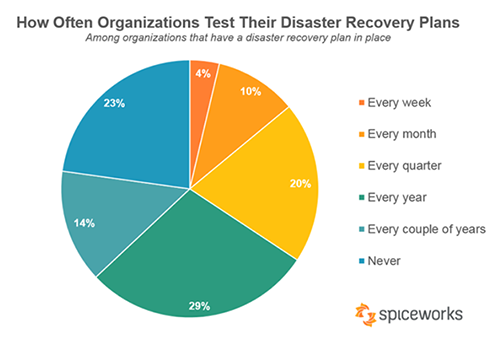
But there is good news. Compared with statistics from previous years, it appears that organizations of all sizes and from all industries are doing better when it comes to having a disaster recovery plan in place. According to the same Spiceworks survey, 95 percent of organizations have a DR plan in place but unfortunately, 23 percent never test or exercise their plan. Exercising your DR plan is as important as a student fire drill or muster drill. Having a plan in place is just the first step. If the people involved in executing the plan don’t know what to do, you won’t be able to recover from a disaster.

High Availability Vs. Disaster Recovery

But before we go any further, let’s be clear on the difference between best practices for handling a system failure versus a disaster. To recover from a system failure, redundant systems, software, and data should be on your local area network (LAN). For critical database applications, you can replicate data synchronously across the LAN. This makes your standby instance “hot” and in sync with your active instance, so it is ready to take over immediately in the event of a failure. This is referred to as high availability (HA).

However, to recover systems, software, and data in the event of a disaster means redundant components must be on a wide-area network (WAN). With a WAN, data replication is asynchronous to avoid negatively impacting throughput performance. This means that updates to standby instances will lag updates made to the active instance, resulting in a delay during the recovery process. Since disasters are rare, some delay may be tolerable and is dependent upon (a) how critical it is to your business to achieve the lowest possible Recovery Time Objective (RTO) and Recovery Point Objective (RPO) and (b) how much budget you can allocate to achieve the best RTO and RPO.

RTO is the maximum tolerable duration of any outage and RPO is the maximum amount of data loss that can be tolerated when a disaster happens. For disaster recovery, RTOs of many minutes or even hours is common with some solutions as it is too expensive to try to recover across a WAN in just a few minutes. For mission-critical applications, your organization will want to achieve a low RPO but the lower your RPO, the more you need processes in place to ensure all data has been replicated on the standby server before failover. This effort tends to increase recovery time.

But with SIOS disaster recovery solution, you can achieve a minimal-to-no-data-loss RPO and an RTO of one to two minutes.

SIOS Delivers One Solution to Meet Your HA and DR Needs

Whether you need local HA within a single site or fast, efficient DR across multiple sites, SIOS solutions meet all your business continuity needs.

The SIOS disaster recovery solution is a multi-site, geographically dispersed cluster that provides RPOs of seconds and RTOs of minutes. What makes SIOS different than many other DR providers is that it offers one solution that meets both high availability and disaster recovery needs.

To support DR, you configure your clusters the same way as you do for high availability but with two distinct differences previously discussed:

  • The DR cluster node(s) are in a geographic site – on-premises, virtual, or in the cloud – that is further away from the HA instance.
  • The DR site is on a wide-area network (WAN), which means that data replication will be asynchronous to avoid negatively impacting throughput performance.

Remember, asynchronous data replication means that updates to the DR instances will lag updates made to the active instance but typically only by a few seconds at most. But with SIOS’ incredibly fast data replication across the WAN, you can keep real-time copies of data synchronized across multiple servers and data centers to achieve both HA and DR.

In addition to one single solution for HA/DR and real-time data replication, the SIOS HA/DR solution also provides:

  • Block-level data compression to minimize network loads
  • Bandwidth throttling to regulate and minimize network congestion
  • WAN optimization to improve network performance
  • Integration with push-button failover to support DR and automatic failover to support HA
  • An agnostic platform approach, allowing you to choose on-premises, virtual, cloud, or a hybrid DR solution

The following case study showcases the use of SIOS DataKeeper to deliver HA and DR in a single solution.

———————————————————————————————————————————–

Enabling HA and DR Protection at a Premier Health Center

ALYN Hospital, located in Israel, is a premier pediatric rehabilitation health center, specializing in diagnosing and rehabilitating infants, children, and adolescents with physical disabilities. Parents bring their children from Israel and abroad to receive a wide range of medical services, paramedical therapies, and additional state-of-the-art rehabilitation services.

The Search for the Right Solution

ALYN Hospital operates a variety of applications – including electronic medical records (EMR), customer relationship management (CRM), SQL Server databases, Microsoft Exchange, and Microsoft Office in support of its clinical and administrative operations. As a healthcare provider, the hospital is subject to strict government regulations and needed to implement strong DR provisions to ensure the protection and availability of their mission-critical applications. The hospital chose Hyper-V Replica to support its DR strategy, operating two, physically separated server rooms on-premises, enabling all critical virtual machines (VNs) running on any Hyper-V host server to be replicated to another in the other room. Unfortunately, this configuration was not satisfying RPO and RTO requirements, so the IT team started to investigate other options.

In looking for the right DR solution, the IT team considered Windows Server Failover Clustering (WSFC), which uses shared storage. Unfortunately, ALYN did not have a SAN in place and because of budget restrictions, it was cost-prohibitive to implement identical SANs in both server rooms. For this reason, ALYN investigated third-party solutions.

In its search for third-party failover clustering software, ALYN established three criteria:

  • The solution had to work with existing hardware.
  • The solution had to provide both high availability (HA) and disaster recovery (DR) protection across all hospital critical applications.
  • The total cost of ownership (TCO) had to fit within the department’s limited budget.

SIOS DataKeeper – The Obvious Choice

After evaluating several different solutions, the IT staff chose SIOS DataKeeper, which the team described as a solution “that delivers carrier-class capabilities with a remarkably low total cost of ownership” and delivers HA and DR in a single cost-effective solution.

SIOS DataKeeper combines real-time, block-level data replication with continuous application-level monitoring and flexible failover/failback policies in a total solution that is easy to implement and manage. DataKeeper leverages WSFC and maintains compatibility with the operating environment, making it easy for the IT team to quickly learn how to use the solution and quickly complete HA configurations for all applications.

With DataKeeper, the IT team can create three-node SANless failover clusters with a single active instance and two standby instances. With this configuration, ALYN can continuously update systems and software without disrupting operations because the active instance can be moved to any server in a three-node cluster and remain fully protected during periods of planned hardware and software maintenance.

In addition, SIOS can work with any type of storage and WAN-optimized data replication, which simplifies the implementation of ALYN’s remote DR site. To maintain high transactional throughput performance, data replication across the WAN occurs asynchronously but SIOS DataKeeper employs special techniques to optimize data transmission, allowing ALYN to achieve demanding RPOs and RTOs.

The Bottom Line

Today, SIOS DataKeeper is providing high availability protection for all of ALYN Hospital’s mission-critical applications. Comments Uri Inbar, ALYN Hospital IT Director, “With SIOS we found a solution that delivers carrier-class capabilities with a remarkably low total cost of ownership. For us, it was an obvious choice.

ALYN Hospital tests the configuration regularly, and routinely changes the active and standby designations, while redirecting the data replication as needed during planned software updates. The applications continue to run uninterrupted.

———————————————————————————————————————————–

 Final Thoughts on SIOS Disaster Recovery

In a Windows environment, SIOS DataKeeper for Windows Server is available in both a Standard Edition and a more robust Cluster Edition. SIOS DataKeeper Standard Edition provides real-time data replication for disaster recovery protection in a Windows Server environment. SIOS DataKeeper Cluster Edition seamlessly integrates with Windows Server Failover Clustering (WSFC), enabling both high availability and disaster recovery configurations.

SIOS LifeKeeper and DataKeeper support all major Linux distributions, including Red Hat Enterprise Linux, SUSE Linux Enterprise Server, CentOS, and Oracle Linux and accommodates a wide range of storage architectures.

Visit the references below for more information on SIOS DataKeeper or SIOS LifeKeeper:

References

  • https://betanews.com/2019/05/28/disaster-recovery-sql-server/
  • https://community.spiceworks.com/blog/3138-data-snapshot-how-well-equipped-are-businesses-to-bounce-back-from-disaster
  • https://www.spiceworks.com/press/releases/spiceworks-study-reveals-one-in-four-companies-never-test-their-disaster-recovery-plan/

See our White Paper:  Understanding Disaster Recovery for Options for SQL Server

Reproduced with permission from SIOS

Filed Under: Clustering Simplified Tagged With: disaster recovery, SIOS

Multi-Cloud Disaster Recovery

October 30, 2021 by Jason Aw Leave a Comment

Multi-Cloud Disaster Recovery

Multi-Cloud Disaster Recovery

If this topic sounds confusing, we get it. With our experts’ advice, we hope to temper your apprehensions – while also raising some important considerations for your organisation before or after going multi-cloud. Planning for disaster recovery is a common point of confusion for companies employing cloud computing, especially when it involves multiple cloud providers.

It’s taxing enough to ensure data protection and disaster recovery (DR) when all data is located on-premises. But today many companies have data on-premises as well as with multiple cloud providers, a hybrid strategy that may make good business sense but can create challenges for those tasked with data protection. Before we delve into the details, let’s define the key terms.

What is multi-cloud?

Multi-cloud is the utilization of two or more cloud providers to serve an organization’s IT services and infrastructure. A multi-cloud approach typically consists of a combination of major public cloud providers, namely Amazon Web Services (AWS), Google Cloud Platform (GCP), and Microsoft Azure.

Organizations choose the best services from each cloud provider based on costs, technical requirements, geographic availability, and other factors. This may mean that a company uses Google Cloud for development/test, while using AWS for disaster recovery, and Microsoft Azure to process business analytics data.

Multi-cloud differs from hybrid cloud which refers to computing environments that mix on-premises infrastructure, private cloud services, and a public cloud.

Who uses multiple clouds?

  • Regulated industries – Many organizations run different business operations in different cloud environments. This may be a deliberate strategy of optimizing their IT environments based on the strengths of individual cloud providers or simply the product of a decentralized IT organization.
  • Media and Entertainment – Today’s media and entertainment landscape is increasingly composed of relatively small and specialized studios that meet the swelling content-production needs of the largest players, like Netflix and Hulu. Multi-cloud solutions enable these teams to work together on the same projects, access their preferred production tools from various public clouds, and streamline approvals without the delays associated with moving large media files from one site to another.
  • Transportation and Autonomous Driving – Connected car and autonomous driving projects generate immense amounts of data from a variety of sensors. Car manufacturers, public transportation agencies, and rideshare companies are among those motivated to take advantage of multi-cloud innovation, blending both accessibility of data across multiple clouds without the risks of significant egress charges and slow transfers, while maintaining the freedom to leverage the optimal public cloud services for each project.
  • Energy Sector – Multi-cloud adoption can help lower the significant costs associated with finding and drilling for resources. Engineers and data scientists can use machine learning (ML) analytics to identify places that merit more resources to prospect for oil, to gauge environmental risks of new projects, and to improve safety.

Multi-cloud disaster recovery pain points:

  • Not reading before you sign. Customers may face issues if they fail to read the fine print in their cloud agreements. The cloud provider is responsible for its computer infrastructure, but customers are responsible for protecting their applications and data. There are many reasons for application downtime that are not covered under cloud SLAs. Business critical workloads need high availability and disaster recovery protection software as well.
  • Developing a centralized protection policy. A centralized protection policy must be created to cover all data, no matter where it lives. Each cloud provider has its unique way of accessing, creating, moving and storing data, with different storage tiers. It can be cumbersome to create a disaster recovery plan that covers data across different clouds.
  • Reporting. This is important for ensuring protection of data in accordance with the service-level agreements that govern it. Given how quickly users can spin up cloud resources, it can be challenging to make sure you’re protecting each resource appropriately and identifying all data that needs to be incorporated into your DR plan.
  • Test your DR plan. Customers must fully screen and test their DR strategy. A multi cloud strategy compounds the need for testing. Some providers may charge customers for testing, which reinforces the need to read the fine print of the contract.
  • Resource skill sets. Finding an expert in one cloud can be challenging; with multi-cloud you will either need to find expertise in each cloud, or the rare individual with significance in multiple clouds.

Overcoming the multi-cloud DR challenge

Meeting these challenges requires companies to develop a data protection and recovery strategy that covers numerous issues. Try asking yourself the following strategic questions:

  • Have you defined the level of criticality for all applications and data? How much money will a few minutes of downtime for critical applications cost your organization in  end user productivity, customer satisfaction, and IT labor?
  • Will data protection and recovery be handled by IT or application owners and creators in a self-service model?
  • Did you plan for data optimization, using a variety of cloud- and premises-based options?
  • How do you plan to recover data? Restoring data to cloud-based virtual machines or using a backup image as the source of recovery?

Obtain the right multi-cloud DR solution

The biggest key to success in data protection and recovery in a multi-cloud scenario is ensuring you have visibility into all of your data, no matter how it’s stored. Tools from companies enable you to define which data and applications should be recovered in a disaster scenario and how to do it – whether from a backup image or by moving data to a newly created VM in the cloud, for example.

The tool should help you orchestrate the recovery scenario and, importantly, test it. If the tool is well integrated with your data backup tool, it can also allow you to use backups as a source of recovery data, even if the data is stored in different locations – like multiple clouds. Our most recent SIOS webinar discusses this same point; watch it here if you’re interested. SIOS Datakeeper lets you run your business-critical applications in a flexible, scalable cloud environment, such as Amazon Web Services (AWS), Azure, and Google Cloud Platform without sacrificing performance, high availability or disaster protection. SIOS DataKeeper is available in the AWS Marketplace and the only Azure certified high availability software for WSFC offered in the Azure Marketplace.

Reproduced from SIOS

Filed Under: Clustering Simplified Tagged With: Amazon AWS, Azure, Cloud, disaster recovery, GCP, Google Cloud Platform, multi-cloud, public cloud

  • « Previous Page
  • 1
  • …
  • 13
  • 14
  • 15
  • 16
  • 17
  • …
  • 26
  • Next Page »

Recent Posts

  • Fail Open vs. Fail Closed: Why It’s a False Dilemma (and How True HA Fixes It)
  • The 5-Step Checklist for Validating Your Failover Setup
  • Managing an Inherited DataKeeper Cluster: Challenges and Best Practices
  • Setting Up Nginx Load Balancer on AWS
  • With Great Power: Cluster Maintenance Best Practices

Most Popular Posts

Maximise replication performance for Linux Clustering with Fusion-io
Failover Clustering with VMware High Availability
create A 2-Node MySQL Cluster Without Shared Storage
SAP for High Availability Solutions For Linux
Bandwidth To Support Real-Time Replication
The Availability Equation – High Availability Solutions.jpg
Choosing Platforms To Replicate Data - Host-Based Or Storage-Based?
Guide To Connect To An iSCSI Target Using Open-iSCSI Initiator Software
Best Practices to Eliminate SPoF In Cluster Architecture
Step-By-Step How To Configure A Linux Failover Cluster In Microsoft Azure IaaS Without Shared Storage azure sanless
Take Action Before SQL Server 20082008 R2 Support Expires
How To Cluster MaxDB On Windows In The Cloud

Join Our Mailing List

Copyright © 2026 · Enterprise Pro Theme on Genesis Framework · WordPress · Log in