
SIOS SANless clusters

SIOS SANless clusters High-availability Machine Learning monitoring

  • Home
  • Products
    • SIOS DataKeeper for Windows
    • SIOS Protection Suite for Linux
  • News and Events
  • Clustering Simplified
  • Success Stories
  • Contact Us
  • English
  • 中文 (中国)
  • 中文 (台灣)
  • 한국어
  • Bahasa Indonesia
  • ไทย

Six Reasons Not to Buy SIOS High Availability Software . . . If You Dare

October 25, 2020 by Jason Aw Leave a Comment

Six Reasons Not to Buy SIOS High Availability Software . . . If You Dare

Six Reasons Not to Buy SIOS High Availability Software . . . If You Dare

Six Reasons Not to Buy SIOS High Availability Software . . . If You Dare

You need SIOS Protection Suite (for Linux or Windows) or SIOS DataKeeper Cluster Edition for high availability protection for business critical applications.

UNLESS

1. You prefer free solutions only.

I get it. There are definitely times when I do the same thing when I need to learn a new skill, get a quick tip, drop a few pounds, or set up a quick demo. Rather than signing up for a subscription, purchasing a license, or investing in a combination of the two, I have gone the free route.

However, the saying often holds true, you get what you pay for. Free trials are fine. Permanently free high availability is like gas station sushi – is the risk really worth it? Be sure that free doesn’t prevent you from utilizing the fullness available for optimizing uptime and increasing availability. Make sure you aren’t passing over a reasonably priced high availability solution that is proven to protect your mission-critical applications.

2. Being a single solution shop solution is more important than meeting your HA needs.

We were a “Ford tough” family for decades. Seriously. I understand what it is like to be a one solution shop. My dad owned a Ford truck for work, a Ford Mustang for leisure, a Ford 3600 tractor for the farm, and a Ford minivan for family travel. There was even a season where we received model toy cars with the brandished blue oval as well.

But, when my wife and I were branching out on our own family needs, we broke away from the single solution to address needs that fell out of the Ford wheelhouse (at the time). You may be a single shop buyer, but if your needs have changed and the HA provider or solution hasn’t kept up, consider whether expanding the solution set will eliminate risks, improve success, or be worth the investment in a complementary solution for those new needs. When we needed a reliable, gas efficient, sleek, family friendly, and economical solution for our family, we supplemented Ford tough with a Honda Odyssey. If you are a single stop shop, and you are not worried about vendor lock-in best of luck.

3. You are more of a do it yourself-er coder.

You like coding. You like to write a lot of scripts, and don’t mind pulling out your bash, ksh, perl, python, powershell, batch or command tool kit and wiring things up yourself. You value the joy in flexibility and adding your own tweaks.

I love writing code as well, but there are times when the last thing I want to do is spend time writing a lot of code and scripts for a problem that is solved, proven, and off the shelf ready. For the do-it-yourself admin, off-the-shelf may not be your preference, but consider whether 20 years of expertise and experience should be rehashed and re-architected for your enterprise. But, if you have to get the code writing fix in, High Availability Software SIOS provides the Generic Application Recovery Kit for you to get in a coding fix.

4. You need Ubuntu support (or Solaris).

Your environment is unique. You have customers who’ve cut their teeth on Solaris and are hanging on to it for dear life. Or you’ve got those who have fully embraced the Linux realm and have moved to Ubuntu. In either case, you look at the SIOS products matrix and Ubuntu isn’t currently a match for your SIOS version. Bummer!

While this is true, consider the rich and vast features and flavors of support that are still available. While there are parts of your enterprise that have dug in on Solaris and others that have raced to embrace Ubuntu and newer variants of Linux, it is more likely that you need a solution capable of supporting RHEL, OEL, SuSE, CentOS and possibly Windows as well. Be sure not to single out a high availability solution by what it doesn’t provide and consider the depth of what it does.

5. You don’t run a hybrid of anything in your environment.

I heard it in the middle of a movie last week. The lead character commented on the idea of moving forward with some new idea of an overly excited owner. The classic line: “Sometimes the juice isn’t worth the squeeze.” In your mind you feel that you aren’t running a hybrid environment. Your applications are critical, but not complex. The moving parts are simple- a database, front end and a supporting application. It makes sense that you might not want to “complicate” things with additional processes, products, solutions or services, and you may feel like the juice isn’t worth the squeeze.

Before you make that final decision for a High Availability Software, assess whether a non-hybrid environment is the same as a simple environment. Consider whether or not the moving parts are as simple as you imagine or whether a solution with failover orchestration would be beneficial to reducing your overall RTO and increasing your RPO.

6. Endorsements from HA experts and experience don’t matter.

I bought a set of headphones online in mid-April. As I suspected, I discovered that anyone can do bluetooth headphones. But, not everyone can do them well. Ergonomically, the “new to market” headphones are a nightmare. Pairing was a breeze, but accidental unpairing is a constant battle. The sound quality is amazing, but that amplifies my annoyance when the headphones randomly chirp – loudly and clearly – for system sounds or at the end of a song.

You may believe that high availability and application monitoring can be done by anyone and that experience doesn’t matter. However, consider your own experiences and mine and ask if you’d really want to trust your enterprise environment to a group that just started thinking about the complexities of hybrid environments, or the dependencies and application-centric knowledge needed for the applications you use most frequently.

When deciding the right High Availability Software for your environment, consider carefully whether you want to go without the many best in class features, hardened and tested solutions, knowledgeable experts, broad swath of supported applications and environments, and industry leading experience and decades of insight. Then after careful consideration, choose wisely.

-Cassius Rhue, Vice President, Customer Experience, SIOS

Reproduced with permission from SIOS

Filed Under: Clustering Simplified Tagged With: Application availability, disaster recovery, High Availability, SQL Server

Expand Your High Availability Metrics

September 20, 2020 by Jason Aw Leave a Comment

Expand Your High Availability Metrics

Expand Your High Availability Metrics

In the technology field, we love data. We love data about data and all the metrics and measures that our tools can bring. We’ve created industries around analytics, products that capture every detail from thousands of connected devices. We love metrics and measures. In many instances within the higher availability space, we love the high availability metrics that tell us how quickly a system recovered from the failure. We calculate and track the time between detection and remediation, and we obsess over knowing and measuring how much transactional data would be lost in a disaster, system failure, or disk crash.

Ironically, in high availability and disaster recovery (HA/DR) systems, there are some metrics that don’t get enough attention.

Here are eight other high availability metrics you should be watching to manage your environment:

1.  Security alerts

Availability isn’t just about application monitoring and recovery.  Systems that are publicly available are always under attack.  If you aren’t monitoring security alerts and warnings, your applications may be running flawlessly, while your intellectual property is being funneled flawlessly out the door.

2. Idle connections

Idle connections sound harmless, but they are about as harmless as the green leafy kudzu on a southern lawn.  Idle connections take up resources and threaten to fill database pools, congest networks, and stifle performance.  Furthermore, idle connections can indicate a problem in the application layer or database configuration.

3. Long-running queries, commands, or jobs

This applies not just to database queries or jobs, but also to commands and backups.  Long running queries, commands and jobs can be an indicator of poor system health, slow disk speeds, CPU or other resource contention, or deeper systematic, application compatibility or OS problems.

4. Disk IO

Disk IO typically refers to the input/output operations of the system related to disk activity. Measuring disk I/O can help identify bottlenecks, poor hardware configurations, improperly sized disk or poorly tuned disk layouts for a given workload.  Monitoring disk I/O can help tell you if the long running queries are a function of poor sql syntax, poorly coded applications, or latency and access problems.

5. Memory

We all think about how much memory is being used, but memory monitoring goes beyond measuring and looking at free versus used.  Monitoring memory helps you look into bottlenecks, leaks, identify improperly sized systems, understand load, load average, and spikes.  In addition, knowing about memory intensive patterns can help you tune your availability suite to avoid false failures.

6. Disk Space

As VP of Customer Experience I once had the unfortunate experience of waking up early in the morning for an emergency call.  The customer was facing a down production system after a power outage.  When they tried to restart their system their protected applications failed to start.  After a quick check of the error logs it was clear that the root drive was 100% full.  The application could not write to any of the file systems.  Disk space monitoring is available in many forms and ways and having it as a metric can prevent unnecessary problems and costly last-minute scrambles to add more. .

7. Errors and alerts

Errors, alerts, and recovery messages in the logs are another good metric to consider.  Your availability solution may be keeping your clients online and happy, but it may also be masking an issue that will need your attention soon.  Adding log monitoring for FATAL, PANIC, and key ERROR messages can help you identify issues that your availability solution is frequently recovering from, such as database crashes, application panics or core dumps, or fatal errors requiring a cold restart.

8. Recovery numbers

Similar to monitoring errors and alerts, the recovery numbers can tell you a lot about the health of your system’s availability.  If you are averaging more than one application recovery per week, you’re likely experiencing something more than your normal availability protection.  And while the recovery was successful in restarting your application or system, too many of these false or even real recoveries isn’t healthy.

The list of HA/DR metrics that we can monitor and the tools to monitor them are growing by leaps and bounds.  Be sure that you and your team consider expanding your current data capture and analysis to include those that make for the best higher availability system possible.

— Cassius Rhue, VP, Customer Experience

Reproduced with permission from SIOS
Filed Under: Clustering Simplified Tagged With: Application availability, High Availability, high availability - SAP, SQL Server High Availability

How to Deliver High Availability for SQL Server in Linux Environments

September 10, 2020 by Jason Aw Leave a Comment

How to Deliver High Availability for SQL Server in Linux Environments

How to Deliver High Availability For SQL Server in Linux Environments

If your organization is running business-critical Microsoft SQL Server on Linux, your IT team undoubtedly knows how challenging continually maintaining high availability, performance and security can be. Particularly difficult is how to ensure high availability with robust replication and automatic failover. Using open-source software and an easily configured HA SANless cluster solution can offer a simpler maintenance approach without sacrificing the safety and performance your organization requires.

Limited High Availability Options for Linux

Most Linux distributions give IT departments two inferior choices for high availability: either pay more for the SQL Server Enterprise Edition to implement Always On Availability Groups, or struggle to make complex do-it-yourself HA Linux configurations work well—something that can be extraordinarily difficult to do.

The problem with using the Enterprise Edition is that it undermines the cost-saving strategy for using an open-source operating system on commodity hardware. For a limited number of small SQL Server applications, it might be possible to justify the additional cost. But it’s too expensive for many database applications and will do nothing to provide general-purpose HA for Linux.

Providing HA across all applications running in a Linux environment is possible using open-source software, such as Pacemaker and Corosync, or SUSE Linux Enterprise High Availability Extension. But getting the full software stack to work as desired requires creating (and testing) custom scripts for each application, and these scripts often need to be retested and updated after even minor changes are made to any of the software or hardware being used. Availability-related capabilities that are unsupported in both SQL Server Standard Edition and Linux can make this effort more challenging.

Finding an Alternative High Availability Solution for SQL Server in Linux

To make HA both cost-effective and easy to implement, you may want to consider two different, general-purpose approaches.

One is using storage-based systems that protect data by replicating it within a redundant and resilient storage area networks (SANs). This approach is agnostic with respect to the host operating system, but it requires that the entire SAN infrastructure be acquired from a single vendor and relies on separate failover provisions to deliver high availability.

The other approach is host-based and involves creating a storage-agnostic SANless cluster across Linux server instances. As an HA overlay, these clusters are capable of operating across both the LAN and WAN in private, public and hybrid clouds. The overlay is also application-agnostic, enabling organizations to have a single, universal HA solution across all applications. While this approach does consume host resources, these are relatively inexpensive and easy to scale in a Linux environment.

Most HA SANless cluster options provide a combination of real-time block-level data replication, continuous application monitoring, and configurable failover/failback recovery policies to protect all business-critical applications, including those using Always On Failover Cluster Instances available in the Standard Edition of SQL Server.

SIOS Technology Corp. offers more robust HA SANless cluster solutions for Linux with advanced capabilities that are designed to free IT from the complexity and daily challenges of supporting and optimizing computing infrastructures. The SIOS Protection Suite solution with LifeKeeper provides:

  • Continuous monitoring of the entire Linux application stack
  • Complete Application-Aware Protection with its application recovery kits (ARK) for fast, safe recovery or failover of complex applications and databases
  • Wizard-driven setup for Linux clustering
  • Configuration flexibility, such as using a traditional shared-storage cluster or software to synchronize local storage in a SANless cluster configuration

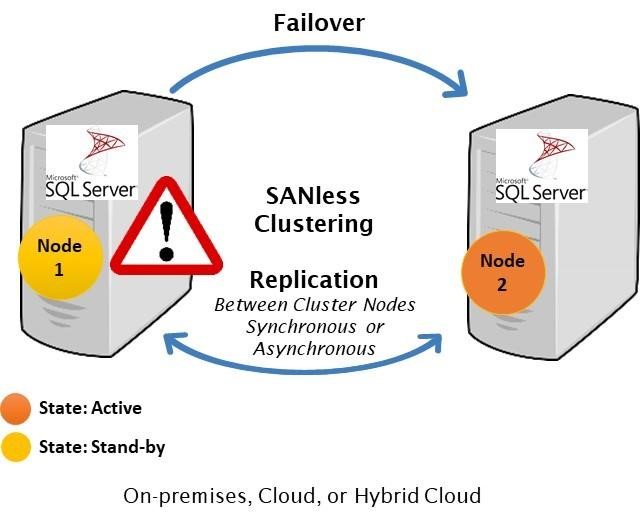
For example, a SANless cluster can handle two concurrent failures. The basic operation is the same in the LAN and WAN, as well as across private, public, and hybrid clouds.

In a typical two-node cluster server #1 is initially the primary that replicates data to servers #. It experiences a problem, automatically triggering a failover to server #2, which now becomes the primary.

In this situation, the IT department would likely begin diagnosing and repairing whatever problem caused server #1 to fail. Once fixed, it could take over as the primary or server #2 could continue in that capacity replicating data to servers #1.

With most HA SANless clustering configurations, failovers are automatic, and both failovers and failbacks can be controlled by a browser-based console.

For further information about SIOS LifeKeeper and Protection Suite solutions, visit SIOS SAN and SANless High Availability Clusters for Cluster Server Environments.

Reproduced with permission from SIOS

Filed Under: Clustering Simplified Tagged With: High Availability, Linux, SQL Server High Availability

Lessons in Cloud High Availability from the Movies

August 11, 2020 by Jason Aw Leave a Comment

Lessons in Cloud High Availability from the Movies

Lessons in Cloud High Availability from the Movies

Joseph Lalonde of jmlalonde.com  has a blog highlighting the leadership lessons from popular movies such as Hancock, The Greatest Showman, and Frozen II.  In credit to Joseph’s inspiring leadership lessons, here are four high availability lessons on cloud migration from Disney’s Frozen II.

Disney’s Frozen II and Cloud Migration Lessons

In Disney’s animated adventure Frozen II the characters Anna, Elsa, Kristoff, Olaf and Sven leave Arendelle to travel to an ancient, autumn-bound forest of an enchanted land. In the adventure, they set out to find the origin of Elsa’s powers in order to save their kingdom.  Aside from being fun for a father of six girls, the movie is also ripe with leadership, life, and high availability lessons.

1.    You can’t go into cloud migration without the proper help.

When Elsa, Anna, Kristoff, Olaf and Sven arrive at the place where the mysterious voice has been calling them, they stand outside an enormous cloud.  When Olaf and Kristoff attempt to enter, they are bounced back and repelled.  It is only when Elsa approaches the cloud with her magic that the portal opens and they enter.

When migrating to the cloud, there will be a lot of voices calling you.  Some will beckon you to AWS, or Azure or GCP, or a myriad of others.  But, no matter which you intend to go with, know that you will need the proper help for a successful entry.  This help should include:

  • Architects knowledgeable of the platform, especially the networking aspects
  • Application administrators who understand the applications installation, configuration, operation and maintenance characteristics
  • Security and OS administrators
  • A cloud partner representative
  • A knowledgeable availability expert for deploying critical applications in highly available architecture

2.    Things will not make sense when you are older, so document and iterate.

While walking through the enchanted forest, Olaf begins experiencing the strange phenomenon and magic of the forest.  As he does, he begins to sing:

  • This will all make sense when I am older
    Someday I will see that this makes sense
  • One day, when I’m old and wise
  • I’ll think back and realize
  • That these were all completely normal events
  • I’ll have all the answers when I’m older

The song concludes with the rousing finish of:

  • ‘Cause when you’re older
  • Absolutely everything makes sense
  • This is fine

Stop.  If things don’t make sense to you when you are starting out in your cloud journey, take the time to make them make sense.  If you are using an agile mindset, launch an investigation spike on the singular topic or topics of confusion.  For example, if you don’t understand the magic of the VPC, Security Group, Availability Zone or Set, Region, or Region to Region concepts today, they will make even less sense later down the road when you return to this configuration months later.  If the test results don’t make sense, don’t move on, run them again.  Also, remember to document the architecture, not just the details you think are important, but the details that the older you who have moved through six other projects and is facing a deadline would want to know to make it all make sense.

3.    Don’t go running into the fire. Choose the right cloud high availability solution.

After a brush with the wind spirit, the enchanted forest is set ablaze by the fire spirit.  As the fire spirit spreads chaos, and fire, Elsa charges off with icy blasts to cool the fire and calm this spirit.  In her zeal, Anna runs into the fire behind her sister and has to be saved.  When at last the two are reunited, Elsa admonishes her sister- “You can’t just follow me into fire”.  The feisty Anna replies, “You don’t want me following you into fire?  Then don’t run into fire!”

Migrating to the cloud and choosing the right availability solution for you can be stressful enough without complicating it by making unrealistic schedules with untested theories and scenarios.  No leader of a deployment team wants his or her team in a fire drill, so don’t knowingly run into one.  Create a plan.  Establish checkpoints and milestones.  Include realistic risk and risk management strategies.  Communicate frequently with vendors and partners, and especially with your team.  Test well, and understand backup and backout plans.

4.    Don’t get stuck in the past re: what you bring in your cloud migration.

There is a song woven throughout the movie, “All is Found”  with the chilling chorus – “Dive down deep into her sound / But not too far or you’ll be drowned.”  Elsa dives down into the deep as the movie peaks and her search and exploration of the past leave her Frozen, her last gasp a burst of flurries to warn and inform her sister.

As one of the heads of our Customer Experience Team at SIOS Technology Corp., I have witnessed too many deployments and migrations get stuck in a comparison trap.  The phrase goes like this, “In our old data center, we” or “The old system could do that.”  It may be true that your old system of fixed systems, dedicated resources, large teams, specific networking, and high cost, high feature SAN storage could do that.  (Although, truthfully, sometimes I’ve seen the curtain peeled back and on-premise didn’t really do that either).  As you migrate to the cloud, understand what makes sense to mimic in the cloud and what doesn’t.  Understand why the system was architected that way on-premises and using the help, “lesson 1, and the learning of lesson 2, make decisions that make sense.

Which leads me to the final lesson.

5.     There will always be two kingdoms: on-premises and in the cloud.

At the end of the movie, Anna becomes queen of Arendelle once ruled by her sister Elsa, while Elsa stays and leads the people of the Northuldra.  There is one who stays in or near the forest once surrounded by mystery and cloud, while the other returns to the familiar land.

As you consider migration to the cloud and your High Availability strategy, remember there will always be two kingdoms.  Your migration strategy would do well to remember that you will always have a need for an on-premise data center to partner with your cloud deployments.  Perhaps it isn’t as sprawling as it once was, but not every workload or critical infrastructure can be repurposed and packaged for the cloud.  Having an HA solution and strategy that can equip and enable both “kingdoms” is essential.

Going to the cloud takes the right team, the right tools and the right solutions, and a strategy and plan to get there, without going through fire.  As you migrate to the cloud, be willing to confront the past, understand it, and remember not to get stuck there.  And, like the two sisters of Disney’s Frozen II, you’ll do well to remember every beautiful enterprise story has two sides, on-premise and cloud just might be yours.

— Cassius Rhue, VP, Customer Experience

Reproduced with permission from SIOS

 

Filed Under: Clustering Simplified Tagged With: Cloud, cloud migration, High Availability

Planning is Key to Enterprise Availability (and to a Happy Marriage)

July 30, 2020 by Jason Aw Leave a Comment

Planning is Key to Enterprise Availability (and to a Happy Marriage)

Planning is Key to Enterprise Availability (and to a Happy Marriage)

Planning dates and getaways, fabulously romantic dinners are a great part of loving your spouse well.  Seminars and workshops overflowing with tips for improving your relationship abound in nearly every area of the world.

But, listen in on the training session provided by SIOS Technology Corp. Project Manager for Professional Services, Edmond Melkomian, and you’ll quickly learn that planning dinners and anniversary retreats aren’t the only way to love your spouse well.

In a recent class on SIOS Protection Suite for Linux, Edmond shared three tips that help you love your spouse well in an enterprise world: plan, plan, plan.

1.   “Plan to plan” your enterprise availability solution

1.   “Plan to plan” your enterprise availability solution

In his course, Edmond Melkomian asked students to name the first thing you should do when deploying an enterprise solution.  His answer, “Plan, plan, plan.”  It seems obvious, but the first step is to start making the plan.  A fairly decent start for a plan includes developing the details for each of the project phases, such as milestones, checkpoints, risks, risk mitigation and strategies, stakeholders, timelines, stakeholder communication plans.  A decent plan will also include details about kickoff, sign-off and closure, and resources (staffing, management, legal/contracts).

Plan to create, review, modify, and update your plan throughout the solution lifecycle.

2.   Plan what to deploy for enterprise availability

Plan what to deploy.  It is likely that a large portion of your enterprise infrastructure exists beyond the realm of the current team’s lifespan with your company.  As you migrate to the cloud, or update your availability strategy, it is worth the time and effort to make a plan regarding what to deploy.  Focus your plan on ensuring that you deploy redundancy at all critical components, network, compute, storage, power, cooling, and applications.  All data centers and cloud providers typically ensure cooling, power, and network redundancy to start.

A number of firms offer architectural teams, cloud solution providers, availability experts, application architects, and migration specialists who help teams discover critical and sometimes hidden dependencies as well as high risk areas vulnerable to Single Points of Failure (SPOF’s).  This investigative work will feed into your plan of what to deploy and/or update in your availability strategy.

Plan on reviewing what you need to deploy.

3.   Plan to keep a QA/pre-production cluster for reliable availability

When I was in the SIOS Technology Corp. development team, I’ll never forget a Friday night call with a long time, but frantic customer.  Earlier in the month a frequent customer unsuccessfully deployed a new software solution into a production environment.  The result was a massive failure.  He called our 800 number at 4:30pm (EST) on Friday.  Why do I recall that exact time?  Friday was date night.  My wife and I had dinner plans, a babysitter for the six girls on standby (by the hour), and hopes for a romantic and relaxing evening.  I was just about to head out for the day when the phone rang.  After a tense first hour, we were back up and running.  This unfortunate episode could have been avoided or mitigated by keeping a UAT or QA system on hand.

As Harrison Howell, the Software Engineer for Customer Experience at SIOS Technology Corp. noted in his blog 6-common-cloud-migration-challenges the limits of on-prem are no longer the same limits.

Customers coming from an on-prem system need to remember that resources are no longer a limiting factor. In the cloud, systems can be effortlessly copied and run in isolation of production, something not trivial on-premises. On-demand access to IT resources allows UAT of HA and DR to expand beyond “shut down the primary node”. Networks can be sabotaged, kernels can be panicked, even databases can be corrupted and none of this will impact production! Identifying and testing these scenarios improves HA and DR posture.

Plan on deploying and keeping a UAT system for HA and DR testing.  As Harrison mentions, “identifying and testing [issues]” “improves [your overall] HA and DR posture,” and that improves your chances of a successful date night.

4.   Plan regular maintenance and updates (including documentation)

Lastly, plan times for regular maintenance and updates to maintain Enterprise Availability.  Your enterprise needs to remain highly available to remain highly profitable and successful.  Environments don’t remain stagnant, and patches, security updates, expansion, and general maintenance are a regular occurrence from inception to retirement.  Creating a plan for how and when you will incorporate updates and maintenance into your enterprise will ensure that you are not only kept up to date, but that you minimize risks and downtime while doing it.  Be sure to include in your plan the use of a test system.  Develop a planned routine and process for validating patches, kernel and OS updates, and security software, and don’t forget to update the project documentation and future plans as you go and grow.

If you can remember to plan for a highly redundant, highly reliable and highly available system upfront, plan to keep a QA/Pre-production cluster after Go-Live, and plan for regular maintenance and updates you will also be able to keep your plans with your spouse for date night.  And not just date night, but you’ll also be able to keep your night’s free from 3am wake up calls due to down production systems.  This is my tip for loving your spouse well.

I love my wife and so I help customers deploy SIOS Technology Corp.’s DataKeeper Cluster Edition and SIOS Protection Suite for Windows and Linux products as a part of a highly available enterprise protection solution.  Contact SIOS.

— Cassius Rhue, VP, Customer Experience

Article reproduced with permission from SIOS

 

Filed Under: Clustering Simplified Tagged With: Application availability, High Availability

  • « Previous Page
  • 1
  • …
  • 30
  • 31
  • 32
  • 33
  • 34
  • …
  • 52
  • Next Page »

Recent Posts

  • Active-Active vs. Active-Passive
  • Broadcom/VMware: Time To Decouple High Availability From Your Hypervisor
  • How To Improve Customer Satisfaction in Technical Support
  • Keeping Buildings Safe: High Availability in Maintenance and Security Systems
  • Designing High Availability Through Modularity and Abstraction

Most Popular Posts

Maximise replication performance for Linux Clustering with Fusion-io
Failover Clustering with VMware High Availability
create A 2-Node MySQL Cluster Without Shared Storage
SAP for High Availability Solutions For Linux
Bandwidth To Support Real-Time Replication
The Availability Equation – High Availability Solutions.jpg
Choosing Platforms To Replicate Data - Host-Based Or Storage-Based?
Guide To Connect To An iSCSI Target Using Open-iSCSI Initiator Software
Best Practices to Eliminate SPoF In Cluster Architecture
Step-By-Step How To Configure A Linux Failover Cluster In Microsoft Azure IaaS Without Shared Storage azure sanless
Take Action Before SQL Server 20082008 R2 Support Expires
How To Cluster MaxDB On Windows In The Cloud

Join Our Mailing List

Copyright © 2026 · Enterprise Pro Theme on Genesis Framework · WordPress · Log in