SIOS SANless clusters

SIOS SANless clusters High-availability Machine Learning monitoring

  • Home
  • Products
    • SIOS DataKeeper for Windows
    • SIOS Protection Suite for Linux
  • News and Events
  • Clustering Simplified
  • Success Stories
  • Contact Us
  • English
  • 中文 (中国)
  • 中文 (台灣)
  • 한국어
  • Bahasa Indonesia
  • ไทย

Test/QA Systems are a Critical Part of Enterprise Availability

July 8, 2020 by Jason Aw Leave a Comment

Test/QA Systems are a Critical Part of Enterprise Availability

Test/QA Systems are a Critical Part of Enterprise Availability

“I could kiss you,” that’s what a friend blurted out to me nearly three decades ago as she ran towards me. She had dropped her reeds for her saxophone on the way to one of the biggest band competitions in our region. I didn’t know whose they were, but when I saw the pack of reeds on the seat on the bus I picked them up and took them with me to the warm-up area. Three minutes into her warm-up, her 1st reed cracked and she panicked as she reached into empty pockets for replacements. When I piped up that I had found them, she blurted out, “I could kiss you right now.”

As the VP of Customer Experience at SIOS Technology Corp. I have the unique and distinct pleasure of working with a number of enterprise customers and partners at different phases of the availability spectrum. Sometimes I have the opportunity of working with end customers for issue resolution, mitigation, and improvements. At other times our teams are actively working with partners and customers to architect and implement enterprise availability to protect their systems from downtime. A recent customer experience reminded me of something that happened nearly 30 years ago when my friend blurted out, “I could kiss you.”

My team and I were on a customer call. The call began with the usual pleasantries, introductions, and an overview of the customer’s enterprise environment. Thirty minutes into the call, things were going so well. Their architecture was solid, thoughtful, and well documented. Their team was knowledgeable, technically sound, and experienced. But then, the customer intimated that due to cost savings they would not be planning to maintain a dedicated test/quality system. I took a deep breath.  Actually it was more of an exhale like the rush of air from a gut punch. I prepared to respond, but before I could a voice broke through.  “The number one cause of downtime is lack of process,” exclaimed the Partner Rep Architect on the call with us. After a brief banter, the customer agreed to maintain a test/QA system and I nearly blurted out, “I could kiss you!”

On the front lines of many Enterprise deployments (new systems, data center migrations, and system updates) my teams in Support and Services have seen dozens of issues that could have been mediated by utilizing a test system/cluster.

A test/quality system is an invaluable part of an HA strategy to avoid downtime. Common tasks associated with maintaining an enterprise deployment such as patches, updates, and configuration changes come with risk. Enormous risk.

Commonly identified risks of testing in production include several serious and potentially catastrophic issues: 

  • Corrupted or invalid data
  • Leaked protected data
  • Incorrect revenue recognition (canceled orders, etc.)
  • Overloaded systems
  • Unintended side effects or impacts on other production systems
  • High error rates that set off alerts and page people on-call
  • Skewed analytics (traffic funnels, A/B test results, etc.)
  • Inaccurate traffic logs full of script and bot activity (a)

If a customer attempts to apply risky changes in production, the result can be quite damaging. On top of those listed above, there is an increased risk of downtime, corruption of application installations, and in some cases irreversible damage. Take the case of Customer X (a high profile SAP Enterprise shop in the manufacturing industry).

After reading a critical notice from a reputable site, the OS Administrator quickly updated his production nodes to the latest kernel update available. Within hours the Production nodes began a series of uninitiated crashes and kernel panics. In his haste, he had installed a kernel that was incompatible with his configuration; the combination of existing application packages, devices, file systems, and related packages. This caused a production outage and several high priority escalations to multiple vendors.

When patches are applied to a test/QA or sandbox system, patches and critical fixes can be managed and verified to reduce loss of productivity and unplanned downtime. Testing applications in a production-like environment allows you to identify unforeseen problems and correct the issues before they adversely impact your operations. Pre-production design and testing eliminate costly business disruption, improve your customer experience and protect your brand.

Using a test QA System to Improve Production Availability and Processes

Here are the basics that using a test/QA system, can provide for improving your production availability and processes. A controlled environment, that is similar (it must resemble production as close as possible) to the production environment, provides the ability to:

  1. Test kernel updates and security updates
  2. Validate settings and configuration tuning
  3. Reproduce production issues and test software updates and patches
  4. Verify application version compatibility and reduce the risk of downtime due to incompatible changes
  5. Provide a safe space to practice and revise go-live, maintenance, outage, and other enterprise procedural activities
  6. Train new hires and team members without impacting enterprise clients

If you have a Test/QA environment for deploying your critical enterprise availability software, I could kiss you right now. Having this environment gives your team the ability “to test, validate and verify(2)” architecture, business requirements, user scenarios, and general integration with a system or set of systems that most closely resembles the production environment- you know the one that makes the money. Of course, you will still have to schedule windows to maintain your production systems and perform testing on them as well, but after a safe buffer step has been completed in between.

— Cassius Rhue, VP, Customer Experience

————-

References:

  1. https://opensource.com/article/19/5/dont-test-production Accessed 5/4/2020
  2. https://www.softwaretestingclass.com/system-testing-what-why-how/ Accessed 5/4/2020
Filed Under: Clustering Simplified Tagged With: disaster recovery, High Availability, Q&A, Risks, Testing

Solution Brief: High Availability for SQL Server in Amazon Cloud Environments

May 17, 2020 by Jason Aw Leave a Comment

High Availability for SQL Server

Solution Brief: High Availability for SQL Server in Amazon Cloud Environments

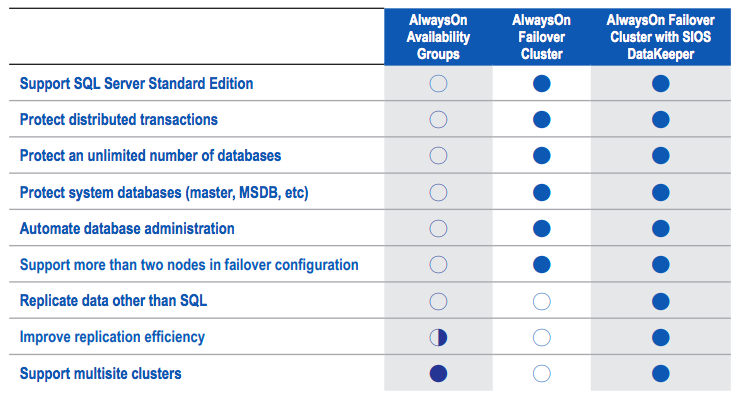
SIOS software provides a simple, cost-efficient way to provide high availability protection for SQL Server in the Amazon Web Services Cloud. Add SIOS DataKeeper Cluster Edition software to a Windows Server Failover Clustering Environment such as SQL Server Always On Failover Cluster Instance (FCI) to create a cloud-friendly SANless cluster. Use AWS Quickstart deployment templates to create a SIOS SANless cluster in minutes.

Fast, Cost-Efficient Way to Add High Availability

Like all traditional failover clustering solutions, SQL Server FCI environments require the use of a shared storage. This requirement makes them impractical or impossible in public cloud environments, including Amazon Web Services. SIOS SANless clustering software eliminates this requirement in an environment that is fully integrated with Windows Server Failover Clustering. SIOS software adds the flexibility to protect your business critical applications such as SQL Server Standard or Enterprise Edition in Windows or Linux and any combination of physical, virtual, and cloud environments.

Fast, Efficient Synchronization

SIOS software uses highly efficient block-level replication to synchronize storage in all cluster nodes in realtime to create a SANless cluster. By replicating data volumes at the block level, SIOS software use significantly fewer system resources, makes more efficient use of the available bandwidth and transfers more data faster across than file-based replication alternatives. As a result, SIOS software delivers incredibly fast replication speeds—without hardware accelerators or compression devices. You get efficient storage without the cost or configuration limitations of a traditional SAN-based environment.

Failover Across Availability Zones for Disaster Protection

It keeps real-time copies of data synchronized across multiple nodes and across EC2 Availability Zones (AZs) for availability and disaster protection.

High Availability with SQL Server Standard Edition

SIOS DataKeeper Cluster Edition software can be used with SQL Server Standard Edition FCI to create a cost-efficient high availability cluster without the need for more costly SQL Server Enterprise Edition licenses.

Solution Brief: High Availability for SQL Server in Amazon Cloud Environments

Key Benefits

Enables Clustering in the Cloud

• Makes cluster failover protection in cloud environments possible by eliminating the need for shared storage.

• Fully integrated with Windows Server Failover Clustering (WSFC)

Protection for Applications and Data

• High availability and disaster protection in a cloud environment.

Ease of Use

• AWS Quick Start deployment templates

• Intuitive console for easy ongoing AWS monitoring and management.

Download our Solution Brief High Availability for SQL Server in Amazon Cloud Environments

Filed Under: Clustering Simplified Tagged With: Amazon Web Services Cloud, High Availability, SQL Server

Case Study: Chris O’Brien Lifehouse Hospital Ensures High Availability in the AWS Cloud with SIOS DataKeeper

May 12, 2020 by Jason Aw Leave a Comment

Chris O’Brien Lifehouse Hospital Ensures High Availability in the AWS Cloud with SIOS DataKeeper

Case Study: Chris O’Brien Lifehouse Hospital Ensures High Availability in the AWS Cloud with SIOS DataKeeper

SIOS Chosen for its Ability to Deliver both High Availability and High Performance

ChrisOBrien-Lifehouse logoChris O’Brien Lifehouse (www.mylifehouse.org.au) is an integrated and focused center of excellence specializing in state-of-the-art treatment and research for patients who are suffering from rare and complex cancer cases. Lifehouse offers everything a cancer patient might need in one place, including advanced oncology-surgery, chemotherapy, radiation therapy, clinical trials, research, education, complementary therapies and psychosocial support. Situated alongside Royal Prince Alfred Hospital and the University of Sydney in Camperdown, the not-for-profit hospital sees more than 40,000 patients annually for screening, diagnosis and treatment. As one of Australia’s largest clinical trial centers, Lifehouse also provides its patients access to the world’s latest cancer treatment breakthroughs.

The Environment

Lifehouse uses the MEDITECH healthcare Electronic Medical Record and patient administration system, which stores the electronic health records for all patients in a database.

“The health information system and database are vital to the care we provide, and if either goes down, patient records would not be accessible, and that would paralyze the hospital’s operations,” explains Peter Singer, Director Information Technology at Lifehouse.

In the hospital’s datacenter, mission-critical uptime has been provided by Windows Server Failover Clustering (WSFC) running on a Storage Area Network (SAN). But like many organizations, Lifehouse wanted to migrate to the cloud to take advantage of its superior agility and affordability.

The Challenge

Lifehouse chose Amazon Web Services as its cloud service provider, and had hoped to “lift and shift” its environment directly to the AWS cloud. To simulate its on-premises configuration, Peter chose a “cloud volumes” service available in the AWS Marketplace. Failover clusters were configured using software defined storage volumes to share data between active and standby instances, and testing proved that the approach could provide the automatic failover needed to satisfy the hospital’s demanding recovery point and recovery time objectives.

There was a problem, however: The use of software-defined cloud volumes had a substantial adverse impact on throughput performance. With so many elements and layers involved, performance problems are notoriously difficult to troubleshoot in software defined configurations deployed in the cloud. With the “No Protection” option specified, the cloud volumes performed well. But “No Protection” was not really an option for the Chris O’Brien Lifehouse Ensures High Availability in the AWS Cloud with SIOS DataKeeper

“We were able to go from testing to production in a matter of days. Ongoing maintenance is also quite simple, which we expect will minimize our operational expenditures associated with high availability and disaster recovery,” said Peter who is responsible for mission-critical MEDITECH application and its database. “We made every reasonable effort to find and fix the root cause, and eventually concluded that software-defined storage would never be able to deliver the throughput performance we needed,” Peter recalls. So the team at Lifehouse began looking for another solution.

The Evaluation

In its search for another solution capable of providing both high availability and high performance, Lifehouse established three criteria:

  • Validation for use in the AWS cloud
  • Ability to work across multiple Availability Zones
  • Performance that was as good as or better than what had been achieved on-premises
  • Security / Privacy with support for encryption in motion and at rest

Validation was important to minimize risk associated with using a third-party solution in the cloud. The ability to work across multiple Availability Zones would assure business continuity in the event an entire AWS datacenter was impacted by a localized disaster. The sub-millisecond latency AWS delivers between Availability Zones would be critical to being able to replicate data synchronously to “hot” standby instances to meet the hospital’s demanding recovery time and recovery point objectives.

After conducting an exhaustive search, Peter concluded that the best available solution was SIOS DataKeeper Cluster Edition from SIOS Technology. SIOS DataKeeper was available on the AWS Marketplace, which assured it was proven to operate reliably in the AWS cloud. And because it did not use software-defined storage, Peter was confident SIOS DataKeeper would be able to deliver the performance Lifehouse needed.

The Solution

SIOS DataKeeper provides the high-performance, synchronous data replication Lifehouse needs. By using real-time, block-level data mirroring between the local storage attached to all active and standby instances, the solution overcomes the problems caused by the lack of a SAN in the cloud, including the poor performance that often plagues software-defined storage. The resulting SANless cluster is compatible with Windows Server Failover Clustering, provides continuous monitoring for detecting failures at the application and database levels, and offers configurable policies for failover and failback.

Lifehouse currently has eight instances in SANless failover clusters to support its MEDITECH application and database across different AWS availability zones to protect against widespread disasters. The latency inherent across the long distances involved normally requires the use of asynchronous data replication to avoid delaying commits to the active instance of the database. But the real-time, block level data mirroring technology used in SIOS DataKeeper still enables Peter Singer to achieve a near-zero recovery point.

The Results

Unlike software-defined shared storage, SIOS DataKeeper is purpose-built for high performance high availability, so it came as no surprise to Peter Singer that the cloudbased configuration now works as needed. What was a bit surprising was just how easy the solution has been to implement and operate: “We were able to go from testing to production in a matter of days. Ongoing maintenance is also quite simple, which we expect will minimize our operational expenditures associated with high availability and disaster recovery.”

SIOS DataKeeper has enabled Lifehouse to take full advantage of the economies of scale afforded in the cloud without sacrificing uptime or performance. “If it were not for SIOS, we might not have been able to migrate our environment to the cloud,” Peter Singer concluded.

Download the pdf

Filed Under: Success Stories Tagged With: data replication, High Availability

Webinar: Oracle database High Availability In The Cloud

April 18, 2020 by Jason Aw Leave a Comment

Oracle Database High Availability In The Cloud

Webinar: Oracle Database High Availability In The Cloud

Oracle DB HA in the Cloud:
Save costs and cut downtime after migrating
your Oracle workloads to the cloud

Moving to the cloud does not have to involve disruptive changes to your architecture and application designs. Nor high costs to keep High Availability redundancy and architectural changes to your HA clusters.

Even when Oracle removed the RAC feature from Standard Edition from 19c onward, and ends support for 12c, you can still achieve high-availability with 3rd party HA solutions like SIOS. Enjoy savings of up to 70% of costs without upgrading to enterprise edition Oracle DB.

In this 1-hour online session, learn how you can achieve the above and more. This includes cost savings when using Oracle and other applications for your organization. All these without compromising your 99.99% uptime requirement in the cloud.

Agenda

  • Benefits of Migrating Oracle DB to the cloud
  • High-Availability Challenges of Moving Oracle in the cloud
  • Why it Matters: Cost benefits compared to using Oracle RAC/Dataguard
  • Oracle and SIOS HA on cloud architectures
  • Q&A

Live Webinar – Thursday, 23rd April, 2020
12pm SGT, 2pm AEST, 11am PHT, 9:30am IST

Used by some of the most demanding enterprises in APAC including – AGL Australia • Perth Stadium • Dept of Transport and Main Roads Australia • Inghams Group Australia • Chris O’brien Hospital • Korea Education bureau • LG Display Korea • Mitsubishi Heavy Industries • NH Bank Korea • Nagaworld Casinos Cambodia • Nomura Research Institute (Shanghai) • Panasonic Asia • Razer Asia-Pacific Pte Ltd • Samsung Korea • Zespri New Zealand

Register Webinar: Oracle database High Availability In The Cloud 

Filed Under: News and Events Tagged With: Cloud, High Availability, Oracle

Perth’s Optus Stadium gets SIOS DataKeeper with Microsoft Windows Server Failover Clustering for Hyper-V high availability

January 26, 2020 by Jason Aw Leave a Comment

Meet Australia’s smartest and highest tech stadium – Perth’s Optus Stadium

SIOS DataKeeper™ implemented with Microsoft Windows Server Failover Clustering for Hyper-V high availability

SIOS DataKeeper was determined to be the only way to ensure a simple, manageable and yet cost-effective and robust solution that supported multiple integrations of devices and data securely, while also guaranteeing a high availability outcome.

The Perth Stadium, also known as Optus Stadium, is a high tech, multi-purpose stadium in Perth, Western Australia. Completed in late 2017 and officially opened in January 2018, the stadium has a capacity of over 60,000 people, making it the third-largest stadium in Australia after the Melbourne Cricket Ground and Stadium Australia. It has also been named Australia’s smartest and highest tech stadium.

According to Sascha Rhalf, Commercial Project Manager, Siemens, the Stadium is a landmark project in Western Australia that shapes the city’s skyline. It’s a high profile infrastructure development project that has been in the publics’ eye from the start due to the significant amount of government funding that the project has received.

The project itself has been a marvel, particularly for the Construction, Building Management and IT industries, given the complexity of both the building construction and IT architecture of the Stadium. Providence Solutions Australia along with Siemens and BGIS, joined forces to form a power-house team to work through the complex nature of the project and deliver one of Australia’s best Stadiums built to-date. Now nearing the end of its first year of operations, we discuss in more detail the background behind the project and the journey thus far.

The Challenge: Maintaining Availability

The highly customized-design of the Stadium made this a challenging project from the beginning. It was also a greenfield project, meaning there were no blueprints or previous examples/use cases to follow or reference. In fact, the blueprint for future similar projects was created during the project itself.

The project demanded a fit-for-purpose and tailored IT management solution that would meet all of the Stadium’s customized needs now, and into the future. The complexities of the IT design requirements ranged from high megapixel cameras, mission-critical application servers, a large number of multi-vendor integrations and dependencies, event day service delivery, and diverse vendors and ICT (Information Communications Technology) requirements. At the same time, it was important to keep to budget and timelines, as well as ensure the highest level of quality and security.

Complexity also stemmed from the fact that the very latest technologies were implemented to support the project’s future requirements. From face recognition to highly sophisticated access systems, to thousands of sensors – high tech and future-proofing technology was selected to ensure that the Stadium was equipped for the future. This meant, however, that the amount of data to be captured and stored on-site would be significant requiring a powerful solution to house and store the data securely.

The performance requirements for the technology implemented at the Stadium also gave complexity to the project. For example, the performance requirements for security video cameras alone was extraordinary. There are around 700 cameras including a significant number of ultra-high-definition cameras.  The CCTV management solution is provisioned with 1Pb of scalable tiered storage for review, analytics, facial recognition and database matching.

There were also varied levels of availability requirements ranging from 99.999% (5 9’s) to 99.9% which is considered unique. It was critical to ensure that there was uninterrupted processing of data and application availability, eliminate any loss of data and transactions if a server fails, and continuous computing during repair.

The Solution for High Availability for Hyper-V Virtual Machines

Providence Solutions Australia was selected as an instrumental technology partner involved in the end-to-end solution design and build. From design to engineering, to building and implementing, they were the “brains” behind the Optus Stadium’s unified compute IT platform.

The Optus Stadium is the first-ever stadium in Australia to embrace a unified, continuous computing infrastructure platform which was highly essential given the complex nature of the project from both a building and IT perspective.

The unified continuous computing infrastructure platform is a single platform that can house multiple applications and data and features built-in resilience through fault tolerance, high availability, high performance and seamless disaster recovery capabilities. Put simply, it is a super platform – one that can cope with anything.

It was decided that a hyper-converged unified compute platform was key to the overall technology and IT build given the range of diverse systems and applications managed. Providence Solutions Australia implemented SIOS DataKeeper™ with Microsoft Windows Server Failover Clustering to provide high availability for their Hyper-V virtual machines. It was determined that this was the only way to ensure that there was a simple, manageable and yet cost-effective and robust solution that supported multiple integrations of devices and data securely, while also guaranteeing a high availability outcome.

The super platform and total building solution work by providing an end-to-end solution for the stadium operations. In a single platform, it contains a convergence of multiple systems, spanning video surveillance management, recording and archival, voice, data, storage, industrial monitoring (SCADA systems), HVAC, building and power management, security systems, video intercoms, irrigation, billboards, lifts, and lighting control.

There is a range of 3rd party vendor applications that sit on the integrated platform including Johnson Control, Philips Dynalite, and Schindler.

The Results

The Stadium has delivered. There has been positive feedback from the public and visitors since the opening. It is a state of the art stadium as well as a workplace with transparent and intelligent security on a future proof backbone with superior analytics.

It has been built with IT security top of mind and has been built meeting all the technical specifications and performance requirements set out by Multiplex. The IT architecture and design has also taken future developments into consideration.

Get a Free Trial of SIOS DataKeeper

Learn more about High Availability Clusters For Virtual Server Environments

Download Case Study PDF

Filed Under: Success Stories Tagged With: High Availability, Perth Optus Stadium

  • « Previous Page
  • 1
  • …
  • 36
  • 37
  • 38
  • 39
  • 40
  • …
  • 57
  • Next Page »

Recent Posts

  • IT Resilience vs. Disaster Recovery: Which Strategy Does Your Business Need?
  • SAP High Availability and Disaster Recovery Outside RISE with SAP
  • Fail Open vs. Fail Closed: Why It’s a False Dilemma (and How True HA Fixes It)
  • The 5-Step Checklist for Validating Your Failover Setup
  • Managing an Inherited DataKeeper Cluster: Challenges and Best Practices

Most Popular Posts

Maximise replication performance for Linux Clustering with Fusion-io
Failover Clustering with VMware High Availability
create A 2-Node MySQL Cluster Without Shared Storage
SAP for High Availability Solutions For Linux
Bandwidth To Support Real-Time Replication
The Availability Equation – High Availability Solutions.jpg
Choosing Platforms To Replicate Data - Host-Based Or Storage-Based?
Guide To Connect To An iSCSI Target Using Open-iSCSI Initiator Software
Best Practices to Eliminate SPoF In Cluster Architecture
Step-By-Step How To Configure A Linux Failover Cluster In Microsoft Azure IaaS Without Shared Storage azure sanless
Take Action Before SQL Server 20082008 R2 Support Expires
How To Cluster MaxDB On Windows In The Cloud

Join Our Mailing List

Copyright © 2026 · Enterprise Pro Theme on Genesis Framework · WordPress · Log in