SIOS SANless clusters

SIOS SANless clusters High-availability Machine Learning monitoring

  • Home
  • Products
    • SIOS DataKeeper for Windows
    • SIOS Protection Suite for Linux
  • News and Events
  • Clustering Simplified
  • Success Stories
  • Contact Us
  • English
  • 中文 (中国)
  • 中文 (台灣)
  • 한국어
  • Bahasa Indonesia
  • ไทย

Planning is Key to Enterprise Availability (and to a Happy Marriage)

July 30, 2020 by Jason Aw Leave a Comment

Planning is Key to Enterprise Availability (and to a Happy Marriage)

Planning is Key to Enterprise Availability (and to a Happy Marriage)

Planning dates and getaways, fabulously romantic dinners are a great part of loving your spouse well.  Seminars and workshops overflowing with tips for improving your relationship abound in nearly every area of the world.

But, listen in on the training session provided by SIOS Technology Corp. Project Manager for Professional Services, Edmond Melkomian, and you’ll quickly learn that planning dinners and anniversary retreats aren’t the only way to love your spouse well.

In a recent class on SIOS Protection Suite for Linux, Edmond shared three tips that help you love your spouse well in an enterprise world: plan, plan, plan.

1.   “Plan to plan” your enterprise availability solution

1.   “Plan to plan” your enterprise availability solution

In his course, Edmond Melkomian asked students to name the first thing you should do when deploying an enterprise solution.  His answer, “Plan, plan, plan.”  It seems obvious, but the first step is to start making the plan.  A fairly decent start for a plan includes developing the details for each of the project phases, such as milestones, checkpoints, risks, risk mitigation and strategies, stakeholders, timelines, stakeholder communication plans.  A decent plan will also include details about kickoff, sign-off and closure, and resources (staffing, management, legal/contracts).

Plan to create, review, modify, and update your plan throughout the solution lifecycle.

2.   Plan what to deploy for enterprise availability

Plan what to deploy.  It is likely that a large portion of your enterprise infrastructure exists beyond the realm of the current team’s lifespan with your company.  As you migrate to the cloud, or update your availability strategy, it is worth the time and effort to make a plan regarding what to deploy.  Focus your plan on ensuring that you deploy redundancy at all critical components, network, compute, storage, power, cooling, and applications.  All data centers and cloud providers typically ensure cooling, power, and network redundancy to start.

A number of firms offer architectural teams, cloud solution providers, availability experts, application architects, and migration specialists who help teams discover critical and sometimes hidden dependencies as well as high risk areas vulnerable to Single Points of Failure (SPOF’s).  This investigative work will feed into your plan of what to deploy and/or update in your availability strategy.

Plan on reviewing what you need to deploy.

3.   Plan to keep a QA/pre-production cluster for reliable availability

When I was in the SIOS Technology Corp. development team, I’ll never forget a Friday night call with a long time, but frantic customer.  Earlier in the month a frequent customer unsuccessfully deployed a new software solution into a production environment.  The result was a massive failure.  He called our 800 number at 4:30pm (EST) on Friday.  Why do I recall that exact time?  Friday was date night.  My wife and I had dinner plans, a babysitter for the six girls on standby (by the hour), and hopes for a romantic and relaxing evening.  I was just about to head out for the day when the phone rang.  After a tense first hour, we were back up and running.  This unfortunate episode could have been avoided or mitigated by keeping a UAT or QA system on hand.

As Harrison Howell, the Software Engineer for Customer Experience at SIOS Technology Corp. noted in his blog 6-common-cloud-migration-challenges the limits of on-prem are no longer the same limits.

Customers coming from an on-prem system need to remember that resources are no longer a limiting factor. In the cloud, systems can be effortlessly copied and run in isolation of production, something not trivial on-premises. On-demand access to IT resources allows UAT of HA and DR to expand beyond “shut down the primary node”. Networks can be sabotaged, kernels can be panicked, even databases can be corrupted and none of this will impact production! Identifying and testing these scenarios improves HA and DR posture.

Plan on deploying and keeping a UAT system for HA and DR testing.  As Harrison mentions, “identifying and testing [issues]” “improves [your overall] HA and DR posture,” and that improves your chances of a successful date night.

4.   Plan regular maintenance and updates (including documentation)

Lastly, plan times for regular maintenance and updates to maintain Enterprise Availability.  Your enterprise needs to remain highly available to remain highly profitable and successful.  Environments don’t remain stagnant, and patches, security updates, expansion, and general maintenance are a regular occurrence from inception to retirement.  Creating a plan for how and when you will incorporate updates and maintenance into your enterprise will ensure that you are not only kept up to date, but that you minimize risks and downtime while doing it.  Be sure to include in your plan the use of a test system.  Develop a planned routine and process for validating patches, kernel and OS updates, and security software, and don’t forget to update the project documentation and future plans as you go and grow.

If you can remember to plan for a highly redundant, highly reliable and highly available system upfront, plan to keep a QA/Pre-production cluster after Go-Live, and plan for regular maintenance and updates you will also be able to keep your plans with your spouse for date night.  And not just date night, but you’ll also be able to keep your night’s free from 3am wake up calls due to down production systems.  This is my tip for loving your spouse well.

I love my wife and so I help customers deploy SIOS Technology Corp.’s DataKeeper Cluster Edition and SIOS Protection Suite for Windows and Linux products as a part of a highly available enterprise protection solution.  Contact SIOS.

— Cassius Rhue, VP, Customer Experience

Article reproduced with permission from SIOS

 

Filed Under: Clustering Simplified Tagged With: Application availability, High Availability

High Availability Software is Insurance Against SAP Downtime

July 18, 2020 by Jason Aw Leave a Comment

High Availability Software is Insurance Against SAP DowntimeHigh Availability Software is Insurance Against SAP Downtime
We all need to buy insurance – for our cars, our houses, our lives. Nobody likes to pay money for a service that we hope we never have to use. But we all know that we should have it just in case. Most people either put off insurance until something awful happens, buy the cheapest, or actually do their homework and buy it from someone they trust.  This last group usually fares the best.

High Availability Software is Insurance Against Downtime

Insurance is often for consumers, but it’s critical to businesses too. You have computer systems and applications that run your business.  If they fail for some reason, you want your business to continue to run or it could cost millions of dollars in lost business through lost transactions and customer data, and irreparable damage to your reputation with your customers. High availability software is your “insurance” against system downtime. This is not something you can ignore. This is not something you can trust that will come along with your hardware or software infrastructure. You want to use high availability solutions from a company that has decades of expertise in high availability and knows how to keep your systems up and running.

A trusted high availability software company should: 

  • Provide a single solution that is platform agnostic – usable on-prem, in the cloud, and on all of your hardware and software platforms
  • Have a product that is easy to configure and set up without having considerable application expertise
  • Know your applications and when your applications are having a problem
  • Take the proper action to attempt to restart or failover applications
  • Fail over the application to a secondary server, maintaining application best practices, and bringing the application back up in the proper order

One of the key applications used in enterprises today is SAP S/4HANA, based on the HANA in-memory database.  Most SAP customers will be required to run the HANA database with SAP by 2025.  You want to find an intelligent HANA availability solution from a company that knows high availability, that knows SAP, knows HANA, and knows what to do to ensure that your critical SAP applications, and your business, continue to run smoothly.

SIOS Technology is the company you can trust for a reliable High Availability Software. The 9.5 release of the LifeKeeper for Linux product contains a new HANA Application Recovery Kit. This will provide you with all you need to keep your SAP and HANA environment running.  Want more information about this release? Watch this interview.

Reproduced with permission from SIOS

Filed Under: Clustering Simplified Tagged With: High Availability

Test/QA Systems are a Critical Part of Enterprise Availability

July 8, 2020 by Jason Aw Leave a Comment

Test/QA Systems are a Critical Part of Enterprise Availability

Test/QA Systems are a Critical Part of Enterprise Availability

“I could kiss you,” that’s what a friend blurted out to me nearly three decades ago as she ran towards me. She had dropped her reeds for her saxophone on the way to one of the biggest band competitions in our region. I didn’t know whose they were, but when I saw the pack of reeds on the seat on the bus I picked them up and took them with me to the warm-up area. Three minutes into her warm-up, her 1st reed cracked and she panicked as she reached into empty pockets for replacements. When I piped up that I had found them, she blurted out, “I could kiss you right now.”

As the VP of Customer Experience at SIOS Technology Corp. I have the unique and distinct pleasure of working with a number of enterprise customers and partners at different phases of the availability spectrum. Sometimes I have the opportunity of working with end customers for issue resolution, mitigation, and improvements. At other times our teams are actively working with partners and customers to architect and implement enterprise availability to protect their systems from downtime. A recent customer experience reminded me of something that happened nearly 30 years ago when my friend blurted out, “I could kiss you.”

My team and I were on a customer call. The call began with the usual pleasantries, introductions, and an overview of the customer’s enterprise environment. Thirty minutes into the call, things were going so well. Their architecture was solid, thoughtful, and well documented. Their team was knowledgeable, technically sound, and experienced. But then, the customer intimated that due to cost savings they would not be planning to maintain a dedicated test/quality system. I took a deep breath.  Actually it was more of an exhale like the rush of air from a gut punch. I prepared to respond, but before I could a voice broke through.  “The number one cause of downtime is lack of process,” exclaimed the Partner Rep Architect on the call with us. After a brief banter, the customer agreed to maintain a test/QA system and I nearly blurted out, “I could kiss you!”

On the front lines of many Enterprise deployments (new systems, data center migrations, and system updates) my teams in Support and Services have seen dozens of issues that could have been mediated by utilizing a test system/cluster.

A test/quality system is an invaluable part of an HA strategy to avoid downtime. Common tasks associated with maintaining an enterprise deployment such as patches, updates, and configuration changes come with risk. Enormous risk.

Commonly identified risks of testing in production include several serious and potentially catastrophic issues: 

  • Corrupted or invalid data
  • Leaked protected data
  • Incorrect revenue recognition (canceled orders, etc.)
  • Overloaded systems
  • Unintended side effects or impacts on other production systems
  • High error rates that set off alerts and page people on-call
  • Skewed analytics (traffic funnels, A/B test results, etc.)
  • Inaccurate traffic logs full of script and bot activity (a)

If a customer attempts to apply risky changes in production, the result can be quite damaging. On top of those listed above, there is an increased risk of downtime, corruption of application installations, and in some cases irreversible damage. Take the case of Customer X (a high profile SAP Enterprise shop in the manufacturing industry).

After reading a critical notice from a reputable site, the OS Administrator quickly updated his production nodes to the latest kernel update available. Within hours the Production nodes began a series of uninitiated crashes and kernel panics. In his haste, he had installed a kernel that was incompatible with his configuration; the combination of existing application packages, devices, file systems, and related packages. This caused a production outage and several high priority escalations to multiple vendors.

When patches are applied to a test/QA or sandbox system, patches and critical fixes can be managed and verified to reduce loss of productivity and unplanned downtime. Testing applications in a production-like environment allows you to identify unforeseen problems and correct the issues before they adversely impact your operations. Pre-production design and testing eliminate costly business disruption, improve your customer experience and protect your brand.

Using a test QA System to Improve Production Availability and Processes

Here are the basics that using a test/QA system, can provide for improving your production availability and processes. A controlled environment, that is similar (it must resemble production as close as possible) to the production environment, provides the ability to:

  1. Test kernel updates and security updates
  2. Validate settings and configuration tuning
  3. Reproduce production issues and test software updates and patches
  4. Verify application version compatibility and reduce the risk of downtime due to incompatible changes
  5. Provide a safe space to practice and revise go-live, maintenance, outage, and other enterprise procedural activities
  6. Train new hires and team members without impacting enterprise clients

If you have a Test/QA environment for deploying your critical enterprise availability software, I could kiss you right now. Having this environment gives your team the ability “to test, validate and verify(2)” architecture, business requirements, user scenarios, and general integration with a system or set of systems that most closely resembles the production environment- you know the one that makes the money. Of course, you will still have to schedule windows to maintain your production systems and perform testing on them as well, but after a safe buffer step has been completed in between.

— Cassius Rhue, VP, Customer Experience

————-

References:

  1. https://opensource.com/article/19/5/dont-test-production Accessed 5/4/2020
  2. https://www.softwaretestingclass.com/system-testing-what-why-how/ Accessed 5/4/2020

Filed Under: Clustering Simplified Tagged With: disaster recovery, High Availability, Q&A, Risks, Testing

Solution Brief: High Availability for SQL Server in Amazon Cloud Environments

May 17, 2020 by Jason Aw Leave a Comment

High Availability for SQL Server

Solution Brief: High Availability for SQL Server in Amazon Cloud Environments

SIOS software provides a simple, cost-efficient way to provide high availability protection for SQL Server in the Amazon Web Services Cloud. Add SIOS DataKeeper Cluster Edition software to a Windows Server Failover Clustering Environment such as SQL Server Always On Failover Cluster Instance (FCI) to create a cloud-friendly SANless cluster. Use AWS Quickstart deployment templates to create a SIOS SANless cluster in minutes.

Fast, Cost-Efficient Way to Add High Availability

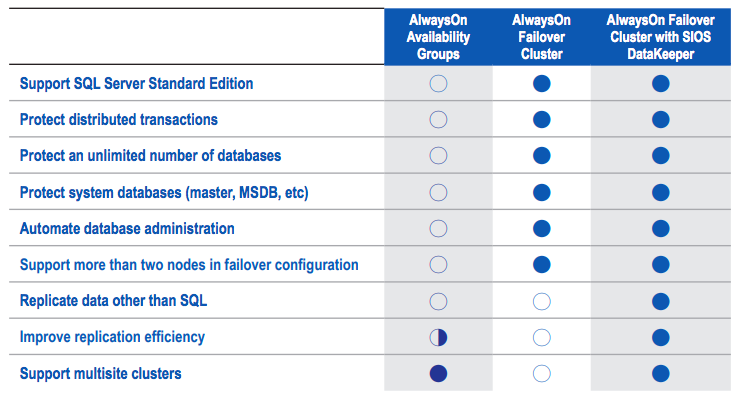
Like all traditional failover clustering solutions, SQL Server FCI environments require the use of a shared storage. This requirement makes them impractical or impossible in public cloud environments, including Amazon Web Services. SIOS SANless clustering software eliminates this requirement in an environment that is fully integrated with Windows Server Failover Clustering. SIOS software adds the flexibility to protect your business critical applications such as SQL Server Standard or Enterprise Edition in Windows or Linux and any combination of physical, virtual, and cloud environments.

Fast, Efficient Synchronization

SIOS software uses highly efficient block-level replication to synchronize storage in all cluster nodes in realtime to create a SANless cluster. By replicating data volumes at the block level, SIOS software use significantly fewer system resources, makes more efficient use of the available bandwidth and transfers more data faster across than file-based replication alternatives. As a result, SIOS software delivers incredibly fast replication speeds—without hardware accelerators or compression devices. You get efficient storage without the cost or configuration limitations of a traditional SAN-based environment.

Failover Across Availability Zones for Disaster Protection

It keeps real-time copies of data synchronized across multiple nodes and across EC2 Availability Zones (AZs) for availability and disaster protection.

High Availability with SQL Server Standard Edition

SIOS DataKeeper Cluster Edition software can be used with SQL Server Standard Edition FCI to create a cost-efficient high availability cluster without the need for more costly SQL Server Enterprise Edition licenses.

Solution Brief: High Availability for SQL Server in Amazon Cloud Environments

Key Benefits

Enables Clustering in the Cloud

• Makes cluster failover protection in cloud environments possible by eliminating the need for shared storage.

• Fully integrated with Windows Server Failover Clustering (WSFC)

Protection for Applications and Data

• High availability and disaster protection in a cloud environment.

Ease of Use

• AWS Quick Start deployment templates

• Intuitive console for easy ongoing AWS monitoring and management.

Download our Solution Brief High Availability for SQL Server in Amazon Cloud Environments

Filed Under: Clustering Simplified Tagged With: Amazon Web Services Cloud, High Availability, SQL Server

Case Study: Chris O’Brien Lifehouse Hospital Ensures High Availability in the AWS Cloud with SIOS DataKeeper

May 12, 2020 by Jason Aw Leave a Comment

Chris O’Brien Lifehouse Hospital Ensures High Availability in the AWS Cloud with SIOS DataKeeper

Case Study: Chris O’Brien Lifehouse Hospital Ensures High Availability in the AWS Cloud with SIOS DataKeeper

SIOS Chosen for its Ability to Deliver both High Availability and High Performance

ChrisOBrien-Lifehouse logoChris O’Brien Lifehouse (www.mylifehouse.org.au) is an integrated and focused center of excellence specializing in state-of-the-art treatment and research for patients who are suffering from rare and complex cancer cases. Lifehouse offers everything a cancer patient might need in one place, including advanced oncology-surgery, chemotherapy, radiation therapy, clinical trials, research, education, complementary therapies and psychosocial support. Situated alongside Royal Prince Alfred Hospital and the University of Sydney in Camperdown, the not-for-profit hospital sees more than 40,000 patients annually for screening, diagnosis and treatment. As one of Australia’s largest clinical trial centers, Lifehouse also provides its patients access to the world’s latest cancer treatment breakthroughs.

The Environment

Lifehouse uses the MEDITECH healthcare Electronic Medical Record and patient administration system, which stores the electronic health records for all patients in a database.

“The health information system and database are vital to the care we provide, and if either goes down, patient records would not be accessible, and that would paralyze the hospital’s operations,” explains Peter Singer, Director Information Technology at Lifehouse.

In the hospital’s datacenter, mission-critical uptime has been provided by Windows Server Failover Clustering (WSFC) running on a Storage Area Network (SAN). But like many organizations, Lifehouse wanted to migrate to the cloud to take advantage of its superior agility and affordability.

The Challenge

Lifehouse chose Amazon Web Services as its cloud service provider, and had hoped to “lift and shift” its environment directly to the AWS cloud. To simulate its on-premises configuration, Peter chose a “cloud volumes” service available in the AWS Marketplace. Failover clusters were configured using software defined storage volumes to share data between active and standby instances, and testing proved that the approach could provide the automatic failover needed to satisfy the hospital’s demanding recovery point and recovery time objectives.

There was a problem, however: The use of software-defined cloud volumes had a substantial adverse impact on throughput performance. With so many elements and layers involved, performance problems are notoriously difficult to troubleshoot in software defined configurations deployed in the cloud. With the “No Protection” option specified, the cloud volumes performed well. But “No Protection” was not really an option for the Chris O’Brien Lifehouse Ensures High Availability in the AWS Cloud with SIOS DataKeeper

“We were able to go from testing to production in a matter of days. Ongoing maintenance is also quite simple, which we expect will minimize our operational expenditures associated with high availability and disaster recovery,” said Peter who is responsible for mission-critical MEDITECH application and its database. “We made every reasonable effort to find and fix the root cause, and eventually concluded that software-defined storage would never be able to deliver the throughput performance we needed,” Peter recalls. So the team at Lifehouse began looking for another solution.

The Evaluation

In its search for another solution capable of providing both high availability and high performance, Lifehouse established three criteria:

  • Validation for use in the AWS cloud
  • Ability to work across multiple Availability Zones
  • Performance that was as good as or better than what had been achieved on-premises
  • Security / Privacy with support for encryption in motion and at rest

Validation was important to minimize risk associated with using a third-party solution in the cloud. The ability to work across multiple Availability Zones would assure business continuity in the event an entire AWS datacenter was impacted by a localized disaster. The sub-millisecond latency AWS delivers between Availability Zones would be critical to being able to replicate data synchronously to “hot” standby instances to meet the hospital’s demanding recovery time and recovery point objectives.

After conducting an exhaustive search, Peter concluded that the best available solution was SIOS DataKeeper Cluster Edition from SIOS Technology. SIOS DataKeeper was available on the AWS Marketplace, which assured it was proven to operate reliably in the AWS cloud. And because it did not use software-defined storage, Peter was confident SIOS DataKeeper would be able to deliver the performance Lifehouse needed.

The Solution

SIOS DataKeeper provides the high-performance, synchronous data replication Lifehouse needs. By using real-time, block-level data mirroring between the local storage attached to all active and standby instances, the solution overcomes the problems caused by the lack of a SAN in the cloud, including the poor performance that often plagues software-defined storage. The resulting SANless cluster is compatible with Windows Server Failover Clustering, provides continuous monitoring for detecting failures at the application and database levels, and offers configurable policies for failover and failback.

Lifehouse currently has eight instances in SANless failover clusters to support its MEDITECH application and database across different AWS availability zones to protect against widespread disasters. The latency inherent across the long distances involved normally requires the use of asynchronous data replication to avoid delaying commits to the active instance of the database. But the real-time, block level data mirroring technology used in SIOS DataKeeper still enables Peter Singer to achieve a near-zero recovery point.

The Results

Unlike software-defined shared storage, SIOS DataKeeper is purpose-built for high performance high availability, so it came as no surprise to Peter Singer that the cloudbased configuration now works as needed. What was a bit surprising was just how easy the solution has been to implement and operate: “We were able to go from testing to production in a matter of days. Ongoing maintenance is also quite simple, which we expect will minimize our operational expenditures associated with high availability and disaster recovery.”

SIOS DataKeeper has enabled Lifehouse to take full advantage of the economies of scale afforded in the cloud without sacrificing uptime or performance. “If it were not for SIOS, we might not have been able to migrate our environment to the cloud,” Peter Singer concluded.

Download the pdf

Filed Under: Success Stories Tagged With: data replication, High Availability

  • « Previous Page
  • 1
  • …
  • 35
  • 36
  • 37
  • 38
  • 39
  • …
  • 56
  • Next Page »

Recent Posts

  • What Is High Availability (HA)?
  • Surviving the Friday Night Crash: From Scrappy Bare Metal to Seamless Data Replication
  • Grounded: What Missing Percona Live Amsterdam Taught Me About HA
  • SIOS LifeKeeper vs. Red Hat High Availability Add-On:
  • The State of Application Resilience: 2026 SIOS High Availability Survey

Most Popular Posts

Maximise replication performance for Linux Clustering with Fusion-io
Failover Clustering with VMware High Availability
create A 2-Node MySQL Cluster Without Shared Storage
SAP for High Availability Solutions For Linux
Bandwidth To Support Real-Time Replication
The Availability Equation – High Availability Solutions.jpg
Choosing Platforms To Replicate Data - Host-Based Or Storage-Based?
Guide To Connect To An iSCSI Target Using Open-iSCSI Initiator Software
Best Practices to Eliminate SPoF In Cluster Architecture
Step-By-Step How To Configure A Linux Failover Cluster In Microsoft Azure IaaS Without Shared Storage azure sanless
Take Action Before SQL Server 20082008 R2 Support Expires
How To Cluster MaxDB On Windows In The Cloud

Join Our Mailing List

Copyright © 2026 · Enterprise Pro Theme on Genesis Framework · WordPress · Log in