SIOS SANless clusters

SIOS SANless clusters High-availability Machine Learning monitoring

  • Home
  • Products
    • SIOS DataKeeper for Windows
    • SIOS Protection Suite for Linux
  • News and Events
  • Clustering Simplified
  • Success Stories
  • Contact Us
  • English
  • 中文 (中国)
  • 中文 (台灣)
  • 한국어
  • Bahasa Indonesia
  • ไทย

SIOS Protection Suite for Linux Quick Service Protection

February 6, 2021 by Jason Aw Leave a Comment

How to add custom application support to SIOS Protection Suite - SIOS Protection Suite for Linux Quick Service Protection

Using SIOS Protection Suite for Linux Quick Service Protection Resource

On a recent engagement with the SIOS Professional Services team, a customer inquired about how to protect a custom application with the SIOS Protection Suite for Linux solution. One of the highly experienced high availability experts at SIOS Technology Corp., helped understand the customer’s application and laid out the methods SIOS provides for custom application support.

SIOS Protection Suite for Linux provides multiple methods for adding high availability and application monitoring to custom applications.  These options include the following:

  • Creating a custom application recovery kit (ARK)1
  • Creating a generic application resource hierarchy
  • Creating a quick service protection resource
Type Coding Complexity Monitoring Recovery
Custom Application Recovery Kit Resource1 Highest Highest Highest
Generic Application Resource Medium High High
Quick Service  Protection Resource Low Medium Medium

Definitions Used in Chart

Monitoring – defined as the ability to make a determination of the availability, accessibility and functioning of the protected application, database or service.  A low level of application, database, or service monitoring provides basic coverage, such as a check for a running process, existence of a pid_file, or that the status command returns a ‘true’ result when executed.  Note: A ‘true’ or ‘0 (zero)’ return code does not mean that the application, database, or service is running. But only that the command executed was able to successfully complete with a positive (‘true’ or ‘0 (zero)’) status result.  The highest level of monitoring indicates that application specific knowledge is applied to determine the health and functioning of the application beyond lower level methods such as process status, ps output, or systemd status returns.  The highest level of monitoring typically applies knowledge of recommended order of healthcheck operations, knowledge of dependencies, and analysis of the results obtained from status and monitoring commands.

Recovery – defined as the ability to restart a failed application, database or service.  A low level of recovery capability implies that commands for a restart are issued and expected output are obtained from the issuance of the command.  The highest level of monitoring indicates that application-specific knowledge is applied to determine how to initiate an orderly restart of the application, database, or service, which may require knowledge of recommended order of operations, dependencies, rollbacks or other related remediation of a failed service.

Solution:  Quick Service Protection Resource

In this engagement, the customer’s application had systemd compatibility. Based on their overall requirements for avoiding coding, minimal monitoring needs, and simple recovery procedures, we recommended the Quick Service Protection (QSP) Resource.

The QSP resource works to quickly add support of a systemd service to the SIOS Protection Suite for Linux resource protection.  In the case of Customer Example.com, they have a systemd compatible service, with the minimal required definition needed to start and stop their application.

[Unit]

Description=SIOS ‘as-is’ Example Service 2020

After=network.target

[Service]

Type=simple

Restart=always

RestartSec=3

User=root

ExecStart=/example_app/bin/exampleapp start

ExecStop=/example_app/bin/exampleapp stop

[Install]

WantedBy=multi-user.target

Example.com systemd file

SIOS recommends that prior to attempting the protection of the resource with the SIOS Protection Suite for Linux product, verify via systemctl that the example application stops and starts accordingly:

# systemctl status example

* example.service – SIOS ‘as-is’ Example Service 2020

Loaded: loaded (/usr/lib/systemd/system/example.service; disabled; vendor preset: disabled)

Active: inactive (dead)

# systemctl start example

# systemctl status example

* example.service – SIOS ‘as-is’ Example Service 2020

Loaded: loaded (/usr/lib/systemd/system/example.service; disabled; vendor preset: disabled)

Active: active (running) since Fri 2020-08-21 14:53:27 EDT; 5s ago

Main PID: 19937 (exampleapp)

CGroup: /system.slice/example.service

`-19937 /usr/bin/perl /example_app/bin/exampleapp start

# systemctl stop example

# systemctl status example

* example.service – SIOS ‘as-is’ Example Service 2020

Loaded: loaded (/usr/lib/systemd/system/example.service; disabled; vendor preset: disabled)

Active: inactive (dead)


After verifying that the application functions correctly via systemd, restart the service and ensure that the service is running.

# systemctl start example

# systemctl status example

* example.service – SIOS ‘as-is’ Example Service 2020

Loaded: loaded (/usr/lib/systemd/system/example.service; disabled; vendor preset: disabled)

Active: active (running) since Fri 2020-08-21 15:59:44 EDT; 3min 2s ago

Main PID: 30740 (exampleapp)

Refer to the SIOS Protection Suite for Linux Quick Service Protection Suite documentation for additional details on the resource create process.

Using the SPS-L UI select the Create option, indicated in the Global UI Resource Toolbar by the following icon:   SIOS Global US Resource

Once the create wizard is launched, select the Quick Service Protection option in the Create Resource Wizard Window

 

In the next prompt for  ‘Switchback Type’, choose whether you will use intelligent switchback or automatic switchback.
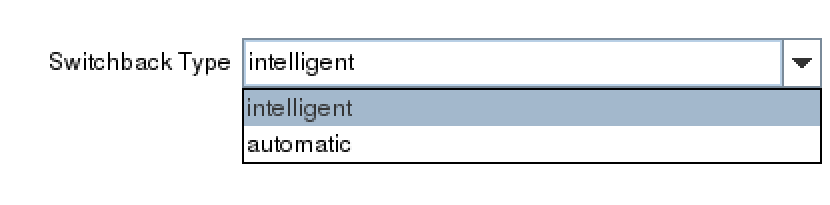
After selecting the ‘Switchback Type’,  the Server dialogue appears allowing you to choose the primary server for the custom application.
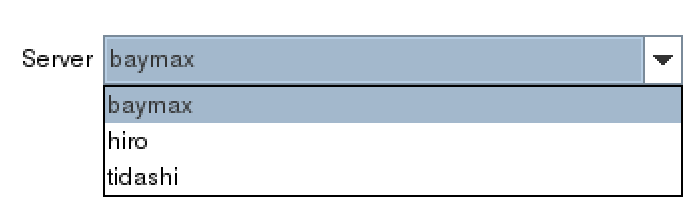
 

(Note: If the service requires storage, be sure to choose the same primary server previously selected for the storage resources.)

In the Service Name dialog box, find the service for your custom application.
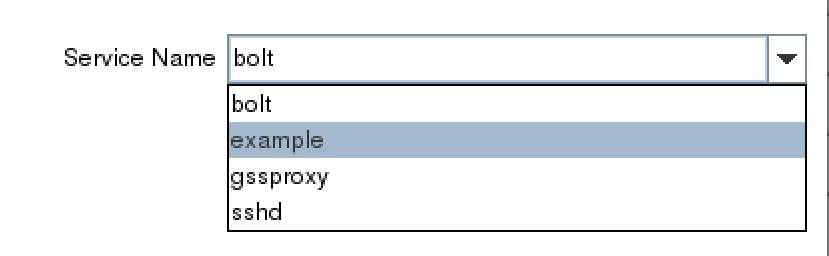
Once you’ve selected the correct service, example, determine whether you will enable monitoring or disable the monitoring service.  Refer to the documentation to gain an understanding of the monitoring provided by the QSP resource.2

 

Next, choose a resource tag.  A resource tag should be a meaningful name that will help your IT team quickly identify which SPS-L resource protects your application or service.

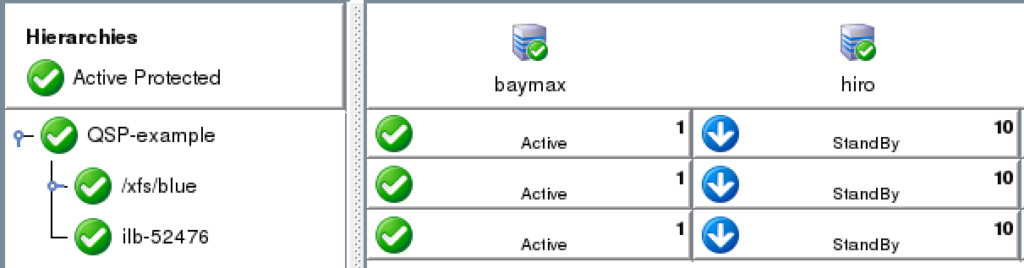
Lastly, follow the final dialogue to complete the resource creation process.  Once the resource is created, use the UI to extend the resource to additional servers. If necessary, create dependencies between the newly protected custom service/application and any other required resources such as storage or IP resources.
 

NOTES:

1 Creating a customer application recovery kit can be accomplished via an engagement with the SIOS Technology Corp. Professional Services Team.  For more information contact professional-services@us.sios.com

2 The QSP Recovery Kit quickCheck can only perform simple health (using the “status” action of the service command). QSP doesn’t guarantee that the service is provided or the process is functioning. If complicated starting and/or stopping is necessary, or more robust health checking operations are necessary, using a Generic Application or Custom Application ARK is recommended

Reproduced from SIOS

Filed Under: Clustering Simplified Tagged With: Application availability, clusters, High Availability, high availability - SAP, SAP S/4HANA

How to Understand & Respond to Availability Alerts

January 29, 2021 by Jason Aw Leave a Comment

Understand & Respond to Availability Alerts

Houston We Have a Problem (or How to Understand & Respond to Availability Alerts)

A Successful Failure

Houston we have a problem!  It is an iconic line that reminds countless space buffs and movie fans about the great difficulty, potential disaster, and the perilous state of the Apollo 13 space mission – a mission NASA now calls “A Successful Failure.”  Ignoring your own application availability alerts may not go down in history as a defining moment, but can also wreak similar havoc

Now back to 1970:

“A routine stir of an oxygen tank ignited damaged wire insulation inside it, causing an explosion that vented the contents of both of the Service Module’s (SM) oxygen tanks to space. Without oxygen, needed for breathing and for generating electric power, the SM’s propulsion and life support systems could not operate. The Command Module’s (CM) systems had to be shut down to conserve its remaining resources for reentry, forcing the crew to transfer to the Lunar Module (LM) as a lifeboat. With the lunar landing canceled, mission controllers worked to bring the crew home alive.”

An explosion of oxygen tanks triggered alarms, warnings, pressure and voltage drops, interrupted communications, and then the now famous radio communication between the astronauts and Mission Control.  But what if, after the explosion, the crew did nothing? What if they never checked on the explosion, never responded to the warnings and gauges, and never informed Mission Control of there being an issue?  What if Mission Control, after being notified or alerted back at their dashboard in the control center, never attempted to provide any assistance?  What if the team buried their heads in the sand, or resigned themselves to fate and chance, never tried to learn, improvise, or improve from the failure they encountered?  The result would have been tragic!  It may have made it to a documentary, but hardly a blockbuster movie featuring an iconic line.

What Do You Do When an Alert is Triggered in Your Environment?

Space walks are a far cry from our own day to day activities, unless of course you work for NASA, but recent blogs on Apollo 13 do spark a question applicable to availability.  What do you do when there is an alert triggered in your environment? Do you just ignore it?  Do you downplay it, waiting to see if the alerts, log messages, or other indicators will just go away?  Do you contact your vendor support to understand how you can disable these alerts, warnings, and messages?  Or do you say, “We have a problem here and we need to work it out”?

As a VP of Customer Experience at SIOS Technology Corp. we have experienced both sides of alerts and indicators.  We have painstakingly walked with customers who chose to ignore warnings, turning off critical alerts that indicated issues, ranging from application thresholds to network instability to potential data inconsistency.  And we have also seen customers who have tuned into their alerts, investigated why their alarms were going off, uncovered the root cause and enjoyed the fruit of their labor.  This fruit is most often the sweet reward of improved stability, innovation and learning, or an averted disaster.

4 things you can do when you your availability product triggers an alert

1. Determine if the type and criticality of the availability alert.

Is the alert or error indicative of a warning, an error, or a critical issue? A good place to assist you and your team with understanding criticality is to consult with available documentation. Check the product documentation, online forums, knowledge base articles (KBA), and internal team data and process manuals.

2. Assess the immediacy of the alert. 

For warnings and errors, how likely are they to progress into a critical issue or event.  For critical issues and alerts, this may be obvious but an assessment, even of critical events will provide some guidance on your next steps; self-correction, issue isolation, or immediate escalation.

3. Consult additional sources. 

What other sources can you access to make a determination about the alert condition? For example, if the alert is storage related, are there other tools that can expose the health of your storage?  If the issue is a network alert, are there hypervisor tools, traffic tools, NIC statistics, or other specialized monitoring tools deployed to help with analysis.

4. Contact support.

In other words, if you are unsure, alert Mission Control. After determining the type, assessing the immediacy, and consulting additional sources, it is a good idea to contact your vendor for support.  A warning about a threshold for API calls may seem innocent. But if the API calls will fail once such a limit is reached, this could be cause for immediate action. Getting the authority of the specialist can be helpful in keeping peace of mind and avoiding disaster.

An experienced vendor like SIOS can help you quickly identify the causes of problems and recommend the best solution.

Repeatedly ignoring problems in your availability environment can lead to unexpected, but no less devastating results. Addressing the problems indicated by alerts, log messages, warning indicators, or other installed and configured indicators gives your customers, your business, your teams, and yourself the “opportunity to solve the problems,” before it becomes a disaster. And at the same time, strengthens your availability strategy and infrastructure.  Which will you choose?

–  Cassius Rhue, VP, Customer Experience

Reproduced from SIOS

Filed Under: Clustering Simplified Tagged With: Application availability, application monitoring, disaster recovery, High Availability, high availability - SAP, SQL Server High Availability

How To Choose A Cloud When You Need High Availability

January 8, 2021 by Jason Aw Leave a Comment

How to Choose a Cloud when you need High Availability

How To Choose A Cloud When You Need High Availability

Understand the cloud market

A number of analyst firms are predicting an ever-increasing number of deployments of applications, databases, and solutions in the cloud. According to Gartner, firms are “moving to the cloud at an increasing rate.”[1] In fact, Gartner and other analysts expect the pace of cloud migration and deployment will continue to accelerate, driven in large part by the pace of innovation in the cloud. In a TechTarget article by Kurt Marko, of MarkoInsights, Marko notes that the pace of innovation that is “being undertaken in the cloud likely can’t be replicated on premises due to the elastic, scalable, and on-demand nature of managed public cloud services.”

We see more and more companies that had been using the cloud only for DevOps applications and databases that were not essential to their business, are now moving mission-critical applications, ERPs and databases that require high availability protection to the cloud.

If you are considering a move to the cloud – and it seems likely that you are – there are several keys to understand when you need high availability.

Familiarize yourself with the cloud high availability options

To plan for the proper availability solution for a cloud or hybrid cloud deployment, consider what the pain points are with regards to both availability (99.9% uptime) and high availability (99.99% uptime). You also need to understand the options that are available for high availability with an eye towards your plans to migrate to the cloud. Notable analysts and experts suggest looking for solutions that will not only mitigate and reduce the pain of migrating your workloads, but will also provide a balanced and comprehensive approach to availability throughout the lifespan of your cloud architecture. Note, it is also wise to consider solutions that can provide protection and high availability for portions of your workload that may one day repatriate from the cloud back to your on-premises environment.

Here are ten things to consider when comparing your availability options in the cloud: 

1. The deployment method. Is it possible to deploy the availability solution you are considering  using an image, CLI, UI, or other repeatable solution such as cloud formation template or packaged scripts.

2. The system requirements. Most notably, consider the operating system (OS), disk, CPU, and memory requirements.

3. The deployment environments. Do your availability options support on-premises only, one or more public clouds, or can they support a mixture, and/or hybrid cloud deployment. Is there a SaaS offering available as well?

4. The breadth and depth of application protection. “Breadth” meaning what types of applications, databases, front-ends, networking, and infrastructure components can be protected?  Is there a flexible framework for adding new applications and variants? “Depth” meaning – is the solution application-aware – and able to maintain application-specific best practices throughout the application failover/failback processes?

5. Performance requirements. We often think of RTO and RPO, but what about other performance needs of your solution. Will your availability solution cause performance issues on failover?

6. Resilience requirements. How large a cluster can the availability solution support?, How many faults and failures can it detect and recover from. How will replication be handled while keeping metadata in sync?

7. Supportability and maintenance. Does the availability vendor have experience with a wide range of availability needs and configurations? Do they have longevity, and a support system designed to address issues that may go beyond their solution? Can they help you minimize disruption and planned downtime during your system management and maintenance (patches, upgrades, and general maintenance).

8. Total cost of ownership. There are entire industries and services dedicated to helping you calculate the total cost of ownership, so we won’t cover that here. Suffice it to say, your calculations will be unique to your organization, cloud provider, applications, and IT team. You should consider whether your availability solution vendor can help you identify strategies for saving utilization, licensing, and other costs? Does the solution automate manual tasks, reduce IT labor time?

9. Licensing and pricing model. How do you consume the cost of the software? Is there a subscription fee, subscription model, pay-as-you-go offering, bring your own license (BYOL), or combination of flexible options. How will you enable the product licensing?  Is there a license server, licensing service, or encrypted key based on virtual machine deployment details, such as address, hostname, MAC address.

10. The impact on IT staff. How much training with the solution require? How much manual intervention will be needed in the event of an application failure event or disaster? Will it require specialized scripting that needs to be maintained? Who will be responsible for ongoing maintenance?

Weigh the benefits and trade-offs

Like every important decision, you need to understand your tradeoffs and choose the best balance to meet your needs. For example, I recently asked a friend to recommend a good walking shoe. I bought a pair he raved about – noting how lightweight they were, how strong and durable the fabric, and how stylish they were.  I went for my first long walk-run in them, and I donated my first pair of “one run” shoes immediately thereafter. When I went to ‘Fleet Feet’ to get an expert’s opinion I ended up with a heavier shoe, with more breathable fabric (also less durable), and an unrivaled level of hideousness. I made a tradeoff between appearance and function that worked for my needs and budget.

Like running shoes, there is no silver bullet solution that will be the right fit for every company, every application, every database, and every possible server and architecture. You are officially free to stop looking for it. Instead, settle into the activity of weighing the trade-offs to determine what is the right fit for your company’s needs. Think about your tradeoffs. For example, if you’re sure you will be a full Microsoft shop, the importance of GCP and AWS support should be a little lower in your evaluation process.

Take your IT infrastructure dynamics into account

Think holistically about availability in your entire IT infrastructure – both on premises and in the cloud. The reasons to do so are best explained with another analogy. In 2018, I was the coordinator for an outreach program feeding the homeless and hungry in Columbia, South Carolina. Our group met once a week to serve a meal and a message of hope to over 100 men, women and children. When we considered expanding – adding more days of the week, more hours, or additional services, we had to think well beyond simple scheduling requirements. Knowing that we were providing a critical service to clients who depend on us, we had to consider all the factors that affected our ability to deliver those services consistently for the long-term, such as: cost, ages of our team members, outside obligations, alternative methods to achieve our goals, risk factors, and other dynamics within our parent organization.

When you are choosing your solution, after you’ve understood the market, familiarized yourself with options, and weighed the trade-offs, the last step is to take into account the various other dynamics in your overall environment. Will the solution meet the needs of your business as a whole? Will your critical data be protected from loss? Will your end-user productivity be protected from downtime? What training will be required to move to the cloud and how will that impact your ability to manage or maintain the solution that you choose? What IT roles will be added, removed, or changed in your cloud journey?  Will any responsibilities for application availability move to any line-of-business owners? And how will the shifts in responsibilities, or team make up improve or decrease your overall potential for success. Consider whether your team needs to take a step-by-step approach, migrating smaller workloads first.

As VP of Customer Experience, I have seen a wide range of cloud migrating planning – some straightforward others extremely disruptive. In one instance a customers’ move to the cloud was highly contentious because management saw it as an opportunity to eliminate an entire IT department. I’m not suggesting that you play politics, but you should be aware of all of the factors at play in these complex projects.

Migrating to the cloud is supposed to save money, time and resources while affording improvements in availability and resilience. Regardless of which cloud you choose, make sure that you consider these tips and select the corresponding availability solution that gives you the flexibility to deliver the protection you need in the configuration you want.

Learn more about cloud high availability options with SIOS.

– Cassius Rhue, VP of Customer Experience, SIOS

Reproduced with permission from SIOS

Filed Under: Clustering Simplified Tagged With: Amazon AWS, Amazon EC2, Application availability, Cloud, clusters, High Availability

New Product Release: SIOS Protection Suite for Linux 9.5.1

December 26, 2020 by Jason Aw Leave a Comment

New Product Release: SIOS Protection Suite for Linux 9.5.1

SIOS is continually updating our products to meet our customer’s evolving needs for high availability for mission-critical applications. We are excited to announce the general availability of SIOS Protection Suite for Linux version 9.5.1!  This release features adds support for a wider range of platforms and enhancements to our command-line interface feature.

New Product Release: SIOS Protection Suite for Linux 9.5.1

Key updates include

      • Support for the following operating systems and platforms: VMware Vsphere 7 , Red Hat Enterprise Linux (RHEL) 8.2 , Oracle Linux 8.2 , CentOS 8.2, SUSE Linux Enterprise (SLES) 12 SP5, RHEL 7.8 , CentOS 7.8 , Oracle Linux 7.8 , SLES 15 SP2
      • CLI Auto Install with enhanced setup script –  for faster, easier implementation
      • Expanded CLI support for ARKs and Cloning – enables simple, consistent deployment of multiple clusters

Reproduced with permission from SIOS

Filed Under: Clustering Simplified Tagged With: High Availability, sios protection suite, SIOS Protection Suite for Linux, Virtual Environments

5 Signs That It Will Take More Than A Blog Post To Fix Your High Availability

December 8, 2020 by Jason Aw Leave a Comment

5 signs that it will take more than a blog post to fix your high availability

5 Signs That It Will Take More Than A Blog Post To Fix Your High Availability

The signs are there. The warning lights are flashing.  In your gut, you can sense it. Maybe you can’t sleep.  Your problems with high availability are deep. But, maybe you are not quite sure.

1. If you think your cloud SLA is all you need for high availability

Cloud solutions have provided great advancements in increased hardware availability and resilience. However, application high availability requires more than just selecting the right hypervisor or cloud provider. Your strategy for high availability cannot stop with the SLA provided by the cloud or a virtualization provider. As quoted by Wired, “The almost four-day Amazon outage of April 2011 did not breach Amazon’s EC2 SLA, which as a FAQ explains, “guarantees 99.95% availability of the service within a Region over a trailing 365 period.” In this DZone article, our own David Bermingham breaks down the differences between cloud SLAs and application availability in detail. If you want a highly available infrastructure, it must include monitoring, recovery, and resilience at the data and application layers as well.

2. If you are just using the high availability clustering that came with your open source operating system

If so, then chances are you didn’t select your database based on what was bundled with the OS, so why would you select your HA solution based on that criteria alone. Bundled tools go a long way in providing extra assurance, possibilities, and capabilities. However, despite the ease of access, bundled tools and OS clustering software are not always capable of meeting your SLA, RPO, RTO, and availability requirements. If your enterprise has a combination of Operating Systems, your team will likely need help navigating different tools and understanding how they integrate together. It’s kind of like choosing the hedge clippers and push reel mower left on the curb to shape “Azalea” on the 13th hole par 5 (at Augusta). Both lawn mowers are designed to cut grass but how much time do you have? How are you going to handle the complexity? Which would you trust? Your strategy for high availability requires more than just considering the conveniences of what is bundled with the OS, otherwise, you’d be running MySQL instead of SAP HANA.

3. If you think that enterprise application licensing, such as SQL Enterprise or Oracle Enterprise, is the same thing as enterprise high availability

In addition to increased cost, many enterprise application licenses also increase the ability of the application to recover in some high availability scenarios. However, it is highly unlikely that your entire enterprise is based on a single application. Your high availability is going to require more than just a highly available database solution. You’ll need an enterprise grade application monitoring and recovery solution with a breadth of support for all of your applications and databases. In addition, you’ll need the ability to manage and replicate not just database data, but critical application and configuration data as well. Availability for a single database or a simple application is one thing – but HA for a complex, multipart application and supporting database is very different. More services, more parts that need to be coordinated, more complex architecture to orchestrate, more specific best practices to adhere to before, during and after failover/switchover. More than what your enterprise license paid for.

4. If your downtime is growing and your uptime is shrinking

The pace of life is ever increasing in many fields. When was the last time your team recovered from backup, manually restarted the applications that were deemed critical, or restarted a set of failed virtual machines or nodes? The pace of your outage events cannot continue to outpace sustainability, or your team’s ability to move beyond firefighting to fire prevention and fire proofing. “You can only run so hard so long (Carey Nieuwhof).” For some of you, you’ve been firefighting for too long, and your outages are becoming more common than your up-time.

5. If your first failover test was on the production server

A recent client remarked that it is simply impossible to test for every possible disaster scenario. As new software is created, deployed, updated, and patched the challenges in higher availability are increasing. But, your live, production data is not the place to find out what does not play well together. And while Go-Live and Post-Go-Live will always have their share of surprises, the inability to actually failover and run on the backup node should not be one of them.

Scouring blogs can provide you with helpful tips and insights to define, redefine, and improve your higher availability. But, if the warning signs are going off that you’ve traded true availability for some semblance of ‘just enough’, then it will take more than a blog post, or scouring every blog post in the availability world for that matter, to fix your HA.

– Cassius Rhue, Vice President, Customer Experience

Reproduced with permission from SIOS

Filed Under: Clustering Simplified Tagged With: Amazon AWS, Application availability, application monitoring, High Availability, high availability - SAP, SQL Server High Availability

  • « Previous Page
  • 1
  • …
  • 33
  • 34
  • 35
  • 36
  • 37
  • …
  • 56
  • Next Page »

Recent Posts

  • What Is High Availability (HA)?
  • Surviving the Friday Night Crash: From Scrappy Bare Metal to Seamless Data Replication
  • Grounded: What Missing Percona Live Amsterdam Taught Me About HA
  • SIOS LifeKeeper vs. Red Hat High Availability Add-On:
  • The State of Application Resilience: 2026 SIOS High Availability Survey

Most Popular Posts

Maximise replication performance for Linux Clustering with Fusion-io
Failover Clustering with VMware High Availability
create A 2-Node MySQL Cluster Without Shared Storage
SAP for High Availability Solutions For Linux
Bandwidth To Support Real-Time Replication
The Availability Equation – High Availability Solutions.jpg
Choosing Platforms To Replicate Data - Host-Based Or Storage-Based?
Guide To Connect To An iSCSI Target Using Open-iSCSI Initiator Software
Best Practices to Eliminate SPoF In Cluster Architecture
Step-By-Step How To Configure A Linux Failover Cluster In Microsoft Azure IaaS Without Shared Storage azure sanless
Take Action Before SQL Server 20082008 R2 Support Expires
How To Cluster MaxDB On Windows In The Cloud

Join Our Mailing List

Copyright © 2026 · Enterprise Pro Theme on Genesis Framework · WordPress · Log in