SIOS SANless clusters

SIOS SANless clusters High-availability Machine Learning monitoring

  • Home
  • Products
    • SIOS DataKeeper for Windows
    • SIOS Protection Suite for Linux
  • News and Events
  • Clustering Simplified
  • Success Stories
  • Contact Us
  • English
  • 中文 (中国)
  • 中文 (台灣)
  • 한국어
  • Bahasa Indonesia
  • ไทย

Fifty Ways to Improve Your High Availability

April 5, 2021 by Jason Aw Leave a Comment

Fifty Ways to Improve Your High AvailabilityFifty Ways to Improve Your High Availability

I love the start of another year.  Well, most of it.  I love the optimism, the mystery, the potential, and the hope that seems to usher its way into life as the calendar flips to another year.  But, there are some downsides with the turn of the calendar.  Every year the start of the New Year brings ‘____ ways to do_____.  My inbox is always filled with, “Twenty ways to lose weight.”  “Ten ways to build your portfolio.”  “Three tips for managing stress.”  “Nineteen ways to use your new iPhone.”  The onslaught of lists for self improvement, culture change, stress management, and weight loss abound, for nearly every area of life and work, including “Thirteen ways to improve your home office.”  But, what about high availability?  You only have so much time every week. So how do you make your HA solution more efficient and robust than ever.  Where is your list?  Here it is, fifty ways to make your high availability architecture and solution better:

  1. Get more information from the cluster faster
  2. Set up alerts for key monitoring metrics
  3. Add analytics.  Multiply your knowledge
  4. Establish a succinct architecture from an authoritative perspective
  5. Connect more resources. Link up with similar partners and other HA professionals
  6. Hire a consultant who specializes in high availability
  7. 100x existing coverage. Expand what you protect
  8. Centralize your log and management platforms
  9. Remove busywork
  10. Remove hacks and workarounds
  11. Create solid repeatable solution architectures
  12. Utilize your platforms: Public, private, hybrid or multi-cloud
  13. Discover your gaps
  14. Search for Single Points of Failure (SPOFs)
  15. Refuse to implement incomplete solutions
  16. Crowdsource ideas and enhancements
  17. Go commercial and purpose built
  18. Establish a clear strategy for each life cycle phase
  19. Clarify decision making process
  20. Document your processes
  21. Document your operational playbook
  22. Document your architecture
  23. Plan staffing rotation
  24. Plan maintenance
  25. Perform regular maintenance (patches, updates, security fixes)
  26. Define and refine on-boarding strategies
  27. Clarify responsibility
  28. Improve your lines of communication
  29. Over communicate with stakeholders
  30. Implement crisis resolution before a crisis
  31. Upgrade your infrastructure
  32. Upsize your VM; CPU, memory, and IOPs
  33. Add redundancy at the zone or region level
  34. Add data replication and disaster recovery
  35. Go OS and Cloud agnostic
  36. Get training for the team (cloud, OS, HA solution, etc)
  37. Keep training the team
  38. Explore chaos testing
  39. Imitate the best in class architectures
  40. Be creative.  Innovation expands what you can protect and automate.
  41. Increase your automation
  42. Tune your systems
  43. Listen more
  44. Implement strict change management
  45. Deploy QA clusters.  Test everything before updating/upgrading production
  46. Conduct root cause analysis exercises on any failures
  47. Address RCA and Closed Loop Corrective Action reports
  48. Learn your lesson the first time.  Reuse key learnings.
  49. Declutter.  Don’t run unnecessary services or applications on production clusters
  50. Be persistent.  Keep working at it.

So, what are the ideas and ways that you have learned to increase and improve your enterprise availability? Let us know!

-Cassius Rhue, VP, Customer Experience

Reproduced from SIOS

Filed Under: Clustering Simplified Tagged With: Application availability, High Availability, high availability - SAP, SQL Server High Availability

Seven Skills That Your Team Needs if You are Going with Open Source High Availability

March 31, 2021 by Jason Aw Leave a Comment

Seven Skills That Your Team Needs if You are Going with Open Source High Availability

Seven Skills That Your Team Needs if You are Going with Open Source High Availability

In the realm of High Availability (HA) there are certain important skills your team needs if you decide to go the route of open source. Open source by definition denotes software that is freely available to use.

Today, there are numerous commercial implementations of high availability clusters for many operating systems provided by vendors like Microsoft and SIOS Technology Corp.  These commercial solutions provide resource monitoring, dependency management, failover and cluster policies, and some form of management prepackaged and priced.  An alternative to commercial implementations are several open source options that also give companies the opportunity to provide high availability for their enterprise.

As companies continue to look for optimizations, cost savings, and potential tighter control, a growing number of companies and customers are also considering moving to open source availability solutions.

Here are seven skills that your team may need for a move to Open Source HA:

1. Coding skills

In many cases the lack of pre-packaged and bundled support for enterprise applications means that your team will need to be able to develop solutions to protect components, fix issues with bundled components, or write application connectors to ensure application awareness is properly handled.  Lots of people can write scripts, but your team will need to know how to create and adhere to sound development practices and standards.  The basics of this include things such as:

  • Design and Architecture Requirements
  • Design Reviews
  • Code / Code Reviews and Unit Tests (preferably automated)

2. Knowledge of the technology environment

Many enterprise applications require integration with multiple systems in order to provide high availability that meets the Service Level Agreements (SLA) and Service Level Objectives (SLO).  Your team will require deep application awareness and knowledge of the technology environment to build protection and solutions for this integration with multiple enterprise systems.  You need people who know the ins and outs of the critical applications, the technology environment for those applications, networking, hardware, hypervisors, and an understanding of the environmental and application dependencies.  You’ll also need team members who understand the architecture, features, and limitations of the set of HA technologies that you intend to use from the Open Source community. Consider how much of these areas your team knows and understands:

  • Data passing and node communication
  • Node failure
  • Application management
  • System recovery and restart
  • Logging and messages
  • Data resilience and protection

3. Business process knowledge

You need someone to understand your business requirements, and the business process.  Your team needs professionals who understand the enterprise’s business and the processes that drive it.  Your team will need to know and understand how much budget is available to spend for developing the solution, how much risk the business is willing to take, and how to gather additional requirements that may be unspoken or unspecified.

The team will also need to know, or to hire someone who knows how to convert those business requirements into software requirements and how to manage a process that brings a minimum viable high availability solution to fruition that meets the needs of the business, the speed of the business, and fits within the processes of the business.

4. Experience with OS, Applications and Infrastructure

If you are looking to go all open, your team will need experience understanding Operating Systems, Applications and Infrastructure.  You’ll need to understand the various OS release cycles, including kernel versions for Linux, updates and hotfixes for Windows.  You have applications in house that need to be supported, but you’ll need to also be diligent to understand the application update cycle, their dependencies, and the intersection of applications and OS support matrices.  If your environment is homogeneous, great.  Otherwise, your team will need to know the differences between RHEL, RHEL derivatives, and SUSE.  If you are both Linux and Windows you’ll need to know these as well.  You’ll also need to understand the difference that the infrastructure will make on the application and OS combination.  AWS and Azure present differences for high availability that differs from GCP, on-premise, and other hypervisors.

5. Change management capabilities

Imagine that you have the development team to create the solution, with technical and business knowledge along with a firm grasp of the OS, Infrastructure and Applications.  But, getting the scripts together is just the beginning.  Your team will also need change management capabilities.  How will your team keep track of the code changes and versions, packages, and package locations?  How will your team manage the releases of updates and changes?  Your team will need to be versed in a source repository, such as git, project management tools, such as Jira, and release train proficiency.  You’ll need a team that understands how to make updates to code, deliver patches and fixes, all while avoiding unwanted impact.

6. Data analytics and troubleshooting experience

When you enter the space of delivering your own HA solution your team will need analytics and troubleshooting experience.  You’ll need to have resources who understand the intersection of application code, system messages, and application error logs and trace files.  When a system crash occurs, you’ll have to dig deeper into the logs to troubleshoot and find the root cause, analyze the data to make recommendations, and be prepare to roll out changes (see #5 above).  Don’t forget, your team will also need to know and understand what the data from these logs and trace files can tell you about the health of your environment even when there isn’t an error, failure or system crash.

7. Connections (Dev, QA, Partners, Community)

Let’s be honest, your business isn’t about delivering high availability, but if you decide to dive into the realm of open source HA you are going to need more help than just the brilliance on your team.  Key to getting that additional help will be understanding where to start and then making the right connections to community developers, persons who are experts on testing, HA and application partners, and the open source community.  Open forums have been really helpful, but you’ll need to double check if the response times are compliant with your SLAs and SLOs.

Using Open Source solutions is an option that many companies choose to pursue for cost concerns and a perception of flexibility, lower cost, and less risk.  But, buyer beware, there may be hidden costs in the form of new skills and management, and hidden risks in terms of the open source programs you use that will be needed for any “roll your own HA solution.”

– Cassius Rhue, VP, Customer Experience

Reproduced from SIOS

Filed Under: Clustering Simplified Tagged With: High Availability, high availability - SAP, Linux, Open Source

Why Does High Availability Have To Be So Complicated?

March 1, 2021 by Jason Aw Leave a Comment

Why Does High Availability Have To Be So Complicated?

Why Does love High Availability Have To Be So Complicated?

It’s the Hallmark movie season, I mean Christmas season, I mean Hallmark Christmas movie season… (don’t judge too harshly, I’m a father of six young ladies, a hopeless romantic, and married to an amazing spouse who enjoys a good holiday laugh and happy ending). If you are in the Hallmark movie season, you know that it is highly likely that you’ll hear the phrase, “Why is love so complicated?”  It will be spoken just before the heartbroken young person has developed feelings for a new love interest, and is ready to dance the night away in their arms, just as the old flame walks into the party.  If you aren’t into the Hallmark holiday romances, maybe it isn’t love that you are wondering about.  Perhaps you want to know: “Why does high availability have to be so complex.

Ten Reasons That High Availability Is So ‘Gosh Darn’ Complicated:

  1. The speed of innovation

    Cloud computing, edge computing, hyper converged, multi-cloud, containers, and machine learning are changing the landscape of enterprise availability at a blistering pace.  By conservative estimates, AWS currently has over 175 services, and “provides a highly reliable, scalable, low-cost infrastructure platform in the cloud that powers hundreds of thousands of businesses in 190 countries around the world.” Choosing an HA solution that allows consistent management across all of these environments, with infrastructure and application awareness is an important way to reduce complexity.

  2. Randomness of disasters

    Someone once said, “make your solution disaster proof, and the universe will build a better disaster.”  Not only are we seeing innovations in the realm of technology, but also in the world of disasters. Resource starvation, cooling system disasters, natural disasters, power grid failures, and a host of new and random disasters often make it harder to insulate the entirety of your enterprise. Last year’s solutions will likely need updates to handle this year’s unprecedented outages. It’s important to work with a vendor that has focused on high availability for many years – who has firsthand experience with finding solutions to the randomness of disasters.

  3. Application complexity

    As technology moves head in the realm of virtualization and cloud computing, applications are following suite. As these application vendors add new options to take advantage of the cloud, they are also adding additional complexity.  Your applications should be protected by solutions designed for higher availability and clustering in AWS, Azure, GCP or other environments.  Look for vendors who provide greater application awareness, understanding of best practices, and who deliver availability solutions architected to taking account of how the application may have been architected and are able to optimize the application’s orchestration in the cloud.

  4. Advances in threats

    The threats to your enterprise also impact your availability. Systems have always had to handle the attacks from intruders, hackers, and even the self-inflicted.  These attacks have become more sophisticated, and the solutions and methods to avoid being victimized often impact the layout, architecture, and software that is deployed within your organization. This software has to “play nice” with your availability solution and your applications. As VP of Customer Experience for SIOS Technology, I have seen how an overly aggressive virus scanner can impact your application and your availability solution.  Ensure you understand the impact of your security systems on your HA/DR environment and choose a HA solution that works with, not against your security goals.

  5. Regulatory requirements

    Data breaches impact the architecture for your application, hypervisor and environment, but so too does the regulatory requirements.  Businesses that have become global now have to make sure they are compliant with data handling regulations in multiple countries.  This can impact what region your solutions can be deployed in, and how many zones you can use for redundancy.  Additional, regulatory requirements can also impact the teams that can support your organization which may impact the choices for your availability software and support.

  6. Shrinking windows

    In the world of 24/7 searches, shopping, gaming, banking, and research the windows are shrinking.  Queries must run faster and take less time.  Responses have to be quicker and have better data.  This means that the allowable downtime for your environment is shrinking faster than you previously imagined.  It also means that maintenance windows are tighter, packed, and have to be optimized and highly coordinated. Work with an HA vendor that can provide guidance on optimizing your cluster configuration for both application performance and fast recovery time.

  7. Increasing competitive pressure

    I grew up in a small town. The hardware store had one competitor. The grocery store had one competitor. The bookstore, antique shop, car dealership, rental office, and bank all had one competitor. Today, you have thousands upon thousands of competitors who want nothing more than to see your customers in their checkout carts. This competition impacts the complexity of your entire business. It weighs heavily on what can and cannot be done in maintenance windows, with upgrades, and at what speed you innovate. Environments that may have been refreshed once every five years have moved to the cloud where optimizations and advancements in processor speed and memory can be had in seconds or minutes. Systems that once had a single run book covering a simple list of applications now look closer to “War and Peace” and cover the growing number of processes, products, services and intelligence being added to increase profits while simultaneously working to reduce risks and downtime.

  8. High availability solution costs

    We all wish we had an unlimited budget, but the reality between what you have available is sometimes somewhere between a little and not enough.  Teams are often forced to balance consumption versus fixed cost, license costs for applications on the standby clusters, and associated costs for availability software.  Enterprise licenses often add a ‘tough to swallow’ price tag for a standby server in an availability environment.  Architecting an availability solution is never free, even if you are a hard core ‘DIY’ team.  DIY comes with additional costs in maintenance, management, source control, testing, deployment, version management and version control, patches, and patch management.  While your team of experts may be clearly up for the challenge, your business likely would prefer their highly valued talents be applied to creating more revenue opportunities.

  9. Business growth

    Growth of your business due to innovation means that your teams are now responsible for more critical applications, more sites, more offices, and more data that needs to be accessible and highly available. As your business grows and thrives the challenges that come with scaling up and scaling out add to the complexities mentioned previously, but also just expand what you have to prepare and plan for.

  10. Team turnover

    The complexity of the environments, speed of innovation, growth of your business, advances in the application tier, and growth in the competitive landscape brings with it the challenge of retaining top talent to keep your infrastructure running smoothly.  Most companies understand that availability is a merger of people, process, product, and architecture among other things. So finding ways to reduce the complexity of clustering environments with automated configuration, documented run books, leveraging products with consistent HA strategies across the infrastructure is a key to both retaining the talent that installs and manages your infrastructure, and mitigating the risks and heavy lifting of those responsible for the key components of availability.

Let’s face it, love takes hard work, good communication, time, investment, skill and determination. There are no shortcuts to a successful relationship.  The same can be said about achieving the best outcomes in an ever emerging, increasingly complex, and fluid technology space within your enterprise.  Availability, clustering, disaster recovery and up time is so ‘gosh darn’ hard because it requires a serious, dedicated, non-stop top to bottom cultural shift accounting for the speed of innovation, the complexity of applications and orchestration, competition and growth, and the other components of keeping applications, databases, and critical infrastructure available to those who need them, when they need them.

-Cassius Rhue, Vice President, Customer Experience

Reproduced from SIOS

Filed Under: Clustering Simplified Tagged With: Application availability, disaster recovery, High Availability, high availability - SAP, SQL Server High Availability

How to Fix Inherited Application Availability Problems

February 26, 2021 by Jason Aw Leave a Comment

How to Fix Inherited Application Availability Problems


How to Fix Inherited Application Availability Problems

What to do when you inherit a mess

I grew up in a large immediate family, and an even larger group of well-meaning aunts, uncles, and family friends.  Anyone who has ever been a part of a large family has probably, on more than one occasion, received a hand-me-down or had well-intentioned relatives give you a freebie. And if so, you know that beneath the surface of that cool-sounding inheritance, the rumored stylish clothes, or the old “family car” a nightmare could be lurking.  Suddenly, your sudden fortune on four wheels feels like a curse that is two-thirds money pit and one third eye-sore.

So what do you do when you inherit a mess of Application Availability Problems?  Well some DIYers bring in the dumpsters and start fresh. But this isn’t HGTV and we aren’t talking about inherited furniture but an inherited application availability problem. You usually know you have a mess on your hands the first time you try to do a cluster switchover for simple, planned maintenance and your application goes offline.  Now, what do you do when you have inherited a high availability mess.

Two Practical Tips For When You Inherit A High Availability Mess (I mean responsibility)

I. Research

Perhaps one of the best things you can do before taking action is to gather as much data as quickly as possible.  Of course, the state of your inheritance might indicate the speed at which you’ll need to gather your data.  Some key things to consider during your research of to solve your Application Availability Problems:

  1. Previous owner. Research the previous owner of the configuration including their chain of command, reach of authority, background, team dynamics and if possible, charter.  Find out what were the original organizational structures.
  2. Research what was done in the past to achieve high or higher availability, and what was left out.  In some environments, the focus for high availability falls squarely on a portion of the infrastructure while neglecting the larger workflow. Dig into any available requirements. As well as what changes have been implemented or added since the requirements were originally instated.  If you’re in the midst of a cloud migration, understand the goals of moving this environment to the cloud.
  3. Owners and requirements provide a lot of history. However, you’ll also want to research why key decision makers made the choices and tradeoffs on designs and solutions, as well as software and hardware architecture requirements.  Evaluate whether these choices were either successful or unsuccessful. Your research should focus on original problems and proposed solutions.
  4. You may also want to consider why the environment you inherited feels like a mess.  For example, is it due to lack of documentation, training, poor or missing design details, the absence of a run book, or other specification details.
  5. Research what, if any, enterprise grade high availability software solutions have been used to complement the architecture of virtual machines, networks, and applications. Is there a current incumbent?  If not, what were the previous methods for availability?

II. Act

Once you’ve gathered this research, your next step is to act: update, improve, implement, or replace.  Don’t make the mistake of crossing your fingers and hoping you never need a cluster failover.

  1. Upgrade

    In some cases, your research will lead to a better understanding of the incumbent solution and a path to upgrade that solution to the latest version.  Honestly, we have been there with our own customers.  Transitions are mishandled. A solution that works flawlessly for years becomes outdated.

  2. Improve

    Consider alternatives if an upgrade is not warranted. If the data points to other areas of improvement such as software or hardware tuning, migration to cloud or hybrid, network tuning, or some other identified risk or single point of failure.  Perhaps your environment is due for a health check or the increases in your workload warrants an improvement in your instance sizes, disk types, or other parameters.

  3. Implement

    In other cases, your research will uncover some startling details regarding the lack of a higher availability strategy or solution. In which case, you will use your research as a catalyst to design and implement a high availability solution. This solution might necessitate private cloud, public cloud, or hybrid cloud architectures coupled with the enterprise grade HA software to enable successful monitoring and recovery.

  4. Replace

    In extreme cases, your research will lead you to a full replacement of the current environment. Sometimes this is required when a customer or partner migrated to the cloud. But their high availability software offering was not cloud ready. While many applications boast of being cloud ready, in some cases this is more slideware than reality.  Your on-premise solution is not cloud ready? Then your only recourse may be to go with a solution that is capable of making the cloud journey with you, such as the SIOS Protection Suite products.

As VP of Customer Experience for SIOS Technology I experienced a situation that shows the importance of these steps – when our Services team was engaged by an enterprise partner to deploy SIOS Protection Suite products.  As we worked jointly with the customer, doing research, we uncovered a wealth of history. The customer professed to have a limited number of downtime or availability issues. But our research revealed an unsustainable and highly complex hierarchy of alerts, manually executed scripts, global teams, and hodgepodge of tools kludged together. We were able to successfully architect and replace their homemade solution with a much more elegant and automated solution with this information. Best part, it was wizard based, including automated monitoring, recovery, and system failover protection. No more kludge. No more trial-and-error DIY. Just simple, reliable application failover and failback for HA/DR protection.

If you have inherited a host of Application Availability Problems, contact the deployment and availability experts at SIOS Technology Corp. Our team can walk you through the research process, help you hone your requirements. Finally, upgrade, improve, replace or implement the solution to provide your enterprise with higher availability.

– Cassius Rhue, Vice President, Customer Experience

Reproduced from SIOS
Filed Under: Clustering Simplified Tagged With: Application availability, High Availability, high availability - SAP, sios protection suite

SIOS Protection Suite for Linux Quick Service Protection

February 6, 2021 by Jason Aw Leave a Comment

How to add custom application support to SIOS Protection Suite - SIOS Protection Suite for Linux Quick Service Protection

Using SIOS Protection Suite for Linux Quick Service Protection Resource

On a recent engagement with the SIOS Professional Services team, a customer inquired about how to protect a custom application with the SIOS Protection Suite for Linux solution. One of the highly experienced high availability experts at SIOS Technology Corp., helped understand the customer’s application and laid out the methods SIOS provides for custom application support.

SIOS Protection Suite for Linux provides multiple methods for adding high availability and application monitoring to custom applications.  These options include the following:

  • Creating a custom application recovery kit (ARK)1
  • Creating a generic application resource hierarchy
  • Creating a quick service protection resource
Type Coding Complexity Monitoring Recovery
Custom Application Recovery Kit Resource1 Highest Highest Highest
Generic Application Resource Medium High High
Quick Service  Protection Resource Low Medium Medium

Definitions Used in Chart

Monitoring – defined as the ability to make a determination of the availability, accessibility and functioning of the protected application, database or service.  A low level of application, database, or service monitoring provides basic coverage, such as a check for a running process, existence of a pid_file, or that the status command returns a ‘true’ result when executed.  Note: A ‘true’ or ‘0 (zero)’ return code does not mean that the application, database, or service is running. But only that the command executed was able to successfully complete with a positive (‘true’ or ‘0 (zero)’) status result.  The highest level of monitoring indicates that application specific knowledge is applied to determine the health and functioning of the application beyond lower level methods such as process status, ps output, or systemd status returns.  The highest level of monitoring typically applies knowledge of recommended order of healthcheck operations, knowledge of dependencies, and analysis of the results obtained from status and monitoring commands.

Recovery – defined as the ability to restart a failed application, database or service.  A low level of recovery capability implies that commands for a restart are issued and expected output are obtained from the issuance of the command.  The highest level of monitoring indicates that application-specific knowledge is applied to determine how to initiate an orderly restart of the application, database, or service, which may require knowledge of recommended order of operations, dependencies, rollbacks or other related remediation of a failed service.

Solution:  Quick Service Protection Resource

In this engagement, the customer’s application had systemd compatibility. Based on their overall requirements for avoiding coding, minimal monitoring needs, and simple recovery procedures, we recommended the Quick Service Protection (QSP) Resource.

The QSP resource works to quickly add support of a systemd service to the SIOS Protection Suite for Linux resource protection.  In the case of Customer Example.com, they have a systemd compatible service, with the minimal required definition needed to start and stop their application.

[Unit]

Description=SIOS ‘as-is’ Example Service 2020

After=network.target

[Service]

Type=simple

Restart=always

RestartSec=3

User=root

ExecStart=/example_app/bin/exampleapp start

ExecStop=/example_app/bin/exampleapp stop

[Install]

WantedBy=multi-user.target

Example.com systemd file

SIOS recommends that prior to attempting the protection of the resource with the SIOS Protection Suite for Linux product, verify via systemctl that the example application stops and starts accordingly:

# systemctl status example

* example.service – SIOS ‘as-is’ Example Service 2020

Loaded: loaded (/usr/lib/systemd/system/example.service; disabled; vendor preset: disabled)

Active: inactive (dead)

# systemctl start example

# systemctl status example

* example.service – SIOS ‘as-is’ Example Service 2020

Loaded: loaded (/usr/lib/systemd/system/example.service; disabled; vendor preset: disabled)

Active: active (running) since Fri 2020-08-21 14:53:27 EDT; 5s ago

Main PID: 19937 (exampleapp)

CGroup: /system.slice/example.service

`-19937 /usr/bin/perl /example_app/bin/exampleapp start

# systemctl stop example

# systemctl status example

* example.service – SIOS ‘as-is’ Example Service 2020

Loaded: loaded (/usr/lib/systemd/system/example.service; disabled; vendor preset: disabled)

Active: inactive (dead)


After verifying that the application functions correctly via systemd, restart the service and ensure that the service is running.

# systemctl start example

# systemctl status example

* example.service – SIOS ‘as-is’ Example Service 2020

Loaded: loaded (/usr/lib/systemd/system/example.service; disabled; vendor preset: disabled)

Active: active (running) since Fri 2020-08-21 15:59:44 EDT; 3min 2s ago

Main PID: 30740 (exampleapp)

Refer to the SIOS Protection Suite for Linux Quick Service Protection Suite documentation for additional details on the resource create process.

Using the SPS-L UI select the Create option, indicated in the Global UI Resource Toolbar by the following icon:   SIOS Global US Resource

Once the create wizard is launched, select the Quick Service Protection option in the Create Resource Wizard Window


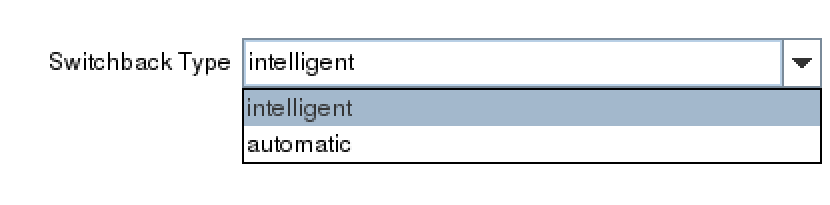
In the next prompt for  ‘Switchback Type’, choose whether you will use intelligent switchback or automatic switchback.

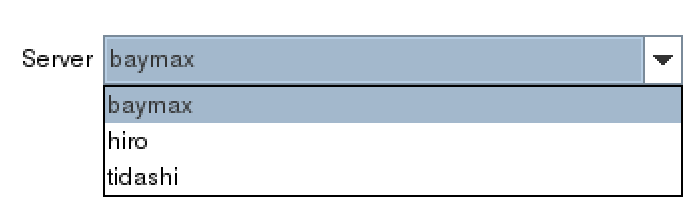
After selecting the ‘Switchback Type’,  the Server dialogue appears allowing you to choose the primary server for the custom application.


(Note: If the service requires storage, be sure to choose the same primary server previously selected for the storage resources.)

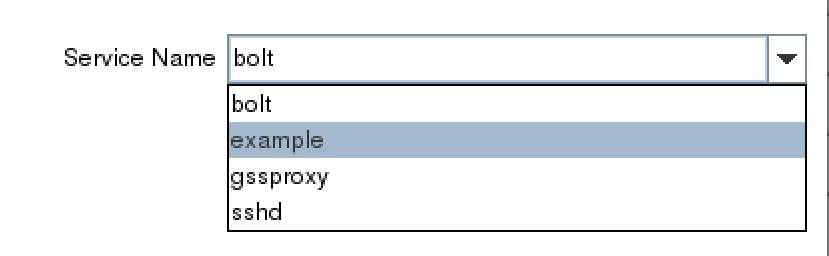
In the Service Name dialog box, find the service for your custom application.

Once you’ve selected the correct service, example, determine whether you will enable monitoring or disable the monitoring service.  Refer to the documentation to gain an understanding of the monitoring provided by the QSP resource.2


Next, choose a resource tag.  A resource tag should be a meaningful name that will help your IT team quickly identify which SPS-L resource protects your application or service.

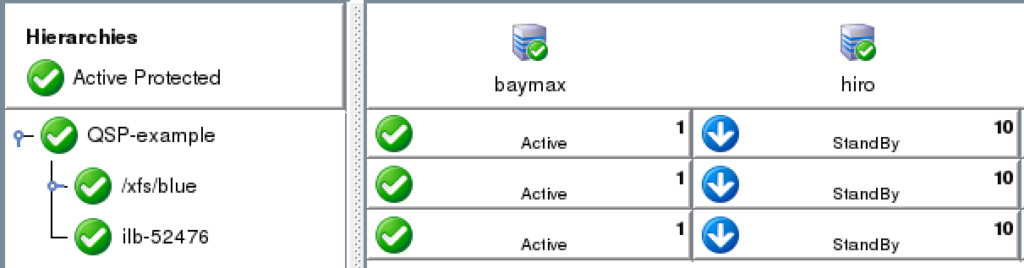
Lastly, follow the final dialogue to complete the resource creation process.  Once the resource is created, use the UI to extend the resource to additional servers. If necessary, create dependencies between the newly protected custom service/application and any other required resources such as storage or IP resources.


NOTES:

1 Creating a customer application recovery kit can be accomplished via an engagement with the SIOS Technology Corp. Professional Services Team.  For more information contact professional-services@us.sios.com

2 The QSP Recovery Kit quickCheck can only perform simple health (using the “status” action of the service command). QSP doesn’t guarantee that the service is provided or the process is functioning. If complicated starting and/or stopping is necessary, or more robust health checking operations are necessary, using a Generic Application or Custom Application ARK is recommended

Reproduced from SIOS

Filed Under: Clustering Simplified Tagged With: Application availability, clusters, High Availability, high availability - SAP, SAP S/4HANA

  • « Previous Page
  • 1
  • 2
  • 3
  • Next Page »

Recent Posts

  • Keeping Buildings Safe: High Availability in Maintenance and Security Systems
  • Designing High Availability Through Modularity and Abstraction
  • The Critical Role of QA and Production Environments in High Availability
  • The Danger of Turn It Off, Turn It Back On Again Thinking in High Availability
  • SIOS Partnerships

Most Popular Posts

Maximise replication performance for Linux Clustering with Fusion-io
Failover Clustering with VMware High Availability
create A 2-Node MySQL Cluster Without Shared Storage
SAP for High Availability Solutions For Linux
Bandwidth To Support Real-Time Replication
The Availability Equation – High Availability Solutions.jpg
Choosing Platforms To Replicate Data - Host-Based Or Storage-Based?
Guide To Connect To An iSCSI Target Using Open-iSCSI Initiator Software
Best Practices to Eliminate SPoF In Cluster Architecture
Step-By-Step How To Configure A Linux Failover Cluster In Microsoft Azure IaaS Without Shared Storage azure sanless
Take Action Before SQL Server 20082008 R2 Support Expires
How To Cluster MaxDB On Windows In The Cloud

Join Our Mailing List

Copyright © 2026 · Enterprise Pro Theme on Genesis Framework · WordPress · Log in