SIOS SANless clusters

SIOS SANless clusters High-availability Machine Learning monitoring

  • Home
  • Products
    • SIOS DataKeeper for Windows
    • SIOS Protection Suite for Linux
  • News and Events
  • Clustering Simplified
  • Success Stories
  • Contact Us
  • English
  • 中文 (中国)
  • 中文 (台灣)
  • 한국어
  • Bahasa Indonesia
  • ไทย

Will Windows Failover Clusters Become Obsolete?

January 23, 2018 by Jason Aw Leave a Comment

Will Windows Failover Clusters Become Obsolete?

I was recently asked whether Windows Failover Clusters (MSCS/WSFC) will become obsolete due to 3rd party HA solutions. To me, there will always be a market for 3rd party HA solutions. But many of the enhancements delivered with Windows Server 2008 have reduced the need to explore alternate HA solutions.  I think the greater threat to MSCS/WSFC is HA solutions provided by the virtualization vendors. This includes Microsoft’s Hyper-V failover clusters (which actually uses WSFC) and VMware HA.  These solutions provided by the virtualization platform provide protection in case of host failure. Although, they currently do not have visibility into the application that is running within the VM.

The real question is what kind of failure do you want to protect against? If physical server failure is your primary concern, then in some cases where MSCS may have previously been deployed, you will see Hyper-V Clusters or VMware HA being deployed instead.  In other cases where MSCS/WSFC may have seemed like overkill or was incompatible with the OS or application, you will instead see clustered VMs being deployed because it is easy to install and it supports all applications and operating systems. The mere fact that more workloads will be running per physical server will make it imperative to have some kind of clustering solution so that the failure of a single server does not bring down your entire infrastructure. In many cases, this clustering solution will be provided by the virtualization vendor.

Hyper-V Clusters and VMware HA are easy to implement and have a broad range of support as the protected VM can be running any OS or application.  The tradeoff is that you lose the application level monitoring included with MSCS/WSFC.  There will always be a class of applications that need application awareness. So MSCS/WSFC or other HA solutions that manage application availability will always be needed to ensure that the application is available, not just the server itself. With that being said, MSCS/WSFC will not become obsolete. Instead, you will see it deployed alongside other cluster solutions provided by the hypervisor vendors.

Read more about Windows Failover Clusters

Reproduced with permission from https://clusteringformeremortals.com/2010/03/01/will-windows-failover-clusters-mscswsfc-become-obsolete/

Filed Under: Clustering Simplified Tagged With: clusters, High Availability, Hyper-V Clusters, VMware HA, Windows Failover Clusters

Remove The Weakest Link, Ensure High Availability Cluster Configuration

January 21, 2018 by Jason Aw Leave a Comment

Build A High Availability Cluster Configuration

When we build a High Availability Cluster Configuration, your application availability is only as good as its weakest link. What this means is that if you bought great servers with redundant everything (CPU, fans, power, RAID, RAM, etc) and a super deluxe SAN with multi-path connectivity. Coupled with multiple SAN switches and clustered your application with your favorite clustering software. You probably have a very reliable application – right? Well, not necessarily. Are the servers plugged into the same UPS? Are they on the same network switch? Are they cooled by the same AC unit? Are they in the same building? Is your SAN truly reliable? Any one of these issues among others is a single point of failure in a High Availability Cluster Configuration.

Seek And Remove The Weakest Link in Cluster Configuration

Of course, you have to know when “good enough” is “good enough”. Your budget and your SLAs will help decide what exactly is good enough. However, one area where I am concerned that people may be skimping is in the area of storage. With the advent of cheap or free iSCSI target software solutions, I am seeing some people recommend that you just throw some iSCSI target software on a spare server and voilà – instant shared storage.

Mind you I’m not talking about OEM iSCSI solutions that have built in failover technology and/or other availability features; or even storage virtualization solutions such as FalconStor. I’m talking about the guy who has a server running Windows Server 2008 that he has loaded up with storage and wants to turn it into an iSCSI target. This is great in a lab. But if you are serious about HA, you should think again. Even Microsoft only provides their iSCSI target software to qualified OEM builders experienced in delivering enterprise class storage arrays.

What You Are Actually Getting?

First of all, this is Windows. Not some hardened OS built to only serve storage. It will require maintenance, security updates, hardware fixes, etc. It basically has the same reliability as the application server you are trying to protect. Does it make sense to cluster your application servers. Yet use the same class of server and OS to host your storage? You basically have moved your single point of failure away from your application server and moved it to your storage server. It’s not a smart move as far as I am concerned.

Some of the Enterprise Class iSCSI target software includes synchronous and/or asynchronous replication software and snapshot capabilities. This functionality certainly helps in terms of your recovery point objective (RPO). Although it won’t help your recovery time objective (RTO) unless the failover is automatic and seamless to your clustering software. Let’s say the primary iSCSI storage array fails in the middle of the night. Who is going to be there to activate the replicated copy? You may be down for quite some time before you even realize there is a problem. Again, this may be “good enough”; you just need to be aware of what you are signing up for. Is that the High Availability Cluster Configuration you’re seeking?

SIOS DataKeeper

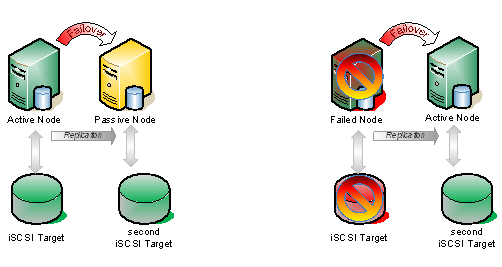
One thing you can do to improve the reliability of your iSCSI target server is to use a replication product such as SteelEye DataKeeper Cluster Edition to eliminate the single point of failure. Let me illustrate.

Typical Shared Storage Configuration
Figure 1 – Typical Shared Storage Configuration. In the event that the iSCSI target becomes unavailable, all the nodes go offline.

If we take the same configuration shown above and add a hot standby iSCSI target using SteelEye DataKeeper Cluster Edition to do replication AND automatic failover, you have just given you iSCSI target solution a whole new level of availability. That solution would look very much like this.

DataKeeper Cluster Edition - High Availability Cluster Configuration
Figure 2 – In this scenario, DataKeeper Cluster Edition is replicating the iSCSI attached volume on the active node to the iSCSI attached volume on the passive node, which is connected to an entirely different iSCSI target server.

The key difference in the solution which utilizes SteelEye DataKeeper Cluster Edition vs. replication solutions provide by some iSCSI target vendors is in the integration with WSFC. The question to ask of your iSCSI solution vendor is this…

What happens if I pull the power cord on the active iSCSI target server?

If the recovery process is a manual procedure, it is not a true HA solution. But what if it is automatic and completely integrated with WSFC? Then you have a much higher level of availability and have eliminated the iSCSI array as a single point of failure.

Chat with us to also achieve High Availability Cluster Configuration

Reproduced with permission from Clusteringformortals.

Filed Under: Clustering Simplified, Datakeeper Tagged With: cluster, DataKeeper Cluster Edition, High Availability, high availability cluster configuration, SANLess Clustering

Steeleye Datakeeper Cluster Edition Wins Windows It Pro Best High Availability/Disaster Recovery Awards

January 20, 2018 by Jason Aw Leave a Comment

I am pleased to announce that Windows IT Pro has awarded SteelEye DataKeeper Cluster Edition the Best High Availability and Disaster Recovery Product in two categories; Community Choice Gold Award and Editors’ Best Silver Award.

SteelEye DataKeeper Cluster Edition - Best High Availability Disaster Recover ProductSteelEye DataKeeper Cluster Edition - Best High Availability Disaster Recover Product

I am really proud to be a part of the SteelEye DataKeeper team and I appreciate all of the Windows IT Pro community that voted for us in the Community Choice award!

Reproduced with permission from https://clusteringformeremortals.com/2009/11/20/steeleye-datakeeper-cluster-edition-wins-windows-it-pro-best-high-availabilitydisaster-recovery-awards/

Filed Under: Clustering Simplified, Datakeeper Tagged With: DataKeeper, DataKeeper Cluster Edition, disaster recovery, High Availability, Windows IT Pro

WHY I SHOULD CONVERT MY #AZURE CLUSTERS TO MANAGED DISKS TODAY!

August 9, 2017 by Jason Aw Leave a Comment

You may have heard about the recent storage outage that impacted some instances in the US East region back on March 16th. A root cause analysis of the outage is posted here.

March 16th US East Storage Outage

Customer impact: A subset of customers using Storage in the East US region may have experienced errors and timeouts while accessing their storage account in a single Storage scale unit

You might be asking, “What is a single Storage scale unit”. Well, you can think of it as a single storage cluster, or single SAN, or however you want to think about it. I don’t think Azure publishes their exact infrastructure, but you can probably assume that behind the scenes they are using Scale Out File Servers for backend storage.

So the question is, how could I have survived this outage with minimal downtime? If you read further down that root cause analysis you come across this little nugget.

Virtual Machines using Managed Disks in an Availability Set would have maintained availability during this incident.

What’s Managed Disks you ask? Well, just on February 8th Corey Sanders announced the GA of Managed Disks. You can read all about Managed Disks here. https://azure.microsoft.com/en-us/services/managed-disks/

The reason why Managed Disks would have helped in this outage is that by leveraging an Availability Set combined with Managed Disks you ensure that each of the instances in your Availability Set are connected to a different “Storage scale unit”. So in this particular case, only one of your cluster nodes would have failed, leaving the remaining nodes to take over the workload.

Prior to Managed Disks being available (anything deployed before 2/8/2016), there was no way to ensure that the storage attached to your servers resided on different Storage scale units. Sure, you could use different storage accounts for each instances, but in reality that did not guarantee that those Storage Accounts provisioned storage on different Storage scale units.

So while an Availability Set ensured that your instances reside in different Fault Domains and Update Domains to ensure the availability of the instance itself, the additional storage attached to each instance really represented a single point of failure. Although the storage itself is highly resilient, with three copies of your data and geo-redundant options available, in this case with a power failure the entire Storage scale unit went down along with all the servers attached to it.

So long story short…migrate to Managed Disk as soon as possible in order to help minimize downtime

https://docs.microsoft.com/en-us/azure/virtual-machines/virtual-machines-windows-migrate-to-managed-disks

And if you really want to minimize downtime you should consider Hybrid Cloud Deployments that span cloud providers or on-prem to cloud!


Reposted from original post by Dave Bermingham Microsoft Clustering MVP –  https://clusteringformeremortals.com/2017/03/22/why-i-should-convert-my-azure-clusters-to-managed-disks-today/

Filed Under: Clustering Simplified Tagged With: #SANLess Clusters for SQL Server Environments, #SANLess Clusters for Windows Environments, Awards, Azure, azure availability managed disk, Clustering 101, High Availability

Announcing AWS Quick Start Deployment Templates for SIOS SQL Failover Cluster

May 15, 2017 by sios2017 Leave a Comment

AWS Quick Start Templates Deploy SQL High-Availability Failover Cluster in the Cloud

Many businesses are struggling to deploy a high-availability failover cluster for SQL Server and other important applications in the cloud. This is because you need shared storage to create a failover cluster. Shared storage is not available or practical in most public clouds. As a result, Many IT teams kept SQL on-premises. Their experts in IT network, storage, and server would take months to plan, order, install, and configure physical environments for HA failover clustering. Finally, they would spend spent thousands of dollars upgrading to SQL Server Enterprise edition to gain advanced clustering capabilities.

SANless Failover Clustering Enables Cost-Efficient SQL High Availability Protection in the Cloud

Today, SIOS DataKeeper Cluster Edition is the first HA/DR solution to combine fully automated, application-centric clustering and efficient data replication. By integrating seamlessly into Windows Server Failover Clustering (WSFC), it enables a WSFC to work in a cloud where shared storage is not possible. SIOS DataKeeper works by synchronizing local storage in real time using highly efficient block-level replication. In this way, creates a SANless cluster to protect your Windows applications in the cloud. You can use it to protect SQL Server Standard Edition without the need for costly upgrades to SQL Server Enterprise Edition.

Quick Start Templates Make Deploying a Failover Cluster in AWS Easy

Now companies can easily deploy a two-node high-availability failover cluster automatically using an AWS EC2 Quick Start deployment. System administrators and managers can simply purchase the SIOS Amazon Machine Images (AMIs) on AWS Marketplace. They can use the AMI to deploy a two-node SQL Server Standard Edition cluster in the AWS cloud using an AWS Quick Start template.

Quick Start templates are automated reference deployments for key workloads on AWS. Each Quick Start launches, configures and runs the AWS service required to deploy a specific workload on AWS. Importantly, the templates use AWS best practices for security and availability. As a result, Quick Starts eliminate manual steps with a single click – they are fast, low-cost, and customizable.

The SIOS AMIs on AWS Marketplace provide an easy, convenient way for customers to purchase SIOS DataKeeper software to protect business critical applications in AWS. You can use them to deploy a high availability cluster using cost efficient SQL Server Standard Edition in the cloud.

Customers can purchase SIOS DataKeeper through the AWS Marketplace at: https://aws.amazon.com/marketplace/seller-profile?id=3c91e2f7-fc8d-4cce-a8aa-1e37abcb4408

To learn more about the SIOS DataKeeper Quick Start for AWS Cloud, visit: https://aws.amazon.com/quickstart/architecture/sios-datakeeper/

To learn more about the SIOS DataKeeper Cluster Edition for High Availability in Cloud Deployments:
http://us.sios.com/san-sanless-clusters-resources/?_sft_subject_c=cloud-high-availability

Filed Under: Blog posts Tagged With: #SANLess Clusters for SQL Server Environments, #SANLess Clusters for Windows Environments, failover cluster, High Availability

  • « Previous Page
  • 1
  • …
  • 51
  • 52
  • 53
  • 54
  • 55
  • 56
  • Next Page »

Recent Posts

  • What Is High Availability (HA)?
  • Surviving the Friday Night Crash: From Scrappy Bare Metal to Seamless Data Replication
  • Grounded: What Missing Percona Live Amsterdam Taught Me About HA
  • SIOS LifeKeeper vs. Red Hat High Availability Add-On:
  • The State of Application Resilience: 2026 SIOS High Availability Survey

Most Popular Posts

Maximise replication performance for Linux Clustering with Fusion-io
Failover Clustering with VMware High Availability
create A 2-Node MySQL Cluster Without Shared Storage
SAP for High Availability Solutions For Linux
Bandwidth To Support Real-Time Replication
The Availability Equation – High Availability Solutions.jpg
Choosing Platforms To Replicate Data - Host-Based Or Storage-Based?
Guide To Connect To An iSCSI Target Using Open-iSCSI Initiator Software
Best Practices to Eliminate SPoF In Cluster Architecture
Step-By-Step How To Configure A Linux Failover Cluster In Microsoft Azure IaaS Without Shared Storage azure sanless
Take Action Before SQL Server 20082008 R2 Support Expires
How To Cluster MaxDB On Windows In The Cloud

Join Our Mailing List

Copyright © 2026 · Enterprise Pro Theme on Genesis Framework · WordPress · Log in