SIOS SANless clusters

SIOS SANless clusters High-availability Machine Learning monitoring

  • Home
  • Products
    • SIOS DataKeeper for Windows
    • SIOS Protection Suite for Linux
  • News and Events
  • Clustering Simplified
  • Success Stories
  • Contact Us
  • English
  • 中文 (中国)
  • 中文 (台灣)
  • 한국어
  • Bahasa Indonesia
  • ไทย

Maximise replication performance for Linux Clustering with Fusion-io

November 27, 2018 by Jason Aw Leave a Comment

Maximise replication performance for Linux Clustering with Fusion-io

Tips To Maximise Replication Performance For Linux Clustering With Fusion-io

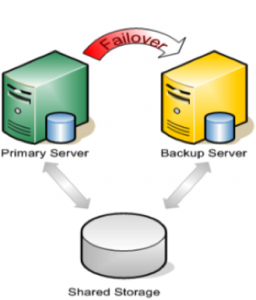
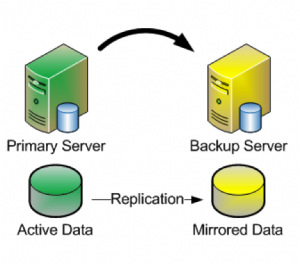
When most people think about setting up a cluster, it usually involves two or more servers, and a SAN – or some other type of shared storage. SAN’s are typically very costly and complex to setup and maintain. Also, they technically represent a potential Single Point of Failure (SPOF) in your cluster architecture. These days, more and more people are turning to companies like Fusion-io, with their lightning fast ioDrives, to accelerate critical applications.  These storage devices sit inside the server (i.e. aren’t “shared disks”). Therefore it can’t be used as cluster disks with many traditional clustering solutions. Fortunately, there are ways to Maximise replication performance for Linux Clustering with Fusion-io. Solutions that allow you to form a failover cluster when there is no shared storage involved – i.e. a “shared nothing” cluster.


Traditional Cluster

 “Shared Nothing” Cluster

When leveraging data replication as part of a cluster configuration, it’s critical that you have enough bandwidth so that data can be replicated across the network just as fast as it’s written to disk.  The following are tuning tips that will allow you to get the most out of your “shared nothing” cluster configuration, when high-speed storage is involved:

Network

  • Use a 10Gbps NIC: Flash-based storage devices from Fusion-io (or other similar products from OCZ, LSI, etc) are capable of writing data at speeds in the HUNDREDS (750 ) of MB/sec or more.  A 1Gbps NIC can only push a theoretical maximum of ~125 MB/sec, so anyone taking advantage of an ioDrive’s potential can easily write data much faster than could be pushed through a 1 Gbps network connection.  To ensure that you have sufficient bandwidth between servers to facilitate real-time data replication, a 10 Gbps NIC should always be used to carry replication traffic
  • Enable Jumbo Frames: Assuming that your Network Cards and Switches support it, enabling jumbo frames can greatly increase your network’s throughput while at the same time reducing CPU cycles.  To enable jumbo frames, perform the following configuration (example from a RedHat/CentOS/OEL linux server)
    • ifconfig <interface_name> mtu 9000
    • Edit /etc/sysconfig/network-scripts/ifcfg-<interface_name> file and add “MTU=9000” so that the change persists across reboots
    • To verify end-to-end jumbo frame operation, run this command: ping -s 8900 -M do <IP-of-other-server>
  • Change the NIC’s transmit queue length:
    • /sbin/ifconfig <interface_name> txqueuelen 10000
    • Add this to /etc/rc.local to preserve the setting across reboots

TCP/IP Tuning

  • Change the NIC’s netdev_max_backlog:
    • Set “net.core.netdev_max_backlog = 100000” in /etc/sysctl.conf
  • Other TCP/IP tuning that has shown to increase replication performance:
    • Note: these are example values and some might need to be adjusted based on your hardware configuration
    • Edit /etc/sysctl.conf and add the following parameters:
      • net.core.rmem_default = 16777216
      • net.core.wmem_default = 16777216
      • net.core.rmem_max = 16777216
      • net.core.wmem_max = 16777216
      • net.ipv4.tcp_rmem = 4096 87380 16777216
      • net.ipv4.tcp_wmem = 4096 65536 16777216
      • net.ipv4.tcp_timestamps = 0
      • net.ipv4.tcp_sack = 0
      • net.core.optmem_max = 16777216
      • net.ipv4.tcp_congestion_control=htcp

Adjustments

Typically you will also need to make adjustments to your cluster configuration, which will vary based on the clustering and replication technology you decide to implement.  In this example, I’m using the SteelEye Protection Suite for Linux (aka SPS, aka LifeKeeper), from SIOS Technologies. It allows users to form failover clusters leveraging just about any back-end storage type: Fiber Channel SAN, iSCSI, NAS, or, most relevant to this article, local disks that need to be synchronized/replicated in real time between cluster nodes.  SPS for Linux includes integrated, block level data replication functionality that makes it very easy to setup a cluster when there is no shared storage involved.

Recommendations

In order to Maximise replication performance for Linux Clustering with Fusion-io, let’s try this. SteelEye Protection Suite (SPS) for Linux configuration recommendations:

  • Allocate a small (~100 MB) disk partition, located on the Fusion-io drive to place the bitmap file.  Create a filesystem on this partition and mount it, for example, at /bitmap:
    • # mount | grep /bitmap
    • /dev/fioa1 on /bitmap type ext3 (rw)
  • Prior to creating your mirror, adjust the following parameters in /etc/default/LifeKeeper
    • Insert: LKDR_CHUNK_SIZE=4096
      • Default value is 64
    • Edit: LKDR_SPEED_LIMIT=1500000
      • (Default value is 50000)
      • LKDR_SPEED_LIMIT specifies the maximum bandwidth that a resync will ever take — this should be set high enough to allow resyncs to go at the maximum speed possible
    • Edit: LKDR_SPEED_LIMIT_MIN=200000
      • (Default value is 20000)
      • LKDR_SPEED_LIMIT_MIN specifies how fast the resync should be allowed to go when there is other I/O going on at the same time — as a rule of thumb, this should be set to half or less of the drive’s maximum write throughput in order to avoid starving out normal I/O activity when a resync occurs

From here, go ahead and create your mirrors and configure the cluster as you normally would.

Interested to Maximise Replication Performance For Linux Clustering With Fusion-io, see what else SIOS can offer.
Reproduced with permission from LinuxClustering

Filed Under: Clustering Simplified, Datakeeper Tagged With: Clustering, Fusion-io, Linux, maximise replication performance for linux clustering with fusion io, replication

Automated Disaster Recovery Protection Clustering Solution For Hedge Fund 

May 6, 2018 by Jason Aw Leave a Comment

Automated Disaster Recovery Protection Clustering Solution For Hedge Fund

Automated Disaster Recovery Protection Clustering Solution For Leading International Macro Hedge Fund

netConsult Selects SteelEye LifeKeeper For Disaster Recovery Protection Clustering Solution of Exchange, Oracle9i and SQL Server Trading Systems.

netConsult is a leading consulting and systems integration provider specializing in data security management for financial services firms. It has implemented SteelEye LifeKeeper to provide automated disaster recovery protection for one of its key clients, a leading international macro hedge fund based in London, England.

Complete, Automated Disaster Recovery Protection Clustering Solution

“Due to the real-time, high-value nature of our client’s business, any kind of failure in their mission critical systems prevents them from completing timely trades. It can have significant impact upon their business. Especially,  in terms of the profitability of transactions and the confidence of their investment clients,” said Richard McDonald principal and founder of netConsult. “SteelEye LifeKeeper is one of four disaster recovery software solutions we researched on behalf of our client. The deciding factors in favor of LifeKeeper were that: it was the only truly complete, automated solution for disaster recovery. It was the only product that was capable of being demonstrated out of the box. And was by far the most reasonably priced given the complexity of our client’s environment, including the need to cluster a heterogeneous mix of storage and servers.”

Increased Server And Application Availability

“Coupled with overall heightened security concerns, it became imperative for our client to implement a comprehensive solution for business continuity. It should function reliably and efficiently. Regardless of the scale of interruption, from a simple server failure to a disaster requiring complete site recovery,” McDonald added. “We appreciated the assurance of disaster recovery protection. Additionally, our client has benefited greatly from the overall increase in server and application availability that the LifeKeeper clustering solution has made possible.”

Effectiveness & Stability Of LifeKeeper

LifeKeeper is being used to ensure complete disaster recovery protection of netConsult’s client’s core, business-critical trading systems. These include: Calypso a currency trading system based on Oracle 9i from Calypso Technology; Tradar Portfolio, also a currency trading system based on Microsoft SQL Server from Tradar Limited; and Microsoft Exchange Server, a messaging and collaboration platform being used for internal communication and confirmation of trading orders. The SteelEye LifeKeeper solution provides automated monitoring, failover and failback of these systems, coupled with integrated disk-level data replication between the customer’s primary business location in the heart of London, and its managed recovery site some distance outside of London, operated by Sungard Data Systems.

SteelEye LifeKeeper is installed on eight servers in a geographically dispersed, heterogeneous stretch-cluster configuration of four server pairs. All running the Windows 2000 operating system – four HP ProLiant BL20p G2 blade servers, accessing Hitachi Thunder 9500 V Series modular storage at the primary location. They are individually clustered over a wide-area network with four HP ProLiant DL380 G2 and DL380 G3 servers, accessing HP MSA1000 storage at the recovery site. Each of the server pairs provide individual high availability protection for the Calypso, Tradar and Exchange systems respectively. The fourth server pair ensures high availability of file and print services. The integrated, disk-level data replication capabilities within LifeKeeper enable the continuous synchronization of the server pairs. Thereby the creation of a stretch-cluster configuration to support disaster recovery over a wide area network.

Disaster Recovery Clustering of Exchange

McDonald went on to say “LifeKeeper proved to be a hands-off solution that was easy to implement in an environment known for its complexities. Since going live we have experienced several server outages. The incidents involved our client’s Oracle and SQL Server systems. LifeKeeper handled so well that no interruption or change in level of service was noticed by any users.”

In addition to the benefit of complete Disaster Recovery Protection Clustering Solution, the LifeKeeper solution has proved to be very useful during systems maintenance. Previously, it was necessary to undertake the manual and time-consuming process of configuring and manually migrating users to backup systems. Now, with LifeKeeper, production systems and user connectivity can be automatically failed over to the recovery location while maintenance is applied to the primary server. Once this task is complete, systems and users are failed back in a similar automated fashion.

“The support we have received from the SteelEye technical team during and after implementation has been excellent,” McDonald concluded. “The deployment of disaster recovery solutions for environments like Exchange and Oracle is no simple task. SteelEye continues to demonstrate a broad range of experience and knowledge, which we value greatly.”

Ensure Business Continuity

“We are excited by the selection of our SteelEye LifeKeeper Disaster Recovery solution by netConsult. The latter is a very well-respected financial services IT consultancy,” said John Banfield, European sales director for SteelEye. “The ability of the LifeKeeper solution to address their client’s critical business requirements and technical complexity is a strong validation of our approach. It is solid proof that LifeKeeper delivers industrial-strength assurance of continuity in the most demanding of environments.”

To find out how our Disaster Recovery Protection Clustering Solution can benefit you, go here.

Filed Under: Success Stories Tagged With: Business Continuity, Clustering, disaster recovery, disaster recovery protection clustering solution, Exchange

Join My Session On Deploying Highly Available SQL Server in Azure

March 31, 2018 by Jason Aw Leave a Comment

@Sqlsatnash Deploying Highly Available SQL Server In #Azure Session At SQL Saturday Nashville, Jan 16th

I’ll be heading to Nashville to share about deploying highly available SQL server. While there, there is a couple of things that I can’t wait to catch up on  – Technology and music. While I’m there, I certainly hope I am able to have some good music at The Station Inn.

Come By My Session On Deploying Highly Available SQL Server in Azure

Jan 16th is going to be a great day of learning and networking. Hang out with my #SQLPass family and join my session. This hour long session is great for those who are keen in learning about deploying SQL Server in Azure.

On Cloud Database/Application Development & Deployment

As we are already aware, Windows Azure is an excellent IaaS platform to deploy SQL Server. There is a need to plan for high availability and disaster recovery even as Microsoft manages the infrastructure. In this session, learn how to leverage Azure Fault Domains, Upgrade Domains, and Internal Load Balancers to ensure high availability of SQL Server deployments within the Azure cloud. You will learn to see the difference between Azure Classic and Azure Resource Manager. And at the same time, how it would affect your SQL Server availability. While Microsoft Azure offers SLA’s of 99.95%, make sure your SQL Server deployment qualifies. Again, this session is best suited for those with intentions to move or have already moved your SQL Servers instances to Azure. By the way, participants for this session should have a basic knowledge of SQL Server AlwaysOn Failover Clustering as well as Availability Groups. But if you don’t, no fear because you should be able to catch up pretty fast with a little bit of practice and experimenting.

Reproduced with permission from https://clusteringformeremortals.com/2015/12/21/sqlsatnash-deploying-highly-available-sql-server-in-azure-session-at-sql-saturday-nashville-jan-16th/

Filed Under: Clustering Simplified Tagged With: Azure, Clustering, Highly Available SQL Server, SQL Server

Microsoft Wants Your Input On The Next Version Of Windows Server

March 13, 2018 by Jason Aw Leave a Comment

Microsoft Wants Your Input On The Next Version Of Windows Server

Windows Server has a new UserVoice page: http://windowsserver.uservoice.com/forums/295047-general-feedback with subsections:

  • Clustering: http://windowsserver.uservoice.com/forums/295074-clustering
  • Storage: http://windowsserver.uservoice.com/forums/295056-storage
  • Virtualization: http://windowsserver.uservoice.com/forums/295050-virtualization
  • Networking: http://windowsserver.uservoice.com/forums/295059-networking
  • Nano Server: http://windowsserver.uservoice.com/forums/295068-nano-server
  • Linux Support: http://windowsserver.uservoice.com/forums/295062-linux-support

This is where YOU get to provide Microsoft with your feedback directly.

Reproduced with permission from https://clusteringformeremortals.com/2015/05/12/microsoft-wants-your-input-on-the-next-version-of-windows-server/

Filed Under: Clustering Simplified Tagged With: Clustering, Linux Support, Microsoft, Nano Server, Networking, storage, UserVoice, Virtualization, Windows Server

Clustering SAP ASCS Instance On Azure

March 13, 2018 by Jason Aw Leave a Comment

Clustering SAP ASCS Instance On Azure

Microsoft published a blog post and white paper on clustering SAP ASCS instance using Windows Server Failover Cluster on Microsoft Azure public cloud. It describes how to install and configure a high-availability (HA) SAP central services instance ASCS in a Windows Server Failover Cluster (WSFC) using the platform Microsoft Azure.

Download the white paper here http://go.microsoft.com/fwlink/?LinkId=613056

Reproduced with permission from https://clusteringformeremortals.com/2015/06/05/clustering-sap-ascs-instance-on-azure/

Filed Under: Clustering Simplified Tagged With: Clustering, High Availability, Microsoft Azure public cloud

  • « Previous Page
  • 1
  • 2
  • 3
  • 4
  • 5
  • 6
  • 7
  • Next Page »

Recent Posts

  • Keeping Buildings Safe: High Availability in Maintenance and Security Systems
  • Designing High Availability Through Modularity and Abstraction
  • The Critical Role of QA and Production Environments in High Availability
  • The Danger of Turn It Off, Turn It Back On Again Thinking in High Availability
  • SIOS Partnerships

Most Popular Posts

Maximise replication performance for Linux Clustering with Fusion-io
Failover Clustering with VMware High Availability
create A 2-Node MySQL Cluster Without Shared Storage
SAP for High Availability Solutions For Linux
Bandwidth To Support Real-Time Replication
The Availability Equation – High Availability Solutions.jpg
Choosing Platforms To Replicate Data - Host-Based Or Storage-Based?
Guide To Connect To An iSCSI Target Using Open-iSCSI Initiator Software
Best Practices to Eliminate SPoF In Cluster Architecture
Step-By-Step How To Configure A Linux Failover Cluster In Microsoft Azure IaaS Without Shared Storage azure sanless
Take Action Before SQL Server 20082008 R2 Support Expires
How To Cluster MaxDB On Windows In The Cloud

Join Our Mailing List

Copyright © 2026 · Enterprise Pro Theme on Genesis Framework · WordPress · Log in